
README file from
Githubchuanban-green(松绿记事本) — Botanical Editorial Neo-Brutalism Theme for Obsidian
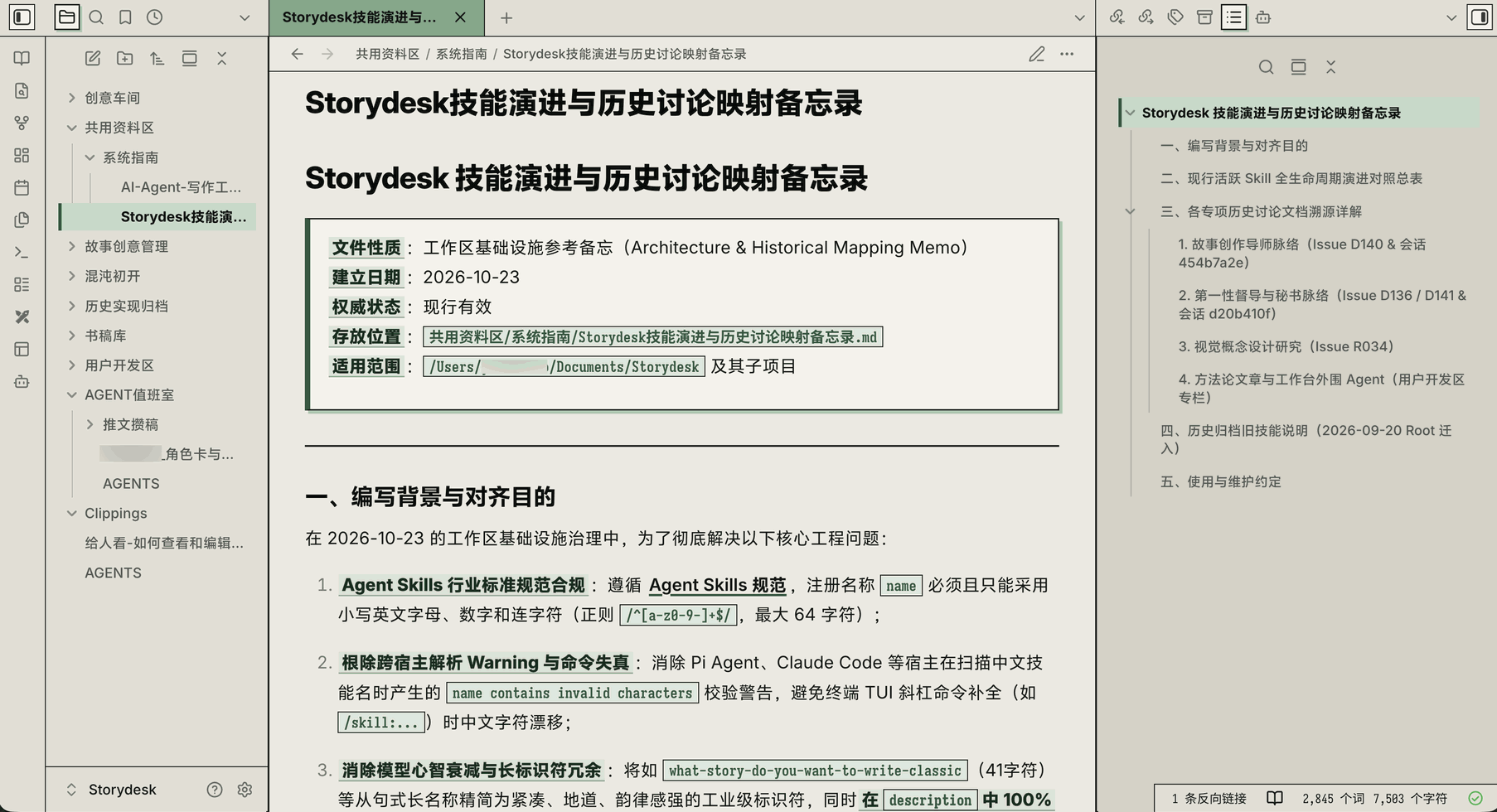
📌 最新版 1.0.5 版界面示意图,采用「vivo Sans(阅读模式锐利印刷黑体)+ Sarasa Mono Slab SC(更纱黑体等距 Slab · 编辑模式打字机黑体)」推荐下载的字体方案才有效果(未预装上述字体时,主题会自动回退至 macOS「冬青黑体 Hiragino Sans GB × SF Mono/苹方」或 Windows「Segoe UI/微软雅黑 × Consolas/思源黑体/微软雅黑」原厂清晰黑体方案,并完整支持通过 Obsidian 原生「设置 → 外观 → 字体」菜单自定义切换)。
chuanban-green(松绿记事本) is a Warm Editorial Neo-Brutalist theme for Obsidian, combining an exposed 1px high-contrast grid, 0px sharp corners, a 3-tier warm newsprint paper palette, dual-mode typography separation (editorial gothic for reading + typewriter slab mono for editing), triple-enhanced bold highlights, and soothing forest/sage green accents with hard-edge offset shadows.
✨ Key Features / 核心视觉特性
| 维度 | 设定值 | 视觉效果说明 |
|---|---|---|
全域纯直角 (0px Radius) |
0px |
彻底移除圆角与标签页底部 Chrome 圆弧脚,所有 Tab、按钮、输入框、弹窗均为干脆利落的直角矩形(开关与滑块保留 1.5px~2px 机械微倒角) |
外露网格线 (Exposed 1px Grid) |
1px solid #181B18 |
铅字炭黑实线贯穿切分左右侧栏、Tab 栏、面包屑、大纲与表格,重现瑞士网格与复古 OS 秩序感 |
三阶印刷纸底 (Warm Newsprint) |
#ECEAE2 / #E2DFD5 / #D6D2C6 |
中央道林浅灰纸 → 侧栏旧报刊中暖灰 → 右上大纲亚麻深暖灰,自然拉开分区景深 |
| 浓绿与淡绿双层强调色 | 竹青 #78AB88 / 深松 #26593F |
顶部激活 Tab 采用竹青浓绿实心块 + 炭黑粗体字;文内双链采用 2px 深松浓绿粗实线底边 |
粗犷亮绿硬边阴影 (Hard Shadow) |
3px 3px 0px #A3C9AE |
零模糊纯色硬边偏移阴影,应用于 Claudian 提问盒、引用块、Callout、代码块、属性框与按钮 |
| 双模式字体分离 + 粗体三重强化 | 阅读态黑体 (400/750) ⇄ 编辑态等距打字机体 |
阅读模式采用现代锐利印刷黑体,编辑/源码模式采用等距打字机黑体(引用符 > 深绿底白字反色、普通语法标记柔绿底无框、行内代码反引号与正文合体单框);粗体叠加 750 ExtraBold、深墨松绿字色、鼠尾草微底衬与 1.5px 松绿细压线 |
🖋️ 推荐下载的字体方案 (Recommended Font Pairing)
为了获得与上方 v1.0.4 界面示意图 100% 一致的满血双模式排版体验,推荐在系统中下载安装以下两套免费字体(安装后无需在 Obsidian 外观中手动设置,主题内置 @font-face 探针会自动识别并接管):
- 阅读模式(
.markdown-rendered)推荐下载字体:vivo Sans(或OPPO Sans 4.0/思源黑体 Source Han Sans SC)- 正文自动调用
400 Regular,粗体直通750 ExtraBold,标题直通850 Heavy,呈现刀锋般锐利的现代杂志印张质感。
- 正文自动调用
- 编辑/源码模式(
.markdown-source-view.mod-cm6)推荐下载字体:Sarasa Mono Slab SC(更纱黑体等距 Slab SC)- 实现中英文严格
2:1等距对齐的打字机手稿台体验,搭配**/#/-松石绿语法活字小印章与当前行左侧3px深松绿标尺。
- 实现中英文严格
- 零预装裸机自动分流兜底与原生菜单自由覆盖:
- 若未安装上述字体,macOS 会自动分流为 「冬青黑体
Hiragino Sans GB(阅读态喇叭口印刷黑体)⇄SF Mono+PingFang SC(编辑态平头几何黑体)」;Windows 会自动分流为 「Segoe UI+Microsoft YaHei微软雅黑(阅读态比例排版)⇄Cascadia Mono / Consolas+Source Han Sans SC / Microsoft YaHei(编辑态西文等宽 + 中文清晰黑体)」,同时完整支持在 Obsidian 「设置 → 外观 → 正文字体」 中一键更换任意自定义字体。
- 若未安装上述字体,macOS 会自动分流为 「冬青黑体
📐 界面细节图解 (Visual Design Breakdown)
📦 Installation / 安装与使用
- Open Obsidian -> Settings -> Appearance -> Themes -> Manage, search for
chuanban-green(松绿记事本), and click Install and use; or copy this folder into your vault's.obsidian/themes/chuanban-green/directory. - (Optional) With the Style Settings plugin installed, open
chuanban-green (松绿记事本)to customize:- Active Tab Style:
Sage Bold (竹青浓绿底 + 炭黑粗体字)⇄Forest Dark (深松墨绿底 + 象牙米白字) - Body Typography Preset:
Editorial Heavy Gothic (现代印刷黑粗体)⇄Typewriter Slab (更纱打字机体)⇄Classic Songti Serif (经典书卷宋体) - Hard Shadow Offset: Default
3px
- Active Tab Style:
📝 Changelog / 更新日志
See CHANGELOG.md for full details.
v1.0.5(2026-11-10) — Windows Editing Mode Crisp CJK Fallback & Native Font Picker Integration (修复 Windows 编辑模式默认回退至「等线」笔画过细发虚问题,并全面打通 Obsidian 原生字体选择菜单):- Windows Editing Mode Crisp CJK Fallback: Replaced thin
DengXian(等线) fallback in@font-face 'MP Editorial Typewriter Fallback',--mp-font-typewriter-stack, and--mp-font-mono-stackwithSource Han Sans SC/Noto Sans CJK SCandMicrosoft YaHei UI/Microsoft YaHei(微软雅黑), ensuring crisp, solid Chinese strokes (400 Regular) in Editing Mode while preserving clear contrast against750 ExtraBoldhighlights. - Obsidian Native Appearance Font Picker Support: Connected
var(--font-text-override),var(--font-interface-override), andvar(--font-monospace-override)across--font-text,.markdown-source-view.mod-cm6 .cm-content, and all typography preset classes so custom fonts selected in Obsidian's built-inSettings → Appearance → Fontmenu take effect immediately in both Reading and Editing modes.
- Windows Editing Mode Crisp CJK Fallback: Replaced thin
v1.0.4(2026-11-10) — Dual-Mode Typography Separation, Triple Bold Enhancement & Showcase Update (双模式字体职责分离、粗体三重强化、语法印章化与 1.0.4 展示主图更新):- Dual-Mode Typography Separation (方案 B 模式职责分离): Reading Mode (
.markdown-rendered) uses sharp editorial gothic (vivo Sans/OPPO Sans 4.0/Sarasa Gothic SC/Source Han Sans SC), while Editing & Source Mode (.markdown-source-view.mod-cm6) uses monospace typewriter slab (Sarasa Mono Slab SC) with a3pxpine-green active-line ruler bar. - Zero-Install Native OS CJK Fallback & Native Font Picker Support: Added automatic crisp fallback for bare systems without third-party fonts (
Hiragino Sans GBvsSF Mono + PingFang SCon macOS;Microsoft YaHeivsCascadia Mono/Consolas + Source Han Sans SC / Microsoft YaHeion Windows, eliminating thinDengXianrendering), and connected--font-text-overrideso Obsidian's built-in Appearance Font Picker works seamlessly across both Reading and Editing modes. - Triple Bold Enhancement & Syntax Badges: Bypassed Obsidian's
--font-text-override: "??"fallback trap; enhancedstrong/.cm-strongwith750 ExtraBold(vivoSans-Extrabold+-webkit-text-stroke: 0.2px), deep pine-ink color (#0D2E1D), sage-green highlight pad (rgba(194, 219, 200, 0.50)), and1.5pxbottom rule; styled.cm-formattingtokens as pine-green monospace stamps and muted raw.cm-urlstrings to0.85em. - Updated Showcase Screenshot: Updated primary
screenshot.pngto showcase thev1.0.4typography system.
- Dual-Mode Typography Separation (方案 B 模式职责分离): Reading Mode (
v1.0.3(2026-11-08) — Windows / Linux / macOS Hidden Frameless Titlebar Compatibility Fix (Windows/Linux 隐藏标题栏模式顶栏遮挡与窗口按钮预留区修复):- Fixed
.titlebarforcing an opaque background inbody.is-hidden-framelessmode on Windows/Linux, which previously covered the top-left and top-right sidebar icons and tab bar. - Replaced hardcoded horizontal
padding: 0 !important/padding: 0 8px !importanton.workspace-tab-header-containerwith explicit--frame-left-spaceand--frame-right-spacerules (calc(8px + var(--frame-right-space, 0px))), preventing top-right icons from colliding with Windows- □ ×window buttons or macOS traffic lights. - Cleared
.workspace-tab-header-innerdefaultpadding: 0 6pxinside.mod-left-split/.mod-right-split/.workspace-sidedockso24×24pxsidebar tab icons render without horizontal clipping.
- Fixed
v1.0.2(2026-11-08) — Top Navigation Grid & Active Tab Alignment Fix (顶部导航栏与激活标签页像素级对齐修复):- Unified
--header-height: 36pxglobally across.workspace-ribbon,.workspace-ribbon::before, and.sidebar-toggle-button.mod-leftto eliminate the4pxvertical step between the left ribbon toggle and the sidebar tab bar (40pxvs36px). - Reset Obsidian's native
.workspace-tab-header-container-innertop/bottom offsets (margin: 5px -6px -1px; padding: 1px 6px 0px) to0and locked.mod-root .workspace-tab-headertoheight: 100%(border-box), fixing the6pxdownward protrusion of the green active tab over the horizontal1pxgrid line. - Standardized sidebar tab icon buttons (
.mod-left-split/.mod-right-split .workspace-tab-header) to24×24pxto match the top-left sidebar toggle box ([◧]).
- Unified
v1.0.1(2026-11-08) — Showcase Screenshot & Visual Design Breakdown (展示主图更新与视觉细节图解):- Updated the primary showcase screenshot (
screenshot.png) and added the annotated visual design breakdown (screenshot-overview.png).
- Updated the primary showcase screenshot (
v1.0.0(2026-11-08) — Initial Official Release (首发正式版):- Initial release of
chuanban-green(松绿记事本) featuring an exposed1pxhigh-contrast grid,0pxsharp corners, 3-tier warm newsprint palette, forest/sage green accents with hard-edge shadows, rectangular toggle switches/sliders, editorial properties table, and full Style Settings / Dark Mode support.
- Initial release of
📄 License
MIT License © 2026 chuanban (Anarcadia)