
README file from
GithubNewsprint
A flat monochrome e-ink theme for Obsidian, built on Red Graphite.
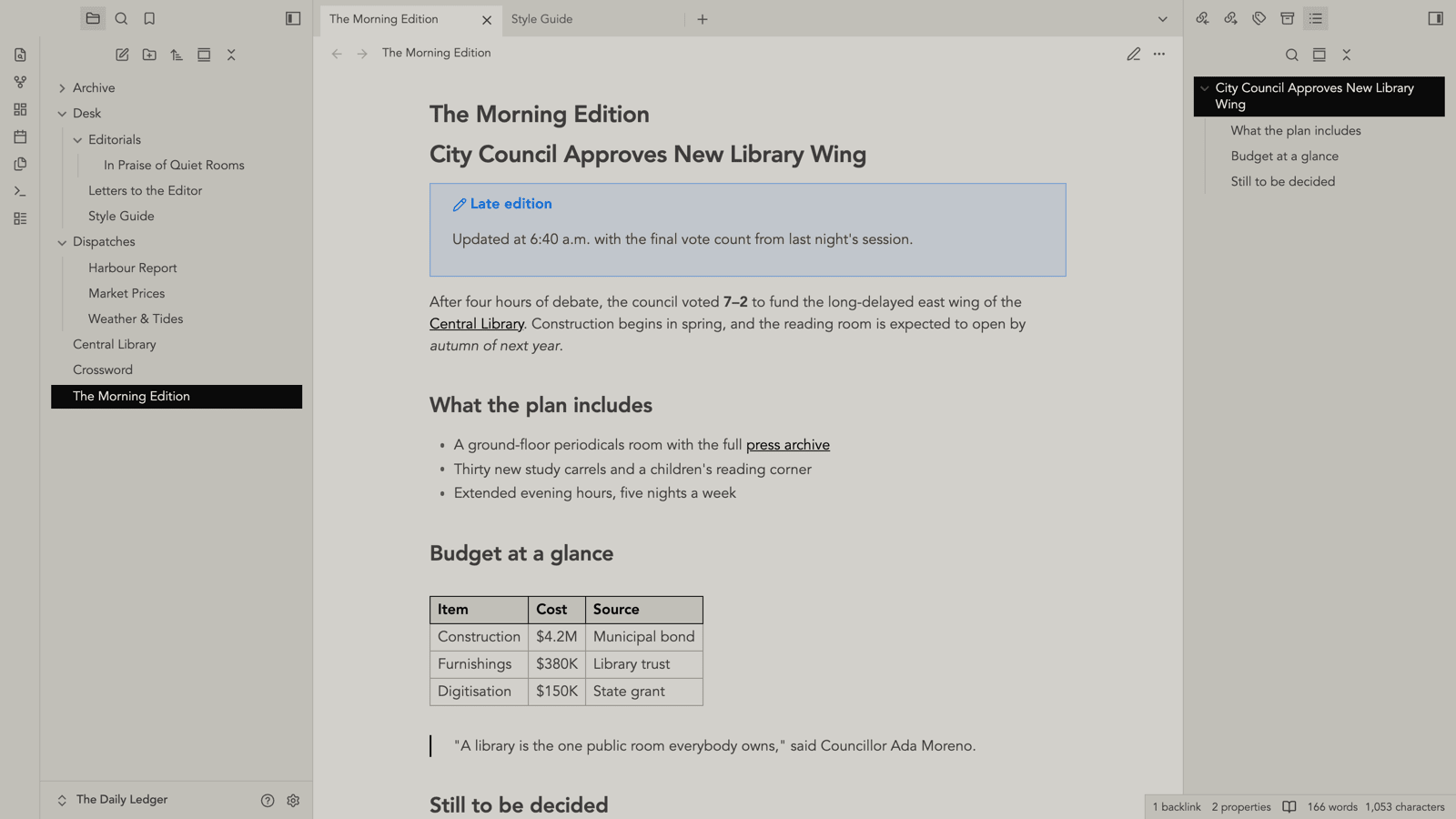
The document you edit is newsprint: a toned page that never reaches white, near-black ink, squared corners, no shadows, and black hairline rules where a boundary carries meaning. The accent is the ink — links are underlined ink, active states are solid ink — so colour appears only where it means something.
The chrome is light newsprint too, a shade darker than the page so it frames it — tab bar, sidebars, the file tree, panels, menus, and status bar are all paper with ink text. Nothing is a dark slab, so third-party panels that use the standard surface and text tokens stay readable. If you colour files with the File Color plugin, its background mode reads best here: the hues show as chips in the light tree, rather than as coloured text that would wash out on paper. The plugin bakes those chips at 15%; a File Color chip opacity slider in Style Settings overrides that so you can dial how strongly they show.
Typography is left alone. The theme sets colour and shape; fonts come from Red Graphite's Style Settings text fields or from Obsidian's Appearance settings.
Light mode is the Newsprint scheme. Dark mode is Red Graphite's, unchanged — there is no newsprint dark palette.
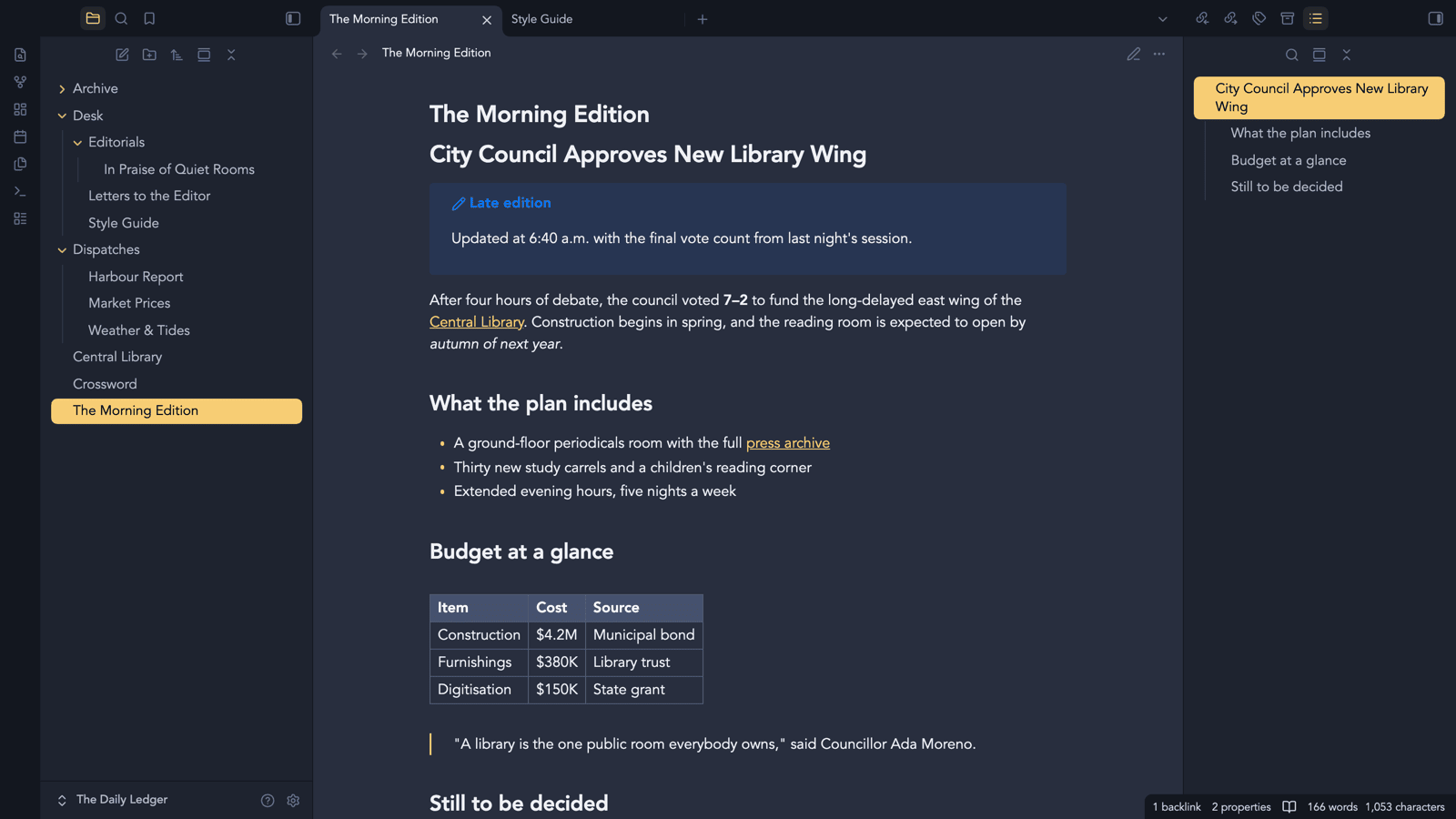
Gallery
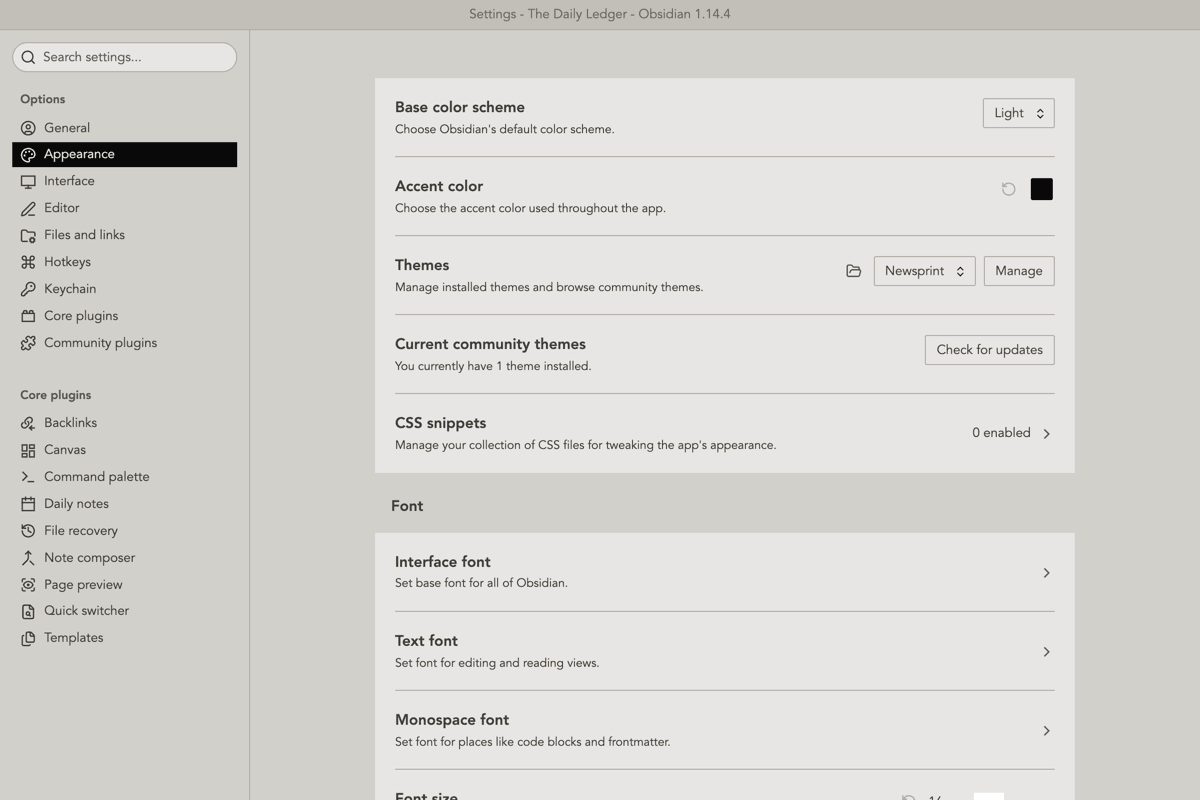
Settings, in the same light chrome: ink labels, with the open page as a solid ink bar.
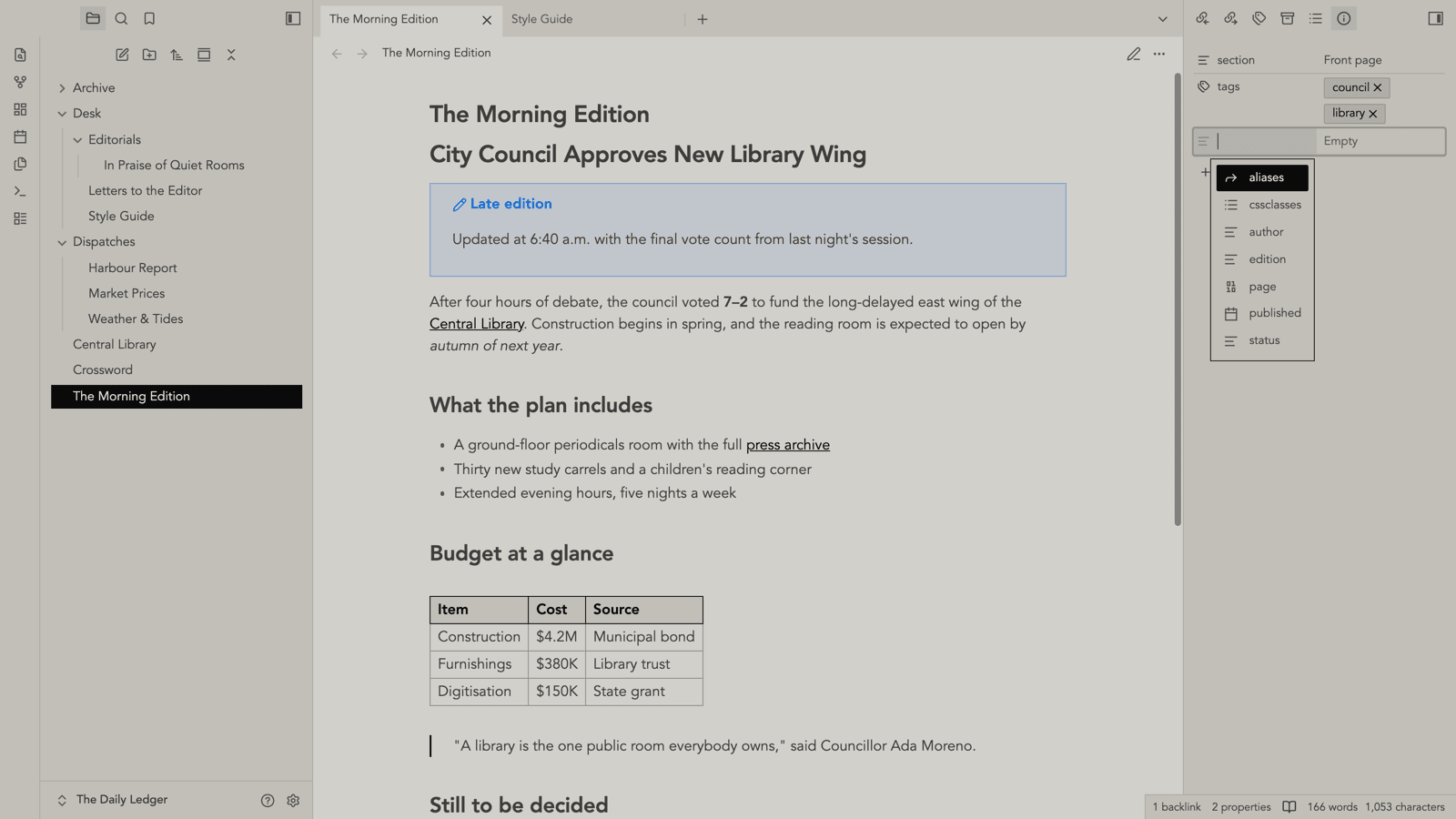
The Properties view in the right sidebar, with the property-name suggestions open.
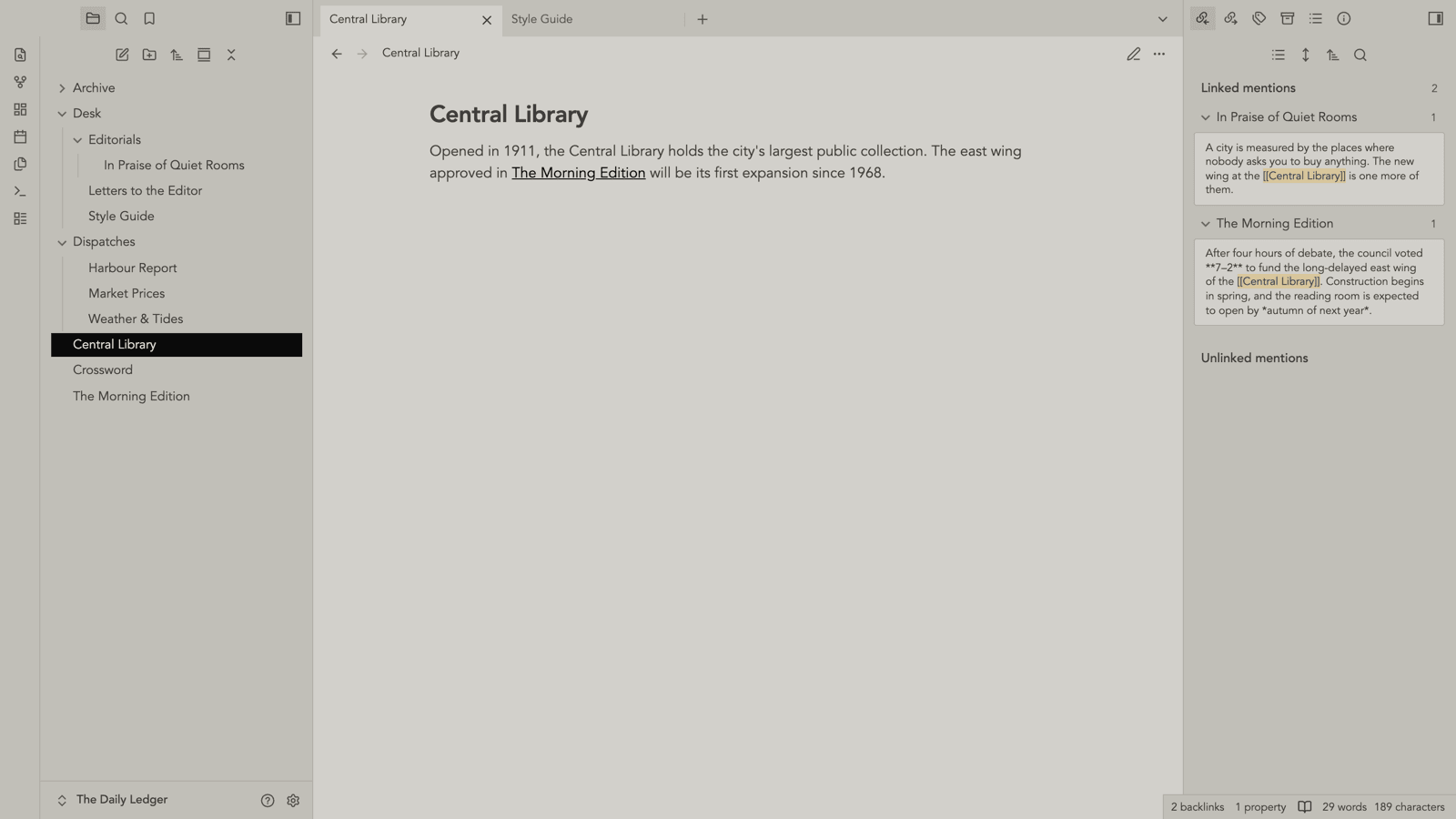
Backlinks: linked mentions in the right sidebar, each match shown in context.
Installation
Not yet in the community directory. To install manually, copy manifest.json and
theme.css into <vault>/.obsidian/themes/Newsprint/, then pick Newsprint in
Settings → Appearance → Themes.
Style Settings
With the Style Settings plugin installed you get:
- Use Red Graphite's original light scheme — off by default. Turning it on adds
the
rg-classic-schemeclass, which drops the entire Newsprint block out and leaves the scheme this theme was forked from in force: near-white page, red accent, rounded and shadowed components. - Base Color — in the Newsprint scheme this is the ink, and the paper is derived from it. Changing hue or saturation retints the paper; changing lightness moves ink and paper together.
- Accent Color — ink by default. Unlike Red Graphite, the Newsprint scheme
reads this setting directly rather than through
--accent-h/s/l, so it keeps working even after you've set an accent in Appearance settings. - Flatten ink — the document text is mottled by default, the way a press lays ink down unevenly so the paper bleeds through the letterforms. Turn this on for flat, even ink.
- Ink unevenness — how far the paper bleeds through (0 = flat).
- Interface, text and monospace fonts.
How the Newsprint scheme works
Red Graphite derives its whole palette from one HSL base color, walking lightness
away from it in 5% steps. That curve cannot produce newsprint. The page sits 80
steps from the ink, which on a linear ramp is base_l + 80% — at or near pure
white for any usable ink. Newsprint's defining trait is paper that never reaches
white, so the light end of the ramp has to be compressed rather than extrapolated.
So the scheme is a second ramp, not a different base color. Both live in
src/scss/themes/_ramps.scss: linear is Red
Graphite's original curve, refactored out of its two theme files and verified to
emit byte-identical declarations, and newsprint is the tuned one.
The tuning is constrained from two directions at once, because Red Graphite's
light scheme spends this single ramp on two jobs: its light end is both the page
surfaces and the text drawn on the near-black chrome, while its dark end is
both the ink on the page and the fills inside that chrome. Rather than bend the
curve to fit, theme-newsprint.scss remaps
the roles that land on the wrong step — text drops one step darker, borders move
from step 30 to 40, and every accent-coloured cue sitting on the dark chrome
(vault name, sidebar icons, nav fills, collapse arrows) moves to the paper end,
since ink-on-ink is invisible. That last group is the price of ink-as-accent, and
it is paid there rather than by compromising the accent.
Measured against the page at the default ink lightness:
| Role | Step | Contrast |
|---|---|---|
text-normal |
100 | 12.8:1 |
text-muted |
80 | 7.4:1 |
text-faint |
70 | 4.7:1 |
| nav item on chrome | 40 | 8.6:1 |
| nav hover on chrome | 00 | 15.9:1 |
The palette values are ported from the newspaper appearance of another project.
That project's original token block is kept at
reference/newspaper-palette.css for the
reasoning behind each value.
Development
Copy .env.example to .env and point OBSIDIAN_PATH at a vault's theme folder,
so the build can copy the result straight in.
npm install
npm run dev     # watch src/, rebuild, copy into the vault
npm run build   # build and copy once
npm run build:ci  # compile only, no .env and no copy
theme.css is generated from src/ and is committed, since Obsidian installs
it directly. Never edit it by hand — CI rebuilds and fails if the committed copy is
stale.
Releasing
Every change to the theme bumps the patch version (z in x.y.z) by one, so
every merged theme change ships as its own release. A change to the theme is
any change under src/ or to theme.css. CI enforces this on pull requests with
check-version.mjs, which also accepts a minor or major
bump and checks manifest.json, package.json and versions.json agree.
- On a branch,
npm version patch --no-git-tag-version— runsversion-bump.mjs, syncingmanifest.jsonand adding aversions.jsonentry. - Commit, open a PR and merge it into
main. .github/workflows/release.ymlsees amanifest.jsonversion with no release yet, checkstheme.cssis up to date, then tags the merge commit and publishes the release withmanifest.jsonandtheme.cssattached. Pushes that don't change the version do nothing.
There is no need to push a tag by hand. It can also be run from the Actions tab (Run workflow) if a release ever needs retrying.
Credits
Forked from Red Graphite for Obsidian
by Sean Williams, which is released into the public domain under the Unlicense and
which in turn takes its colours from Bear.app's Red Graphite theme. The SCSS layout,
original Grunt build and every app/ and plugins/ component style are Sean's work; the
Newsprint ramp and scheme are the additions here.
License
MIT — see LICENSE.