
README file from
Github🌸 Spring Blossom - Obsidian Theme
A theme that feels like a quiet morning in a Japanese garden. Cherry petals, fresh leaves, soft light. For slow thoughts and gentle notes 🌿
📑 Table of Contents
- ✨ Features
- 📸 Screenshots
- 📦 Installation
- 🎨 Color Palette
- 🛠️ Customization
- 💡 Share Your Ideas
- 📝 Credits
✨ Features
- 🌸 Soft spring palette with cherry pink and fresh green tones
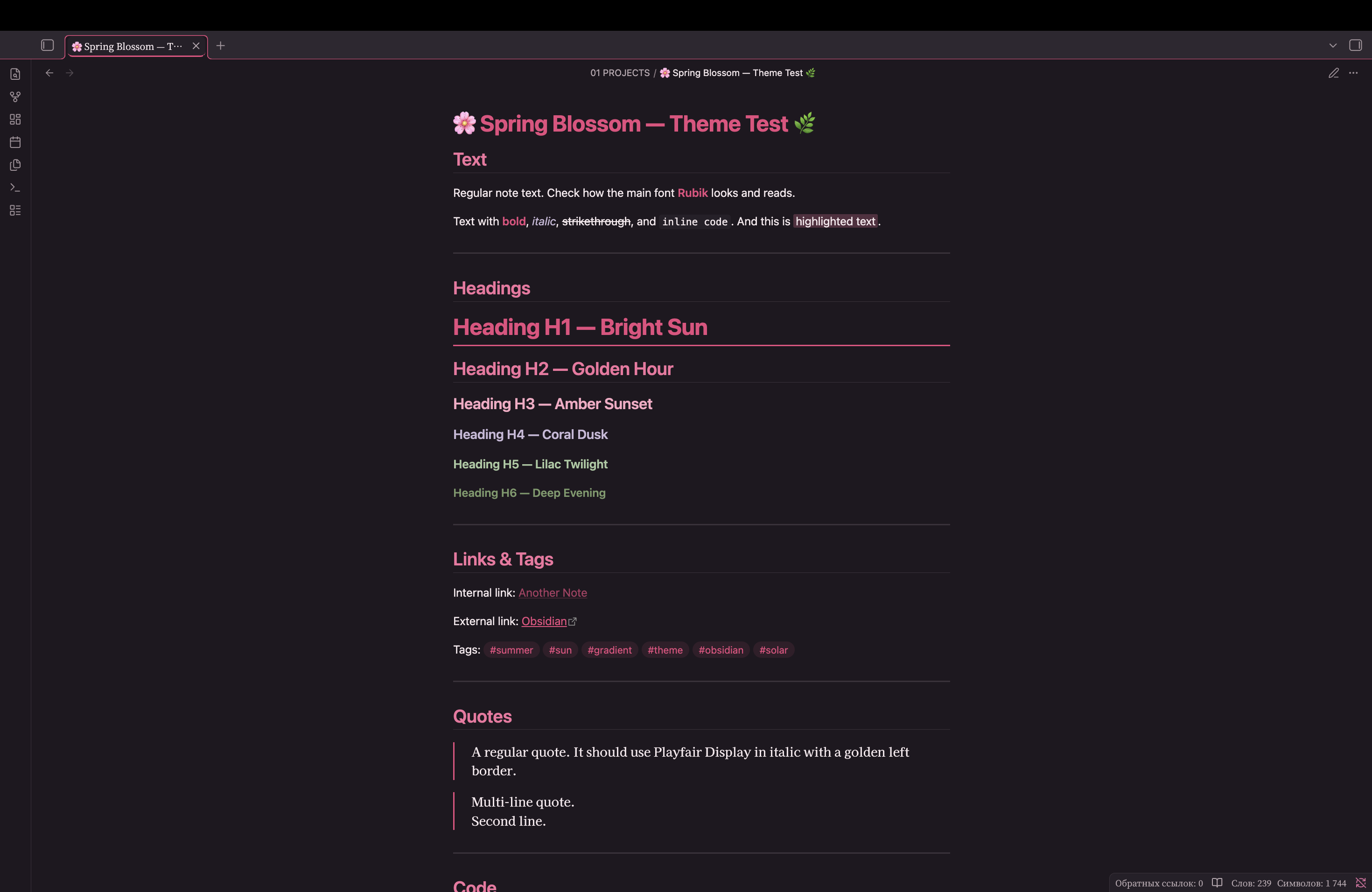
- 🌿 Sunset gradient across headings — from blossom to leaf
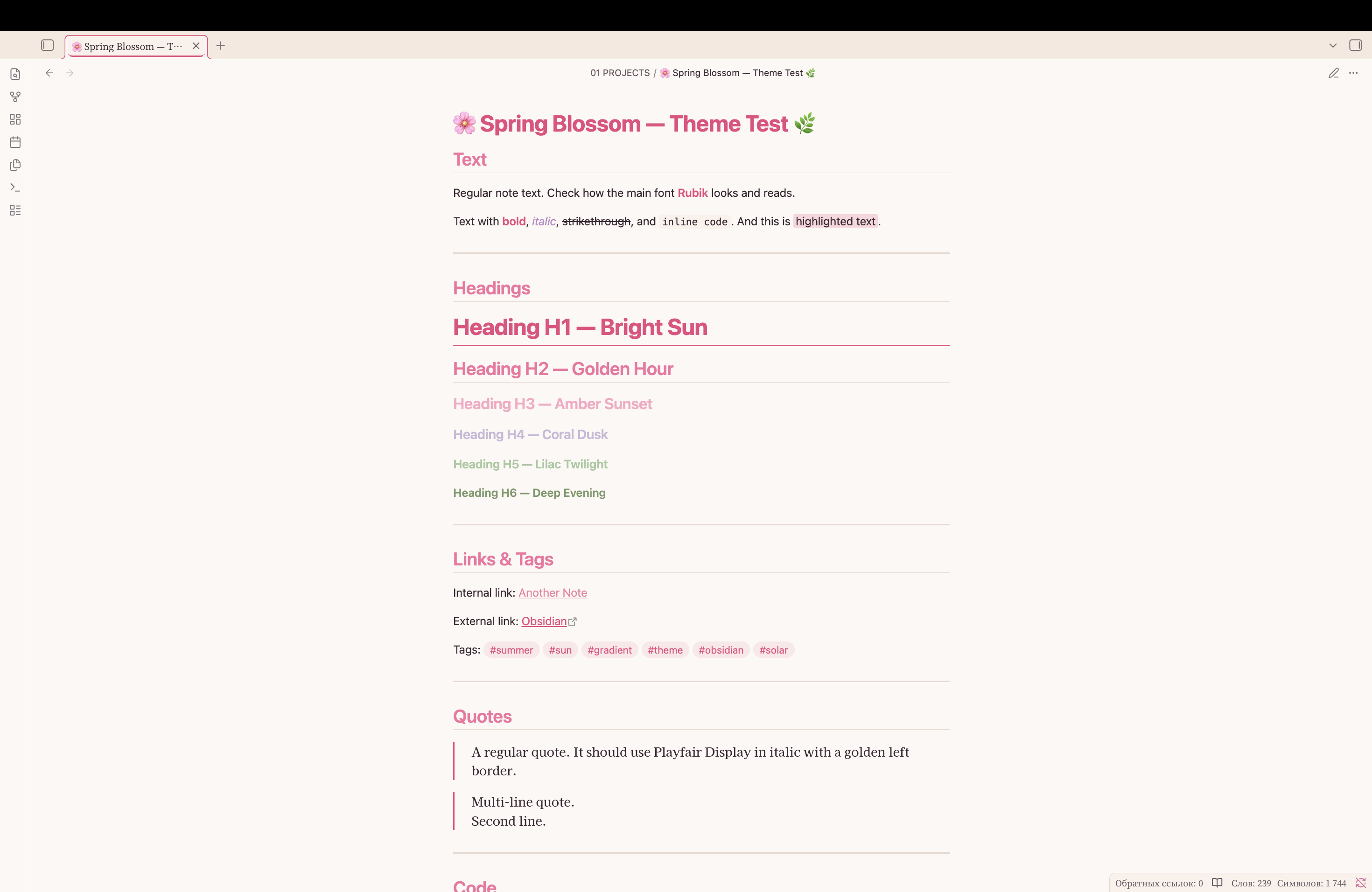
- 🌓 Dark and light mode support
- 🏯 Japanese-inspired typography: Noto Serif JP, Zen Antique Soft, Kaisei Decol
- 🎯 WCAG-compliant contrast for accessibility
- ✨ Hardcoded accent colors that override user settings
- 🖊️ Smooth animations and transitions
📸 Screenshots
Dark Mode
Light Mode
📦 Installation
From Obsidian Community Themes
- Open Obsidian Settings
- Go to Appearance → Themes → Manage
- Spring Blossom
- Click Install and then Use
Manual Installation
- Download the
theme.cssandmanifest.jsonfiles - Create a folder called
Spring Blossomin your.obsidian/themes/directory - Place both files in this folder
- Enable the theme in Obsidian Settings → Appearance → Themes
🎨 Color Palette
Heading Gradient
| Heading | Dark Theme | Light Theme | Mood |
|---|---|---|---|
| H1 | #e84a7f |
#e84a7f |
Cherry blossom |
| H2 | #f472a0 |
#f472a0 |
Soft petals |
| H3 | #f9a8c4 |
#f9a8c4 |
Pale bloom |
| H4 | #c8b8d8 |
#c8b8d8 |
Spring mist |
| H5 | #a8c8a0 |
#a8c8a0 |
Young leaf |
| H6 | #7a9a6a |
#7a9a6a |
Fresh grass |
Base Colors
| Element | Dark Theme | Light Theme |
|---|---|---|
| Background | #1e1820 |
#fdf8f5 |
| Text | #f5e8ed |
#3a2832 |
| Accent | #f472a0 |
#e84a7f |
| Leaf | #a8c8a0 |
#7a9a6a |
🛠️ Customization
Changing Colors
You can customize the theme by editing the CSS variables in theme.css:
--blossom-rose: #e84a7f; /* Change to your preferred cherry pink */
--blossom-petal: #f9a8c4; /* Change to your preferred pale bloom */
--blossom-leaf: #a8c8a0; /* Change to your preferred fresh green */
Recommended Accent Color
For the best experience, set your Obsidian accent color to:
- RGB:
232, 74, 127 - HEX:
#e84a7f
Note: The theme hardcodes accent colors, so user settings will be overridden.
💡 Share Your Ideas
Have an idea for a new feature or a soft detail you'd love to see in Spring Blossom? I'd love to hear it!
You can share your suggestions by:
- 🐛 Opening an issue on GitHub
- ✉️ Sending a message through the Obsidian forum
Your ideas help make this theme bloom even brighter for everyone! 🌸🌿
📝 Credits
- Inspired by quiet Japanese gardens and blooming spring mornings
- Typography: Noto Serif JP, Zen Antique Soft, Kaisei Decol, IBM Plex Mono
- Designed for calm, peace, and inspiration
Enjoy the gentle Spring Blossom vibes! 🌸🌿