
README file from
GithubVellum — An Obsidian Theme
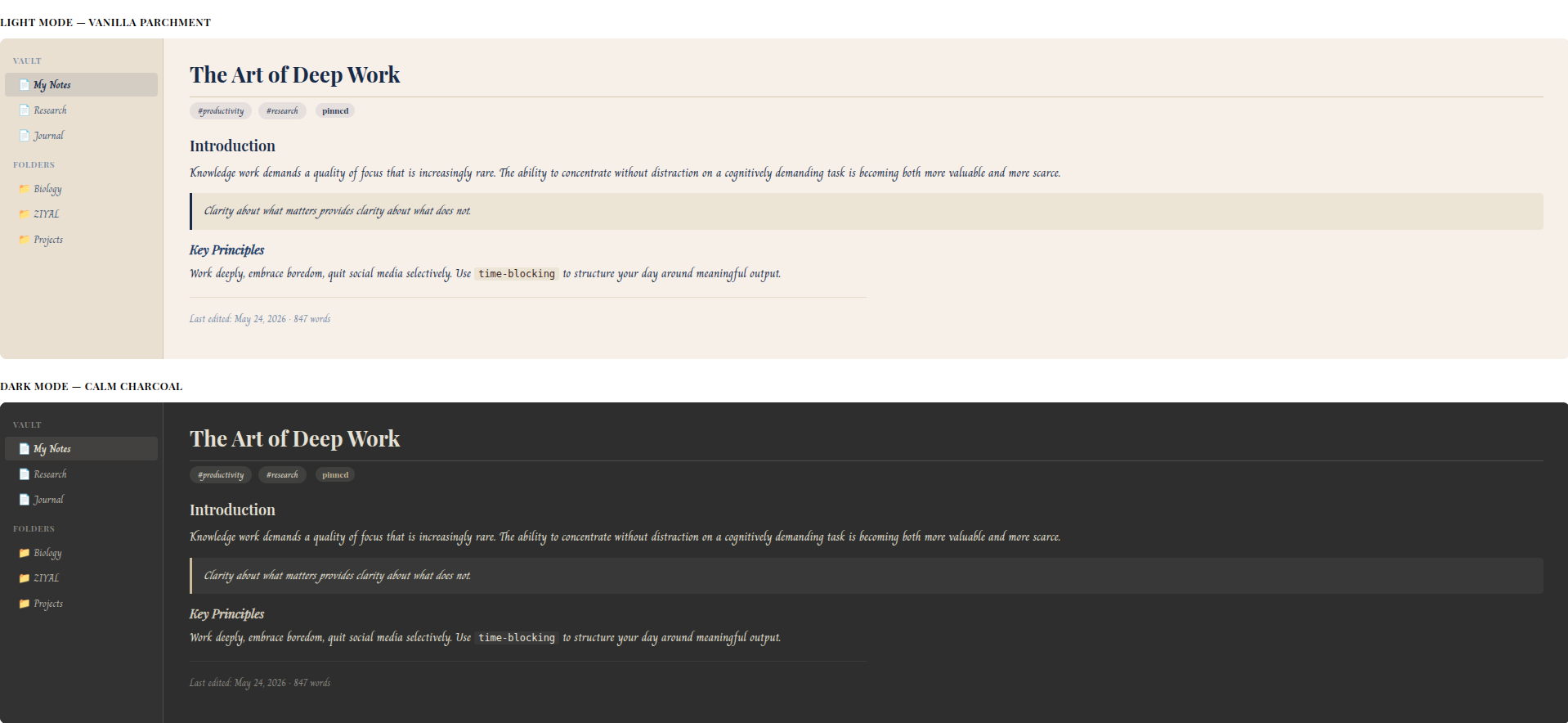
Write like you're inscribing on ancient parchment. Read like you're holding a manuscript under moonlight.
A sophisticated dual-mode theme for Obsidian — warm Vanilla Parchment for daylight writing, calm Charcoal Grey for late-night sessions.
Features
- Dual mode — Full light & dark theme support
- Playfair Display headings — elegant, editorial, timeless
- Charm body text — calligraphic, warm, a joy to read
- Sepia toggle — Switch light theme font from Navy Blue → Warm Brown (old scroll feel)
- Ultra minimal UI — Everything hidden until you need it
- Style Settings support — Adjust font size, line height, content width, accent colors, and more — no CSS knowledge needed
- WCAG AA accessible — All color combos tested (6.48:1 contrast ratio on dark mode)
- Mobile responsive — Works on Obsidian Mobile too
Color Palette
Light (Vanilla Parchment)
| Role | Color |
|---|---|
| Background | #F5F0E8 |
| Font (default) | #1B2A4A Navy Blue |
| Font (sepia mode) | #3D2B1F Warm Brown |
| Accent | #1B2A4A |
Dark (Calm Charcoal)
| Role | Color |
|---|---|
| Background | #2E2E2E |
| Surface | #4D4C4C |
| Font | #E4E0D3 Warm Off-White |
| Accent | #C8BC98 |
Installation
From Obsidian Community Themes (recommended)
- Open Settings → Appearance → Themes
- Search for Vellum
- Click Install and use
Manual Install
- Download
theme.cssandmanifest.json - Create a folder:
<vault>/.obsidian/themes/Vellum/ - Place both files inside
- Go to Settings → Appearance and select Vellum
Optional: Style Settings Plugin
Install the Style Settings plugin to get a visual control panel for:
- 📏 Font size slider (13–22px)
- 📐 Line height slider (1.3–2.2)
- 📄 Content width slider (500–1100px)
- 🎨 Custom accent colors
- 🟤 Sepia font toggle (light mode)
Fonts Used
- Playfair Display — Claus Eggers Sørensen — SIL Open Font License
- Charm — Cadson Demak — SIL Open Font License
Both loaded via Google Fonts CDN. Works offline if fonts are cached.
Credits
Designed by Rohith A — ZIYAL (ழியல்)
Built with care for writers, students, researchers, and anyone who believes notes deserve to be beautiful.
License
MIT License — free to use, modify, and share.