README file from
GithubMonokai Syntax
中文 | Development | GitHub
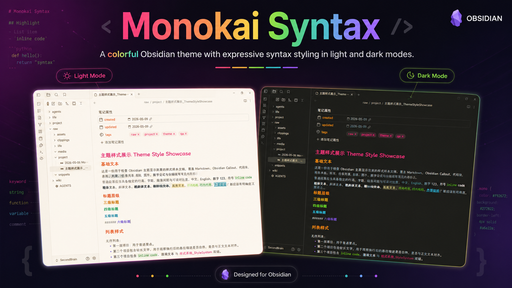
Monokai Syntax is an Obsidian community theme inspired by the Monokai Pro visual language, tuned for writing, code notes, navigation, graph view, and long-running knowledge bases.

Highlights
- Monokai-inspired dark and light palettes for Obsidian.
- Markdown reading view and Live Preview styling.
- CodeMirror 6 syntax colors mapped to the Monokai spectrum.
- File explorer, ribbon, tabs, modals, graph view, and canvas polish.
- Custom file icons with optional monochrome mode.
- Style Settings support for palette filters, density, icons, typography, and accents.
- No remote runtime assets in the final theme CSS.
Installation
Community Theme
Monokai Syntax is available from Obsidian's community theme store.
Open Obsidian, go to Settings -> Appearance -> Themes -> Manage, search for Monokai Syntax, then install and enable it.
Manual Installation
Create this folder in your Obsidian vault:
Your Vault/.obsidian/themes/Monokai Syntax/
Copy these files into it:
theme.css
manifest.json
Then enable Monokai Syntax from Obsidian's Appearance settings.
Style Settings
For the full configuration experience, install the community plugin Style Settings.
Available controls include:
- Palette filter: Classic, Machine, Octagon, Ristretto, Spectrum.
- Compact density.
- Colorful or monochrome file icons.
- Font and typography options.
- Accent, link, and code color overrides.
Roadmap
- Expand file icon coverage.
- Refine Markdown reading view and Live Preview details.
- Improve Style Settings coverage.
- Polish graph view, canvas, and plugin compatibility.
- Track Obsidian UI changes and keep the published community theme up to date.
Development
Build, lint, audit, and vault sync instructions live in DEVELOPMENT.md.
License
MIT. See LICENSE.md.