
README file from
GithubNeobrutalism Theme
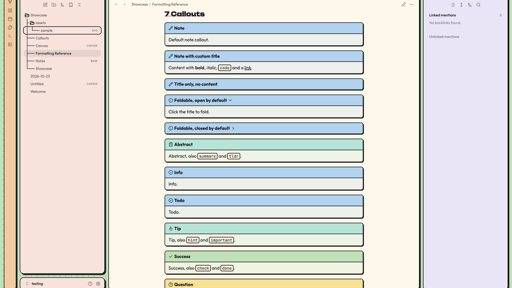
Welcome to the Neobrutalism Theme, a colorful and cozy theme for Obsidian. Pastel colors, bold black outlines, hard shadows and rounded corners turn your workspace into a set of friendly boxes on a dotted background, while the writing area stays calm and easy to read.
Features
- Boxes everywhere: Sidebars, tab groups, the ribbon and the status bar are separate boxes with black borders and hard shadows. The layout holds up when you move, split, stack or collapse panes.
- Pastel color zones: Green dotted background, a warm eggshell editor, red left sidebar, blue tab bars and a lilac right sidebar. A note keeps its eggshell writing surface wherever you put it.
- Everything styled: Callouts, tables, code blocks, tags, checkboxes, properties, embeds, footnotes, settings, command palette, menus, Canvas, Graph view and Bases.
- Connected file tree: Tree lines like in LazyVim and simple folder icons that open and close.
- Fonts included: Unbounded for headings, Outfit for text and JetBrains Mono for code, embedded in the theme. Nothing is loaded from the internet.
- Desktop and mobile: Works on macOS, Windows, Linux, iOS and Android.
- Customizable: Gaps, borders, shadows, corner radius, colors, fonts and more with the Style Settings plugin. Every value is also a CSS variable at the top of
theme.css.
Preview
Style Settings
Install the Style Settings plugin and open its settings tab to adjust:
- Layout: gap between boxes, gap on phones, tab bar height, hide the status bar
- Shape: border width, shadow offset, corner radius, hover movement, image borders, tree lines
- Background: dot grid on or off, dot size and spacing
- Colors: background, editor, panels, each sidebar, tab bars, ribbon, status bar, accent, borders, shadows, tags, heading markers, folder icons
- Typography: heading font, text font, heading markers on or off
Notes
- Obsidian's dark mode is not supported yet. When Obsidian runs in dark mode, the theme stays light. A dark version is planned.
- On macOS, Obsidian uses native context menus by default. They are drawn by the system and cannot be themed. Turn off "Native menus" in Obsidian's settings to get the themed menus.
- Folder icon outlines are always 2px, also when you change the border width.
Fonts
The theme embeds these fonts (Latin subset). All of them are licensed under the SIL Open Font License 1.1.
- Unbounded, Copyright 2022 The Unbounded Project Authors
- Outfit, Copyright 2021 The Outfit Project Authors
- JetBrains Mono, Copyright 2020 The JetBrains Mono Project Authors
Troubleshooting
If your issue isn't listed here, feel free to open an issue in the repository, and I'll do my best to assist!
License
MIT. You are welcome to copy and change the theme, please keep the copyright notice.
Enjoy a bold and cozy note-taking experience with the Neobrutalism Theme!