
README file from
GithubDedication 2 Theme for Obsidian
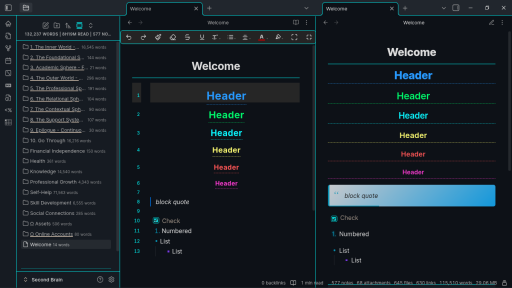
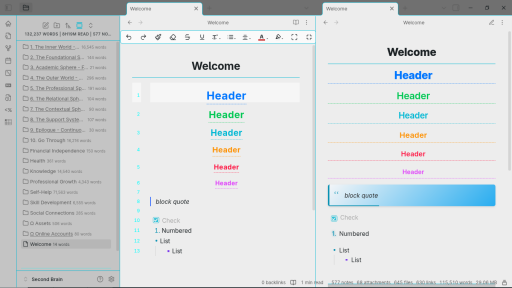
A sophisticated, highly customizable dark theme for Obsidian with premium color presets inspired by iconic sci-fi, fantasy, and cinematic aesthetics.
Dark Mode
Light Mode
Features
Premium Color Presets
- Original Dark - The elegant default theme with beautiful blue, cyan, and gold accents
- Matrix Green - Classic terminal green on black for coding enthusiasts
- Blade Runner - Cinematic cyberpunk palette with neon accents
- Dark Knight - Sophisticated dark theme with gold and deep red accents
- Gotham Noir - Monochromatic elegance with strategic gold highlights
- Cosmic Blue - Deep space-inspired blues with cosmic accents
- Star Trek - Professional sci-fi theme with command gold and science blue
Typography Options
- Inter (Default) - Clean modern sans-serif
- System Fonts - Your OS default fonts
- Georgia Serif - Classic serif for traditional reading
- Helvetica Neue - Professional sans-serif
- Source Sans Pro - Friendly readable sans-serif
- Roboto Mono - Clean monospace for coding
Enhanced UI Elements
- Beautiful heading indicators with colored bars
- Animated pendulum startup loading
- Custom calendar styling with colored weekdays
- Sophisticated table designs
- Custom tooltip styling
Installation
- Open Obsidian Settings
- Go to Appearance → Themes
- Click Manage and search for "Dedication 2"
- Select and activate the theme
Customization
Style Settings Plugin (Recommended)
Install the Style Settings plugin to access all customization options:
- Go to Community Plugins → Browse
- Search for "Style Settings" and install
- Restart Obsidian and enable the plugin
- Access settings via Settings → Style Settings
Available Customizations
Color Schemes
- Switch between 7 premium color presets
- Each preset includes both dark and light variants
- Presets maintain consistent visual hierarchy
Typography
- 6 font family options
- Maintains readability across all choices
- Proper font stacking for cross-platform compatibility
Recommended Settings
For Best Experience
- Enable Style Settings plugin for full customization
Contributing
We welcome contributions! Feel free to:
- Submit bug reports
- Suggest new color presets
- Improve documentation
- Share your customizations
License
This theme is released under the MIT License.