
README file from
GithubDark Citrussy
Dark Citrussy is a dark theme for Obsidian built on Blue Topaz. I used Blue Topaz for a long time and kept changing the same few things, so I merged those changes into one theme. No more re-enabling eight snippets on every device.
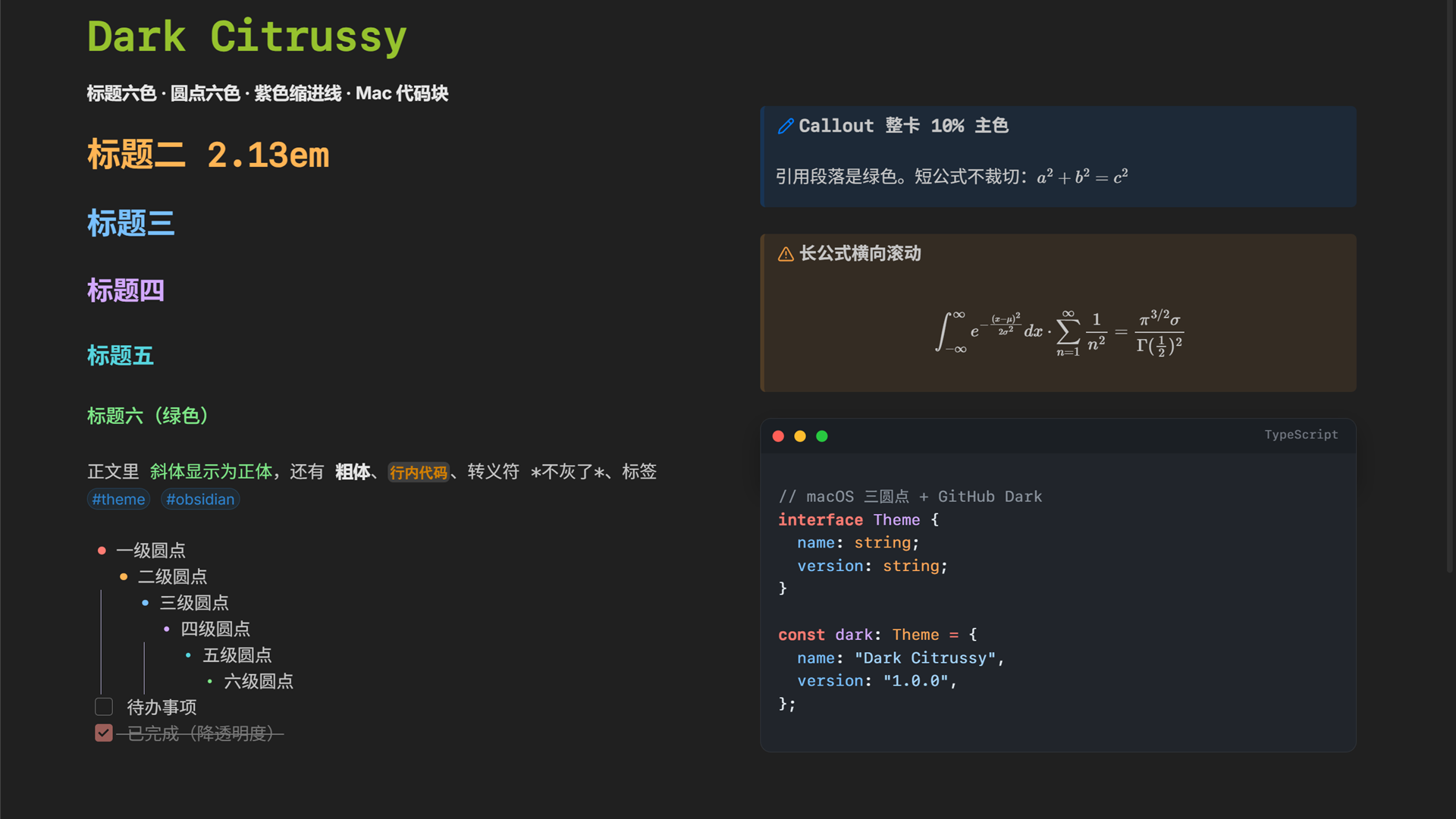
What changed
- The current line has no tint. That blue highlight is the first thing I remove from any theme.
- Italics render upright in the H6 green, and escaped characters keep the body color.
- Tags are small rounded pills.
- List bullets come in six colors and shrink with depth. Ordered list numbers take the same colors.
- Checkboxes are 16px, and completed tasks fade out.
- Headings use a six-color ladder: H1 at 2.13em, 0.21em less per level, note title at 2.34em.
- List indent is 1.65em, with a purple guide line that runs unbroken between rows.
- Callouts are washed with 10% of their accent color. Quotes use the theme green.
- A long block equation scrolls sideways inside its callout instead of breaking the card.
- Code blocks get a macOS traffic-light bar and GitHub Dark syntax colors.
Install
Dark Citrussy is in the community theme directory. Open Settings → Appearance → Manage themes → Browse, search for Dark Citrussy, then install and select it.
To install by hand, download theme.css and manifest.json from the latest release and put both in .obsidian/themes/Dark Citrussy/.
You need Obsidian 1.13 or newer. The theme is dark only. The palette is built for the dark scheme, so switching Obsidian to light leaves you with a mix of light and dark styles.
Repo layout
| File | What it is |
|---|---|
theme.css |
The built theme, around 31,900 lines: Blue Topaz first, my overrides after it. |
overrides.css |
My layer on its own. This is the file to edit. |
manifest.json |
Theme metadata. |
screenshot.png |
The screenshot above. |
To rebuild, append overrides.css to the Blue Topaz theme.css and copy the result into the vault:
copy /b "path\to\Blue Topaz\theme.css"+"overrides.css" theme.css
Then run Reload app without saving from the command palette.
Notes
- Everything before the
Tweaksblock is Blue Topaz. I fixed two spots in it: a stray quote in the print styles at line 26,744 and an external Dribbble gif used as a background at line 25,489. When the base updates, that whole range gets replaced. - Order matters. Several variables (
--tag-size,--checkbox-size,--list-indent,--lg-*) sit onbodyand are overridden by later blocks, so moving a block changes the output. !importantis there to beat Blue Topaz's own rules. Remove one and the base style comes back.- Some values are fixed for dark mode: the code block background
#21252b, the six heading colors, the purple guide line. - One rule hides folders named
fontsandaccessaryin the file explorer. It matches those exact names, so on another vault it does nothing. - The overrides lean on Blue Topaz variables (
--activeline-background,--list-indent,--callout-color). Change the base and they stop working.
Credits
MIT license, see LICENSE. The base theme is Blue Topaz, also MIT, Copyright (c) 2020 WhyI & Pkmer. Keep its license header in theme.css if you redistribute the file.