
README file from
Github🎃 All Hallows' Eve - Obsidian Theme
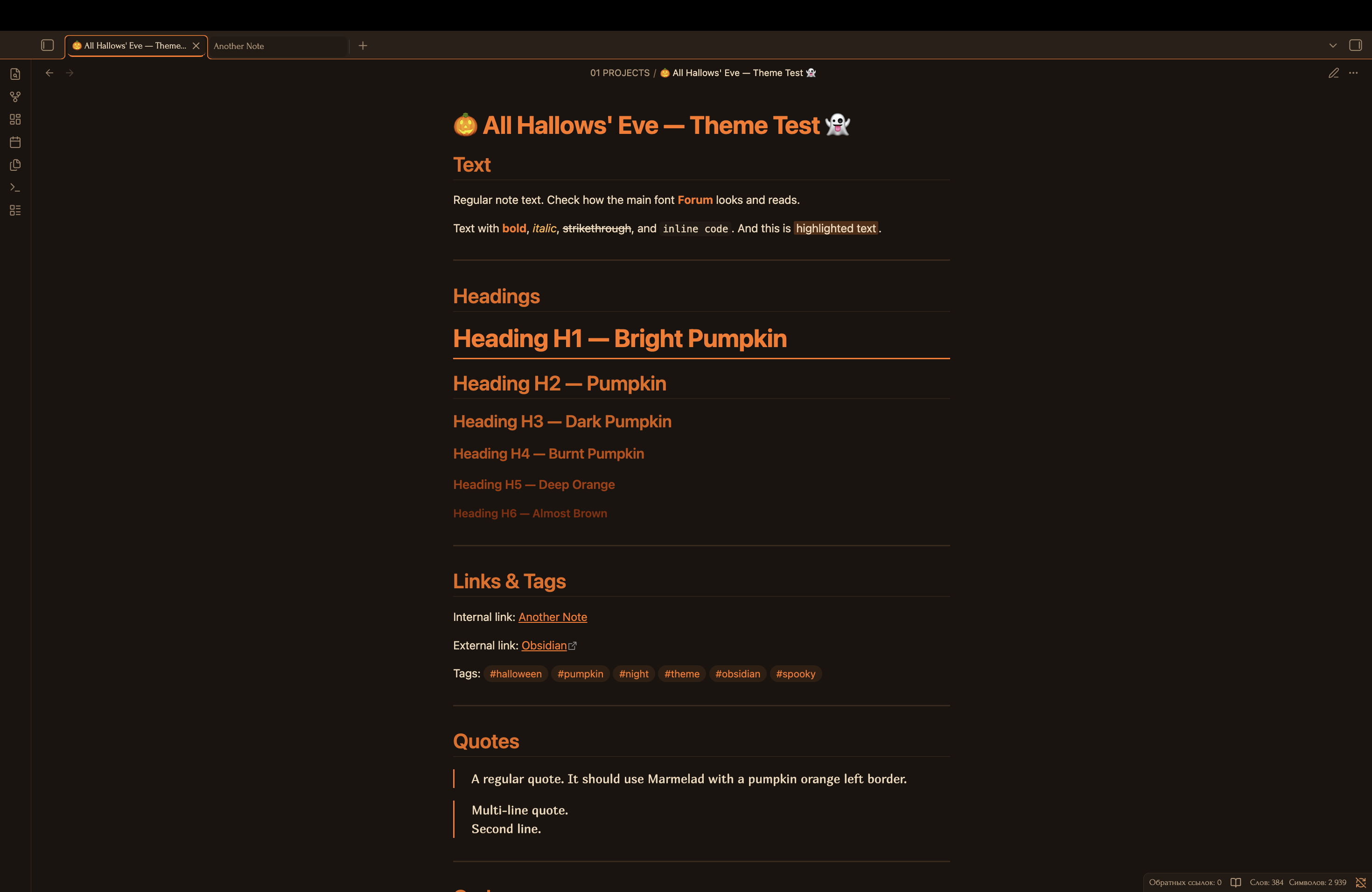
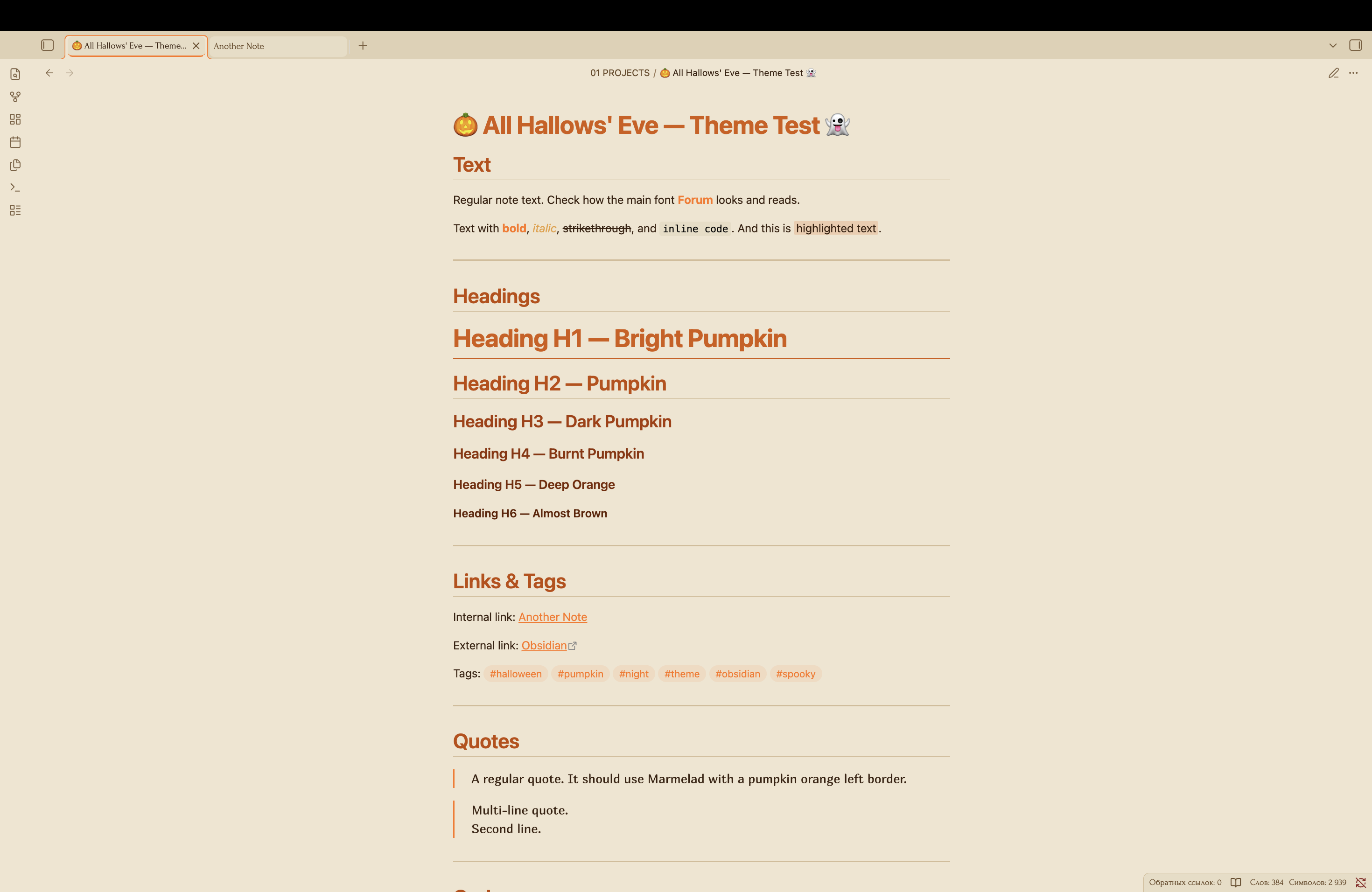
A Halloween theme for Obsidian. Pumpkin orange, candle glow, and spooky elegance. Dark and light modes. For those who want their notes to feel like a haunted night 👻
📑 Table of Contents
- ✨ Features
- 📸 Screenshots
- 📦 Installation
- 🎨 Color Palette
- 🛠️ Customization
- 💡 Share Your Ideas
- ✨ Extra Effects
- 📝 Credits
✨ Features
- 🎃 Pumpkin orange palette with candle glow accents
- 🌅 Gradient across headings — from bright pumpkin to dark ember
- 🌓 Dark and light mode support
- 📜 Gothic-inspired typography: Forum, Ruslan Display, Marmelad, JetBrains Mono
- 🎯 WCAG-compliant contrast for accessibility
- ✨ High contrast code syntax highlighting
- 🖊️ Smooth animations and transitions
- 🎃 Pumpkin dividers with three pumpkins in the center
📸 Screenshots
Dark Mode
Light Mode
📦 Installation
From Obsidian Community Themes
- Open Obsidian Settings
- Go to Appearance → Themes → Manage
- Find All Hallows Eve in the community store
- Click Install and then Use
Note: The theme has been submitted for review to the Obsidian community store and is awaiting moderation. 🎃
Manual Installation
- Download the
theme.cssandmanifest.jsonfiles - Create a folder called
All Hallows Evein your.obsidian/themes/directory - Place both files in this folder
- Enable the theme in Obsidian Settings → Appearance → Themes
🎨 Color Palette
Heading Gradient
| Heading | Dark Theme | Light Theme | Mood |
|---|---|---|---|
| H1 | #ff7518 |
#b84a08 |
Bright pumpkin |
| H2 | #e86810 |
#a83a00 |
Pumpkin |
| H3 | #d45a08 |
#903000 |
Dark pumpkin |
| H4 | #c04a00 |
#782800 |
Burnt pumpkin |
| H5 | #a83a00 |
#602000 |
Deep orange |
| H6 | #8a2a00 |
#481800 |
Almost brown |
Base Colors
| Element | Dark Theme | Light Theme |
|---|---|---|
| Background | #1a1410 |
#e4d8c0 |
| Text | #f0d8b8 |
#2e1a08 |
| Accent | #ff7518 |
#b84a08 |
| Candle | #ffb347 |
#c9853a |
🛠️ Customization
Changing Colors
You can customize the theme by editing the CSS variables in theme.css:
--halloween-pumpkin: #ff7518; /* Change to your preferred pumpkin */
--halloween-pumpkin-dark: #d45a08; /* Change to your preferred dark pumpkin */
--halloween-candle: #ffb347; /* Change to your preferred candle glow */
Recommended Accent Color
For the best experience, set your Obsidian accent color to:
- RGB:
255, 117, 24 - HEX:
#ff7518
Note: The theme hardcodes accent colors, so user settings will be overridden.
💡 Share Your Ideas
Have an idea for a new feature or a spooky detail you'd love to see in All Hallows' Eve? I'd love to hear it!
You can share your suggestions by:
- 🐛 Opening an issue on GitHub
- ✉️ Sending a message through the Obsidian forum
Your ideas help make this theme spookier for everyone! 🎃👻
✨ Extra Effects
Effects that can be added to the theme. Checked items are already implemented.
- 🎃 Pumpkin dividers — gradient with three pumpkins in the center
- 🎃 Icons in collapsible blocks — 🎃 (collapsed) / 👻 (expanded)
- 🕸️ Spider web borders — light web pattern on borders
- 🕯️ Candle flicker — pulsing glow on active tabs
- 👻 Ghostly appearance — smooth note appearance with slight offset
- 🦇 Bat cursor — bat icon instead of cursor
- 🍬 Colored tags — different colors for different tag types
- 🌕 Moon in corner — semi-transparent moon in top-right corner
- 💀 Skulls as list markers — custom
::marker
📝 Credits
- Inspired by Halloween nights, pumpkin lanterns, and candlelight
- Typography: Forum, Ruslan Display, Marmelad, JetBrains Mono
- Designed for spooky, atmospheric, and comfortable note-taking
Enjoy the spooky All Hallows' Eve vibes! 🎃👻