
README file from
GithubX Clipper
Save X (Twitter) posts with images and videos included.
English README → README.md
Features
- Clip posts from X (Twitter) by pasting the URL
- Download images and videos directly into your vault's attachments folder
- Auto-extract hashtags from post text and save them as tags (both frontmatter and inline)
- Tag suggestions with toggle buttons based on your usage history
- Previous tags remembered — manually selected tags from your last save are pre-activated
- Clear all button to quickly reset tag selections
- Custom X icon in the ribbon for quick access
- Japanese language support for filenames and tags
- Fallback API — automatically tries vxtwitter if fxtwitter is unavailable
Installation
From Community Plugins (Recommended)
- Open Settings → Community plugins
- Click Browse and search for "X Clipper"
- Click Install, then Enable
Manual Installation
- Download
main.js,manifest.json, andstyles.cssfrom the latest release - Create a folder
.obsidian/plugins/x-clipper/in your vault - Copy the downloaded files into that folder
- Restart Obsidian and enable the plugin in Settings → Community plugins
Usage
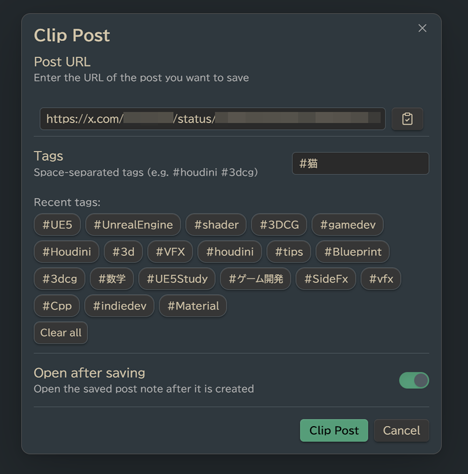
- Click the 𝕏 icon in the ribbon, or run the Clip Post command from the command palette
- Paste the post URL (e.g.
https://x.com/username/status/123456789) - Optionally add or toggle tags
- Click Clip Post
The plugin will:
- Fetch the post text and author info
- Download any attached images/videos to
{Posts folder}/attachments/ - Create a Markdown note with frontmatter, embedded media, and tags
Settings
| Setting | Description | Default |
|---|---|---|
| Posts folder | Where to save clipped posts | X_Posts |
| Copy note path to clipboard | Auto-copy [[note]] link after saving |
On |
| Open saved note after saving | Open the note immediately | Off |
Saved Note Format
---
author: "Author Name"
author_url: "https://x.com/username"
post_url: "https://x.com/username/status/123"
date_saved: 2025-01-01T12:00:00.000Z
tags: ["houdini", "3dcg", "VFX"]
---
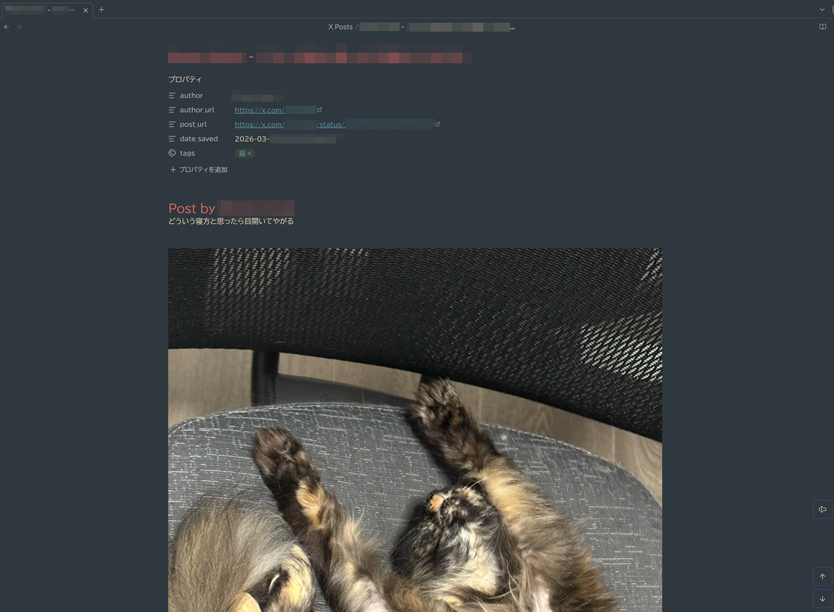
# Post by Author Name
Post text content here...

![[post_img_1234567890_1.jpg]]

---
#houdini #3dcg #VFX

**Author:** [Author Name](https://x.com/username)
**Original Post:** [View on X](https://x.com/username/status/123)
**Saved:** 2025年1月1日 12:00
API
This plugin uses the fxtwitter API (with vxtwitter as fallback) to fetch post data. No authentication or API keys are required.