
README file from
Github🏋️ Workout AI Tracker for Obsidian
Advanced workout tracking plugin for Obsidian with AI-powered analysis using Claude API.
✨ Features
📝 Workout Tracking
- ✅ Template-based workouts - Select from 5 default templates or create custom ones
- ✅ Quick workout entry with modal interface
- ✅ Track weight, reps, RPE, heart rate for each set
- ✅ Warmup/cooldown cardio activities (elliptical, rowing, etc.)
- ✅ Automatic markdown file generation with Obsidian Base properties
- ✅ Organized in customizable folder structure
- ✅ Progress tracking within workout (exercise X of Y)
⏱️ Built-in Tools
- ✅ Rest timer with countdown and notifications
- ✅ Quick add exercise to today's workout
- ✅ Progressive volume and set tracking
- ✅ Duration tracking
🤖 AI-Powered Analysis
- ✅ Claude API integration for intelligent workout analysis
- ✅ Progress tracking (weights, reps, volume)
- ✅ Program recommendations
- ✅ Recovery analysis
- ✅ Imbalance detection
- ✅ Personalized training advice
📊 Data Organization
- ✅ Uses Obsidian Base (properties in frontmatter)
- ✅ Markdown files for full-text search
- ✅ Git-friendly version control
- ✅ No external dependencies
Below are some screenshots of the app in action:
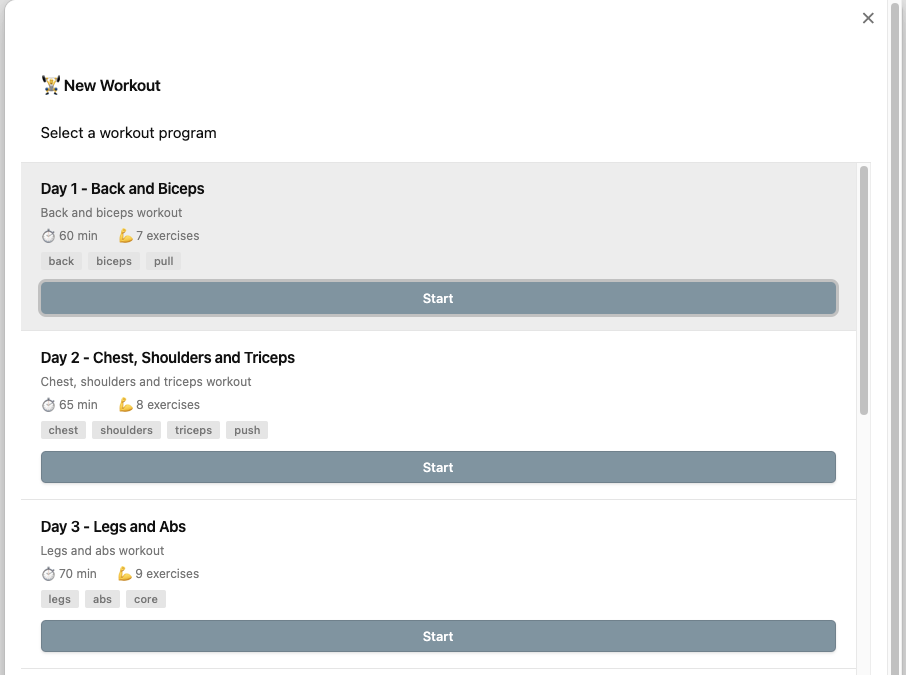
New Workout Selection
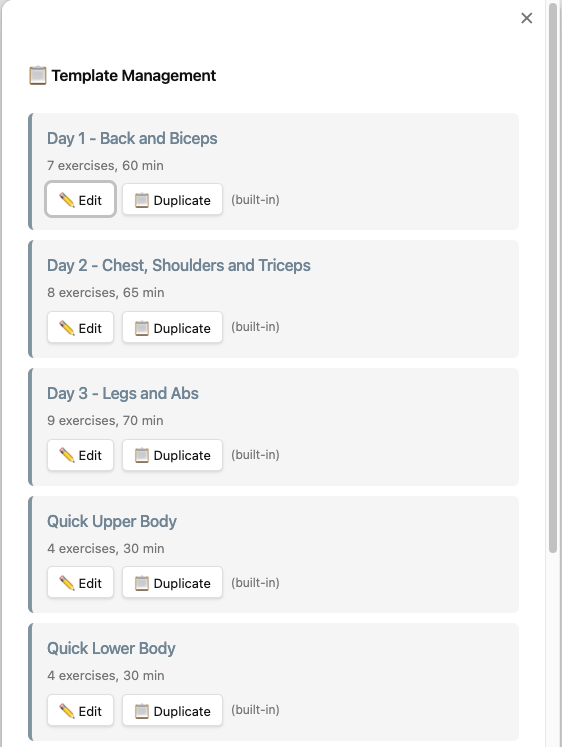
Template Management
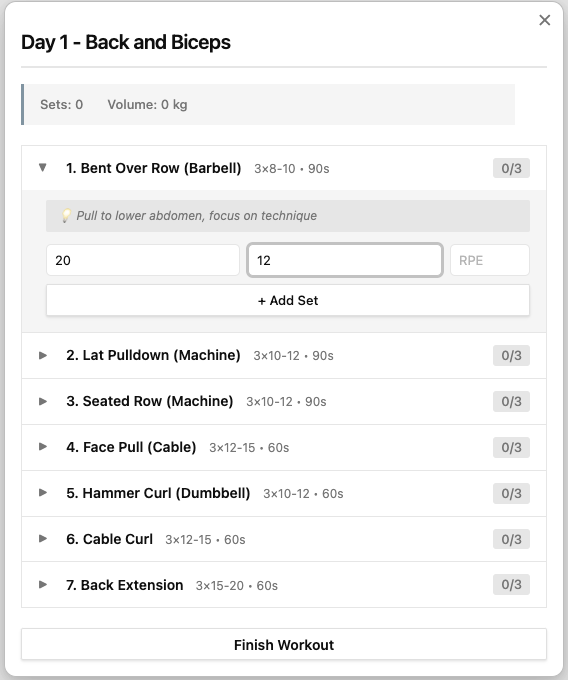
Workout Session
🚀 Installation
Manual Installation
- Download the latest release
- Extract files to
.obsidian/plugins/workout-ai-tracker/in your vault - Reload Obsidian
- Enable "Workout AI Tracker" in Settings → Community Plugins
From Source
git clone https://github.com/yourusername/obsidian-workout-ai
cd obsidian-workout-ai
npm install
npm run build
Copy main.js, manifest.json, and styles.css to your vault's plugins folder.
⚙️ Setup
1. Get Claude API Key
- Go to https://console.anthropic.com/
- Create an account or sign in
- Generate an API key
- Copy the key (starts with
sk-ant-...)
2. Configure Plugin
- Open Obsidian Settings
- Go to Workout AI Tracker
- Paste your Claude API key
- Set your workouts folder (default:
Workouts) - Configure default rest time (default: 90 seconds)
📖 Usage
Starting a Workout
Method 1: Ribbon Icon
- Click the 🏋️ icon in the left ribbon
- Select a template from the list (Day 1, Day 2, Day 3, Quick Upper, Quick Lower)
- Click "Start" to begin the workout with pre-configured exercises
- Or click "Create Empty Workout" for a custom workout
Method 2: Command Palette
- Press
Cmd/Ctrl + P - Type "Start new workout"
- Press Enter
- Select your template
Method 3: Hotkey (configure in settings)
- Set custom hotkey for "Start new workout"
Using Workout Templates
The plugin comes with 5 default templates based on your optimized training program:
-
Day 1 - Back and Biceps (60 min, 7 exercises)
- Back and biceps focused workout
- Includes Bent Over Row, Lat Pulldown, Seated Row, Face Pull, Hammer Curl, Cable Curl, Back Extension
-
Day 2 - Chest, Shoulders and Triceps (65 min, 8 exercises)
- Chest, shoulders, and triceps
- Includes Bench Press, Incline Press, Overhead Press, Lateral Raise, Reverse Fly, Tricep Pushdown
-
Day 3 - Legs and Abs (70 min, 9 exercises)
- Legs and abs
- Includes Goblet Squat, Leg Press, Romanian Deadlift, Bulgarian Split Squat, Leg Curl, Calf Raise, Abs exercises
-
Quick Upper Body (30 min, 4 exercises)
- Fast upper body workout
- Push-ups, Pull-ups, Overhead Press, Dumbbell Row
-
Quick Lower Body (30 min, 4 exercises)
- Fast lower body workout
- Goblet Squat, Lunges, Romanian Deadlift, Calf Raises
Managing Templates:
- Press
Cmd/Ctrl + Pand type "Manage workout templates" - ✏️ Edit any template (default or custom):
- Default templates: Creates a new custom copy when saved
- Custom templates: Updates the existing template
- ➕ Create new templates from scratch with the "+" button
- 📋 Duplicate templates to create variations
- 🗑️ Delete custom templates (default templates are protected)
- Custom templates are saved in plugin data.json (persistent, synced with vault)
Template Editor Features:
- Edit template name, description, and tags
- Add/remove/reorder exercises within the template
- Configure sets, reps range (min-max), and rest time for each exercise
- Set target weights as suggestions for exercises
- Add exercise notes (technique tips, progression advice)
- Set estimated workout duration
- Enable/disable warmup and cooldown (with duration)
- Save validates that name and at least one exercise are present
Tracking Exercises
When using a template, the plugin guides you through each exercise:
- Current Exercise Info - Shows exercise name, target sets/reps, rest time, and notes
- Set Counter - Displays which set you're on (e.g., "Set 2 of 3")
- Input Weight and Reps - Enter the weight (kg) and repetitions completed
- Optional Fields - Add RPE (1-10) and heart rate if desired
- Add Set - Click to record the set
- Progress Automatically - Plugin moves to next set or exercise
- Skip Exercise - Option to skip if needed
- View Completed - See summary of all completed sets
- Finish Workout - Save to markdown file when done
Template-Free Workouts:
- Choose "Create Empty Workout" for custom workouts
- Manually enter each exercise name as you go
- Add sets one at a time with full flexibility
Using Rest Timer
- After completing a set, press
Cmd/Ctrl + P - Type "Start rest timer"
- Timer countdown begins
- Skip anytime or wait for completion
AI Analysis
Analyze Recent Workouts:
- Open any note
- Press
Cmd/Ctrl + P - Type "Analyze workouts with AI"
- Wait for AI analysis
- Analysis inserted into current note
What AI Analyzes:
- 📈 Progress trends (weight/reps/volume)
- 💡 Program recommendations
- 😴 Recovery assessment
- ⚖️ Muscle group imbalances
- 🎯 Specific next-workout advice
📁 File Format
Generated Workout File
---
date: 2025-11-08
program: Day 1 - Back and Biceps
duration: 45
totalSets: 18
totalVolume: 2450
type: workout
---

# Day 1 - Back and Biceps

📅 2025-11-08 | ⏱️ 45 min | 💪 18 sets | 📊 2450 kg volume

## 🏃 Warmup

- **Type:** Elliptical
- **Duration:** 10 min
- **Resistance:** 7
- **Incline:** 8
- **Average HR:** 118 bpm

## 💪 Exercises

### Bent Over Row (Barbell)

| Set | Weight (kg) | Reps | RPE | HR | Rest (sec) |
| --- | ----------- | ---- | --- | --- | ---------- |
| 1   | 20          | 12   | 7   | 135 | 90         |
| 2   | 20          | 12   | 8   | 138 | 90         |
| 3   | 20          | 12   | 9   | 142 | 90         |

### Lat Pulldown (Machine)

| Set | Weight (kg) | Reps | RPE | HR | Rest (sec) |
| --- | ----------- | ---- | --- | --- | ---------- |
| 1   | 40          | 12   | 7   | 130 | 90         |
| 2   | 40          | 12   | 8   | 133 | 90         |
| 3   | 40          | 11   | 9   | 137 | 90         |

## 🏃 Cooldown

- **Type:** Elliptical
- **Duration:** 10 min
- **Resistance:** 7
- **Incline:** 8
- **Average HR:** 115 bpm

## 📝 Notes

Great workout! Feeling progress on rows.
Obsidian Base Properties
Properties automatically added to frontmatter:
date- Workout date (YYYY-MM-DD)program- Program nameduration- Total minutestotalSets- Number of sets completedtotalVolume- Total kg lifted (weight × reps)type- Always "workout" for filtering
Querying with Dataview
TABLE duration, totalSets, totalVolume
FROM "Workouts"
WHERE type = "workout"
SORT date DESC
LIMIT 10
TABLE WITHOUT ID
  date as "Date",
  duration as "Duration (min)",
  totalVolume as "Volume (kg)"
FROM "Workouts"
WHERE program = "Day 1 - Back and Biceps"
SORT date DESC
🎨 Customization
Custom CSS
Add to your vault's .obsidian/snippets/workout-custom.css:
/* Custom workout card styling */
.exercise-item {
  background: linear-gradient(135deg, #667eea 0%, #764ba2 100%);
  color: white;
}

/* Timer styling */
.timer-display {
  color: #ff6b6b;
  font-size: 96px;
}
🔧 Advanced Usage
Templates
Create a template in Templates/Workout Template.md:
---
date: { { date } }
program: { { title } }
type: workout
---

# {{title}}

## Warmup

- [ ] 10 min elliptical

## Exercises

- [ ] Exercise 1
- [ ] Exercise 2

## Cooldown

- [ ] 10 min elliptical
Dataview Dashboards
Create Workouts Dashboard.md:
# 🏋️ Workout Dashboard

## This Week

```dataview
LIST duration + " min"
FROM "Workouts"
WHERE type = "workout" AND date >= date(today) - dur(7 days)
SORT date DESC
```

## Total Volume by Program

```dataview
TABLE WITHOUT ID
  program as "Program",
  sum(totalVolume) as "Total Volume (kg)",
  count(rows) as "Sessions"
FROM "Workouts"
WHERE type = "workout"
GROUP BY program
```

## Recent PRs

```dataview
TABLE date, program, totalVolume
FROM "Workouts"
WHERE type = "workout"
SORT totalVolume DESC
LIMIT 5
```
🤝 Contributing
Contributions welcome! Please:
- Fork the repository
- Create a feature branch
- Make your changes
- Submit a pull request
📄 License
MIT License - see LICENSE file for details
🙏 Acknowledgments
- Obsidian team for amazing plugin API
- Anthropic for Claude API
- Community plugin developers for inspiration
🐛 Bug Reports
Report issues at: https://github.com/yourusername/obsidian-workout-ai/issues
📮 Support
- GitHub Discussions: Ask questions and share ideas
- Email: [email protected]
Made with 💪 for the Obsidian community