
README file from
GithubVaultMan






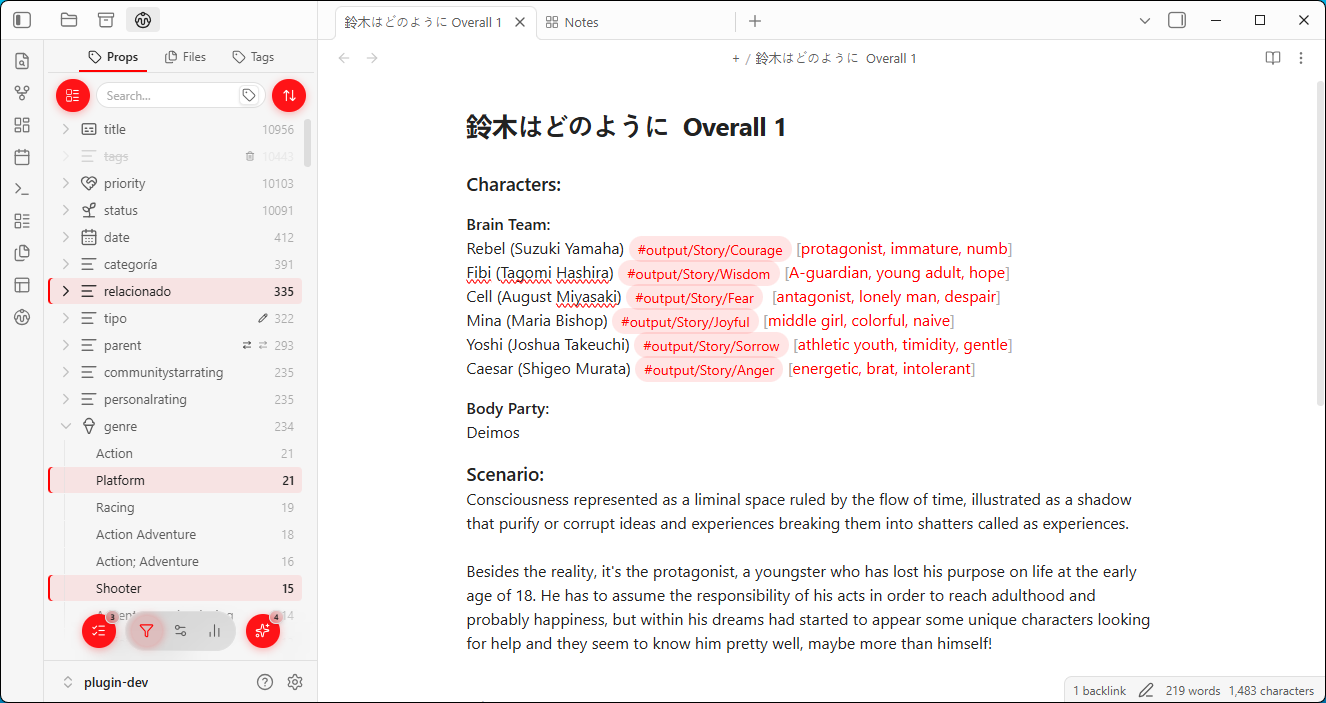
Table of Contents
Introduction
Vaultman (aka Node-Notes) is a collection of tools for files navigation, selection and edition with filters and automation of actions.
Once you have hundreds, thousands of notes (even mixed file formats), the built-in explorers get limiting fast for organization: You can see your files, tags and properties listed, rename them one at a time, and that's it.
With Vaultman, you can filter your files, select the operational boundaries (globally or only slected), queue a batch of actions, preview exactly what they will change and apply everything at once.
Add, Rename, Delete, Replace Properties/Values/Content, Move Files, Copy nodes, etc.
This plugin gives you a control panel for your data, imitating the functionality of your OS explorer with the power of Obsidian Bases. Giving you different views to navigate across your vault and edit data / metadata for your Personal Knowledge Management.
I designed this plugin for myself, looking for a workflow that could speed up my workflow without the burden of too many plugins scattered around and disconnected from each other, and only needing a few clicks every time I want to change or move something. Hope it helps you too!
Installation
Main workflow is already usable and will help you to decrease some repetitive processes. Although there are some placeholders of functionalities that will be delivered in the upcoming versions. Stay tuned!.
Obsidian Community Plugins
You can browse this plugin from the Community Plugins as: "Vaultman" to start using it! Or you can go and take a look into the community webpage to see its overall score, ranking and stats at the Obsidian Community Page
Only stable version releases will be shown in the official Obsidian Community Plugins.
Via BRAT
I'll also release experimental "beta" versions for those who want to check the project progress, and for PC/Mobile testing.
- Install BRAT from the community plugins store
- In BRAT settings → Add Beta Plugin
- Enter
meibbo/vaultman - Enable Vaultman in Settings → Community Plugins
Beta versions are more prone to bugs and performance issues, and can break your vault. Use them at your own risk, and always make backups before updating or using them.
This project is in an early state, developing feedback is totally welcomed!
Features
Plugin sidebar Frame
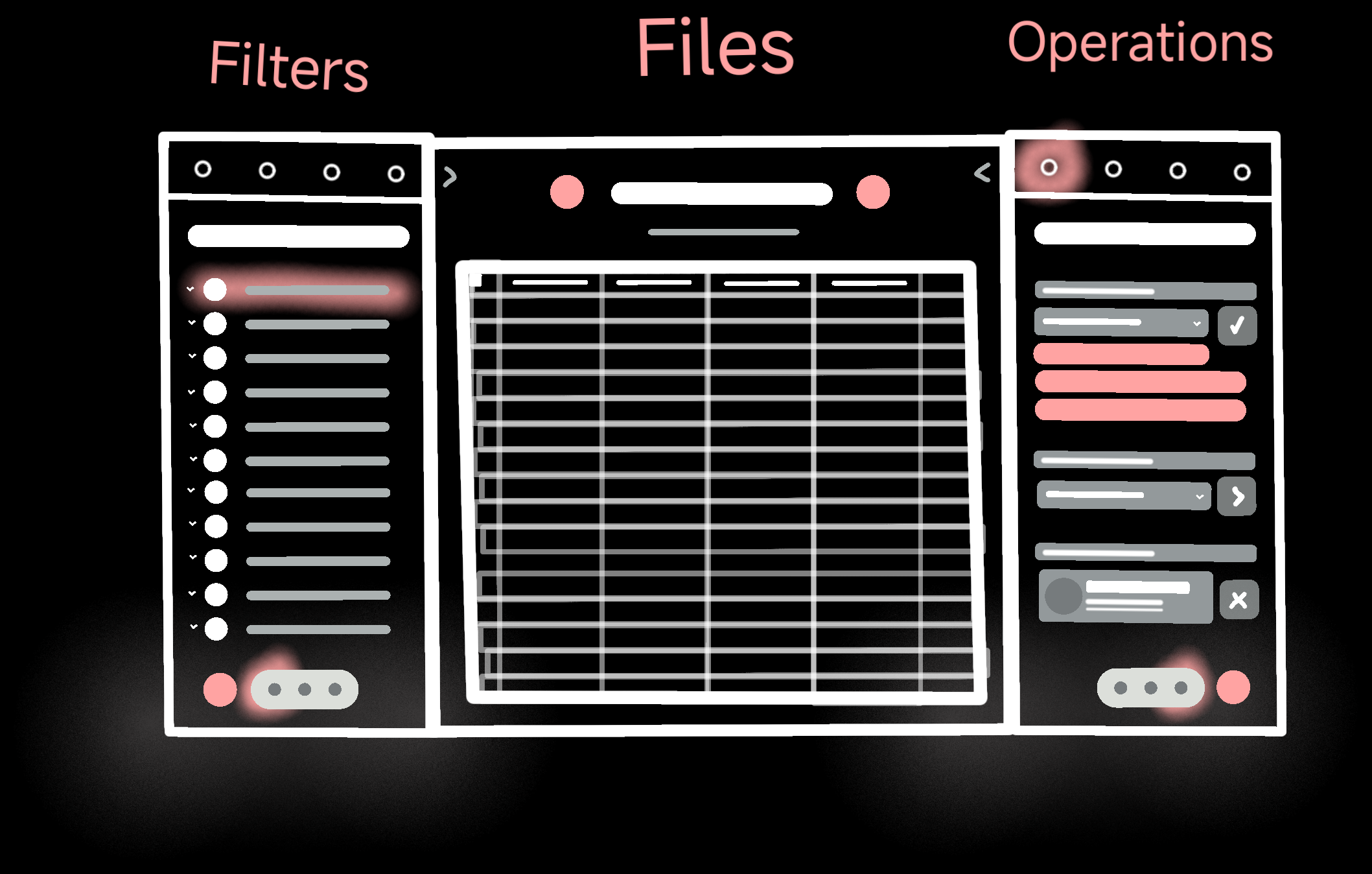
The main interface is a compact and modular sidebar (can also live in the main workspace) that lets you choose its content depending of what you want to edit or visualize (Frontmatter, Files, Tags or Content).
With a bottom dock to navigate between pages and a top bar for their subpages/tabs.
It also has FAB buttons that opens menus for quickly navigation between overlays:
- View menu: how the nodes are presented.
- Sort menu: how they are sorted and grouped.
- Active filters: which nodes scopes file actions.
- Queue list: which actions are ready to be processed.
Explorers
What makes them special. These components are scrollable, searchable, selectable, draggable (WIP) and can be filtered based on your needs.
They are a generic and adapts to any data provider configured to show fetched data from different sources within Obsidian and converts them into node elements.
Such as icons, labels, content (WIP), operation badges, highlights, counters, etc.
(currently only available tree and grid views.)
Main Page
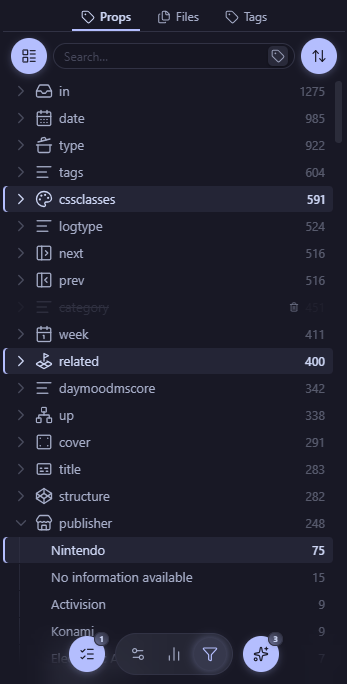 It is called filters now, but will be changed to something more generic
This is where the explorers live, from here you can filter out the exact options you wanted to select for different kinds of operations.
-
Properties tab: a live scrollable list of every property and value in your vault, built from the frontmatter index.
-
Files tab: a list of the files and folders of your vault, affecting the amount of elements showed based on your active filters.
-
Tags tab: a list that gives you power to rearrenge your tags and set them in the frontmatter of your notes or dragging them into the content.
-
Content tab: this is a reimagination of the core search plugin with a global replace functionality and the option to filter notes by their content.
Every explorer has a toolbar with a search box, sorts and different views to facilitate your navigation and only will affect each tab individually
Node-Notes
Every concept, every non-MD file, even plugins and snippets can have their own note for quick access and usage. Use them as your own personal library, or to put images to preview them in cards!
Useful for conceptualizing what tags or properties are for in your Vault, or to quickly toggle ON/OFF groups of snippets or plugins from the comfort of your sidebar!
Filters & Operations
A node will be any of the options that are listed from the provider data of the selected tab (even snippets, plugins and layouts will have their own tabs!)
Every selected node will apear in the Active filters island, where you can strategically add logical groups (and/or/none), supress filters, clear all, or even select templates of filters(WIP) to scope down the exact nodes you wanted to edit.
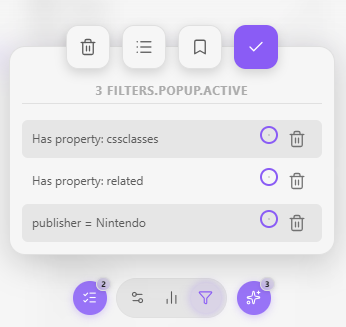
This version only scopes the files tab from selected properties, tags or content. Scoping content or metadata from selected files will be added soon.
Queue changes
Every action including move, convert, set, edit, create or delete of any node will be stored by default on the queue changes list. It lets you preview exactly what they will change and apply everything at once or manually run/discard changes.
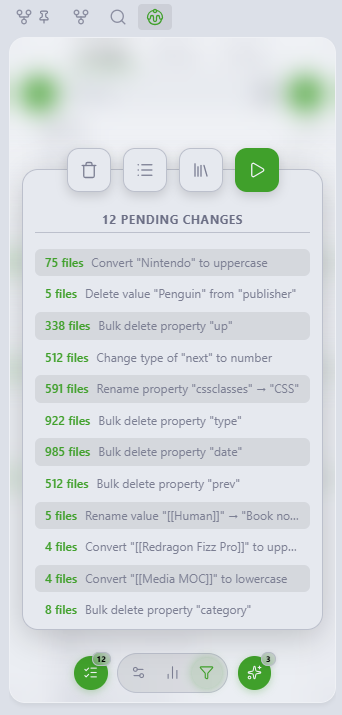
A future update with file diff capabilities is planned for better visualization of what queue actions will change in every single file and an public API is coming for other plugins or even AI agents use this component to let you have control of massive edition before it happens.
Stats / Homepage / Tools
Pages are meant to be used as tab groups inside the sidebar, a functionality some people might find useful to store multiple tools without cluttering the sidebar.
For now, there's a simple dashboard placeholder that will gradually become into widgets that fetch general vault statistics.
Also, the left FAB let's you choose any file as your sidebar homepage (useful in mobile, because there's not an easy way YET to put notes or bases in your sidebars) and the right one is a quick acces to settings.
Here is placed the snippets and plugins explorers. They benefit of the grouping capability for manual bulk on and off
There will live tools that supercharge obsidian, like Linter (with scopes), Layouts, Templates, etc.
Development
I'll be working on the branches: Main, Dev and Sandbox (my favourite), any issue/suggestion/pull request is welcome!
git clone https://github.com/Meibbo/VaultMan
cd VaultMan
I'm using pnpm for package management and Vite for compiling packages. This project has at least 65% of coverage with unit tests (still in sandbox branch), CI/CD, GitHub Actions, CodeQL and smoke tests.
Working pipeline, current workflows and system structure docs will be released soon.
I'm committed to this project so expect more frequent updates and features coming your way!.
Roadmap
- Increase explorers performances using memory snapshots and/or indexing
- Add logic groups to filters for better scoping
- Add groups and manual sorting for all explorers
- Sticky rows for tree views
- Keyboard and enhanced mouse/touch navigation support
- Release official Node-Notes feature (every concept deserves its note)
- Marks and templates for automation and quick navigation
- Drag & Drop operations
Built With
This project uses the following open-source libraries:
- TypeScript
- Svelte
- PNPM
- Vitest
- Vite
- UnoCSS
- Bits UI
- SASS
- DnD-Kit
- PretextJS (experimental)
- TanStack Virtualizer & Table
All third-party libraries retain their respective licenses.
Contributing
Vaultman is currently maintained primarily by one maintainer. Issues, bug reports, small fixes, and focused pull requests are welcome.
Before opening a pull request, please:
- open an issue first for large changes;
- keep changes focused;
- run
pnpm verifywhen possible; - avoid including generated build artifacts;
- report security issues privately through SECURITY.md.
Contributions are expected to be compatible with the project license.
Security
For vulnerability reporting and supported-version expectations, see SECURITY.md. Please do not open a public issue for a suspected vulnerability.
License
Apache License 2.0 — Meibbo. This product is published as it is without any explicit warranty due to its early development state.
Disclaimer: This is a student project. AI agentic tools were used in the making of this plugin, is manually tested and debugged in mock vaults to ensure main workflow functionality.
Built for me, for you, and for better tools that lets us make more with less effort.