
README file from
GithubUnread+
Track unread files in Obsidian. New files get a colored dot — folder badges propagate counts up the entire tree so you always know where to look, even in a collapsed vault.
Features
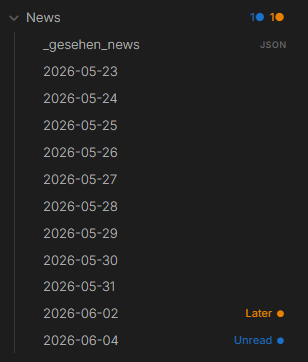
Colored dots — Unread (blue) and Later (orange) by default. Fully customizable — add any status with any color.
Folder badges — each parent folder shows a per-status count (1● 1●) at every depth, even collapsed.
Status bar — total unread count visible at the bottom of Obsidian at all times.
Dot aging — fresh dots start at full opacity and fade slightly each day. Files you've been sitting on for a week look the part.
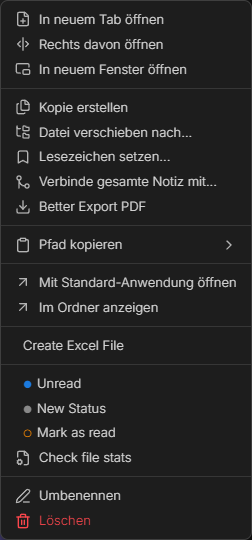
Snooze — right-click → Snooze 1 day / 3 days / 1 week. The dot disappears and comes back automatically when the time is up.
Offline detection — files created by scripts or sync tools while Obsidian was closed are picked up automatically on the next launch.
Open Next Unread — Ctrl+Shift+U opens all unread files one by one until the queue is empty.
Colored context menu — each status shows its own colored circle. No guessing.
Installation
- Download
main.js,manifest.json,styles.cssfrom the latest release - Copy to
.obsidian/plugins/unread-plus/in your vault - Settings → Community Plugins → enable Unread+
# From source
git clone https://github.com/kashicards/unread-plus.git
cd unread-plus && npm install && npm run build
Usage
| Action | How |
|---|---|
| Set status | Right-click file → pick status |
| Clear status | Right-click → Mark as read |
| Snooze | Right-click → Snooze 1 day / 3 days / 1 week |
| Open next unread | Ctrl+Shift+U |
| Mark all as read | Command palette → Mark all as read |
Settings
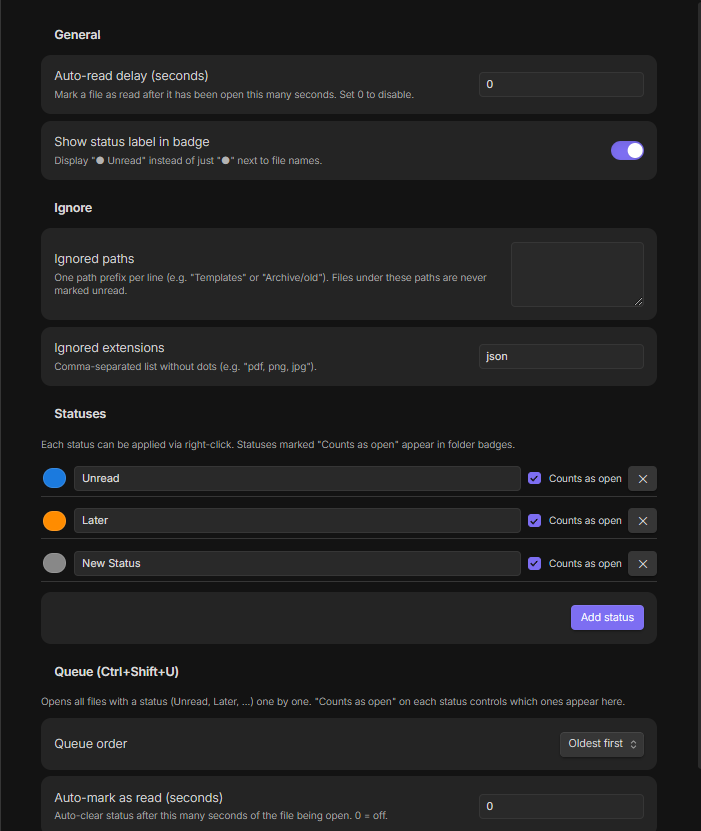
- Auto-read delay — auto-clear status after N seconds of the file being open
- Show label in badge — display
Unread ●instead of just● - Ignored paths / extensions — never track certain folders or file types (
jsonexcluded by default) - Statuses — add, rename, recolor; "Counts as open" controls folder badges and queue inclusion
- Queue — order and auto-mark behavior for
Ctrl+Shift+U