
README file from
Github📖 Torah Verse Inserter
Insert any Hebrew Bible (Torah / Tanakh) verse into your notes — beautifully, instantly, offline
Full Hebrew text with nikud & cantillation · Type Hebrew with your regular keyboard · Optional translations



🌐 English | Español | עברית | العربية | Français | Русский | Português
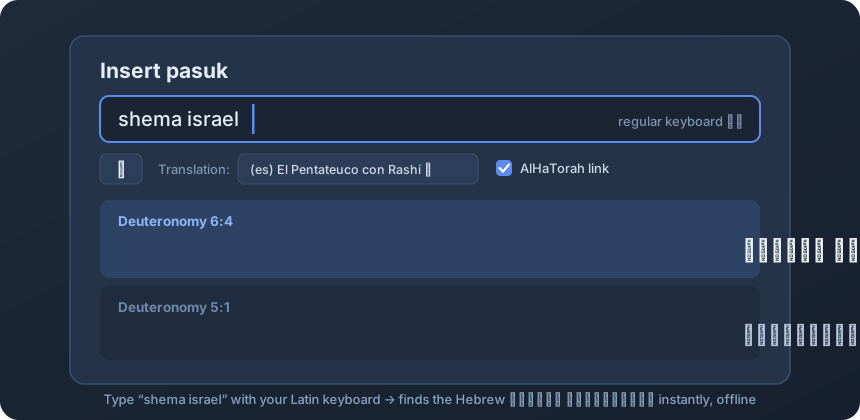
✨ The killer feature: Hebrew without switching keyboards
Searching Hebrew text normally means switching your keyboard layout back and forth. Not here. Type the way you'd pronounce it — the plugin understands Latin transliteration naturally and finds the Hebrew:
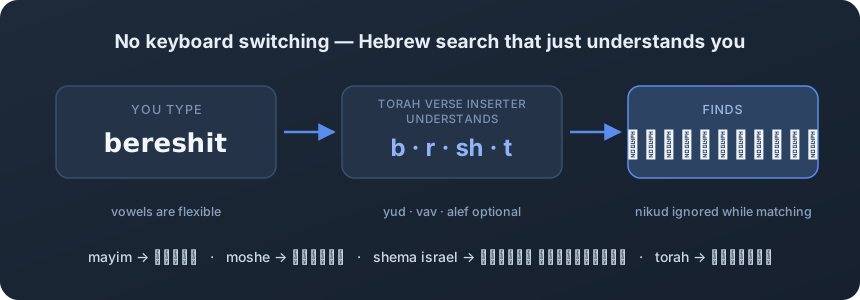
| You type (regular keyboard) | It finds (Hebrew) |
|---|---|
bereshit |
בְּרֵאשִׁית |
shema israel |
שְׁמַע יִשְׂרָאֵל |
mayim |
מַיִם |
torah |
תּוֹרָה |
It handles the tricky parts of Hebrew for you: vowels are flexible, and ambiguous letters (yud, vav, alef) are matched intelligently — so mayim finds מַיִם and adam finds אָדָם without you thinking about it.
Of course, you can also paste or type Hebrew directly (with or without nikud), or use the built-in on-screen alef-bet keyboard — your choice.
📚 What it does
- Inserts any verse of the Tanakh (Torah, Nevi'im, Ketuvim — all 39 books) into your note as a clean Markdown quote with its reference.
- Complete Hebrew text bundled offline — the full Miqra according to the Masorah (MAM), with nikud (vowels) and te'amim (cantillation). No internet needed for the Hebrew text. Ever.
- Three ways to find a verse:
- By reference —
Genesis 1:1,Gén 1:1-3,bereshit 1:1,תהלים 23(English, Spanish, transliteration or Hebrew book names, with verse ranges) - By transliteration — type
veahavtawith your regular keyboard - By Hebrew text — paste בראשית with or without nikud
- By reference —
- Optional translations — choose from Sefaria's library (English, Spanish, French and more, varies by book) and insert it below the Hebrew.
- AlHaTorah deep-links — one checkbox adds a link that opens the verse in Mikraot Gedolot (Rashi, Ramban, Ibn Ezra side-by-side).
- Your format, your rules — Hebrew with or without nikud / cantillation, quote block or inline.
🚀 How to use
- Install & enable the plugin (Settings → Community plugins → search "Torah" or "Hebrew").
- Open a note and run the command "Insert pasuk (Tanakh verse)" from the Command Palette (
Cmd/Ctrl+P). 💡 Assign it a hotkey in Settings → Hotkeys (search "pasuk") — e.g.Cmd+Shift+P. - Search any of the three ways:
- Reference:
shemot 3:14orExodus 3:14orÉxodo 3:14 - Transliteration:
ehyeh asher ehyeh(regular keyboard — no Hebrew layout needed!) - Hebrew:
אהיה אשר אהיה
- Reference:
- Optionally pick a translation from the dropdown and/or check AlHaTorah link — both choices are remembered.
- Press Enter (or click a result). Done:
> וַיֹּאמֶר אֱלֹהִים אֶל־מֹשֶׁה אֶהְיֶה אֲשֶׁר אֶהְיֶה...
>
> And God said to Moshe: "I will be what I will be..."
> — Exodus 3:14 · (en) The Koren Jerusalem Bible · [AlHaTorah](https://mg.alhatorah.org/Full/Exodus/3.14)
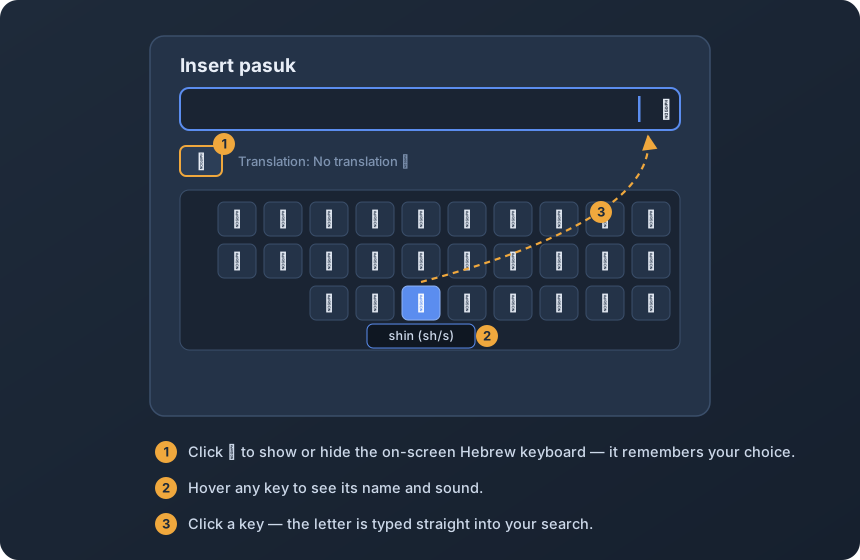
The on-screen alef-bet keyboard
Click the א button to open a Hebrew keyboard inside the search window — handy when you want a specific letter (like ע vs א). Hover any key to see its name and sound. It remembers whether you left it open.
⚙️ Settings
| Setting | Description | Default |
|---|---|---|
| Include nikud (vowels) | Insert Hebrew verses with vowel points | On |
| Include te'amim (cantillation) | Insert Hebrew verses with cantillation marks | Off |
| Insert as quote block | Wrap verses in a Markdown blockquote with the reference | On |
| Maximum search results | Limit verses shown when searching by text | 30 |
| Font compatibility | Replace rare Hebrew marks (qamats qatan, holam haser) with standard equivalents so every font renders them | On |
🕮 Text sources
- Hebrew text: Miqra according to the Masorah (MAM) — a meticulously accurate digital edition of the Tanakh based on the Aleppo Codex, version-pinned via Sefaria. In ketiv/qere cases, the plugin inserts the qere (the form that is read), fully vocalized.
- Translations: fetched on demand from the Sefaria library (requires internet, optional).
- Mikraot Gedolot links: AlHaTorah.org.
☕ Support
Torah Verse Inserter is free and open source. If it helps your Torah study or your Hebrew workflow, you can support its development:


🤝 Contributing
Issues and PRs are welcome — especially transliteration cases that don't match what you expected, or book-name aliases in your language. Please open an issue with an example.
Looking for diacritics-insensitive search across your own notes? Check out my other plugin: Diacritics-Free Search.
Made with ❤️ for students of Torah and the Hebrew language