
README file from
GithubTo-Do → Done Mover
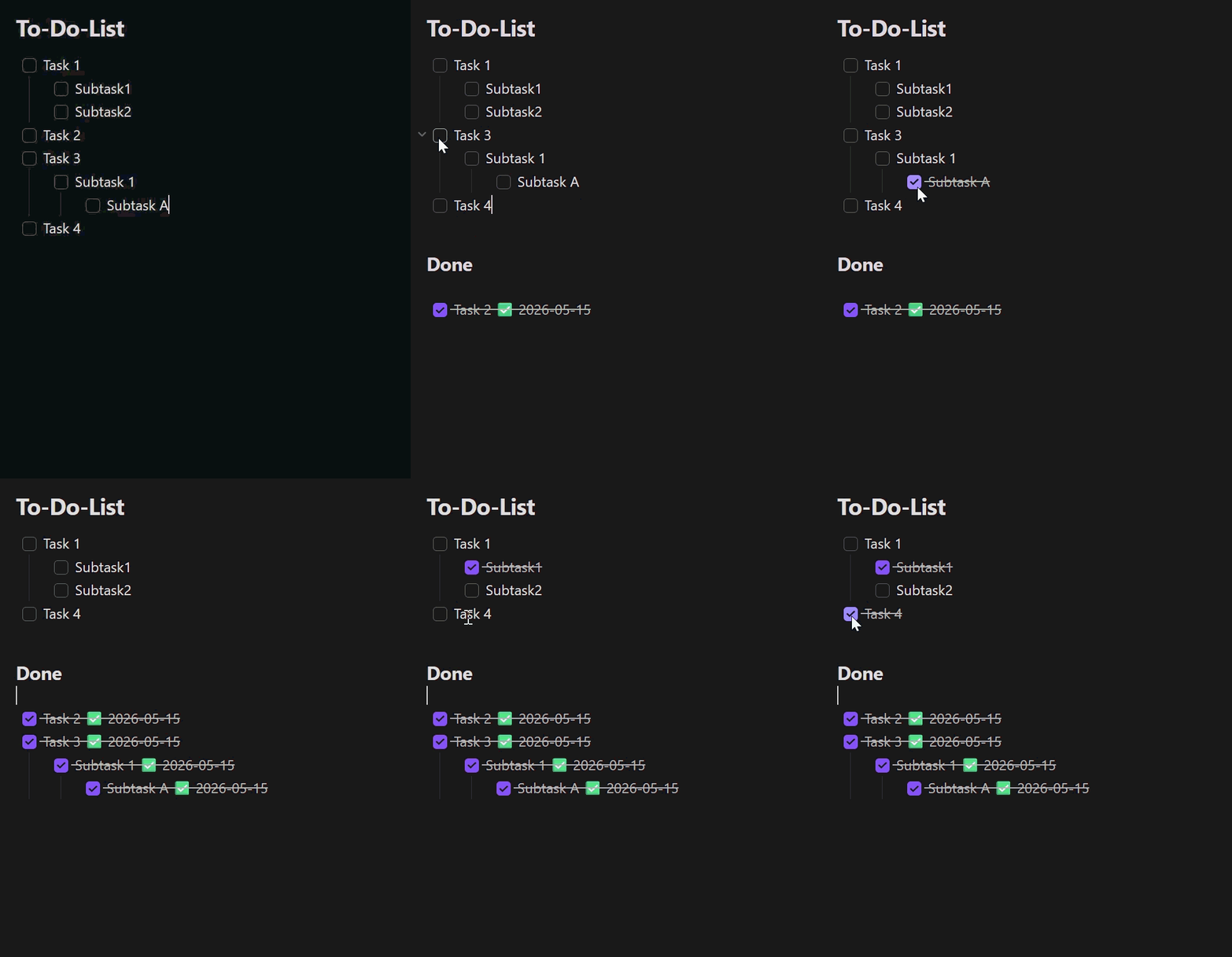
An Obsidian plugin that quickly moves completed
checkbox tasks — including their indented sub-tasks — from a to-do list into
a ### Done section of the same note.
🌍 Languages: English (this page) · Deutsch The plugin interface follows Obsidian's UI language: English by default, German when Obsidian is set to German.
Demo
Features
- Right-click menu in the editor:
- Move completed tasks to Done — moves every fully completed task.
- Move selection to Done — moves the task blocks touched by the current text selection (only shown when text is selected).
- The same actions are available as commands (command palette, can be bound to hotkeys).
- Auto mode (optional): as soon as a task is checked, it moves to Done automatically — but only when the task and all of its sub-tasks are checked.
- Sub-tasks move along with their parent; indentation is preserved.
- Optionally appends a completion date
✅ YYYY-MM-DDto each moved, checked line (no duplicate dates). - If the
### Doneheading does not exist, it is created at the end of the note.
Settings
| Setting | Description | Default |
|---|---|---|
| Auto mode | Move completed tasks automatically | off |
| Done heading | Name of the target heading | Done |
| Append completion date | Append a ✅ date to moved lines |
on |
Usage
- Open a note that contains a checkbox to-do list.
- Right-click in the editor and choose an action, or run the matching command from the command palette.
- Completed tasks are moved under the configured Done heading.
Build from source
npm install
npm test          # unit tests (Vitest)
npm run build     # produces main.js
Install into a vault
Copy main.js and manifest.json into
<Vault>/.obsidian/plugins/todo-done-mover/, then enable the plugin under
Settings → Community plugins.
For development you can use the project folder directly as the plugin folder
(npm run dev for a watch build).
Releases
Pushing a git tag triggers the GitHub Actions workflow in
.github/workflows/release.yml, which builds the plugin and attaches
main.js and manifest.json to a new GitHub release. Make sure the tag
matches the version in manifest.json.
Project structure
| File | Purpose |
|---|---|
main.ts |
Plugin class: commands, context menu, auto mode |
src/taskParser.ts |
Markdown parsing, section and block detection |
src/mover.ts |
Pure move logic (moveCompletedTasks, moveSelectedTasks) |
src/settings.ts |
Settings UI |
src/i18n.ts |
UI string localization (English / German) |
src/types.ts |
Shared types and defaults |
src/*.test.ts |
Unit tests |
taskParser.ts and mover.ts have no Obsidian dependencies, so they are
unit-testable without a running Obsidian instance.