
README file from
GithubTasks CalDAV Sync
Bidirectional sync between obsidian-tasks and any CalDAV server (Nextcloud, Radicale, Fastmail, iCloud, etc.).
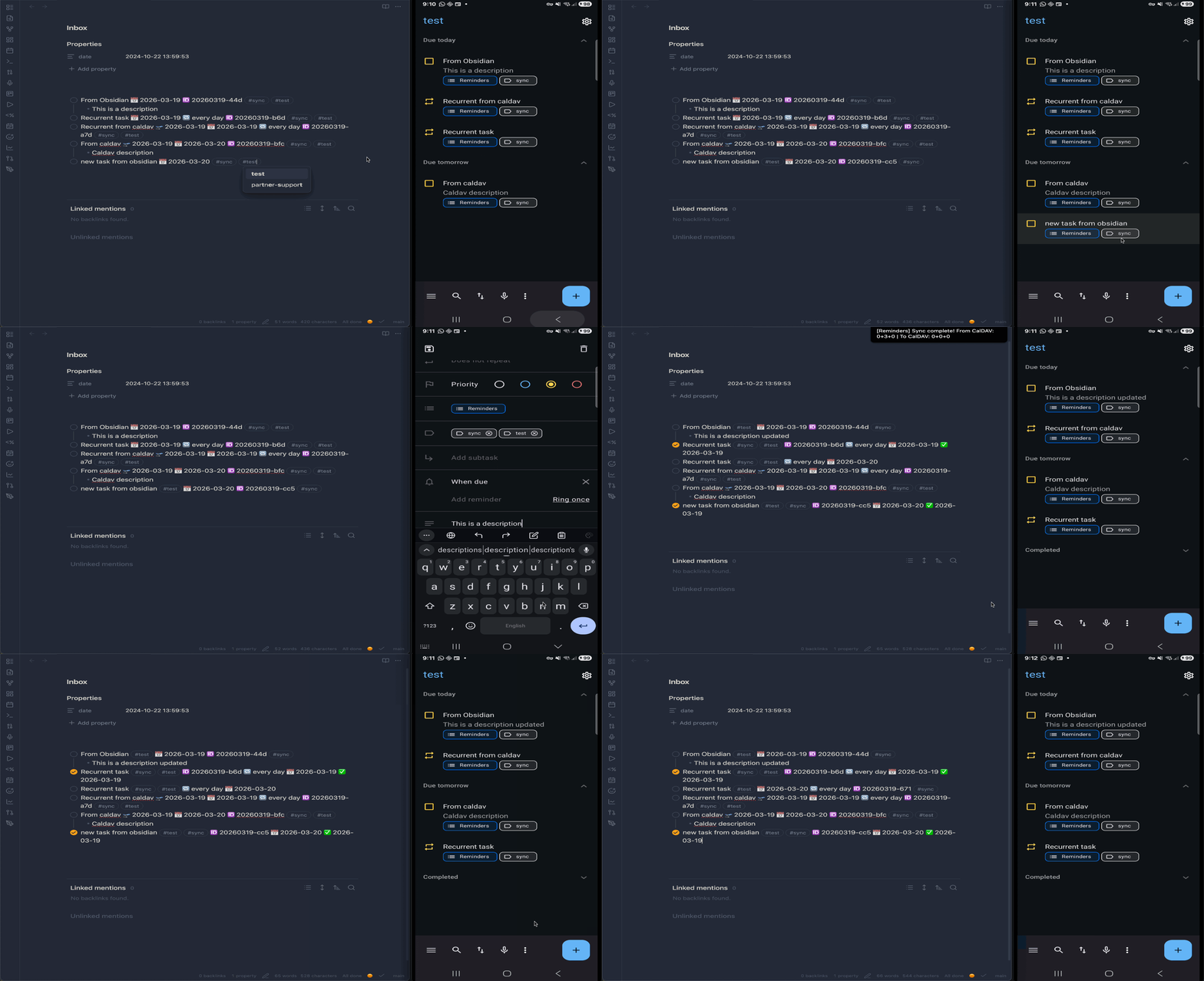
Works with the obsidian-tasks plugin — syncs task status, dates, priorities, recurrence, tags, and notes as standard VTODO items.
Features
- Multi-calendar support — sync different tags to different calendars and servers (tasks must have the tag on both sides — Obsidian
#tagand CalDAVCATEGORIES) - Bidirectional sync — push tasks to CalDAV servers and pull changes back
- Auto-sync — configurable interval (default: 5 minutes)
- Dry-run mode — preview what will sync before committing changes
- Conflict detection — manual resolution or auto-resolve with Obsidian wins
- Task notes — indented bullet points below a task round-trip as VTODO DESCRIPTION
- Recurrence —
RRULEround-trips between CalDAV and obsidian-tasks format - Delete detection — three-way diff detects deletions on either side
- Reconciliation — automatically matches identical tasks when switching calendars or after lost sync data, preventing duplicates
Requirements
- Obsidian v0.15.0+
- obsidian-tasks plugin (must be installed and enabled)
- A CalDAV server with VTODO support
Installation
From Community Plugins
Not yet available — waiting for review.
Using BRAT (recommended)
- Install the BRAT plugin
- Open BRAT settings → Add Beta Plugin
- Enter
josecoelho/obsidian-tasks-caldavand click Add Plugin - Enable "Tasks CalDAV Sync" in Settings → Community Plugins
BRAT will also handle future updates automatically.
Manual
- Download
main.js,manifest.json, andstyles.css(if present) from the latest release - Create
VaultFolder/.obsidian/plugins/obsidian-tasks-caldav/ - Copy the downloaded files into that folder
- Restart Obsidian and enable the plugin in Settings → Community Plugins
Configuration
Open Settings → Tasks CalDAV Sync. Add one or more calendars, each with:
| Setting | Description |
|---|---|
| Tag | Only tasks with this tag are synced — on both sides (Obsidian tags and CalDAV CATEGORIES must match) |
| Calendar name | Name of the calendar on the server |
| Server URL | CalDAV server endpoint |
| Username / Password | CalDAV credentials |
Global settings:
| Setting | Description | Default |
|---|---|---|
| Sync interval | Auto-sync period in minutes | 5 |
| New tasks destination | File where incoming CalDAV tasks are created | Inbox.md |
| New tasks section | Optional heading within the destination file | — |
| Sync completed tasks | Include completed tasks in sync | off |
| Delete behavior | What happens when a task is deleted on one side | ask |
Conflict resolution
Two modes:
- Manual (default) — sync pauses when conflicts are detected, requiring review
- Auto-resolve Obsidian wins — automatically keeps the Obsidian version on conflict
Usage
Commands
Open the command palette (Ctrl/Cmd + P) to access:
| Command | Description |
|---|---|
| Sync with CalDAV now | Run an immediate sync |
| Preview sync (dry run) | See what would change without applying |
| View sync status | Show last sync time and any conflicts |
| Inject task IDs | Add unique IDs to selected tasks |
| Validate task IDs | Check document for valid/invalid task IDs |
Task IDs
Each synced task needs a unique ID. The plugin uses the obsidian-tasks native format:
- [ ] Buy groceries 🆔 20260213-a1b
Use the "Inject task IDs" command to add IDs to existing tasks, or the plugin will assign them automatically during sync.
Metadata mapping
| Obsidian | CalDAV | Direction |
|---|---|---|
| Task text | SUMMARY | ↔ |
| Indented bullets | DESCRIPTION | ↔ |
📅 due date |
DUE | ↔ |
🛫 start date |
DTSTART | ↔ |
✅ done date |
COMPLETED | ↔ |
🔁 recurrence |
RRULE | ↔ |
| Priority emoji | PRIORITY (1-9) | ↔ |
| Tags | CATEGORIES | ↔ |
| Status (done/cancelled) | STATUS | ↔ |
Task notes
Indented bullet points below a task are synced as the VTODO DESCRIPTION field:
- [ ] Plan vacation 🆔 20260213-x2c
    - Research flights
    - Book hotel
    - Pack list
These notes round-trip to/from CalDAV clients like Thunderbird or Tasks.org.
Known limitations
- Priority round-trip is lossy — obsidian-tasks uses emoji-based priorities (⏫🔼🔽) while CalDAV uses numeric PRIORITY (1-9). Obsidian→CalDAV maps correctly, but CalDAV→Obsidian does not write priority emojis back into the task markdown.
- Internal obsidian-tasks API — This plugin accesses obsidian-tasks' internal
getTasks()method, which is not part of the official public API. Future obsidian-tasks updates could break this integration.
Tested CalDAV servers
- Radicale (E2E test suite)
- Fastmail
Should work with any CalDAV server that supports VTODO (Nextcloud, iCloud, Synology, Baikal, etc.).
Development
npm i            # install dependencies
npm run dev      # watch mode
npm run build    # production build with type checking
npm test         # run all tests (unit + E2E, requires Docker for Radicale)
See CLAUDE.md for architecture details and testing guidelines.
License
MIT