
README file from
GithubSpider




🌏 Other languages: 中文文档
AI conversations that branch like a spider's web — press Tab to spin off a deep-dive from any answer. Explore, compare, and trace back without losing context.
An Obsidian plugin that turns ChatGPT / Claude / DeepSeek / any OpenAI-compatible API into a branching knowledge map. Read an AI answer, hit an unfamiliar term, select the text, press Tab — a child node appears, ready for the next question. Infinite depth, instant backtrack, one-click export to Obsidian Canvas / Markdown / Mermaid mindmap.
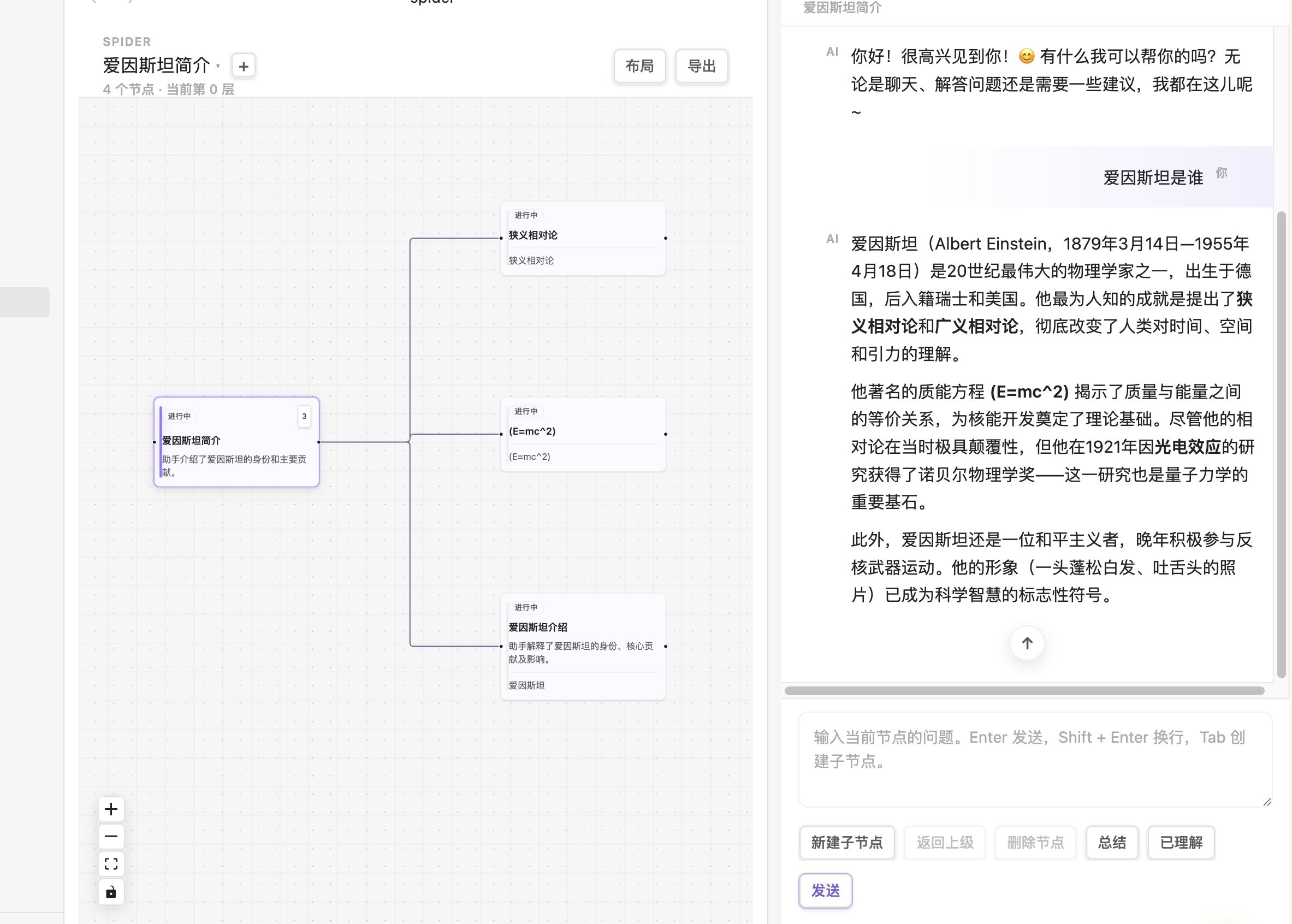
🎬 Looking for an animated demo? A GIF should live here — record a 5-second Tab-branch interaction, save as
.github/demo.gif, and replace the image above. See Recording a Demo for tools.
🤔 Why Spider?
| Scenario | Plain AI chat | Spider |
|---|---|---|
| Mid-answer, want to drill into a term | Copy-paste → new window → lose the original thread | Select text → Tab → child node carries the context |
| Want to compare 3 phrasings of the same question | Open 3 tabs and alt-tab | Same parent, 3 children, side-by-side |
| Done exploring, want it as notes | Copy-paste into a note, links break | One-click export to Markdown + Canvas + Mermaid |
| Want AI to live inside your docs, not a separate tab | Constant window switching | Stay in Obsidian the entire time |
vs Copilot plugin: Copilot is a single-thread chatbot. Spider is a multi-thread knowledge graph — same topic, Copilot gives you one line, Spider gives you one tree.
⚡ 30-Second Quick Start
- Install: Settings → Community plugins → Browse → search
spider→ Enable - Configure your API key: Settings → Spider → fill in
apiBaseUrl+apiKey+model(any OpenAI-compatible endpoint) - Create your first map: Click the spider ribbon icon (or run command
Spider: New map) → start chatting - Try Tab-branching: Select any text in an AI response, press
Tab— that's it
✨ Features
🌳 Infinite-Depth Branching Chat
- No depth limit: drill down as deep as you need; the graph grows with you
- Optional parent context: child node requests automatically include parent title / summary / anchor
- Streaming responses: typewriter-style real-time rendering with Markdown & code-block highlighting
- Select-to-branch: highlight any text in an AI response →
Tab→ the child's "anchor" is that exact highlight - Auxiliary actions: retry, summarize, AI auto-title
🕸️ Interactive Knowledge Graph
- Full-tab canvas powered by React Flow
- Click a node to switch context; the chat panel follows automatically
- Collapse / expand subtrees to keep large maps clean
- Auto-layout via Dagre algorithm with active-path highlighting
- Drag nodes — positions persist, the canvas looks the way you left it
📦 One-Click Structured Export
Spider Maps/
  ├── README.md                 # Package overview
  ├── index.md                  # Obsidian entry-point note
  ├── nodes/                    # One Markdown file per node
  ├── diagrams/mindmap.mermaid.md
  ├── canvas/map.canvas         # Visual knowledge map
  └── data/map.json             # Raw data (re-importable)
- Canvas nodes are color-coded by state (purple = root / green = understood / gray = archived / blue = open)
- Edges carry labels (anchor text or first-question excerpt) with clear arrow directions
- Markdown files cross-link parent / child / index — backlinks wire up the full thinking chain
🔌 Works with Any OpenAI-Compatible API
- Official OpenAI (
https://api.openai.com/v1) - DeepSeek / Moonshot / Qwen / GLM (OpenAI-compatible mode)
- OpenRouter / Together / Groq (aggregator APIs)
- Local LLMs: Ollama, vLLM, LM Studio — all expose OpenAI-compatible endpoints
- Anthropic Claude via proxy
💡 Because it's the OpenAI Chat Completions spec, you just need a base URL + key + any model name that endpoint supports.
🔐 Privacy & Network Disclosure
- The plugin requires network to call AI, but you fully control which endpoint
- API key stays local (Obsidian's plugin data.json); never uploaded
- Never reads your vault — only sends the current node's messages + optional parent context + optional anchor text
- Maps are 100% local: stored as
.spider/maps/*.json, syncable via Obsidian Sync - Offline-capable: knowledge graph, navigation, export, history — everything works offline. Only "send message" needs network.
🌐 Bilingual UI
Switch between Chinese and English any time in settings. Export artifacts are intentionally hard-coded to Chinese — exports are historical records and shouldn't be retroactively rewritten when the UI language changes.
⌨️ Keyboard Shortcuts
| Key | Action |
|---|---|
Tab |
With text selected in an AI response → create child node from that anchor. Without selection → create empty child node. |
Shift + Tab |
Jump to parent node |
← → |
Parent ↔ first child |
↑ ↓ |
Move between sibling nodes |
Enter |
Send message (inside composer) |
Shift + Enter |
Newline (inside composer) |
Esc |
Clear current selection |
Delete / Backspace |
Delete current node (non-root, focus not in input) |
⚙️ Settings
| Setting | Description | Default |
|---|---|---|
| API Base URL | OpenAI-compatible endpoint | https://api.openai.com/v1 |
| API Key | Your API key (password input, stored locally) | — |
| Model | Any model name your endpoint supports | gpt-4o-mini |
| Interface Language | Chinese / English | English |
| Include parent context | Send parent title/summary/anchor with child requests | ✅ on |
| Include full context | Also send parent's full message history (more tokens) | ❌ off |
| Stream responses | Stream tokens as they arrive | ✅ on |
| Tab to create child nodes | Enable the Tab shortcut | ✅ on |
| Auto-summarize nodes | AI auto-summarizes each node | ❌ off |
| Default export folder | Where export packages go | Spider Maps |
📥 Installation
From Community Plugin Store (recommended)
- Obsidian → Settings → Community plugins
- Turn off Safe mode (if it's on)
- Browse → search
spider→ Install → Enable - Settings → Spider → fill in your API key and model
From Source (development)
git clone https://github.com/111pointer111/spider
cd spider
npm install
npm run build
# Copy main.js, manifest.json, styles.css into
# <vault>/.obsidian/plugins/spider/
# Then enable the plugin in Obsidian
Or use npm run link to symlink the build output to your vault and pair with npm run dev for live-reload during development.
🛠 Development
npm install        # install dependencies
npm run dev        # watch mode (esbuild)
npm run build      # production build (runs tsc --noEmit first)
npm test           # run vitest tests
npm run link       # symlink build output into your vault
Project Structure
src/
  ai/          OpenAI-compatible API provider (streaming + sync + summarize)
  domain/      ChatMap immutable factories + tree ops + guards + Dagre layout
  export/      Markdown / Mermaid / Canvas / JSON exporters
  state/       Multi-view session store + per-session ViewState
  storage/     Vault JSON persistence (backward-compatible with old directory)
  ui/          React components (graph, chat panel, gallery, modals)
  utils/       ID generation, path handling, activeDocument shim
tests/         vitest unit tests (domain + export + AI layers)
__mocks__/     Obsidian API stub for vitest
🎥 Recording a Demo
🎬 Want to contribute a demo GIF?
- Record 5–10 seconds with Kap (macOS) / ScreenToGif (Windows) /
ffmpeg(Linux)- Show: open spider → ask a question → select text in AI response → press
Tab→ child node appears → continue asking- Export as GIF, save to
.github/demo.gif- Open a PR; we'll swap the static screenshot above for

🧭 Roadmap (running list)
- Full-text node search (Ctrl/Cmd+F inside the canvas)
- Multi-select nodes + batch operations
- Node backlinks (auto-track "which nodes reference me")
- Custom system prompts
- Optional AI summary attached to export package
📜 License
🙏 Credits
- Obsidian — the endlessly extensible note app
- React Flow (@xyflow/react) — canvas engine
- @dagrejs/dagre — auto-layout
- Feynman Technique — the pedagogical idea: if you can't explain it simply, you don't understand it