
README file from
GithubSpeed Reader
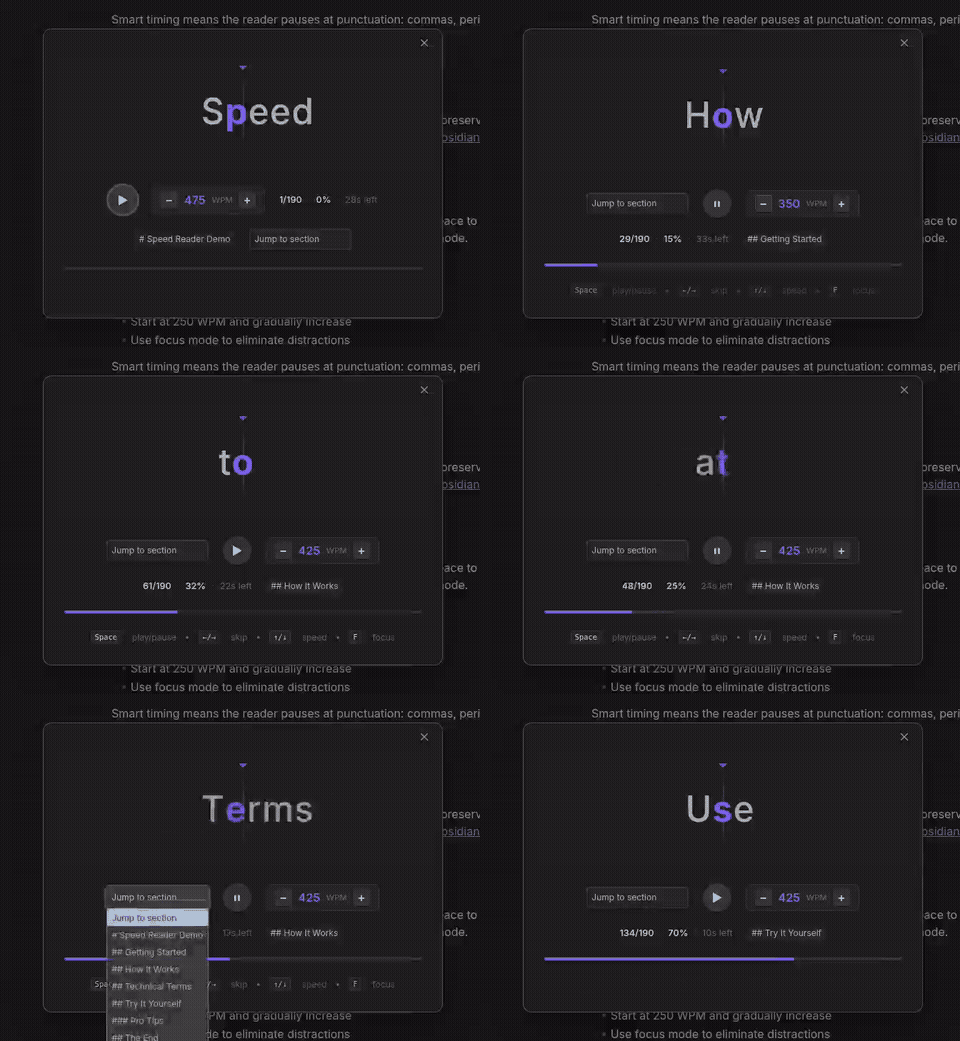
RSVP-based speed reading for Obsidian. Flash one word at a time with optimal recognition point highlighting to read faster with better focus.
Features
- Markdown-aware: Automatically strips bold, italic, code, links, frontmatter, and more
- ORP Highlighting: Highlights the optimal recognition point of each word
- Smart Timing: Pauses longer at sentence endings, commas, numbers, and long words
- Live Controls: Adjust WPM, skip words, jump to sections in real time
- Focus Mode: Hide everything except the current word
- Auto-pause: Pauses when you switch away from Obsidian, resumes on return
- Selection Support: Read selected text or the entire note
Usage
- Open any note in Obsidian
- Click the book icon in the ribbon, or run Speed Reader: Start speed reading
- Press Space to play/pause
Keyboard Shortcuts
| Key | Action |
|---|---|
Space |
Play / Pause |
← / → |
Skip 10 words |
↑ / ↓ |
Adjust speed ±25 WPM |
F |
Toggle focus mode |
Esc |
Close reader |
Installation
Community Plugins: Open Settings → Community plugins → Browse, search "Speed Reader", then install and enable.
Manual: Download main.js, manifest.json, and styles.css from the latest release into <vault>/.obsidian/plugins/speed-reader/.
License
0-BSD — Madhusudan Kulkarni