
README file from
GithubSemantic Reading for Obsidian
Mark prose with semantic sigils — Def, R, Q, A, M, and 14 others across 4 families — to capture the structural role each span plays in an argument. Then turn those tags into a vault-wide knowledge graph, a spaced-repetition queue, and AI-synthesized study guides and outlines.
A reading-to-knowledge-to-writing loop, all inside Obsidian.
Install via BRAT (recommended for now)
This plugin is not yet in the official community-plugins list. Use BRAT to install it from this repo:
- Install BRAT from the community plugins browser and enable it.
Cmd-P → BRAT: Add a beta plugin for testing.- Paste:
DavidTbilisi/obsidian-semantic-reading. - Click Add Plugin. BRAT fetches the latest release.
- Settings → Community plugins → enable Semantic Reading.
BRAT will auto-update the plugin whenever a new release is cut.
Documentation
Deep-dive docs live on the wiki:
- Inline Syntax — the
{{Tag|text}}grammar - Tag Taxonomy — 19 builtins, families, encoding frameworks
- Domain Profiles — per-note tag toolkits via
semantic_domain: - Integrations — Anki, Readwise, Todoist/Things, ICS, Mermaid/Canvas, …
- MCP Server — JSON-RPC tools for Claude Desktop / Cursor / VS Code
- Public API — for Templater / Dataview JS / other plugins
- Settings Reference
- Troubleshooting
What it does
1. MARK — tag prose with sigils
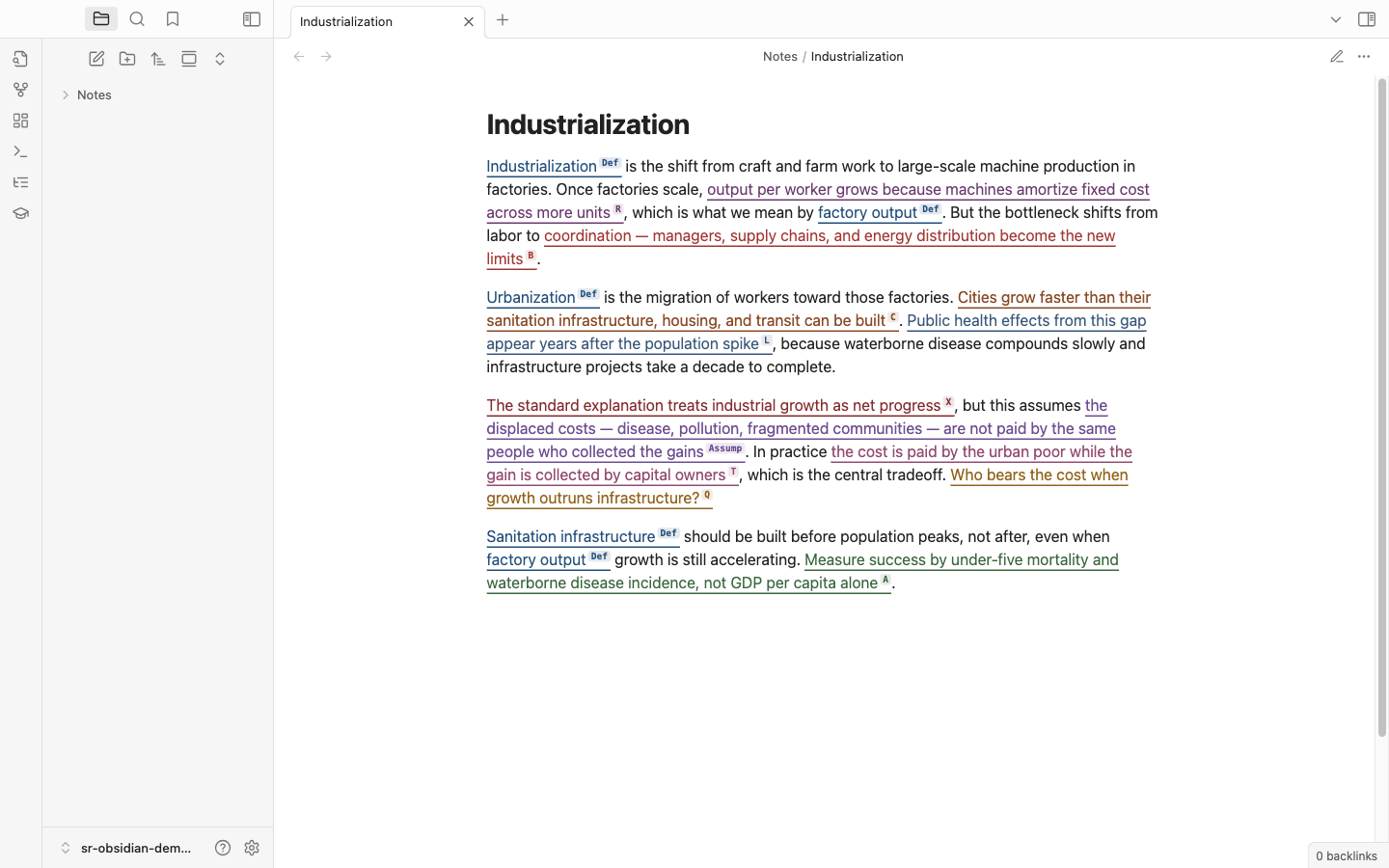
Select text in any note. A floating tagbar appears. Press a letter (d=Def, r=R, q=Q, a=A, m=M, etc.) or click the sigil. The selection is wrapped in inline {{Def|cognition}} syntax and rendered as a colored span with a superscript label in both Live Preview and Reading mode.
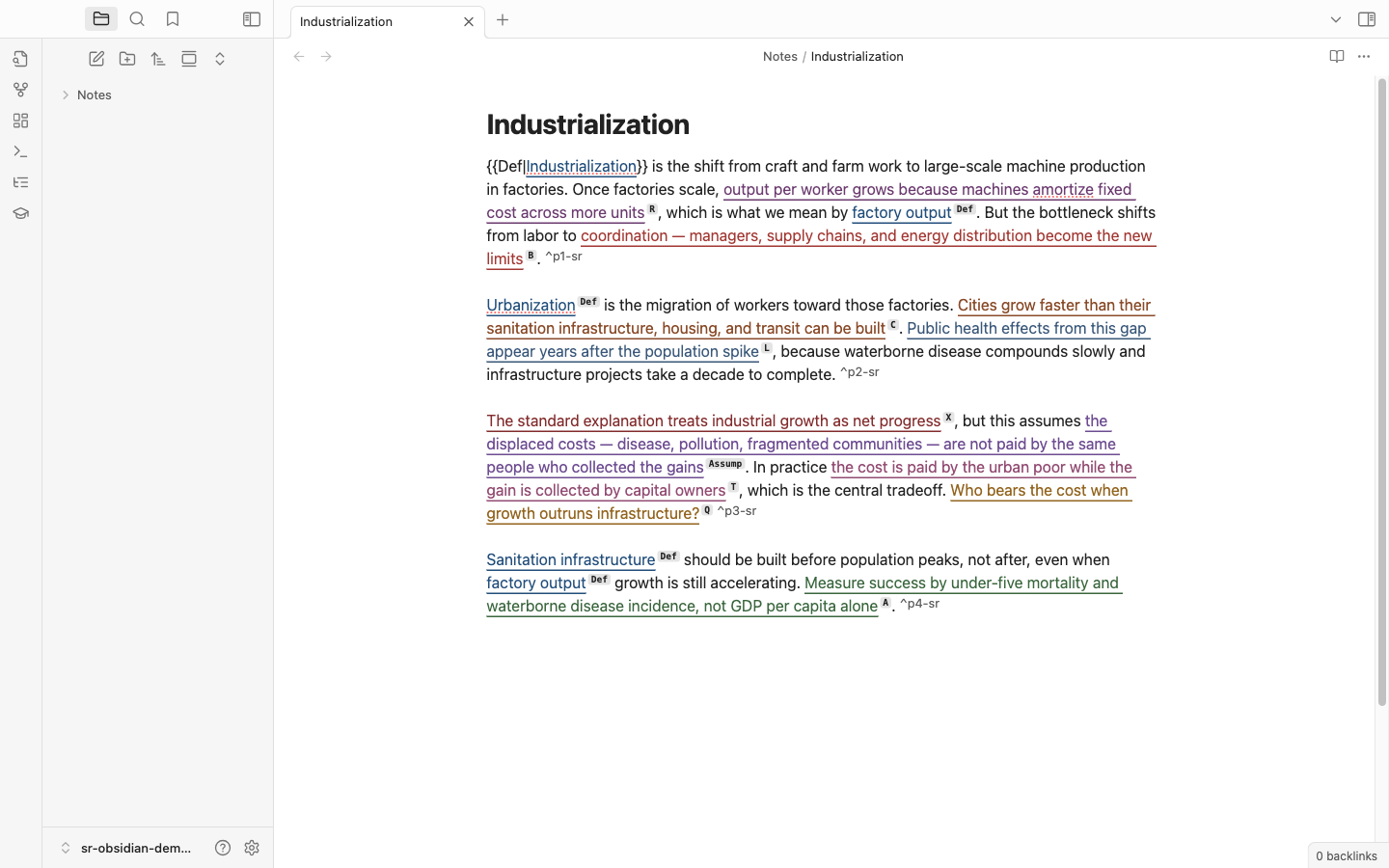
Modes (1–5) control which tags are available — Easy surfaces obvious anchors, Structural makes local structure visible, Regenerative exposes the whole 19-tag palette. Per-note override via semantic_mode: 5 in frontmatter.
Domain profiles swap the active tag toolkit per note. Add semantic_domain: programming (or bible, science, legal, meeting) to a note's frontmatter and you get domain-specific sigils — Fn, Algo, Bug, Perf for code; Vrs, Cmd, Prom, Cov, Prph for scripture; Hyp, Var, Exp, Res for science; Stt, Hold, Prec, Rule for legal; Dec, Own, Rsk, Blk for meetings. Each profile decides whether to keep, prune, or replace the built-in 19. Edit or add your own under Settings → Domains.
2. KNOW — vault-wide knowledge graph
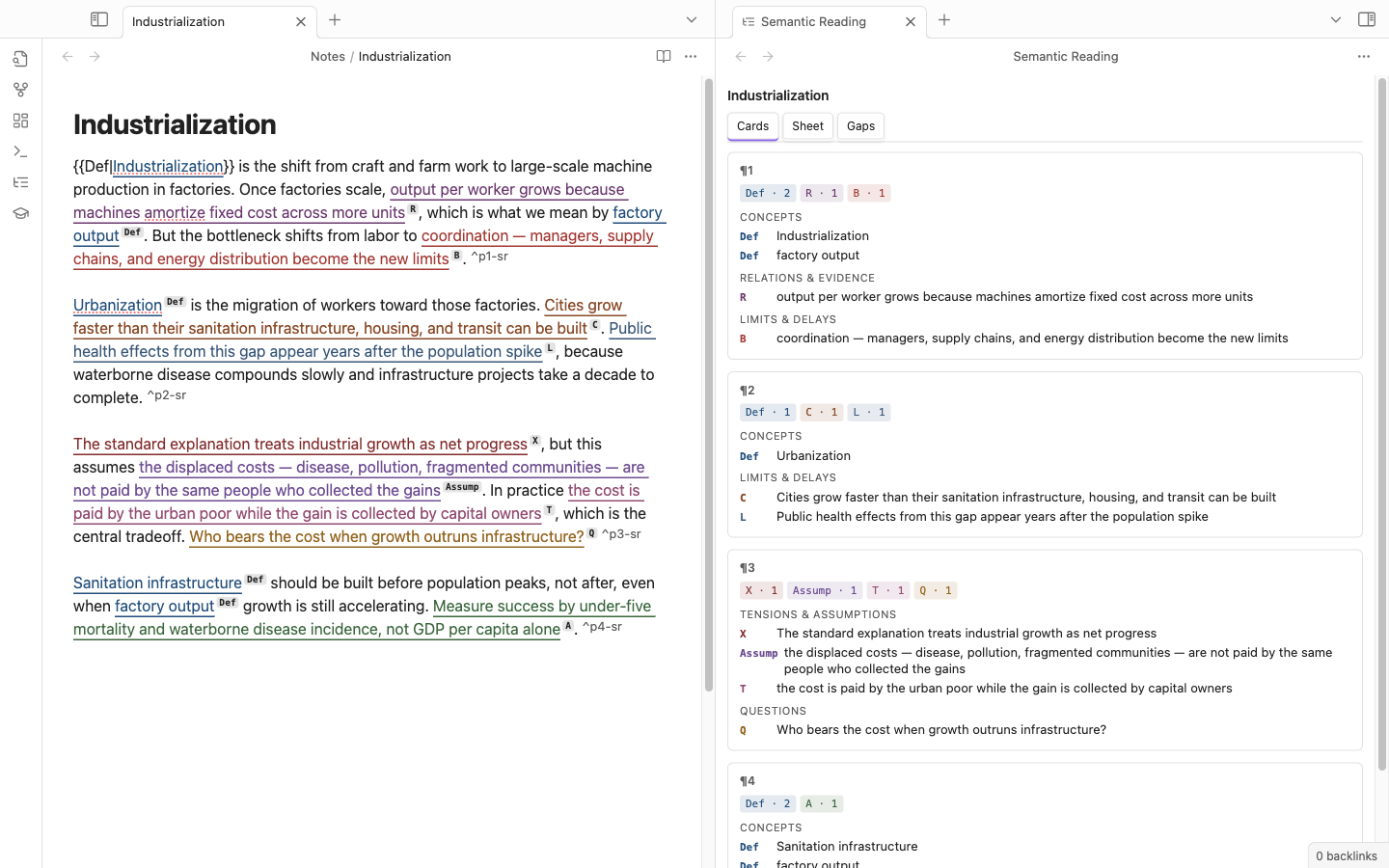
-
Cards / Sheet / Gaps side view — per-note inventory of tagged spans, grouped by semantic family.
-
Per-note Atlas — SVG concept graph of
Deftags in the current note.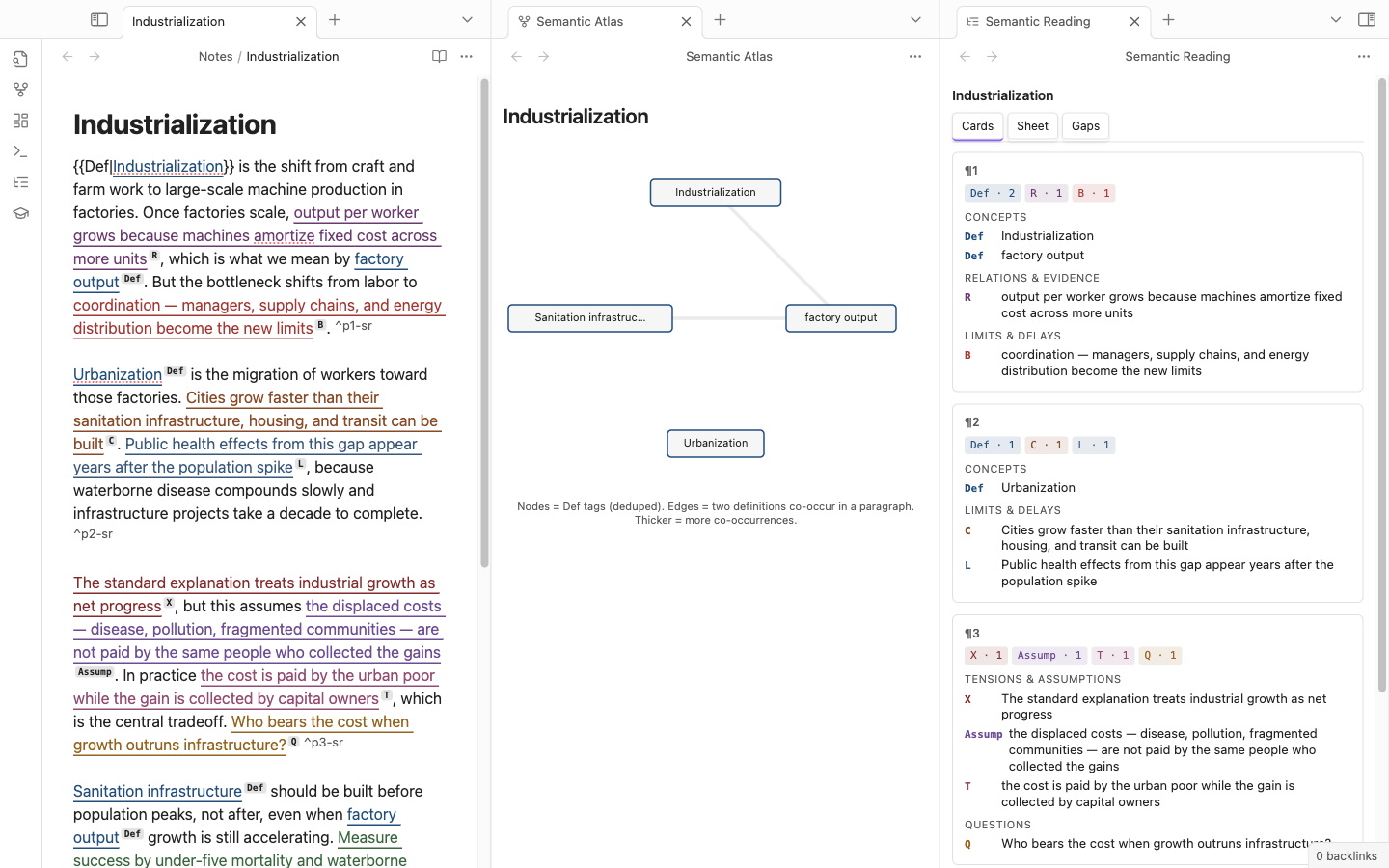
-
Vault-wide Atlas — force-directed graph of every
Defacross the vault. Click a node to open its hub page.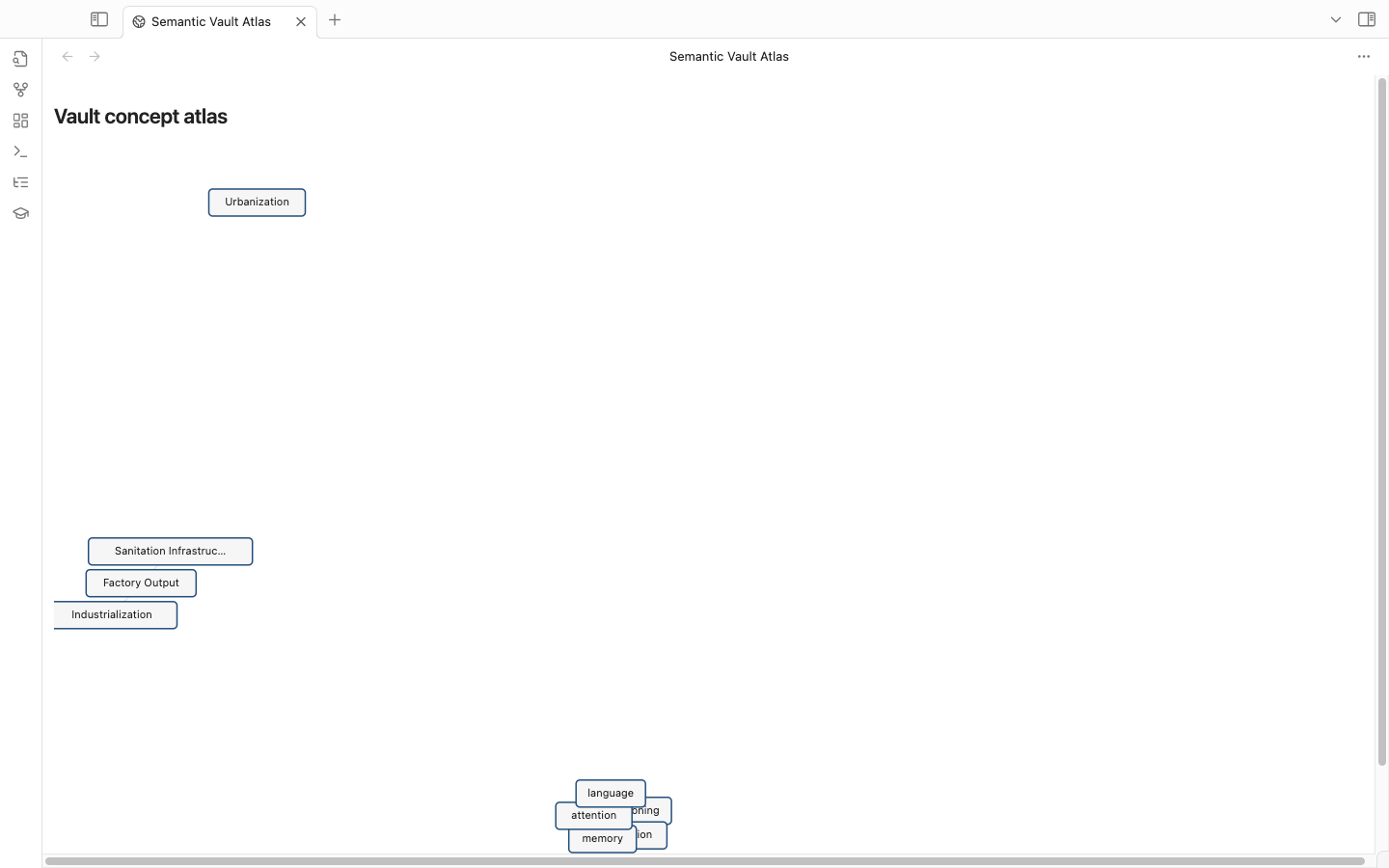
-
Concept hub pages — auto-generated
Concepts/<name>.mdaggregating every definition of a concept across all notes. Backlinks panel and graph view light up for free. -
Search by tag — quick-switcher modal (
Cmd-P → Search vault by tag): typeQfor every open question,Def cogto fuzzy-match concepts.
3. REMEMBER — built-in spaced repetition
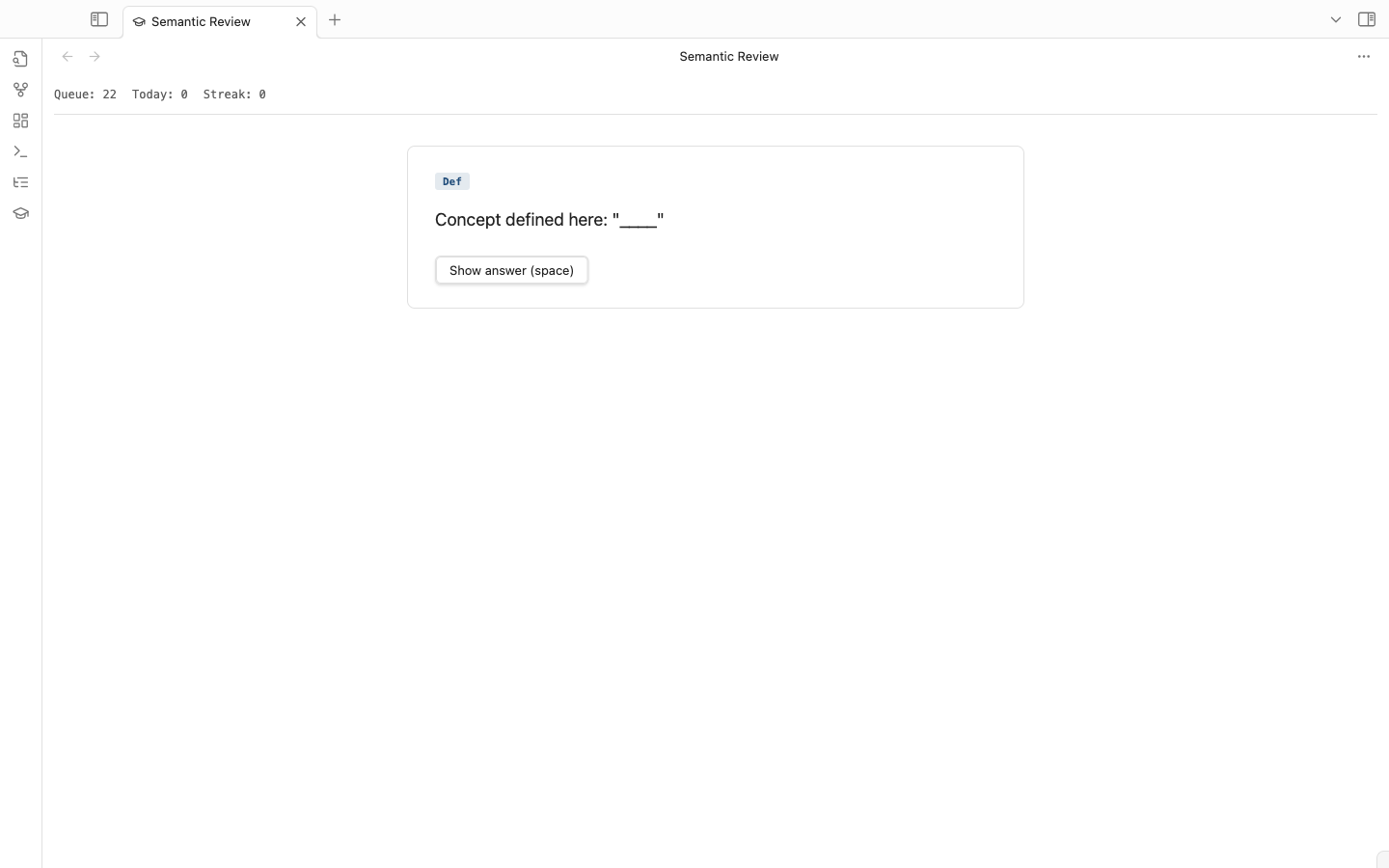
- Review queue (
Cmd-P → Open review queue) — full-pane study UI. Space to flip, 1–4 to rate. FSRS-v5 scheduler (vendored, no native deps). - Tagged
Defspans become cloze cards.Qspans become recall cards. Opt-in per tag. - Streak + daily counter tracked in plugin data.
4. MAKE — AI synthesis from tags
Cmd-P → Synthesize from vault tags… opens a template picker:
- Outline —
Def → R → Evchains for a concept - Steelman —
T / X / Opp / Assumpsurfaced from the vault - Study guide —
Q + A + Mformatted as exam prep - Briefing —
N / D / P + key Defs + Qas a one-pager - Reading agenda — global open
Qs ranked
The slice fed to the LLM is shown to you before the call. Output lands in Synthesis/ with full provenance — every claim links back to the source paragraph.
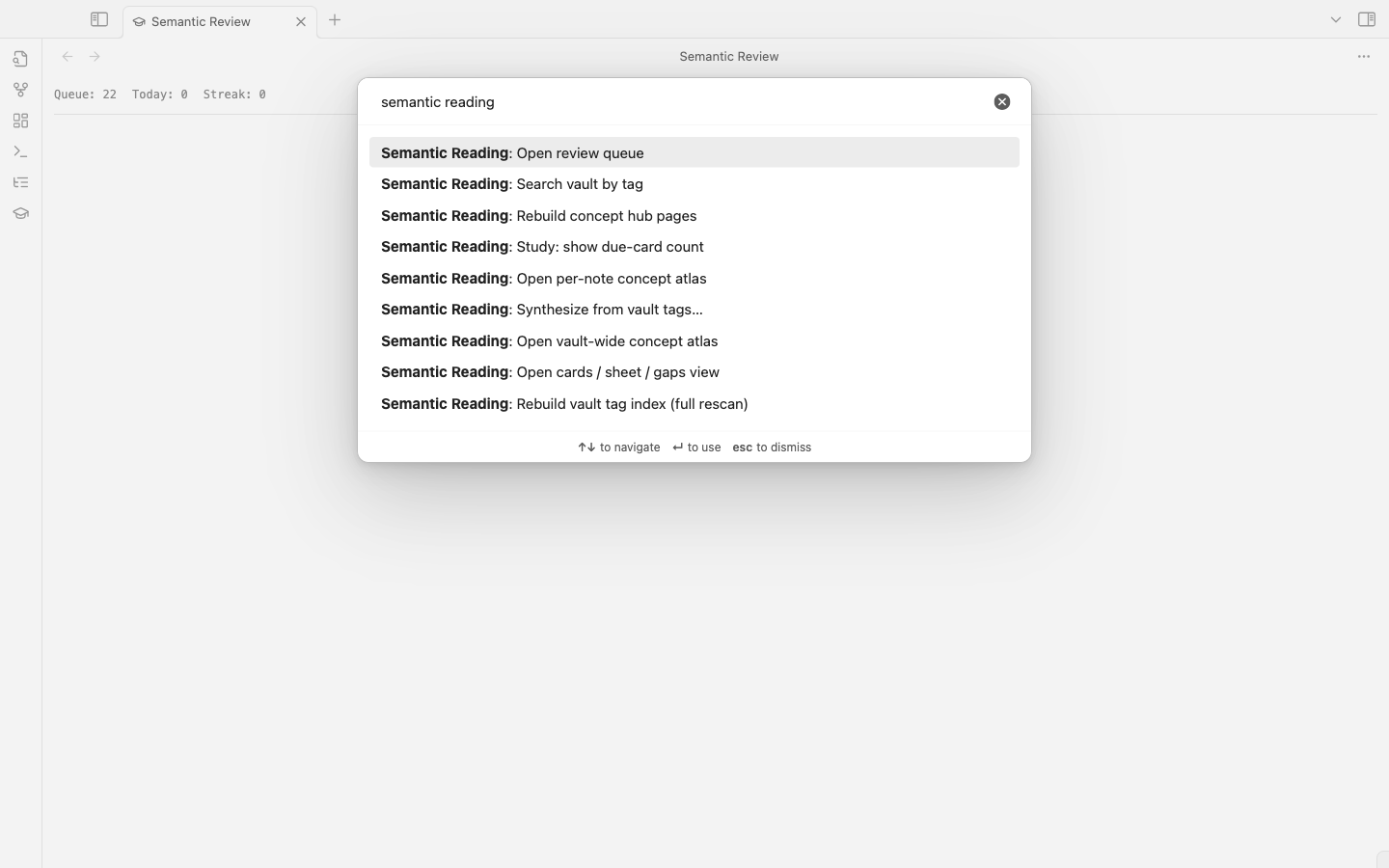
Every plugin entry-point lives under one prefix in the command palette:
Exports (no AI required)
- Annotated markdown — full note with tag extracts grouped by family.
- Anki CSV per framework — one CSV per encoding framework (NEDF, CAST, SPEAR, HEART, ORACLE), Anki "Basic" note-type compatible.
Integrations
- Anki sync (AnkiConnect) — push every
Def/Qcard into Anki desktop, tagged with a stablesrid_…so re-syncs skip duplicates. - Dataview starter pack — drops a query template you can copy/paste to build dashboards over
semantic_tags:frontmatter. - Tasks MOC — generates
Actions.mdwith one- [ ]perA-tagged span across the vault. Plays well with the Tasks plugin. - Daily note injection — prepends
📚 N due · M open · K conceptsto today'sYYYY-MM-DD.mdwhen you open it. - Relation graph from R-tags — parses arrow keywords (
causes,supports,depends on,blocks,requires, …) inR-tagged spans and either inserts a fenced ```mermaid block into the note (idempotent — re-runs replace the existing block) or writes a sibling*.relations.canvasfor Obsidian Canvas. - Calendar (.ics) export — every
A-tagged span paired with a co-locatedD-tagged date in the same paragraph becomes one VEVENT inactions.ics. Subscribe from Calendar.app / Fantastical; UID per event is stable so re-exports update events in place. - Tasks app push — push
A-tagged spans to Todoist (REST v2, deduped bysrid_…label) or Things 3 (things:///addx-callback-url, deduped locally). Domain-aware:semantic_domain → project_idmapping routes each action to the right project/list. - Readwise / Kindle import — pulls highlights into the vault as one note per book in a destination folder of your choice. Frontmatter is pre-filled with
source,author,source_url, and a blanksemantic_domain:ready for you to set. Kindle path parsesMy Clippings.txtfrom a file picker — no API needed. - MCP server — exposes the vault over JSON-RPC 2.0 as MCP tools, resources, and prompts. Read tools cover the tag index, concepts, actions, open questions, due-cards queue (incl. the L2 i+1 queue), card state, domain profiles, the parser, and AI suggest. Opt-in write tools (off by default, gated by "Allow write tools") close the loop: grade a card (
sr_review_card), apply a tag to a span (sr_apply_tag), synthesize (sr_synthesize), rebuild hubs, and export. Resources surface concept hubs, the open-questions list, and any note for direct attachment; prompts expose the tag-suggest and synthesis templates. An SSE channel pushesresources/list_changedas the index changes, and list endpoints are cursor-paginated. Localhost-only; off by default. Compatible with Claude Desktop, Cursor, VS Code, and any MCP client.
Every integration has its own settings section and command-palette entry. Tokens for external services (Readwise, Todoist) are stored in plugin data.json and never written to vault notes.
Privacy and network use
The plugin works fully offline except for the optional features below, all off by default. Each is an explicit, user-triggered command — there is no background traffic, no telemetry, no third-party analytics.
- AI features (suggest, check, synthesize) — calls go to api.anthropic.com using your Anthropic API key. Each call sends the tag schema (cached system prompt) plus the active paragraph or the previewed slice. Note contents outside that slice are never sent.
- Readwise import — fetches from readwise.io/api/v2/export/ using your Readwise token. Outbound only — no vault content leaves.
- Tasks push (Todoist) — sends
A-tagged span text to api.todoist.com/rest/v2 using your Todoist token, one task per action. - AnkiConnect sync — talks to 127.0.0.1:8765 (your local Anki desktop), never the network.
- MCP server — binds to 127.0.0.1 only. Off by default; opening a port is opt-in. Optional bearer token gates clients.
All tokens are stored in this plugin's data.json (inside the vault's .obsidian/plugins/ folder). They are not written to any vault note. To go fully offline, leave AI off and don't run the import/push commands.
Inline syntax reference
{{Tag|text}}                       # tagged span
{{Tag|text|note=annotation}}       # with attached note
{{Tag|[[Concepts/cognition]]}}     # tagged wikilink (Def → hub page)
{{Tag|[[Concepts/cognition|cognition]]}}  # explicit display
The {{…}} delimiters are chosen to avoid collisions with native Obsidian syntax (==highlight==, [[wikilink]], Dataview key:: value).
Tag taxonomy
| Family | Tags |
|---|---|
| Anchor | N (Name), D (Date), P (Place) |
| Meaning | Def (Definition), Mn, Ex, An, Q (Question) |
| Structure | R (Relation), Ev, C (Constraint), B (Bottleneck), L (Delay), T (Tradeoff), X (Tension), Opp, Assump |
| Execution | A (Action), M (Measure) |
Each tag routes downstream to one of the Neural OS encoding frameworks (NEDF, CAST, SPEAR, HEART, ORACLE), which is what the Anki CSV export uses.
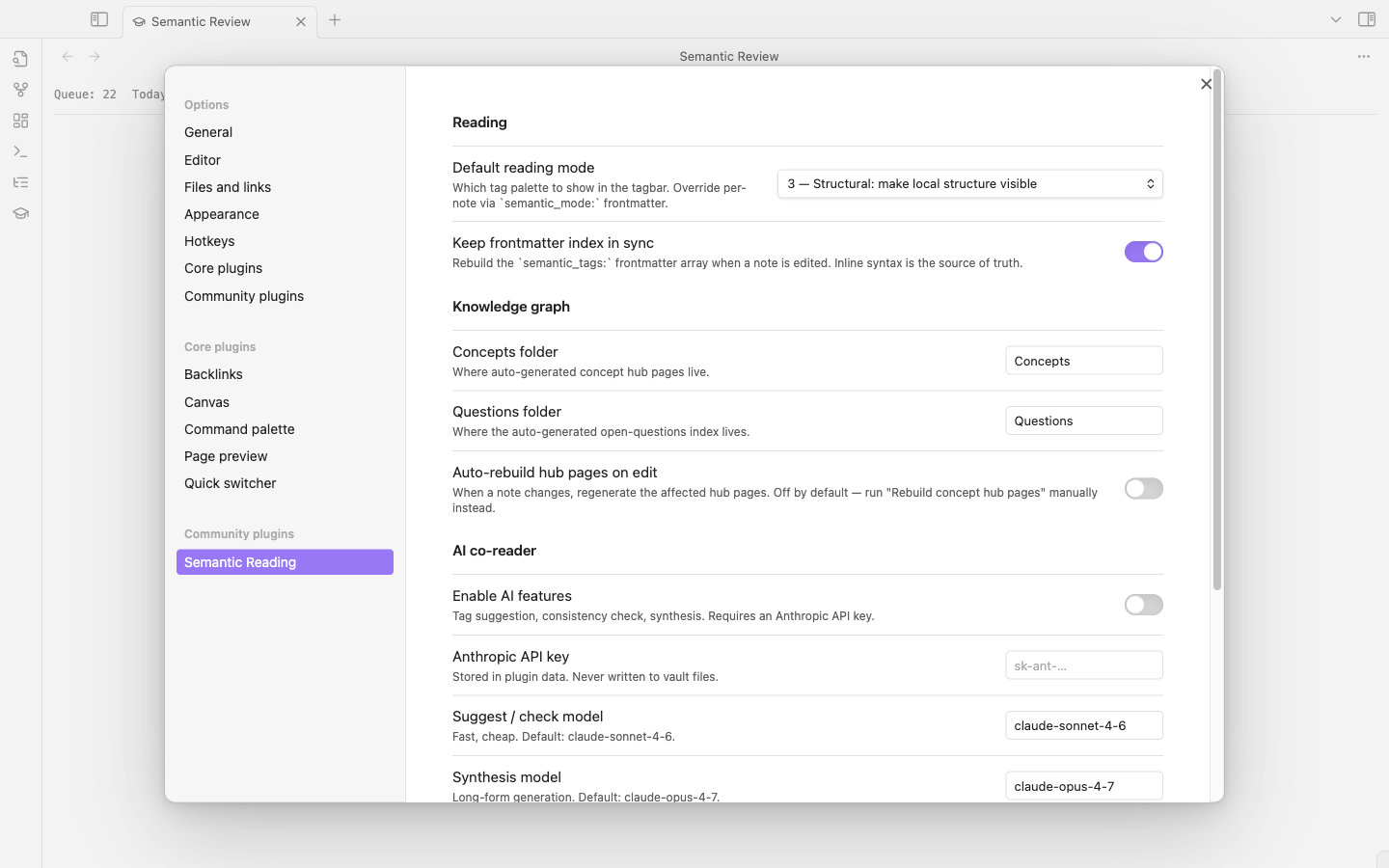
Settings
- Default reading mode — controls the tagbar palette.
- Keep frontmatter index in sync — rebuild
semantic_tags:on save (inline is always source of truth). - Auto-rebuild hub pages on edit — off by default. Run "Rebuild concept hub pages" manually instead, or toggle on.
- AI co-reader — enable, API key, model selection.
- Synthesis output folder — default
Synthesis/. - Custom tags / Domains — vault-wide tag extensions and per-note
semantic_domain:profiles. - Readwise / Kindle import — token, destination folder, sync cursor.
- Tasks app push — provider (Todoist / Things 3), token, default project, domain→project mapping.
- Calendar (.ics) export — output path.
- Anki sync — AnkiConnect endpoint, deck name.
- Daily note injection — toggle.
- MCP server — enable, port, optional bearer token.
Keyboard shortcuts (when active)
| Key | Action |
|---|---|
Letter (d, q, r, m, a, c, b, l, t, x, n, p, w, s, e, g, i, y, o) |
Apply tag after selection |
Esc |
Hide tagbar / dismiss suggestions |
Cmd-Shift-T |
AI: suggest tags for current paragraph |
Space |
Show answer in review |
1–4 |
Rate review card (Again / Hard / Good / Easy) |
Development
git clone https://github.com/DavidTbilisi/obsidian-semantic-reading
cd obsidian-semantic-reading
npm install
npm run dev
Symlink the repo into your vault's .obsidian/plugins/semantic-reading/ for hot-rebuild iteration:
ln -s "$(pwd)" /path/to/vault/.obsidian/plugins/semantic-reading
Then Cmd-P → Reload app without saving in Obsidian picks up each rebuild.
Regenerating the screenshots in this README
The screenshots under docs/img/ are scripted, not hand-captured. The drivers live in the companion standalone-app repo (semantic-reading/scripts/plugin-demo/) — they spin up an isolated Obsidian instance with --user-data-dir and --remote-debugging-port, seed a throwaway vault, attach via Playwright CDP, and walk through every view. To regenerate after a UI change:
# from inside the semantic-reading repo (where scripts/ + Playwright live)
npm run build --prefix ../obsidian-semantic-reading   # rebuild main.js
npm run demo:plugin                                    # captures into ../obsidian-semantic-reading/docs/img/
The launcher uses its own --user-data-dir so it never touches your real Obsidian session.
License
MIT — see LICENSE.