
README file from
GithubRollover Daily Todos Helper
An unofficial companion for Rollover Daily Todos.
It opens today's daily note after a configurable startup delay so Rollover Daily Todos can reliably catch the note-creation event on desktop and Android.
Why this plugin exists
On some setups (especially Android + synced vaults), today's note can be created very early during startup. When that happens, plugins that listen to file creation events can miss the event.
This plugin delays the "open today's daily note" action so startup order is more reliable.
Features
- Configurable startup delay (
0-120seconds) - Works on desktop and mobile (
isDesktopOnly: false) - Executes daily-note open command (default command ID:
daily-notes) - Fallback command resolution by prefix (
daily-notes:*) - Optional skip if today's note is already open
- Optional second command (run rollover after opening)
- Manual command and settings button: Run now
Installation (manual)
- Open your vault folder.
- Create plugin directory:
.obsidian/plugins/rollover-daily-todos-helper
- Copy these files into that directory:
manifest.jsonmain.jsstyles.css
- Restart Obsidian (or reload community plugins).
- Enable Rollover Daily Todos Helper in Community Plugins.
Recommended setup
- Keep Daily Notes core plugin enabled.
- In Obsidian app behavior, open last file on startup (not automatic daily note).
- In this plugin, set delay to
5-10seconds. - Keep
commandId = daily-notesunless you use custom commands.
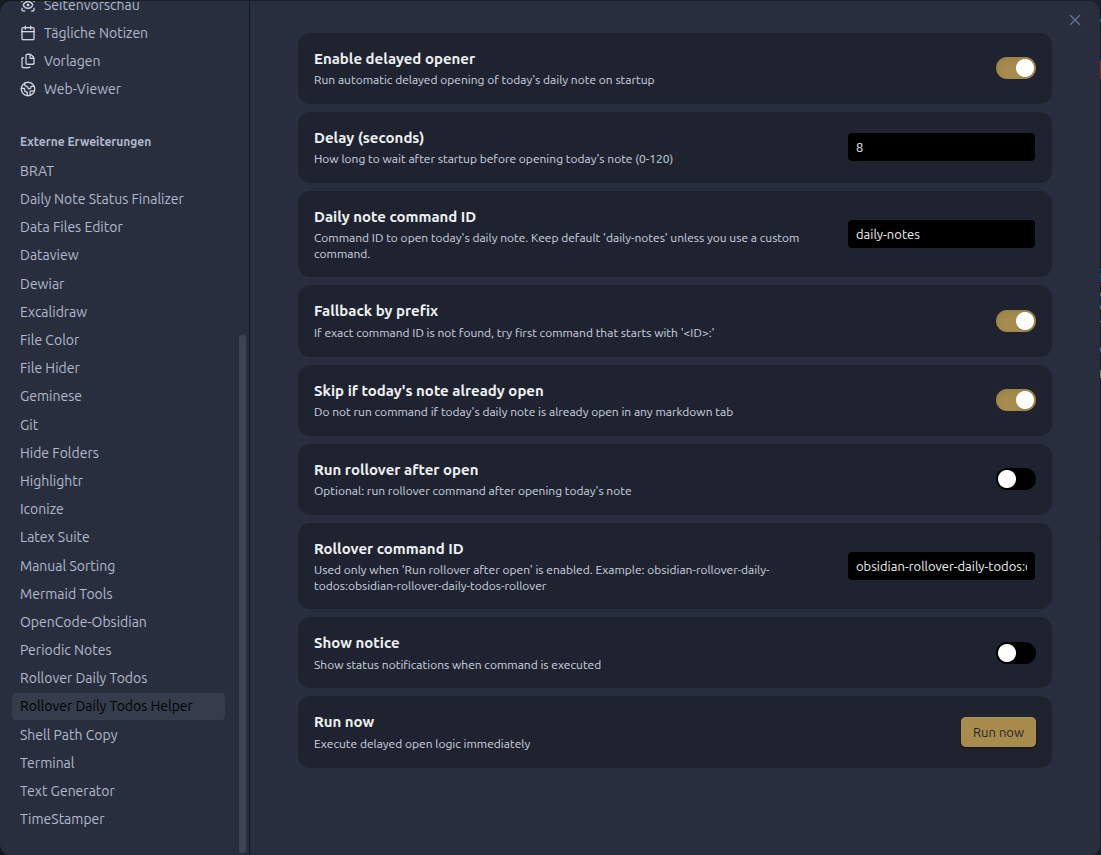
Settings
- Enable delayed opener: turns startup behavior on/off.
- Delay (seconds): wait time after layout ready.
- Daily note command ID: command to run (default
daily-notes). - Fallback by prefix: if exact command not found, tries first
daily-notes:*command. - Skip if today's note already open: avoids redundant execution.
- Run rollover after open: optional secondary command.
- Rollover command ID: default
obsidian-rollover-daily-todos:obsidian-rollover-daily-todos-rollover. - Show notice: show execution status notifications.
Command IDs and localization
Obsidian command names can be localized, while command IDs are usually stable. If your setup differs, set command ID manually in plugin settings.
Known limitations
- If today's note already exists and your rollover plugin reacts only to file creation, opening it later may not trigger rollover automatically.
- In that case, either enable Run rollover after open or run rollover manually from command palette.
License
MIT