
README file from
GithubReview Critic
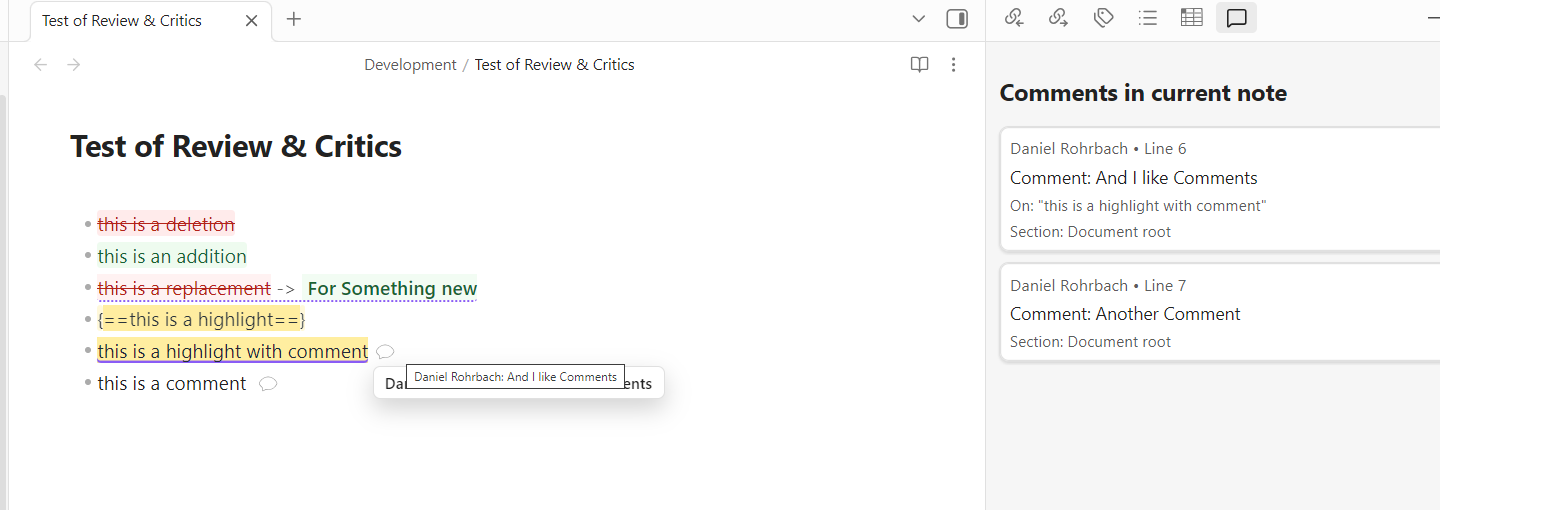
Review Critic helps you edit and review notes collaboratively inside Obsidian without leaving Markdown. Use quick commands to mark additions, deletions, replacements, highlights, and inline comments, then review everything with clear visual rendering in Reading View and Live Preview. It is designed for drafting, peer review, and content polishing workflows where you want tracked-style edits while keeping your notes plain-text and portable.
Features
- Insert standalone and anchored comments
- Mark additions, deletions, highlights, and substitutions
- Toggle Track Changes Mode for automatic add/delete/replace markup
- Toggle Accepted Text View to read edits as accepted output while keeping comments visible
- Resolve tracked changes (accept/reject single change), accept all changes, and resolve comments
- Use a unified Changes pane with quick action buttons (
Add,Delete,Highlight,Replace,Comment) plus Track Changes toggle - Resolve/remove comments directly from the comments pane
- Save, activate, overwrite, and delete named color theme presets
- Render review tokens in Reading View
- Highlight review tokens in Live Preview
- Open a comments pane for the active note and jump to comment locations
- Customize token colors and default author name in plugin settings
- Guard review actions against duplicate clicks (accept/reject/resolve run as single in-flight commands)
- Prevent accidental markup corruption in Track Changes mode by blocking edits to token delimiters
- Protect syntax-sensitive markdown edits (tables/headings/lists/callouts/code fences/links/footnotes) with safe bypass in Track Changes mode
- Show one non-blocking bypass notice per session (
review.trackChanges.protectedBypass) - Block quick actions on protected syntax-sensitive selections with explicit notice (
review.quickAction.protectedSelection) - Preserve substitution old/new visual split with strike-through limited to original text
How Features Work
Comment: Inserts a standalone comment token at the cursor.
Example:{>> [author=Daniel] Needs citation here <<}Comment Selection: Wraps the selected text in an anchored comment/highlight token so the comment is tied to that text.Add: Wraps selected text as an addition token.
Example:{++new text++}Delete: Wraps selected text as a deletion token.
Example:{--old text--}Highlight: Wraps selected text as a highlight token.
Example:{==important sentence==}Replace: Converts selected text into a substitution token and lets you fill in replacement text.
Example:{~~old text~>new text~~}Comments Pane: Opens a side pane that lists comments for the active note; clicking an item jumps to that location in the note.Changes Pane: Lists tracked changes, providesAccept/Rejectper entry,Accept All, quick action buttons, and a Track Changes toggle in one place.- Track Changes editing rules:
- Typing/deleting inside
{++addition++}edits the addition text directly (no nested deletion tokens). - Typing inside
{--deletion--}splits the deletion and inserts a separate addition token. - Comment bodies (
{>> ... <<}) are edited as normal text, not wrapped as additions. - Edits that touch markup delimiters (
{++,++},{--,--},{~~,~>,~~},{>>,<<}) are blocked to protect token integrity.
- Typing/deleting inside
- Reading View rendering: tokens are rendered with clear visual styling (for review readability).
- Live Preview rendering: tokens remain editable while still being visually distinct.
- Structural markdown safety in Track Changes mode:
- If a change touches syntax-sensitive markdown, the plugin preserves content and bypasses unsafe tracked-token injection.
- Bypassed syntax-sensitive edits are intentionally excluded from the Changes pane.
- Quick actions (
Add,Delete,Highlight,Replace) are protected no-op on syntax-sensitive selections and show a non-blocking notice. - The first protected bypass in a session shows one notice; repeated bypasses stay non-blocking and silent.
Commands
CommentComment SelectionAddDeleteHighlightReplaceComments PaneChanges PaneQuick Actions Pane(opens the unified Changes/Quick Actions pane)Toggle Track Changes ModeToggle Accepted Text ViewAccept All Tracked ChangesAccept Tracked Change At CursorReject Tracked Change At Cursor
Privacy and Data Handling
- No telemetry or analytics
- No network/API calls
- All parsing and rendering happens locally inside your vault
- Uses Obsidian plugin data storage only for plugin settings
Compatibility
minAppVersion:1.7.2isDesktopOnly:false(desktop and mobile supported)
Installation
After acceptance into Obsidian Community Plugins:
- Open
Settings -> Community plugins -> Browse. - Search for
Review Critic. - Install and enable.
Before acceptance (manual install from a GitHub release):
- Open the plugin releases page:
https://github.com/rohrbachd/obsidian-review-critics/releases - Click the latest version (or a specific version like
0.1.0). - In the release
Assetssection, download exactly these files:manifest.jsonmain.jsstyles.css
- Open your vault folder on disk.
- Go to
.obsidian/plugins/inside the vault. - Create this folder:
.obsidian/plugins/review-critic - Copy the three downloaded files into that folder.
- In Obsidian, open
Settings -> Community plugins. - If needed, turn off
Restricted mode. - Find
Review Criticin the installed plugins list and enable it. - Reload Obsidian if the plugin does not appear immediately.
Example Windows path:
D:\YourVault\.obsidian\plugins\review-critic
Screenshots
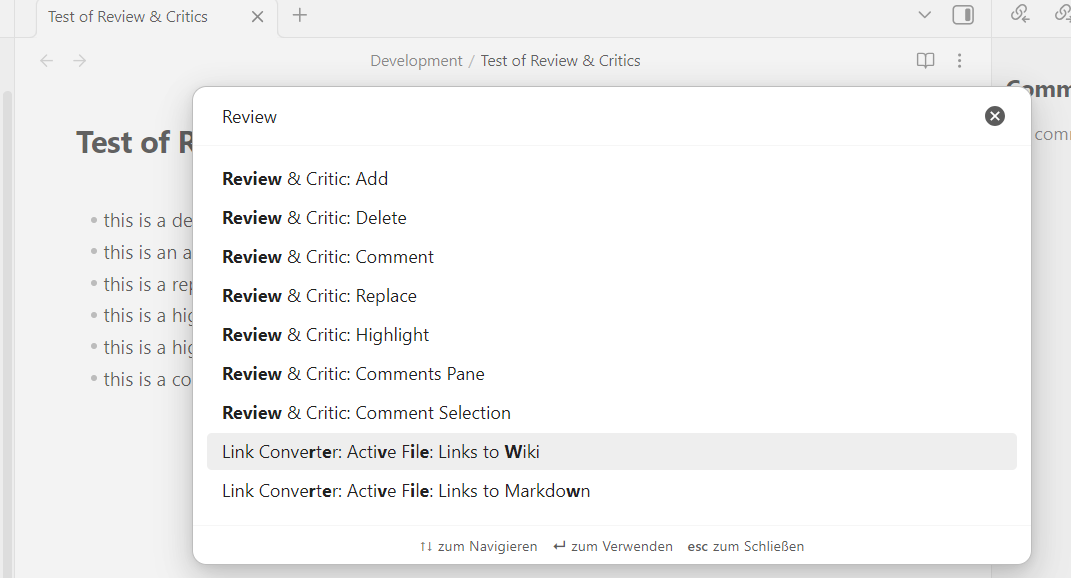
Commands Palette
Shows the plugin commands available in Obsidian's command palette (Comment, Add, Delete, Highlight, Replace, and Comments Pane).
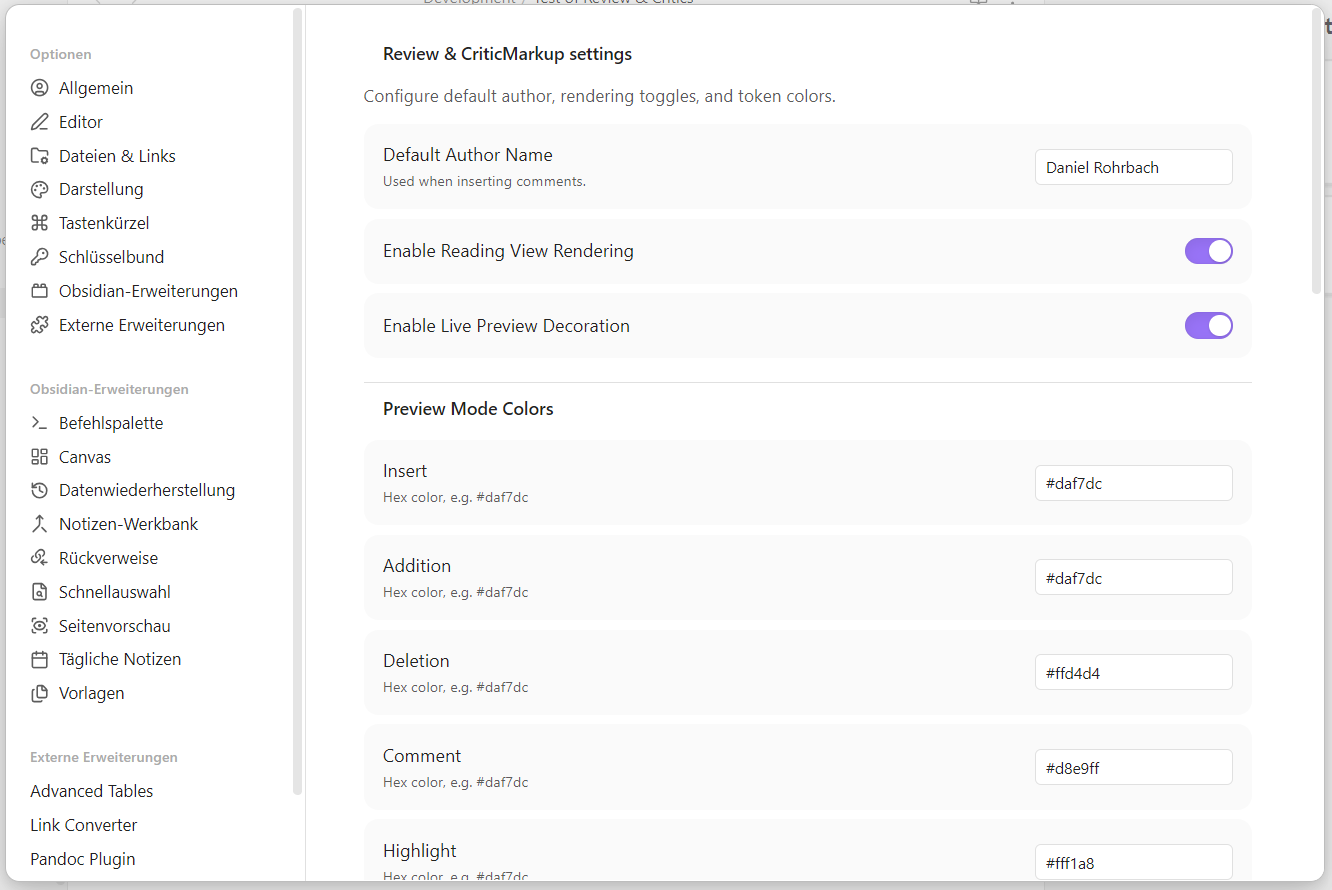
Settings Tab
Shows configurable options for default author name, reading/live rendering toggles, and token color customization.
Development
npm install
npm run build
npm run dev
npm run deploy -- "D:\\Path\\To\\Your\\Vault"
Release Checklist
npm run build
npm run lint
npm test
npm run release:check -- 0.1.0
- Tag must exactly match
manifest.jsonversion (example:0.1.0, notv0.1.0) - GitHub release must include
manifest.json,main.js,styles.cssas assets
Automated Release Publish
Prerequisites:
ghCLI installedgh auth logincompleted- clean git working tree (all changes committed)
Full setup + repeatable release steps: docs/release-workflow.md
One-command end-to-end release:
.\scripts\release.ps1 -Type patch
What it does:
- Uses latest published GitHub release as version base
- Bumps version files (
manifest.json,versions.json,package.json) - Commits release bump (if needed)
- Builds + validates release assets
- Pushes
main - Tags and publishes GitHub release
- Uploads
manifest.json,main.js,styles.css
Alternative npm command:
npm run release:auto -- patch
Project Docs
- PRD: docs/obsidian-review-plugin-prd.md
- Track Changes behavior contract (as-built rules/invariants): docs/track-changes-behavior-contract.md
- Obsidian integration/testing: docs/obsidian-integration-testing.md
- Feature usage: docs/obsidian-feature-usage.md
- Publication prep: [docs/Obsidian Publication Guide.md](docs/Obsidian Publication Guide.md)
- Release workflow: docs/release-workflow.md
- Screenshot capture guide: docs/screenshots/README.md