
README file from
GithubResearcher
You have a question worth digging into. Researcher runs a deep web search — not an LLM answering from memory, but actual searches across hundreds of live sources — and writes the results into your vault as a cited report.
The sidebar gives you a lightweight queue for managing ideas from first capture through to a finished report, without leaving Obsidian.
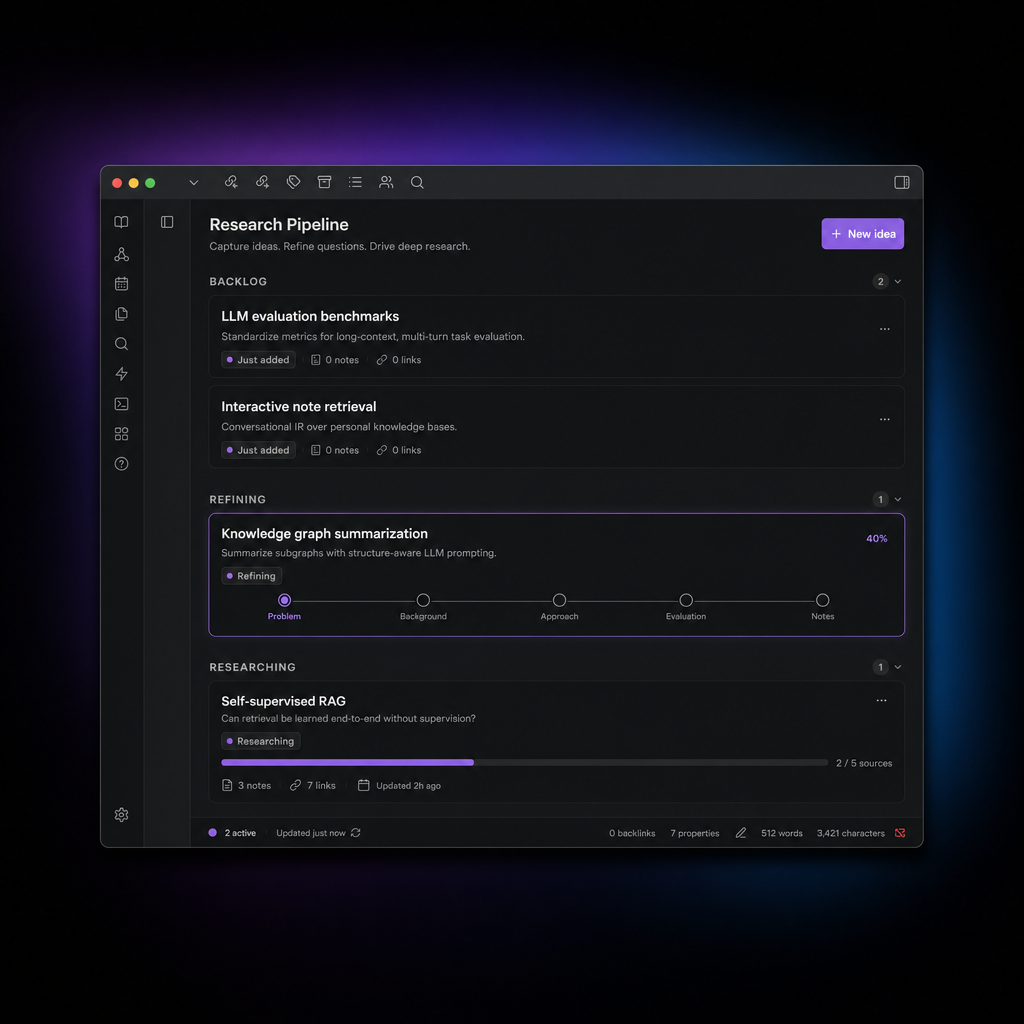
What you get
When a research run finishes, a report.md lands in your vault. It covers the topic from multiple angles, cites its sources inline, and links back to the idea note that started it. The report is just a note — you can edit it, link it, fold it into other writing.
The research itself is done by open-deep-research, which runs search queries, pulls and reads pages, and iterates until it has enough to write a coherent synthesis. It's not fast (expect several minutes per run), but it's thorough in a way that a single prompt isn't.
The workflow
Ideas move through five stages:
Backlog → To Refine → To Research → Researching → Completed
Backlog — capture anything: a question you're sitting on, a topic you want to understand, a passage you highlighted. Use the command palette or drag selected text into a note.
To Refine — an LLM reads the note and suggests clarifying questions: what outcome would make this useful, what you already know, what constraints apply. Answer them in the note. Skip this step if the question is already sharp enough.
To Research — ready to run. Start a research job from here.
Researching — runs in the background. The sidebar card shows live progress. When it finishes, report.md is in your vault.
Completed — report is written and linked from the idea note.
Drag cards forward, right-click for any move (including backward), or run commands from the active note.
What you need
- Obsidian 1.5+ (desktop only — the research process runs as a subprocess)
- An LLM for the refinement step: Ollama, OpenAI, Anthropic, OpenRouter, or any OpenAI-compatible endpoint
- Python 3 + open-deep-research for the research step
The research step is the point of the plugin, but everything else — capture, refinement, organisation — works without it. If you skip Python setup, you can still use the sidebar to manage ideas manually.
If you skip LLM setup, question generation falls back to three generic placeholders you can fill in yourself.
Setup
1. Install the plugin via Obsidian community plugins, or manually (see below).
2. Set your LLM — Settings → Researcher → LLM provider. Pick a provider, paste an API key, set a model name. Ollama works out of the box if it's running locally.
3. Set up deep research — run the setup script from the plugin's sidecar folder:
cd /path/to/vault/.obsidian/plugins/researcher/sidecar
./setup-open-deep-research.sh
This creates a Python venv and installs open-deep-research. The script prints the exact path to paste as Python command in settings.
You'll also need API keys for a search backend (Tavily is the default) and for whichever model you're using for research. Set these in your shell environment before launching Obsidian — they're not stored in the vault.
4. Open the sidebar — ribbon icon or Open research sidebar command.
Commands
| Command | What it does |
|---|---|
| Create research idea | Opens a modal to name and describe a new idea |
| Capture selection as research idea | Wraps selected text into a new idea note |
| Make current note a research idea | Adds research frontmatter to an existing note |
| Generate clarifying questions | Asks the LLM to suggest questions for the current note |
| Start deep research on active note | Kicks off a research run |
| Open research sidebar | Focuses the sidebar panel |
LLM providers
| Provider | Notes |
|---|---|
| Ollama | Local. Set base URL to your server (default: http://localhost:11434) |
| OpenAI | API key from platform.openai.com |
| Anthropic | API key from console.anthropic.com |
| OpenRouter | API key from openrouter.ai |
| OpenAI-compatible | Any endpoint that speaks /chat/completions |
Research output
Each run creates a folder under Research Runs/:
Research Runs/
  my-idea-2025-01-17/
    run.json      ← full run record and live progress
    status.json   ← compact status polled by the sidebar
    report.md     ← the output
The sidecar supports three engines, set via Sidecar engine in settings or the RESEARCHER_SIDECAR_ENGINE env var:
auto— uses open-deep-research if importable, otherwise falls back to the stubopen_deep_research— requires the installed venvstub— deterministic, no web access (useful for testing the workflow without spending API credits)
Optional env vars (override what's set in plugin settings):
RESEARCHER_RESEARCH_MODEL        # e.g. openai:gpt-4.1
RESEARCHER_SUMMARIZATION_MODEL
RESEARCHER_COMPRESSION_MODEL
RESEARCHER_FINAL_REPORT_MODEL
RESEARCHER_SEARCH_API            # tavily, duckduckgo, etc.
RESEARCHER_MAX_ITERATIONS        # default 4
RESEARCHER_MAX_TOOL_CALLS        # default 8
RESEARCHER_MAX_CONCURRENCY       # default 4
API keys (OPENAI_API_KEY, TAVILY_API_KEY, etc.) are read from your shell environment and are not written into the vault.
Manual installation
Copy into .obsidian/plugins/researcher/:
manifest.json
main.js
styles.css
sidecar/deep_research.py
sidecar/setup-open-deep-research.sh
sidecar/.env.example
Enable in Settings → Community plugins.
Development
pnpm install
pnpm build    # type-check + bundle → main.js
pnpm dev      # watch mode
pnpm typecheck