
README file from
GithubObsidian Replace All
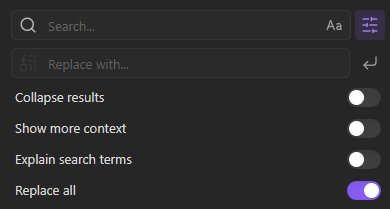
Replace All is an Obsidian plugin that injects replace all functionality directly into the core file plugin.
Usage
- Use the built-in Obsidian find to find instances to replace.
- Enter the replacement string in the input box.
- Press Enter.
Undo replace all: Use the command palette (Ctrl+P or Cmd+P) and search for "Undo replace all" to undo all changes applied by the previous replacement.
Installing
- Install the Plugin:
- (Recommended) If installing through Obsidian, go to Settings > Community plugins > Browse and search for "Replace All".
- If downloading manually, place the plugin files in your Obsidian plugins folder.
- Enable the Plugin: Go to Settings > Community plugins, find "Replace All" and toggle it on.
Development
If you want to contribute or modify the plugin, follow these steps:
- Clone this repo.
- Make sure your NodeJS is at least v16 (
node --version). npm ioryarnto install dependencies.npm run devto start compilation in watch mode.- Feel free to file a pull request with any improvements.