
README file from
GithubPropMove
Automatically move notes based on frontmatter properties. It just works.
[!NOTE]
☕ Buy Me A Coffee — These are small tools, built with AI — on purpose. There isn't enough time to learn every language and dive into every rabbit hole, so AI lets me solve real problems from my daily life and homelab — and that matters more to me than clever code. The AI writes most of the code; the idea, the tinkering, testing, publishing and maintenance are mine. Issues answered, features shipped, a few stars and downloads — does that sound like AI slop? Take a look and make your own opinion. If this project helps you, buy me a coffee ☕
Features
- Auto-move on create/update — watches frontmatter changes and moves notes automatically
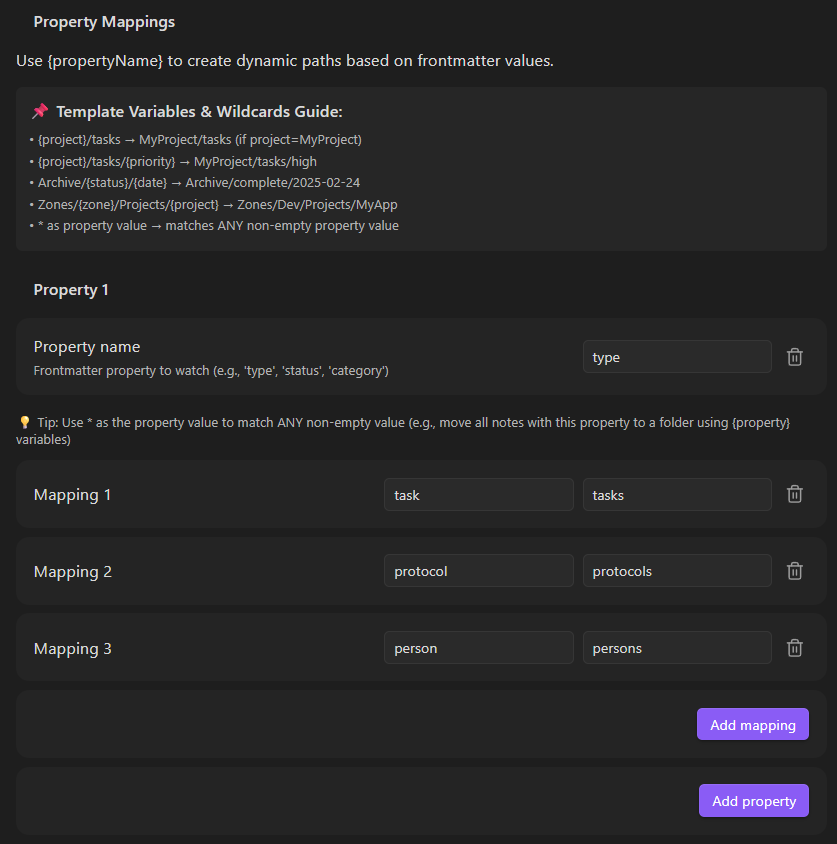
- Multiple property mappings — define value-to-folder rules per property
- Smart conflict handling — appends unique suffixes when targets exist
- Ignore folders — exclude template folders from processing
- Auto folder creation — creates missing target directories
- Wiki-link stripping —
[[Project]]resolves to clean folder name - Autocomplete — property names and folder paths suggest from your vault
- Auto-update paths — mapping folders follow vault renames automatically
- Match operators — equals, contains, is-empty, is-not-empty per mapping
Screenshots
Simple. Manually map specific values:
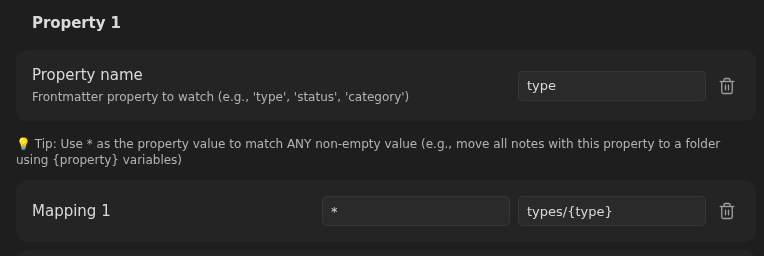
Variable. Use wildcards to create dynamic paths:
How It Works
- Note created or frontmatter changes
- If in ignored folder → skipped
- First matching property mapping determines target folder
- If target exists → numeric suffix appended (configurable)
- Note moved to destination, folders created if needed
License
MIT