
README file from
GithubProject Cockpit
An Obsidian plugin that replaces the new tab with a project dashboard — all your active work at a glance.
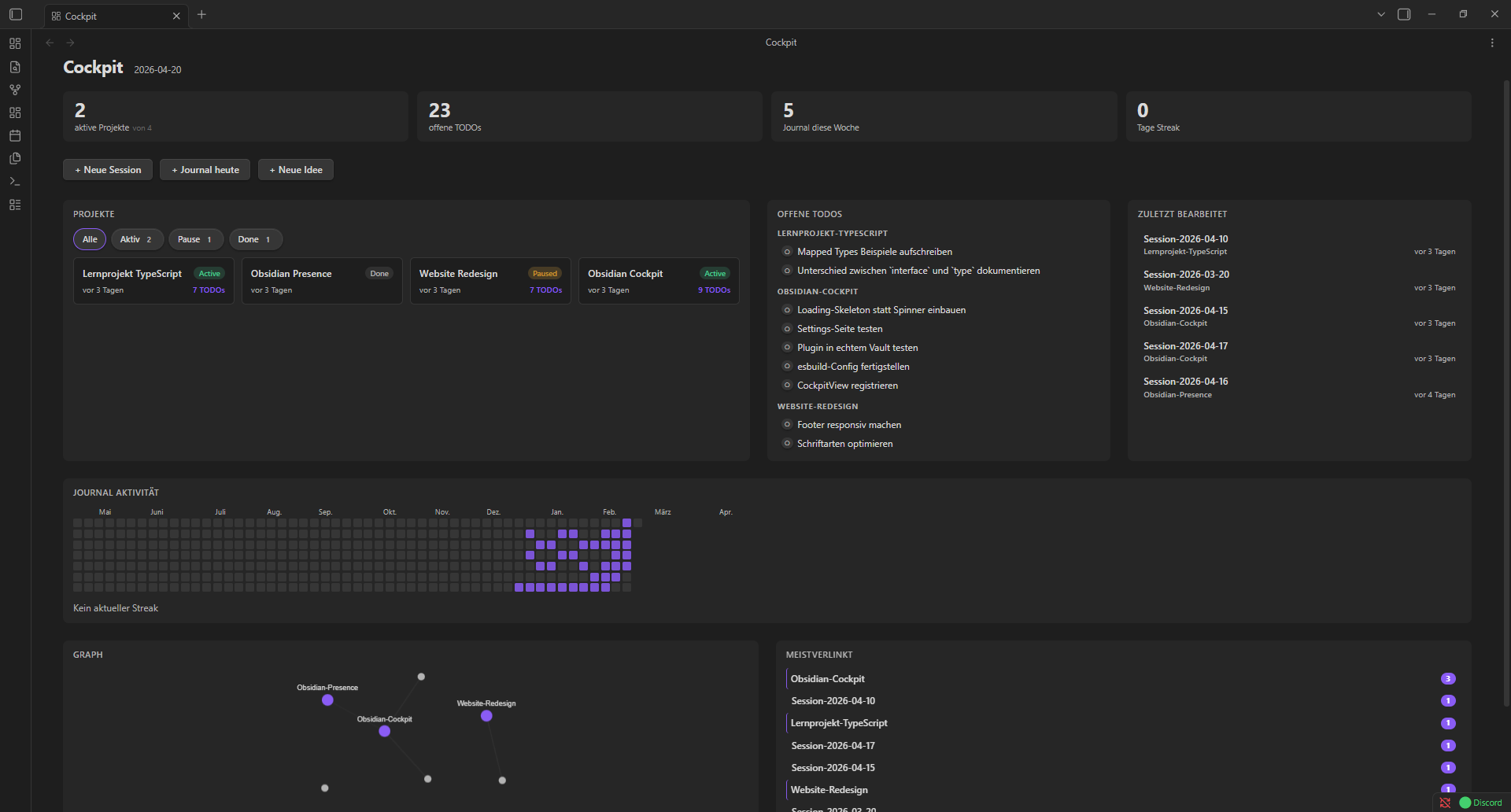
Features
- Projects — cards with status badges (Active / Paused / Done), TODO count, and last-modified time. Filter by status.
- Open TODOs — all unchecked
- [ ]items across your projects, grouped by project. Click to check off inline or open the file. - Recent Sessions — the last files you edited, with project and timestamp.
- Journal Heatmap — GitHub-style activity grid of the last 52 weeks. Reads your journal folder by filename (
YYYY-MM-DD.md) ordatumfrontmatter. - Mini Graph — force-directed graph of links between your project files. Drag, zoom, and pan. Double-click to reset.
- Stats Bar — active projects, open TODOs, journal entries this week, and current streak.
- Backlinks Panel — the 7 most linked files within your projects folder.
- Quick Actions — one click to create a new session, journal entry, or idea from a template.
Installation
From the Community Plugin Store
Search for Project Cockpit in Settings → Community Plugins.
Manual
- Download
main.js,styles.css, andmanifest.jsonfrom the latest release. - Copy them into
<vault>/.obsidian/plugins/project-cockpit/. - Enable the plugin in Settings → Community Plugins.
Configuration
Open Settings → Project Cockpit to configure:
| Setting | Default | Description |
|---|---|---|
| Projects folder | 01_Projekte |
Root folder scanned for project subfolders |
| Journal folder | 04_Journal |
Folder containing your daily notes |
| Template — New Session | 05_Templates/Projekt-Session.md |
Template used by the New Session quick action |
| Template — Journal | 05_Templates/Journal.md |
Template used by the Journal heute quick action |
| Template — New Idea | 05_Templates/Idee.md |
Template used by the Neue Idee quick action |
Project structure expected
Each project is a subfolder inside your projects folder. The plugin identifies the hub file by name — a .md file with the same name as its folder, placed as a sibling:
01_Projekte/
  My-Project/             ← session and note files go here
    Session-2026-04-17.md
    notes.md
  My-Project.md           ← hub file (same name as folder, frontmatter: status: active)
Supported status values: active / aktiv, paused / pause, done / abgeschlossen.
Development
pnpm install
pnpm dev        # watch mode
pnpm build      # production build
pnpm lint       # ESLint
pnpm typecheck  # TypeScript
The plugin folder is symlinked into a local Obsidian vault for live testing.
License
MIT