
README file from
GithubPrivate Quartz Publish
⚠️ This plugin requires a server you run yourself. It writes frontmatter inside Obsidian; the actual rendering and serving happens on a small docker stack (see
server-example/). If you don't already have a VPS + domain, Obsidian Publish ($8/month) might be a better fit.
An Obsidian plugin + reference server stack that lets you opt-in publish individual notes or whole folders from your vault to a self-hosted Quartz site, with unguessable random-slug URLs so the public surface cannot be enumerated.
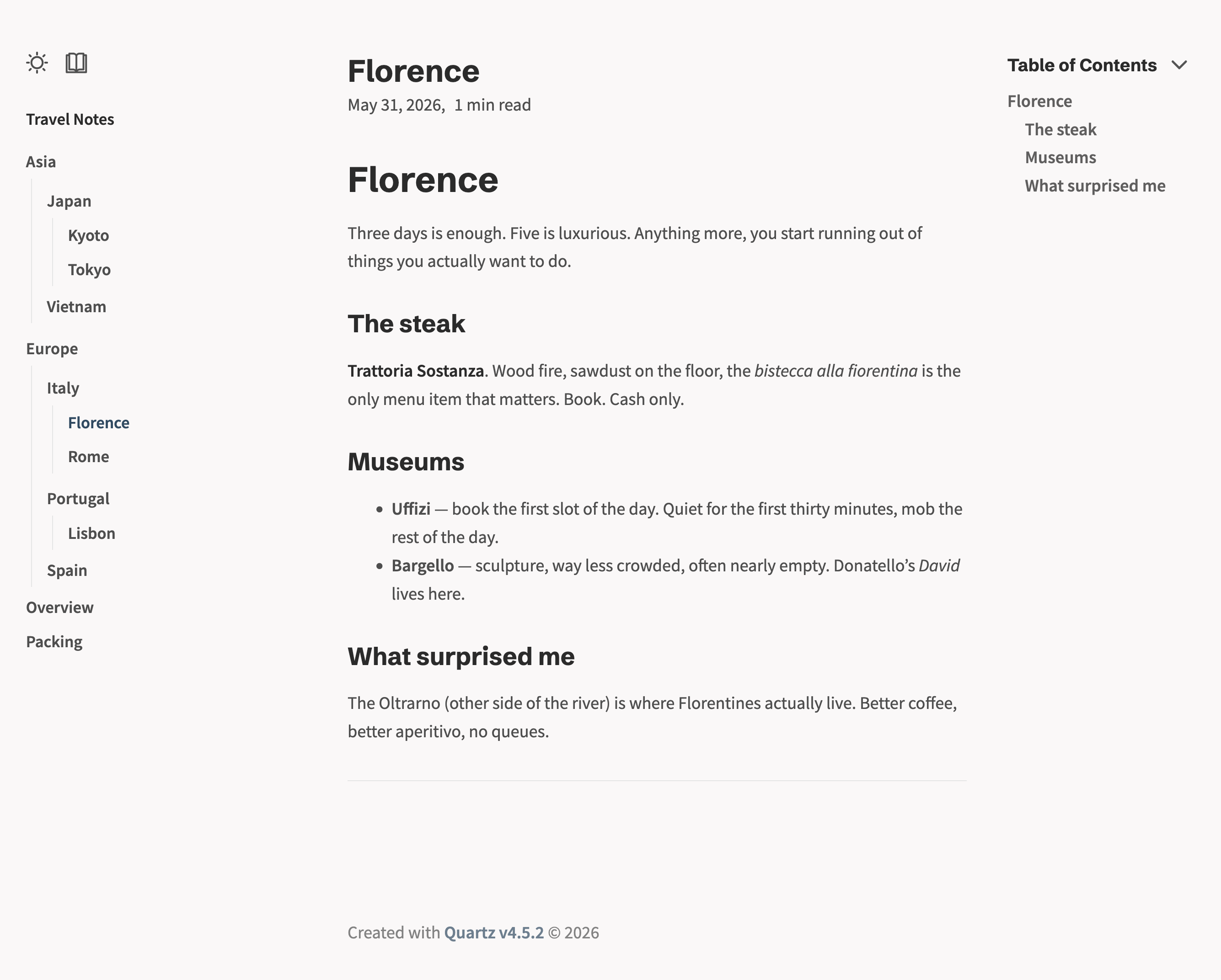
Above: a published folder bundle. The sidebar shows the entire folder structure (Asia/Japan, Europe/Italy/Portugal, etc.) and the currently-open note is highlighted in its proper position. Folder URLs render this sidebar; direct file URLs render the note alone.
Right-click a note     →  /aT3kP9wQ2x                       standalone, no sidebar
Right-click a folder   →  /xZk2a9p4Mc                       landing page + sidebar of bundled notes
Click around in folder →  /xZk2a9p4Mc/aT3kP9wQ2x            sidebar persists
Guess a filename       →  HTTP 404
Guess /sitemap.xml     →  HTTP 404
Why
Obsidian Publish costs $8/month and pins you to their domain. Quartz lets you self-host, but its defaults publish every markdown file in your vault folder. That was the catalyst for this project: I wanted opt-in publishing, with privacy:
- Sharing a single note URL must not reveal the existence of any other note.
- Sharing a folder URL must reveal only the notes I bundled together.
- Filenames, folder names, vault structure must never appear in URLs or HTML.
- Search engines must not crawl a sitemap of everything.
Properties
- Zero network calls from the plugin. The plugin only edits frontmatter and its own data file. All actual publishing is server-side, driven by the file changes that LiveSync (or any other vault sync) replicates.
- Cryptographically random slugs. 10-char base62 ≈ 60 bits of entropy; collisions effectively impossible.
- Two opt-in shapes.
- Single note: random URL, standalone page, no navigation to anything else.
- Folder bundle: every
.mddescendant published (recursive, including subfolders), plus a folder landing page with a sidebar listing every note. Sidebar persists as you click through. Re-publishing reuses the existing folder slug, so previously shared links keep working.
- URL-editing visitor cannot enumerate. No sitemap, no RSS, no folder index pages, no tag pages, no
/index, no search. - Wikilink leak protection. Wikilinks to unpublished notes are stripped to plain text before staging — the name of an unpublished note never reaches the public HTML.
- Embed leak protection. Images / PDFs are renamed to a SHA-256 content hash so they can't be enumerated by original filename.
- Belt-and-suspenders filter. Even if a stray file somehow lands in the build directory, Quartz's
ExplicitPublishfilter drops it at render time. - Sync-resilient folder state. Folder publishes write
folder_sluginto each child note's frontmatter, not just into the plugin'sdata.json. So the server-side stager works even if your vault sync mechanism (LiveSync, etc.) excludes plugin data files from replication.
Right-click UX
On a note:
| Action | What it does |
|---|---|
| Publish to web | Writes publish: true and a random slug to frontmatter. Copies the URL. |
| Unpublish from web | Removes publish (slug retained, so re-publish gives the same URL). |
| Copy public URL | For already-published notes. |
| Rotate public URL | Generates a fresh slug; the old URL 404s on the next reconcile. Use if you sent a link to the wrong person. |
On a folder:
| Action | What it does |
|---|---|
| Publish folder | Bulk-publishes every .md descendant (recursive, includes subfolders). Reuses an existing folder slug if any descendant already has one, otherwise mints a new one. Copies the folder URL. |
| Unpublish folder | Removes the folder slug AND unpublishes every .md descendant (recursive). |
| Copy folder URL | For already-published folders. |
Also available via Command Palette: Toggle publish on active note, Copy public URL of active note, Rotate public URL of active note.
How it fits together
Obsidian (your devices)
   │
   │  Right-click → Publish
   │  Plugin edits frontmatter (publish: true, slug: aT3kP9wQ2x)
   │  Plugin updates its own data.json with folder slugs
   ▼
Your vault sync (Self-hosted LiveSync, Syncthing, git, anything that
gets vault files onto the server)
   │
   ▼
Server VPS
   │
   ▼  stager  (Deno, watches the vault)
   │  Mirrors only `publish: true` notes into ./content
   │  Rewrites wikilinks and embeds
   │  Strips refs to unpublished notes (leak protection)
   │
   ▼  quartz  (v4.5.2, builds ./content into ./site)
   │  Custom FolderSidebar component renders conditionally
   │
   ▼  Caddy / nginx / reverse proxy
   │  try_files for extensionless URLs
   │  handle_errors → 404.html
   │
notes.example.com
Quick start
1. Plugin
# Clone and build
git clone https://github.com/jagajaga/private-quartz-publish.git
cd private-quartz-publish
npm install
npm run build
Then copy main.js, manifest.json, and styles.css (if present) into your vault at <vault>/.obsidian/plugins/private-quartz-publish/. In Obsidian:
- Settings → Community plugins → enable Private Quartz Publish
- Settings → Private Quartz Publish → set Base URL to your published Quartz site (e.g.
https://notes.example.com) - Right-click any note → Publish to web
If you sync your vault across devices, you only need to do the install on one device — the plugin files will replicate via your vault sync. (If you use Self-hosted LiveSync, you must turn on "Sync hidden files" so .obsidian/ is included.)
2. Server side
Prerequisites: a Linux server with a public IP, Docker installed, and a domain whose A/AAAA records point at the server. If you don't already have your Obsidian vault on the server, set up Self-hosted LiveSync or any other vault sync mechanism first — this stack expects your markdown to land on disk somewhere it can read.
One-command setup:
git clone https://github.com/jagajaga/private-quartz-publish.git
cd private-quartz-publish/server-example
./setup.sh
The wizard prompts for your vault directory and public domain, writes .env, pulls the pre-built images from GHCR, and brings the stack up with automatic Let's Encrypt HTTPS via the bundled Caddy.
Manual setup (if you prefer to read what's happening):
cd server-example
cp .env.example .env
$EDITOR .env                          # VAULT_DIR
$EDITOR quartz/quartz.config.ts       # baseUrl + pageTitle
cp docker-compose.example.yml docker-compose.yml
docker compose up -d
Then wire caddy/Caddyfile.example into your reverse proxy.
Settings
Settings tab inside Obsidian (Settings → Private Quartz Publish):
| Setting | Default | Notes |
|---|---|---|
| Base URL | https://notes.example.com |
Your Quartz site's URL, no trailing slash. |
| Slug length | 10 |
Random characters per slug. 10 ≈ 60 bits entropy. |
| Copy URL on publish / rotate | true |
Auto-copy to clipboard. |
| Confirm folder operations | true |
Confirm before bulk-publishing or bulk-unpublishing a folder. |
| Publish flag key | publish |
Frontmatter key the stager looks for. Change only if you also change it server-side. |
| Slug key | slug |
Frontmatter key for the per-note slug. Same caveat. |
Architecture, in one paragraph
The plugin writes structured frontmatter. The server-side stager (Deno) watches the vault, scans frontmatter, and only copies files containing publish: true into a separate flat content directory. Folder bundle state is stored in the plugin's data.json (which lives in the vault and syncs along with everything else). Quartz reads only the staged content directory — it never sees the raw vault. Caddy serves the Quartz build output. The vault is bind-mounted into the stager as read-only. The Quartz container has no access to the vault at all.
URL behavior
| URL | Returns | Sidebar? |
|---|---|---|
/<file-slug> |
The one note, standalone | No |
/<folder-slug> |
Folder landing page listing bundled notes | Yes |
/<folder-slug>/<file-slug> |
The note within the folder bundle | Yes (persists across clicks within folder) |
/<anything-else> (filename, foldername, sitemap.xml, RSS, /) |
404 | — |
License
Acknowledgments
- Quartz by Jacky Zhao — the static site generator this builds on.
- Self-hosted LiveSync by vrtmrz — the sync layer this is designed to pair with.