
README file from
GithubPopup Dictionary
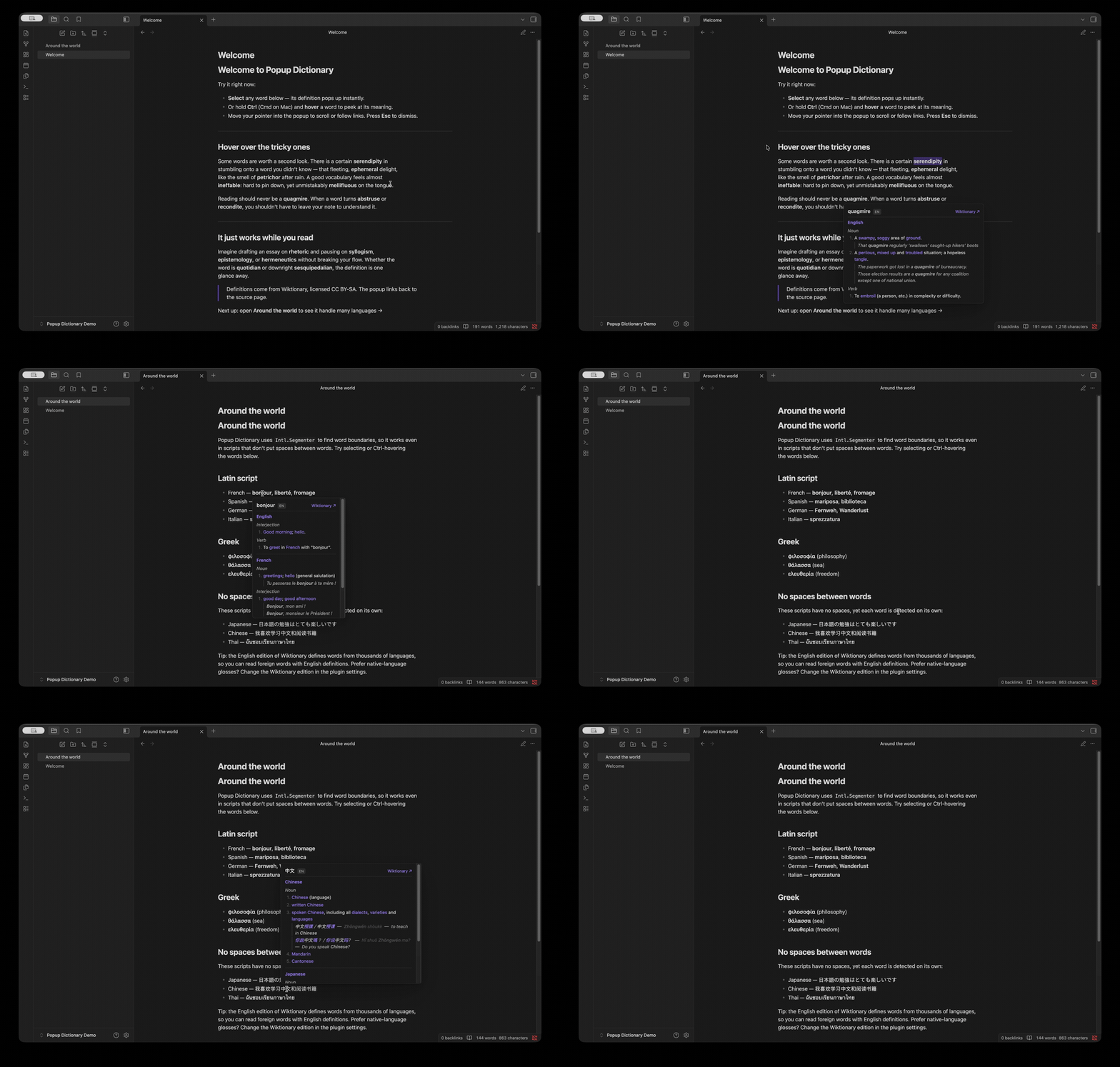
An Obsidian plugin that shows a word's definition in a small popup when you select a word or Ctrl-hover it. Definitions come from Wiktionary, so it works across a very large number of languages.
Features
- Selection lookup — select a word and run the Look up selected word command (bind it to a hotkey), or enable automatic lookup on every selection.
- Hover lookup — hold Ctrl (configurable) and hover a word to see its definition after a short delay. Move into the popup to scroll or click links.
- Many languages — word boundaries are detected with
Intl.Segmenter, so even scripts without spaces between words (Chinese, Japanese, Thai, Khmer, …) are handled. Definitions are returned grouped by language. - Configurable — a language allow-list, examples on/off, number of senses, hover delay and modifier key.
- Theme-aware popup styling; results link back to the Wiktionary page.
How it works
For each lookup the plugin calls the Wiktionary REST API:
https://<edition>.wiktionary.org/api/rest_v1/page/definition/<word>
The response is an object keyed by language code; each language has parts of speech
and HTML definitions. This page/definition endpoint is only implemented for the
English edition (en) — other editions return HTTP 501, so en is effectively
the only usable value. That's not a real limitation in practice: the English edition
defines words from thousands of languages (French, Greek, Japanese, …), with the
glosses written in English. To focus on one or more source languages, use the
"Show only these languages" allow-list rather than changing the edition.
Definitions are © Wiktionary contributors, licensed CC BY-SA. The popup links back to the source page.
Build
This plugin ships as TypeScript source and must be compiled once. You need Node.js 18 or newer.
npm install      # install dev dependencies
npm run build    # type-check and bundle to main.js
For active development use npm run dev, which rebuilds main.js on every change.
Develop in a container (no local Node needed)
A dev container is included, so you don't have to install Node on your host — only Docker.
-
VS Code: open the folder and choose Dev Containers: Reopen in Container. The container (
mcr.microsoft.com/devcontainers/javascript-node) runsnpm installautomatically; then runnpm run buildornpm run devin its terminal. -
Plain Docker: from the project folder,
docker run --rm -u node \ -v "$PWD":/workspaces/app -w /workspaces/app \ node:20-bookworm-slim \ bash -lc "npm install && npm run build"main.jsis written back to the project folder via the bind mount, ready to copy into your vault.
Installation
From the Community Plugins browser (once published)
In Obsidian: Settings → Community plugins → Browse, search for Popup Dictionary, install, and enable it.
Manually (from a release or your own build)
Copy these three files into your vault:
<your-vault>/.obsidian/plugins/popup-dictionary/
├── main.js
├── manifest.json
└── styles.css
Then in Obsidian: Settings → Community plugins, reload, and enable Popup Dictionary. (During development you can instead symlink the project folder to that location so rebuilds are picked up automatically.)
Usage
- Selection: select a word, then run Look up selected word from the command palette. Assign a hotkey under Settings → Hotkeys for one-key lookups. Or set Selection trigger → Automatic on selection to pop up whenever you select a word.
- Hover: hold Ctrl and hover over a word; the definition appears after the configured delay. Move the pointer into the popup to scroll or follow links.
- Dismiss: press Escape, click outside the popup, or scroll the note.
Settings
| Setting | Default | Description |
|---|---|---|
| Wiktionary edition | en |
Wiki to query. Only en is supported — Wiktionary's definition API is not implemented for other editions (they return HTTP 501). The English edition still covers thousands of languages. |
| Show only these languages | (all) | Comma-separated language codes to display (e.g. en, el, ja). Empty shows everything. |
| Selection trigger | Command / hotkey | Whether selecting a word looks it up automatically or only on command. |
| Enable hover lookup | on | Show definitions on hover (desktop only). |
| Hover modifier key | Ctrl / Cmd | Key to hold while hovering. None triggers on hover alone. |
| Hover delay | 300 ms | How long to rest on a word before lookup. |
| Show examples | on | Include example sentences when available. |
| Max definitions per part of speech | 5 | Cap the number of senses shown. |
Network use & privacy
To fetch definitions, the plugin sends the word you look up (and your chosen Wiktionary
edition) over HTTPS to Wikimedia's Wiktionary REST API at
https://<edition>.wiktionary.org. Nothing else is collected, stored remotely, or sent
anywhere; results are cached only in memory for the current session, and lookups fail
gracefully when you are offline.
Notes & limitations
- Requires an internet connection (live Wiktionary API). Lookups are cached in-memory during a session.
- Hover is desktop-only. On mobile, use selection lookup.
- Language is inferred from the word itself (Wiktionary returns every language that spells the word that way) — single short words can be ambiguous across languages; use the language allow-list to focus the results.
- The hover/selection listeners are attached to the main window; notes opened in a separate pop-out window are not covered yet.
- Definitions are currently English-only glosses. Wiktionary's
page/definitionREST endpoint is only implemented for the English edition, so non-English editions return HTTP 501. The English edition still covers thousands of source languages — see the roadmap below.
Roadmap
- Native-language definitions. Let you read glosses in French, Greek, etc. — not just English. The REST endpoint can't do this, so it would mean fetching from the per-edition MediaWiki action/parse API and parsing the page HTML. Tracked as a goal; contributions welcome.
Project layout
src/
├── main.ts           plugin lifecycle, event wiring, command, orchestration
├── settings.ts       settings interface, defaults, settings tab UI
├── dictionary.ts     Wiktionary client: fetch, parse, in-memory cache
├── wordDetection.ts  caret/selection → word, via Intl.Segmenter
└── popup.ts          floating popup: render, position, dismiss
License
MIT