
README file from
Githubpdf-to-md
Writing by hand aligns more naturally with the flow of thought than typing in my mind.
This tool converts handwritten notes to Markdown using AI, designed as a seamless Obsidian Plugin.
中文文档 | English
🎉 Obsidian Plugin
An all-in-one Obsidian plugin that converts handwritten PDFs to Markdown in a single click!
Key Features:
- 📄 Right-click any PDF → "Convert to Markdown"
- 🤖 Support for GPT-4o, GPT-5.4, Alibaba Qwen (千问), and Google Gemini
- 📊 Real-time progress tracking with visual progress bar
- 🔐 Secure API key management (read-only environment variables check)
- ⚙️ Configurable DPI, timeout, retry, and file conflict handling
Plugin Installation
Method 1: Obsidian Plugin Marketplace (Recommended)
- Open Obsidian → Settings → Community Plugins
- Search for "pdf-to-md"
- Click Install and Enable
Method 2: Manual Installation
- Download the latest release from GitHub Releases
- Extract files to your Vault:
<your-vault>/.obsidian/plugins/pdf-to-md/ ├── main.js ├── pdf.worker.min.js └── manifest.json - Restart Obsidian and enable the plugin
Plugin Quick Start
1️⃣ Configure Environment Variables
Important: pdf-to-md reads API keys from environment variables only. No API keys are stored on disk. This is more secure.
Get Your API Keys:
- Alibaba Qwen (Recommended): https://dashscope.console.aliyun.com/apiKey
- OpenAI: https://platform.openai.com/api-keys
- Google Gemini: https://aistudio.google.com/
Set Environment Variables:
Windows (PowerShell - Run as Administrator):
# Alibaba Qwen
[System.Environment]::SetEnvironmentVariable('DASHSCOPE_API_KEY', 'sk-xxx...', 'User')

# OpenAI
[System.Environment]::SetEnvironmentVariable('OPENAI_API_KEY', 'sk-proj-xxx...', 'User')

# Google Gemini
[System.Environment]::SetEnvironmentVariable('GEMINI_API_KEY', 'AIzaSyxxx...', 'User')
Mac/Linux:
# Edit ~/.bashrc or ~/.zshrc (Mac users use ~/.zprofile), add:
export DASHSCOPE_API_KEY='sk-xxx...'
export OPENAI_API_KEY='sk-proj-xxx...'
export GEMINI_API_KEY='AIzaSyxxx...'

# Save and reload:
source ~/.bashrc  # or source ~/.zshrc
⚠️ Restart Obsidian after setting environment variables (complete restart required, not just reload).
2️⃣ Select AI Provider
Open Obsidian Settings → PDF to Markdown:
- Select the AI model directly from the unified Model dropdown (supporting various GPT-4o, GPT-5.4, Qwen, and Gemini models).
3️⃣ Convert PDF
- Find PDF in Obsidian file browser
- Right-click → "Convert to Markdown"
- Wait for conversion (progress bar shows status)
- Converted
.mdfile is auto-saved
Example:
Input:  my_notes.pdf
Output: my_notes_qwen.md         (if using Qwen)
        my_notes_gpt-5.4.md      (if using GPT 5.4)
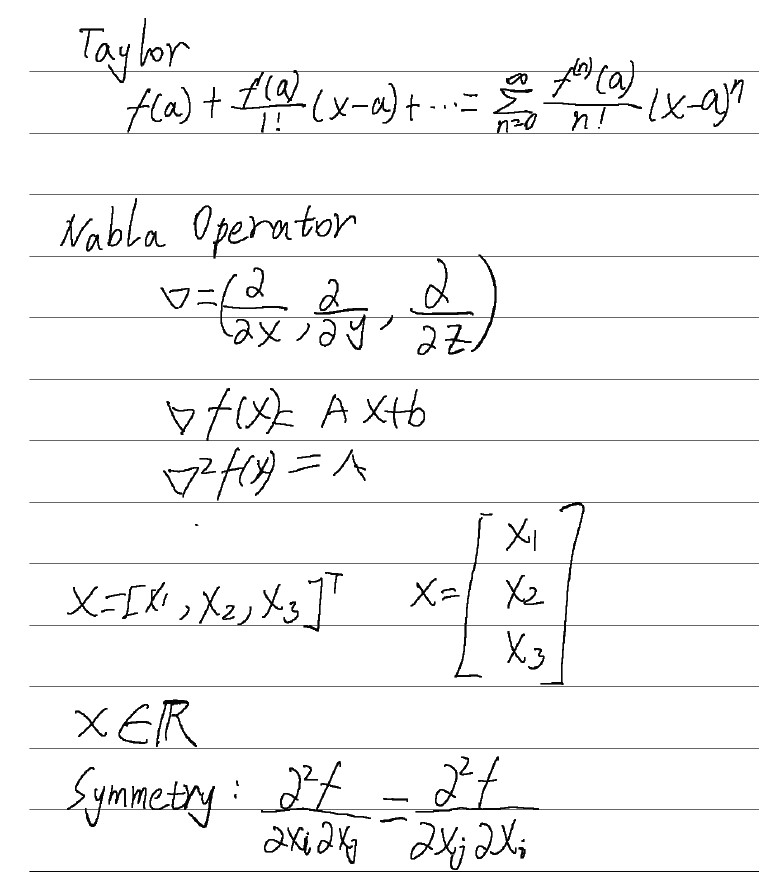
Qwen
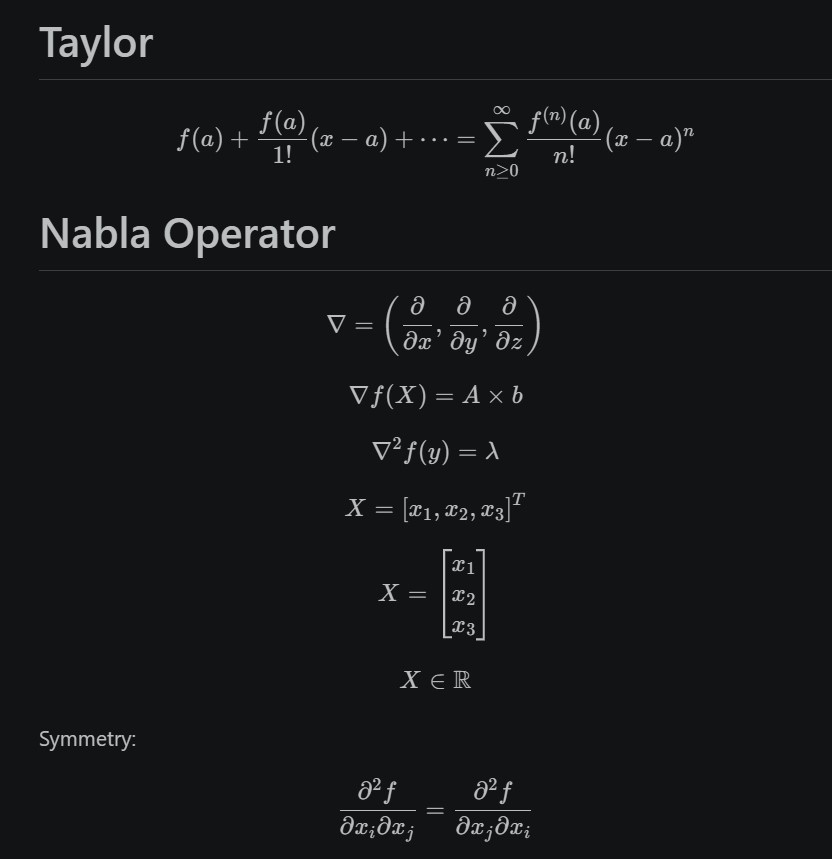
GPT

Supported AI Models
| Provider | Model | Cost/Page | Speed | Quality |
|---|---|---|---|---|
| Alibaba Qwen 🏆 | qwen-vl-max | ¥0.00345 | 15-30s | Excellent |
| OpenAI | gpt-5.4-mini | $0.003 | 5-10s | Excellent+ |
Plugin Settings
| Option | Default | Description |
|---|---|---|
| Model | Qwen VL Max | Select the AI model from the unified list |
| API Key Status | Auto-detect | Shows environment variable status (read-only) |
| PDF Rendering DPI | 200 | Higher DPI = better quality but slower (100-400) |
| API Timeout | 60s | Maximum wait time for API response |
| Max Retries | 3 | Number of retry attempts on failure |
| File Conflict Handling | Model-based naming | How to handle existing output files |
File Conflict Strategies:
- Overwrite: Replace existing file (⚠️ loses previous content)
- Skip: Don't generate if file exists
- Add Timestamp: Append timestamp to filename
- Model-based Naming (Recommended): Append model name (e.g.,
my_notes_qwen.md)
📊 Performance
Real Results
See actual output from different models:
- Qwen Result - Best cost-effectiveness
- OpenAI Result - Highest accuracy
- Original PDF - Input example
📖 Background
While studying control theory, I fell in love with the handwriting experience of the iFlytek Smart Notebook. However, organizing notes in Obsidian proved frustrating: the native OCR was terrible at recognizing mathematical formulas.
I developed this plugin to solve that problem. It leverages powerful Vision Language Models (Qwen-VL, GPT-4o/GPT-5.4, and Gemini) to provide:
- Accurate Mixed Recognition: Seamlessly handles text and complex formulas
- LaTeX Math Formulas: Converts equations into clear Obsidian-renderable LaTeX ($...$ and $$...$$)
- Cost-Effective & Flexible: Choose cheap, fast, or ultra-accurate models inside Obsidian
🤝 Contributing
Issues and Pull Requests are welcome!
📄 License
MIT License
Enjoy pdf-to-md! If you find it helpful, please consider giving it a Star ⭐ on GitHub!