
README file from
GithubAuto Link Converter
An Obsidian plugin that automatically converts pasted URLs into reference-style markdown links with page titles.
Features
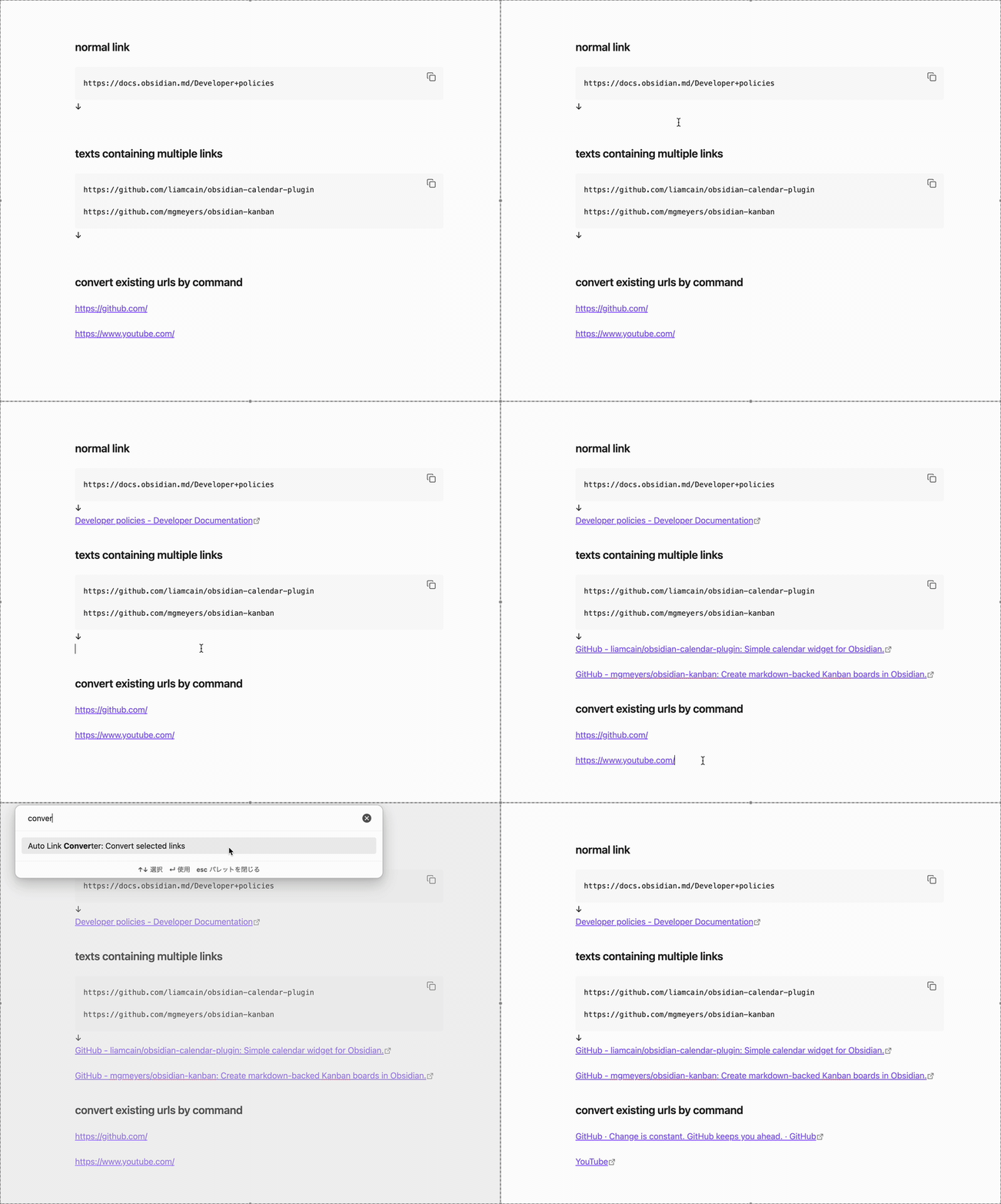
- Automatic URL Conversion: When you paste a URL, it automatically fetches the page title and converts it to a reference-style markdown link
- Manual Conversion Command: Convert selected URLs using the command palette
- Customizable Settings: Configure auto-conversion behavior and placeholder text
Usage
Automatic Conversion (Paste)
- Copy text containing a URL (or URLs) to your clipboard
- Paste it into your note (Ctrl/Cmd + V)
- The plugin will automatically:
- Fetch the page title
- Convert the URL to a reference-style link
Manual Conversion (Command)
- Select one or more URLs in your note
- Open the command palette (Ctrl/Cmd + P)
- Run "Auto Link Converter: Convert selected links"
- Selected URLs will be converted to reference-style links
Settings
- Enable auto-conversion: Whether to automatically convert pasted URLs to reference-style links
- Placeholder text: The text to display when the title cannot be fetched from the URL (default: "Untitled")