
README file from
GithubPaperFlow
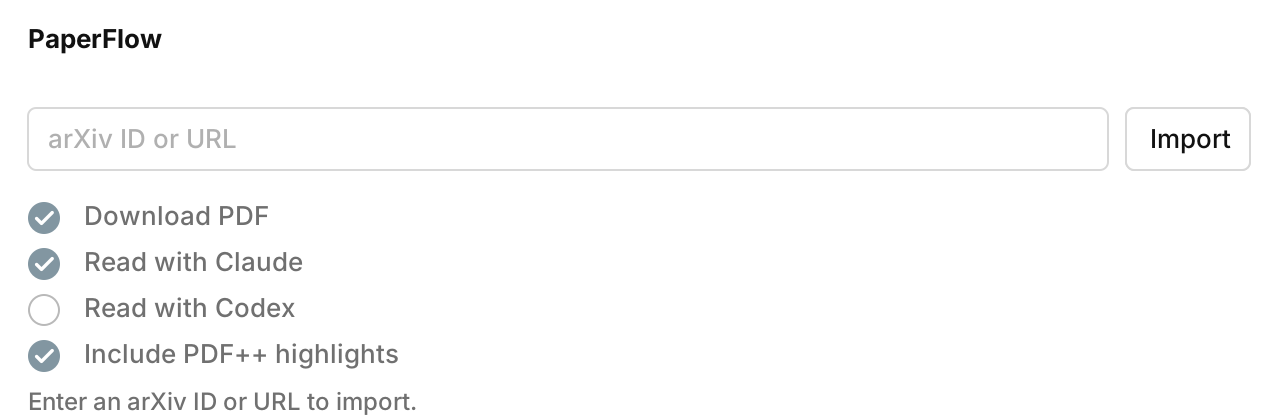
PaperFlow turns arXiv links into Obsidian paper notes, PDFs, AI summaries, and PDF++ highlights.
What It Does
- Import from arXiv IDs or arXiv URLs.
- Download PDFs and create Markdown notes in
Rawby default. - Read papers with Claude Code or Codex.
- Generate concise sections for idea, method, limitations, future work, and key sentences.
- Add exact-match PDF++ highlights with configurable concepts and colors.
Installation
Community Plugin
Enable community plugins in Obsidian and search for PaperFlow.
Manual Install
Create this folder in your vault:
Your Vault/.obsidian/plugins/paperflow
Download main.js, manifest.json, and styles.css from a release and place
them in that folder. Then enable PaperFlow from Obsidian's Community
plugins settings.
Local Development Install
npm install
npm run build
cp manifest.json main.js styles.css "Your Vault/.obsidian/plugins/paperflow/"
Reload Obsidian or disable and re-enable the plugin after copying files.
Usage
Open the command palette and run one of:
PaperFlow: Import metadata and PDF from arXivPaperFlow: Import metadata only from arXiv
Enter an arXiv ID or URL, then press Enter or click Import.
Supported inputs:
1703.06870
arXiv:1703.06870
https://arxiv.org/abs/1703.06870
https://arxiv.org/pdf/1703.06870
PaperFlow shows progress, supports canceling, and opens the generated note when the import finishes.
Settings
Open Settings -> PaperFlow.
PDF folder: folder for downloaded PDFs.Note folder: folder for generated Markdown notes.Custom template file: optional custom note template path.Read with Claude: run local Claude Code after PDF download.Claude command: optional Claude CLI path. Empty tries common locations.Read with Codex: run local Codex after PDF download.Codex command: optional Codex CLI path. Empty tries common locations.Include PDF++ highlights: add best-effort PDF++selection=ranges to AI key-sentence callouts. Default is off.PDF++ highlight concepts: add/remove concept headings and choose each highlight color with a hex color picker.Reading prompt: shared prompt template used by Claude and Codex.
AI Reading
When Read with Claude or Read with Codex is enabled, PaperFlow appends a
short reading section:
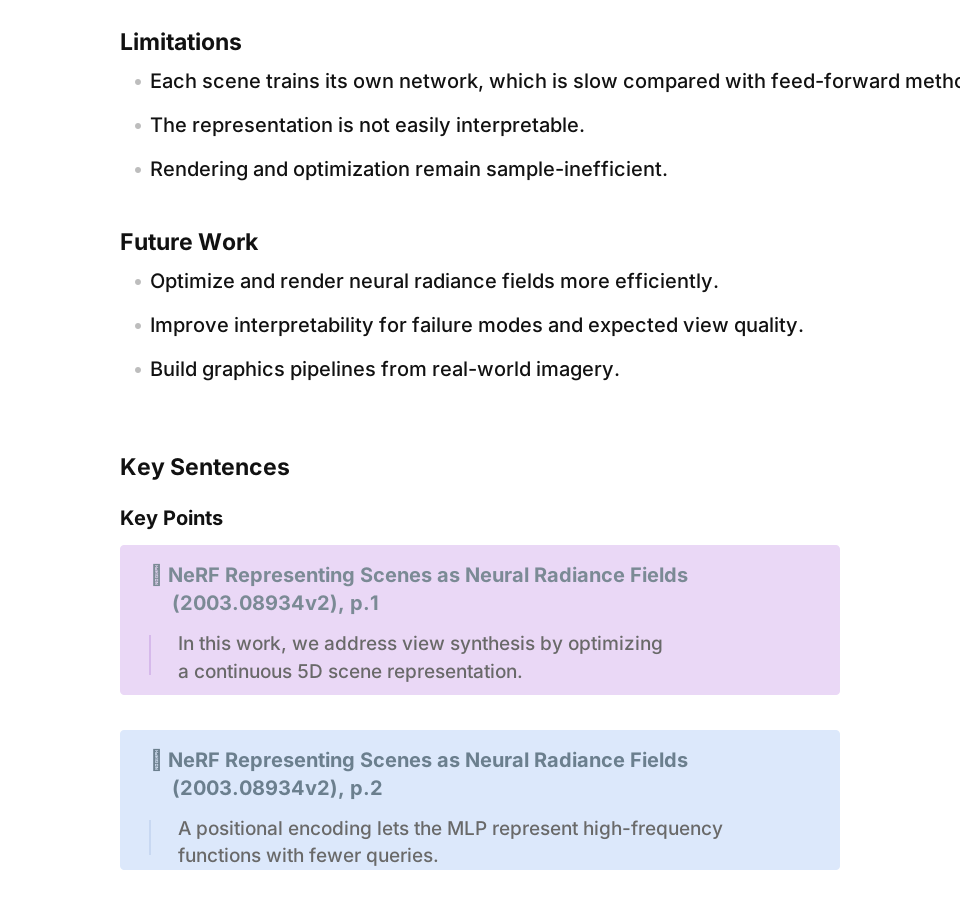
IdeaMethodLimitationsFuture WorkKey Sentences
The reading prompt supports these placeholders:
{{ reader }}
{{ pdf_full_path }}
{{ pdf_vault_path }}
{{ pdf_name }}
{{ pdf_title }}
{{ title }}
{{ paper_id }}
{{ authors }}
{{ abstract }}
{{ pdf_text }}
{{ pdf_text }} is mainly for Codex. PaperFlow extracts bounded PDF text locally
through the bundled PDF text layer.
PDF++ Highlights
AI key sentences can become PDF++ callouts:
> [!PDF|yellow] [[Paper Title.pdf#page=1&color=yellow|Paper Title, p.1]]
> > quoted sentence
With Include PDF++ highlights, PaperFlow locates exact quoted sentences in the
PDF text layer and adds a PDF++ selection= range:
> [!PDF|yellow] [[Paper Title.pdf#page=1&selection=20,87,22,100&color=yellow|Paper Title, p.1]]
> > quoted sentence
If a sentence cannot be matched uniquely, PaperFlow keeps the page-only link instead of creating a wrong highlight.
Metadata And Network Behavior
The plugin uses https://arxiv.org/abs/<id> first and reads citation metadata
from the abstract page. The slower legacy Atom API is only used as a fallback.
Timeouts:
- arXiv abstract page metadata: 15 seconds.
- arXiv API fallback metadata: 15 seconds.
- PDF download: 120 seconds.
- Codex reading: 420 seconds.
Custom Note Templates
The generated note can use the built-in template or a custom template file.
Available variables:
{{ paper_id }}: arXiv paper ID.{{ title }}: paper title.{{ authors }}: authors as text.{{ date }}: publication date.{{ abstract }}: paper abstract.{{ comments }}: paper comments.{{ pdf_link }}: downloaded PDF link, or remote PDF URL when no PDF was downloaded.
To use a custom template:
- Open
Settings -> PaperFlow. - Set
Custom template file. - Click
Create template file, or create the file yourself. - Edit the template in source mode.
Desktop Requirements
PDF import works in Obsidian desktop and mobile, but AI reading requires desktop because it runs local CLI tools.
Optional tools:
- Claude Code CLI for
Read with Claude. - Codex CLI for
Read with Codex.
Security
PaperFlow runs local Claude or Codex CLI commands only when those reading features are explicitly enabled. Metadata import, PDF download, and PDF++ matching do not execute shell commands.
License
MIT