
README file from
GithubOn-Demand Plugins
Obsidian plugin that delays plugin activation and only loads plugins when needed, improving startup performance.
How to use
- Open Settings → On-Demand Plugins.
- Choose a loading mode for each plugin.
- Click Apply changes (Obsidian will restart automatically).
Loading modes
| Mode | Description |
|---|---|
| Lazy on demand | Loads when a command is executed, a specified view type is opened, or when a specific file is opened. In the settings modal you can separately enable lazy on file and lazy on view. View types are automatically collected when you click Apply changes, so manual entry is not required. |
| Lazy on layout ready | Loads after the workspace layout is ready. |
| Always enabled | Loads at startup as normal. |
| Always disabled | Keeps the plugin disabled. |
When Lazy on demand is selected you can configure
lazy on fileandlazy on viewindividually in the modal. View types are auto-detected on Apply changes.
Notes
- Plugins that use
setInterval/setTimeoutor register global hooks (for example,vault.on) should be set to Lazy on layout ready. If set to Lazy on demand, such plugins will not run their background tasks or hooks until they are loaded. - Inline/embedded views (for example, Dataview inline queries) are not supported.
Backups
When settings change, .obsidian/community-plugins.json is updated automatically. Up to three generations of backups are created; please keep your own backups as well.
How it works
Instead of loading the plugin code at startup, this project registers "dummy commands" that cache command metadata. The actual plugin is loaded only when its command or a configured view/file is used. Internally it monkey-patches parts of Obsidian's core, so updates to Obsidian may break behavior.
This project is based on the work by Alan Grainger: https://github.com/alangrainger/obsidian-lazy-plugins
Screenshots
 On‑Demand Plugins settings page.
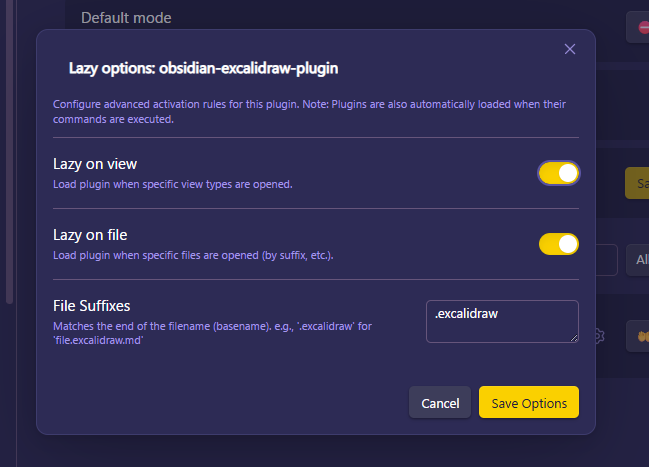 Settings modal.