
README file from
GithubMovieLog
An Obsidian plugin for tracking your movie and TV series watching history. Fetches media information via TMDB API, generates structured watch records, and displays them in a card wall view.
Features
- TMDB Search: Search movies and TV series via command palette, automatically fetch metadata
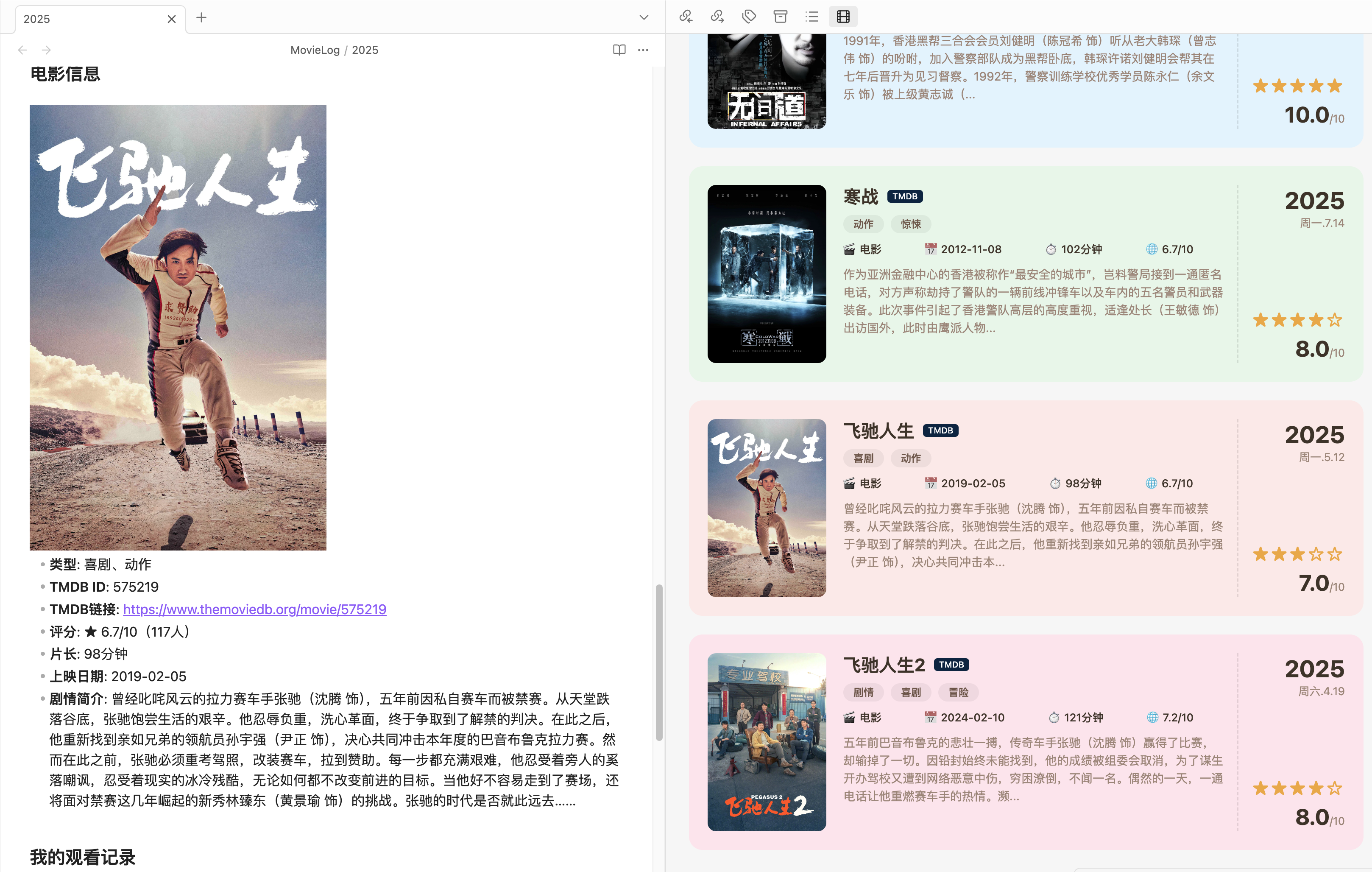
- Templated Records: Auto-generate Markdown files with posters, ratings, synopsis, etc.
- Series Support: Track TV series by season, including episode lists and watch progress
- Card Wall View: Browse all watch records in a visual card grid
- Personal Fields: Fill in your thoughts, personal rating, watch platform, watch status, etc.
Preview
Installation
Method 1: Install from Obsidian Community Plugins (Recommended)
- Open Obsidian → Settings → Community Plugins → Browse
- Search for "MovieLog"
- Click Install and Enable
Method 2: Manual Installation
- Download the latest
main.js,manifest.json,styles.cssfrom Releases - Create the plugin directory in your Obsidian vault:
{your vault}/.obsidian/plugins/movielog/ - Copy the three downloaded files into that directory
- Open Obsidian → Settings → Community Plugins → Enable MovieLog
Method 3: Build from Source
# Clone the repository
git clone https://github.com/zzditto/MovieLog.git
cd movielog

# Install dependencies
npm install

# Build
npm run build

# Copy to your Obsidian vault
cp main.js manifest.json styles.css /path/to/your/vault/.obsidian/plugins/movielog/
Configuration
- Open Obsidian → Settings → Community Plugins → MovieLog
- Enter your TMDB API Key:
- Sign up at themoviedb.org
- Get your API Key from API Settings
- Configure other options:
- Default Save Folder: Directory for watch records (default:
MovieLog) - TMDB Language: Metadata language (default: Simplified Chinese)
- Card Size: Display size of cards in the card wall
- Sort By: Sort by watch date, title, rating, or release date
- Default Save Folder: Directory for watch records (default:
Usage
Add Movie Record
- Press
Ctrl+P(Cmd+Pon macOS) to open the command palette - Type
MovieLog: Add Movie Record - Enter the movie name and search
- Select the movie from the result list
- A Markdown file with complete information is auto-generated
- Fill in your thoughts, rating, and other personal fields
Add TV Series Record
- Open the command palette, type
MovieLog: Add TV Series Record - Search for the TV series name
- After selecting the series, choose the season to record
- A file with series information and episode list is auto-generated
- Update watch progress and your thoughts
View Card Wall
- Click the movie icon in the left sidebar
- Or use the command palette and type
MovieLog: Open Card Wall - Browse all watch records, click a card to jump to the corresponding file
License
MIT License