
README file from
GithubMood Quarter Calendar
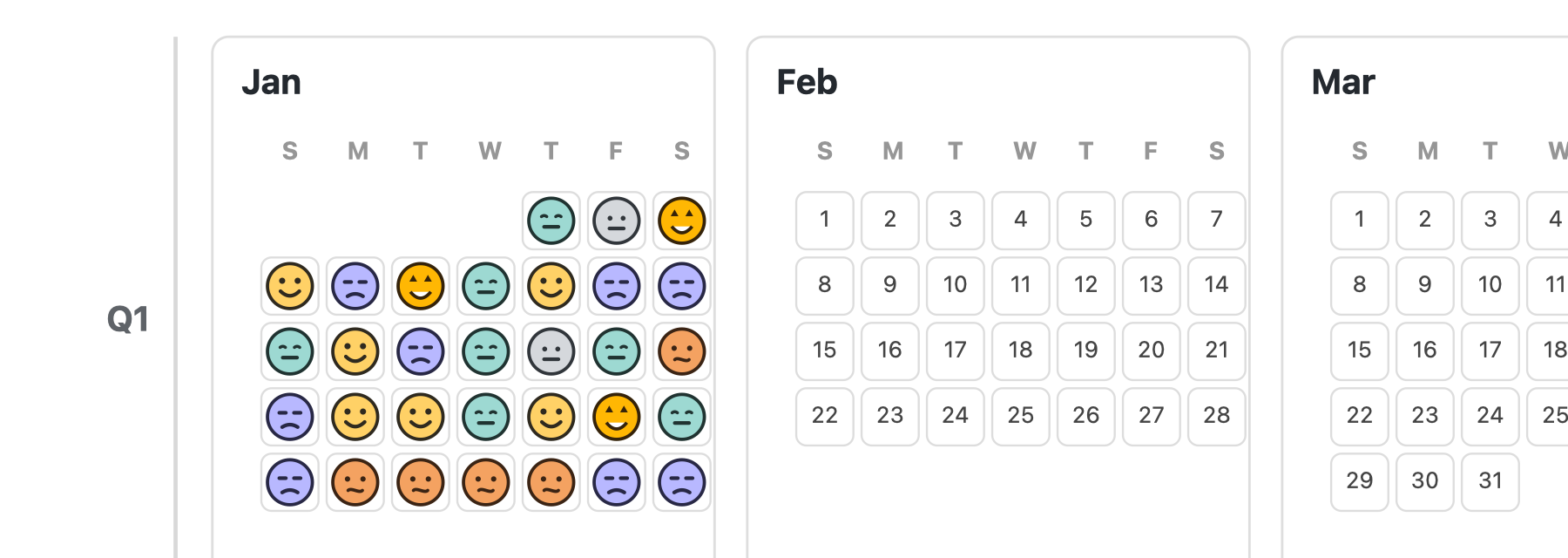
Mood Quarter Calendar is a lightweight Obsidian plugin for people who want a yearly mood tracker that still feels like a journal. It reads mood from your daily notes and displays custom SVG mood faces in a readable quarter-by-quarter calendar.
Instead of another dense heatmap or a separate mood database, this plugin keeps your mood data in Markdown: frontmatter, inline fields, or tags such as #mood/happy.
What Makes It Different
- Custom SVG mood faces: uses consistent vector faces instead of system emoji or plain color blocks.
- Quarter-by-quarter year layout: displays three months per row, making month boundaries easier to see than a dense GitHub-style heatmap.
- Markdown-first tracking: reads mood directly from daily notes, without storing your personal mood history in a separate JSON database.
- Tag-friendly input: supports
#mood/happy,#心情/开心,mood: happy, andmood:: happy. - Low-friction editing: click a date to record mood, or just write a mood tag while journaling.
- Local and private: reads and writes only local files in your vault.
Why Another Mood Calendar?
Existing Obsidian plugins can track mood, render heatmaps, or help insert emotion words. Mood Quarter Calendar focuses on a narrower gap:
Show the emotional texture of a year at a glance, using readable calendar structure and expressive but consistent visual symbols.
It is not trying to be a full diary system, AI coach, or analytics suite. It is a small visual layer over the journal you already write.
Features
- Render a full-year mood calendar in a Markdown code block.
- Show one quarter per row, with three months per row.
- Display one custom SVG face per recorded day.
- Keep mood and mood detail data in the source daily note.
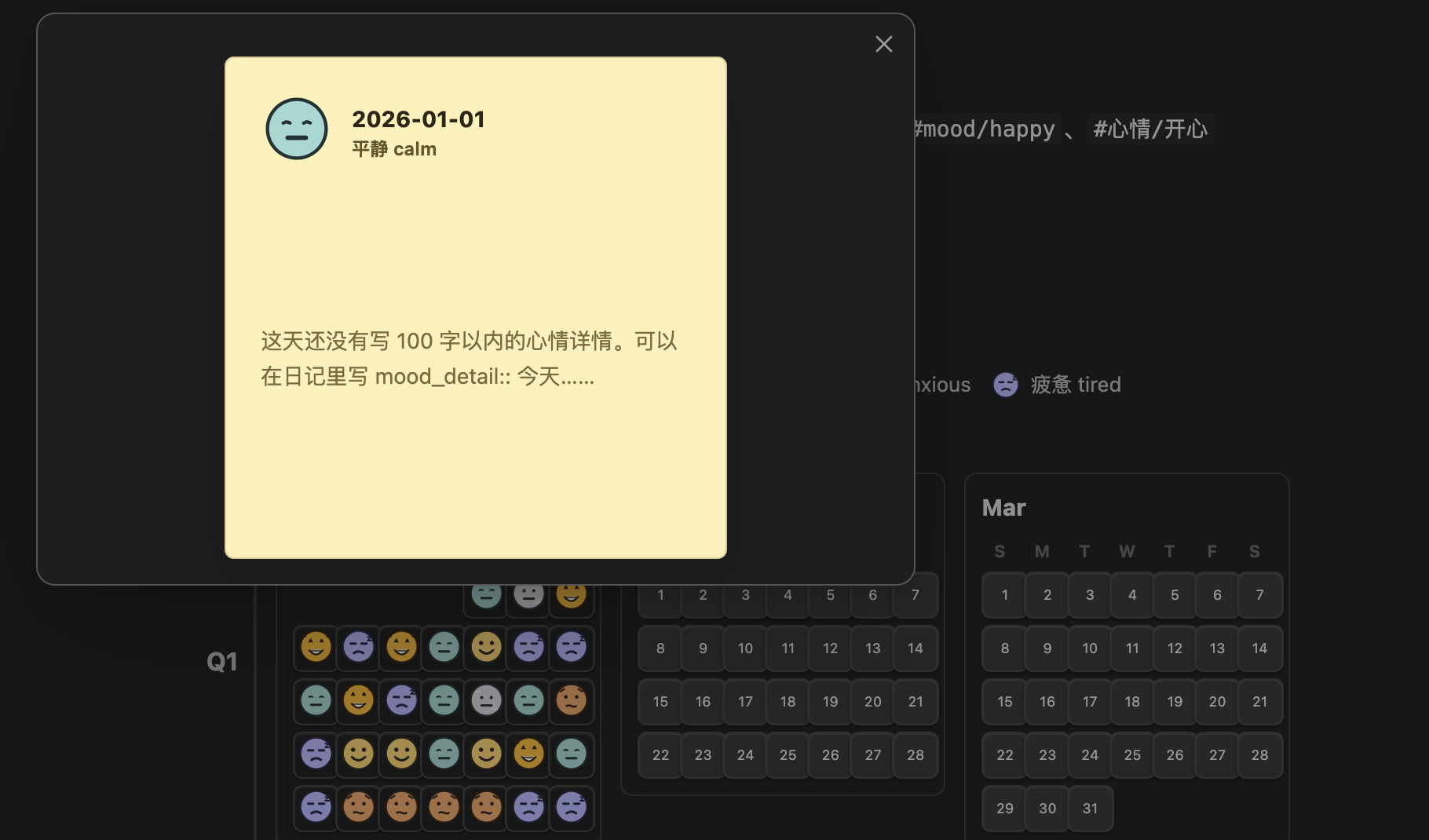
- Click a recorded mood face to open a square sticky note with the day's short mood detail.
- Record mood by clicking an empty day in the calendar.
- Read mood from frontmatter, inline fields, or body/frontmatter tags.
- Create a missing daily note when recording a mood for a date that does not exist yet.
Mood Values
The plugin supports these mood keys:
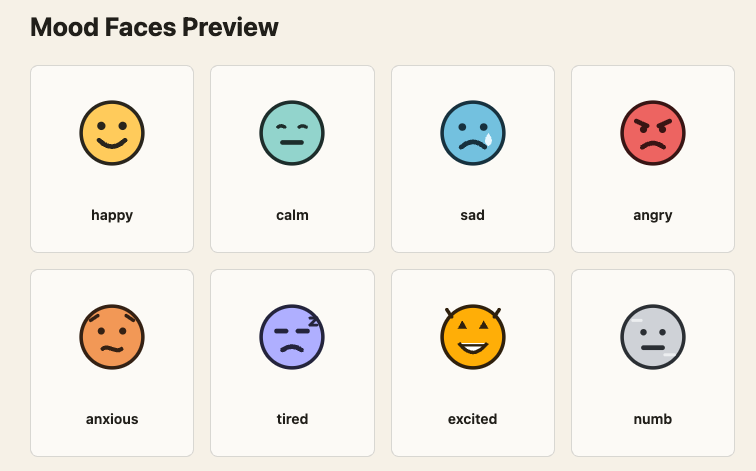
| Key | Meaning |
|---|---|
happy |
开心 |
calm |
平静 |
sad |
难过 |
angry |
生气 |
anxious |
焦虑 |
tired |
疲惫 |
excited |
兴奋 |
numb |
麻木 / 没感觉 |
These faces are rendered directly by the plugin, so they look consistent across platforms and do not depend on Apple, Windows, or Android emoji fonts.
Usage
Add a code block to any note:
```mood-quarter-calendar
year: 2026
```
The plugin scans daily notes whose path contains 02_Daily and whose filename is YYYY-MM-DD.md.
Recording Mood
You can record mood in frontmatter:
---
mood: happy
mood_detail: 今天整体很稳定,完成了重要任务,也有一点被看见的开心。
---
You can record mood with an inline field:
mood:: happy
mood_detail:: 今天整体很稳定,完成了重要任务,也有一点被看见的开心。
You can also record mood with tags in frontmatter or the note body:
---
tags: [mood/happy]
---
#mood/happy
#心情/开心
Mood details are optional and capped at 100 characters in the sticky note. Supported detail fields are mood_detail, mood_note, mood_detail_cn, and Chinese inline fields such as 心情详情:: 今天…….
The command Mood Quarter Calendar: Record today's mood opens a mood picker and writes both mood: <key> and mood/<key> by default. Clicking a day that already has a mood opens its sticky note instead of the picker.
Settings
Daily folder segment: the folder name used to identify daily notes. Default:02_Daily.Mood property: the frontmatter property used for mood. Default:mood.Mood detail properties: comma-separated frontmatter or inline fields used for the sticky note. Default:mood_detail,mood_note,mood_detail_cn.Daily note path pattern: used when creating a missing daily note.Default year: optional fallback year.Also write mood tag: writes amood/<key>tag when using the picker.
Sticky Note Preview
Clicking a recorded mood face opens a square sticky note. The note displays the mood face, date, mood label, and a short detail pulled from your daily note.
Privacy
Mood Quarter Calendar only reads and writes local Markdown files in your Obsidian vault. It does not send data to any external service.
Manual Installation
Download the latest release assets:
manifest.jsonmain.jsstyles.css
Place them in:
<your-vault>/.obsidian/plugins/mood-quarter-calendar/
Then reload Obsidian and enable the plugin in Community Plugins.
Release Checklist
For Obsidian community plugin releases, attach these files to each GitHub release:
main.jsmanifest.jsonstyles.css
The release tag must match the version in manifest.json.
License
MIT