
README file from
GithubMarvis


⭐️ Marvis is brand new and shipping weekly. Expect rough edges. If you hit a bug or have an idea, please open an issue — every report helps shape the next release. Thanks for trying it!
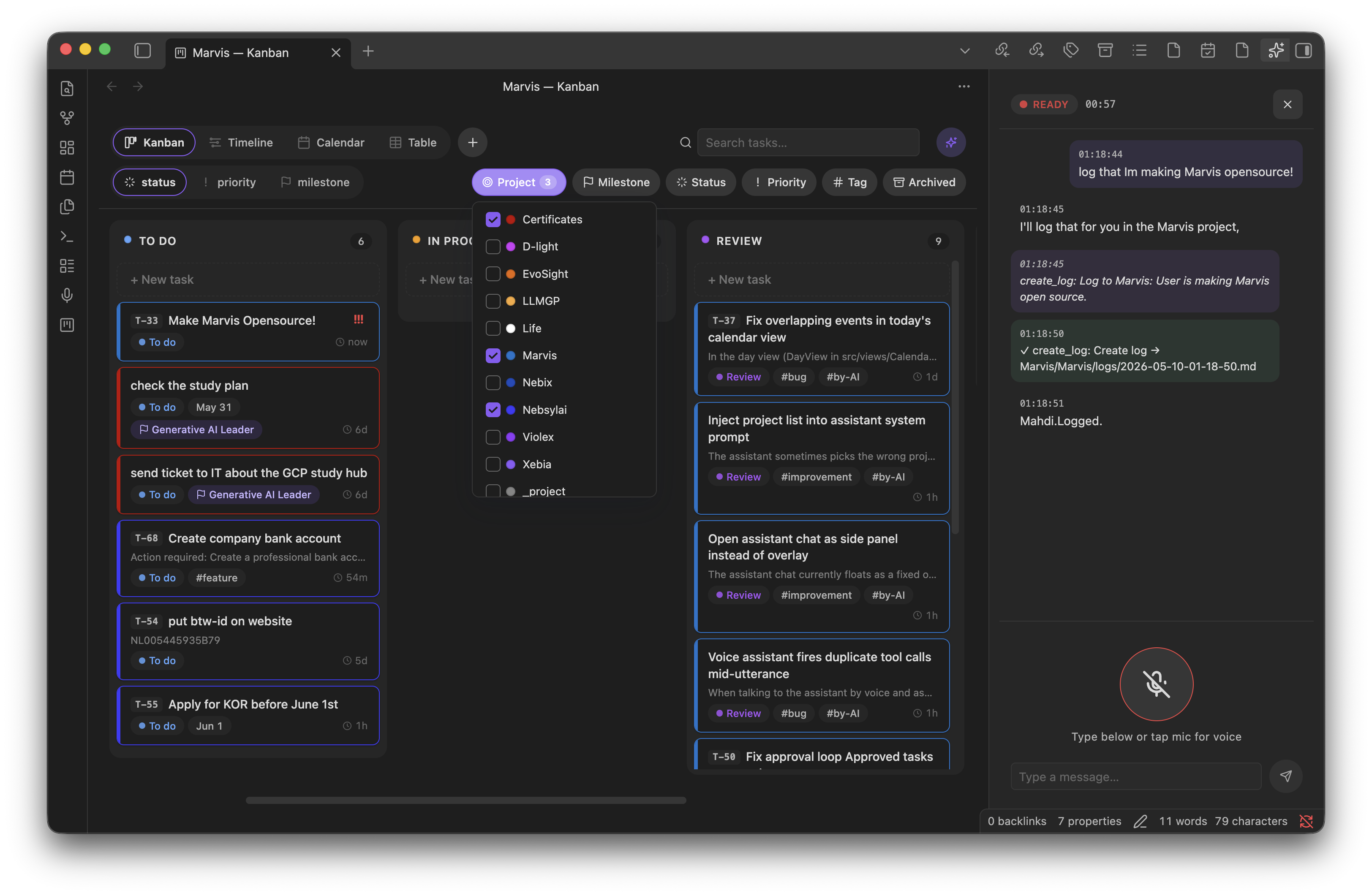
A multi-view project planner and habit tracker for Obsidian. Projects, milestones, tasks, logs, habits and events are real markdown notes; views (Kanban, Timeline, Calendar, Table) sit on top.
Highlights
🖥️ Four views, one source of truth
Kanban, Timeline (Gantt), Calendar, and Table all render the same data — every project, milestone, task, log, and event is a real markdown note with frontmatter. Drag-and-drop, filtering by project / milestone / status / priority / tag / date, and fuzzy text search work consistently across all four.
🦜 Live voice AI assistant
Talk to your planner — voice or text — via Google Gemini Live. Knows your projects and the note you have open, so "add a task here, high priority, due Friday" or "what's on my plate today?" just works. Every vault write is gated by a confirmation modal. Bring your own Gemini API key; nothing is proxied.
📆 Apple Calendar sync (macOS)
Pull any of your Apple Calendars into the vault as real Marvis events — markdown notes that participate in every view. One-way (external → vault), idempotent, recurrence-aware, with invitation status surfaced visually.
🦾 Coding agents as project managers
Symlink a Marvis project folder into your code repo and the bundled marvis-project skill teaches Claude Code, Cursor, etc. how to pick tasks, update status, and append work logs against your real planning notes. Because every task is its own file, you can run multiple assistant sessions in parallel on different tasks — nothing collides.
📱 Mobile-ready
Every view works on Obsidian iOS and Android. The toolbar collapses into a mobile nav bar, filters and create flows open as full-screen modals, and tap targets are sized for thumbs. macOS-only features (Apple Calendar sync) hide themselves on other platforms.
Features
- Four switchable views over the same data:
- Kanban — group by status, priority, or milestone.
- Timeline — Gantt-style with day/week/month zoom, grouped by project or milestone, with overlap-aware lane packing so rows stay compact.
- Calendar — month/week/day modes; events render with response-status cues (needs-response, tentative, declined).
- Table — per-kind sub-tabs for tasks, projects, milestones, events, and logs, all sortable.
- First-class entities — projects, milestones, tasks, logs, and events are notes with frontmatter, fully compatible with Dataview/Bases.
- Stable IDs — every item gets a
T-/L-/M-/P-/E-code; backfill command for existing vaults. - Filtering & search — project, milestone, status, priority, tag, date range, fuzzy text; tab-aware (the Project chip hides on the Projects table, etc.).
- Drag-and-drop — reorder/restage in Kanban (fractional indexing), reschedule and resize in Timeline, drag events in Calendar.
- Quick-create with smart parsing:
Fix login !high due:tomorrow @Brison #bug. - Quick log to capture timestamped notes against a project.
- Recurring tasks/events via RRULE.
- Customisable statuses & priorities with colours; configurable root folder and view defaults.
- Apple Calendar sync (macOS) — one-way pull of events into the vault, mapped to projects.
- Conversational AI assistant (Gemini Live, voice + text) — docks as a right-sidebar panel; aware of your projects and the file you have focused so deictic references ("this task", "the current note") resolve automatically; every vault change is gated by a confirmation modal; transcripts can be persisted to
_chats/. - Per-project coding-agent skill — each project gets a
skills/marvis.mdscaffolded from a configurable template, so external agents (Claude Code, Cursor, …) can pick up project conventions automatically. - Archive — move done tasks into a project's
archive/folder. - Mobile-friendly — works on Obsidian mobile (macOS-only features like Apple Calendar sync degrade gracefully).
Vault layout
Marvis/
  Project Life/
    _project.md
    milestones/v1.md
    tasks/Fix-login.md
    logs/2026-05-04-09-30-00.md
    events/2026-05-10-kickoff.md
    skills/marvis.md
    archive/
Development
npm install
npm run dev      # esbuild watch
npm run build    # tsc + esbuild production
To test in a real vault, symlink this folder into <vault>/.obsidian/plugins/marvis/.
See CONTRIBUTING.md for the full setup + contribution flow, and ARCHITECTURE.md for the code map and conventions.
Support
Marvis is free and MIT-licensed. If it saves you time, you can sponsor ongoing development via GitHub Sponsors or buy me a coffee — both pay for new features, faster issue triage, and the occasional coffee.
Security
Found a vulnerability? Please don't open a public issue — see SECURITY.md.
License
MIT © Mahdi Massahi