
README file from
GithubLock Cards
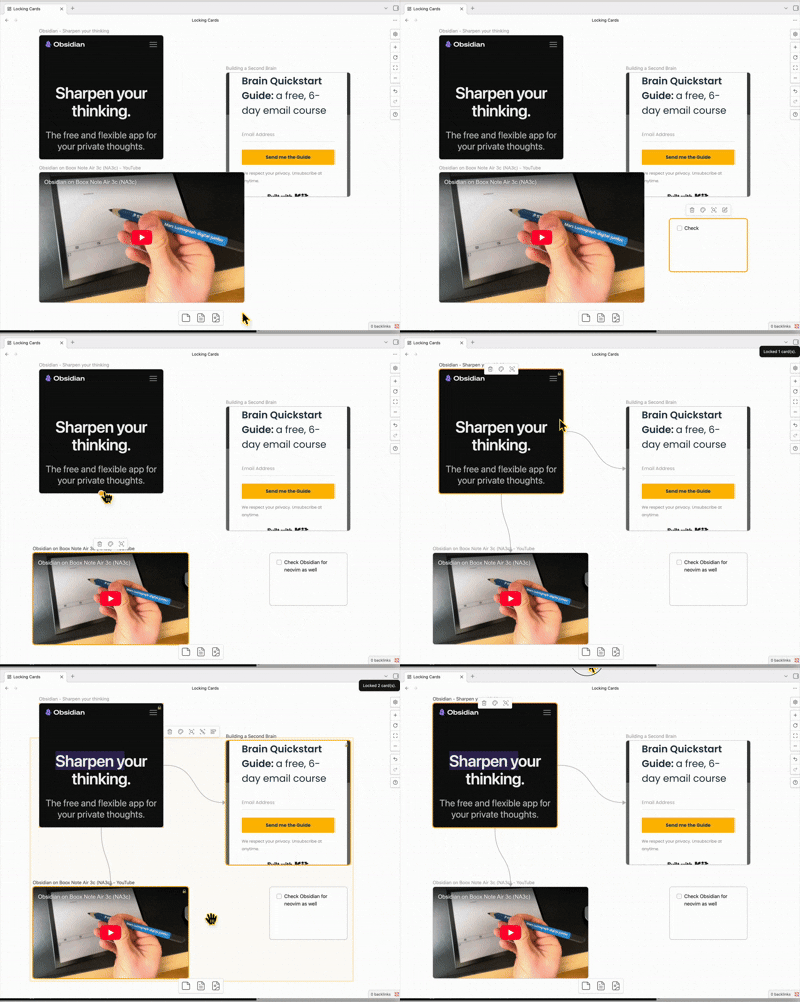
Lock selected Canvas cards to prevent moving and resizing.
Usage
- Open a Canvas.
- Select one or more cards.
- Run the command Toggle lock for selected canvas cards.
Locked cards are visually marked and attempts to move/resize them are reverted.
Settings
- Disable lock while shift is held: temporarily allow moving locked cards by holding shift.
Install (manual)
Copy these files into:
<Vault>/.obsidian/plugins/lock-cards/
main.jsmanifest.jsonstyles.css
Then reload Obsidian and enable the plugin in Settings → Community plugins.
Development
- Install dependencies:
npm install - Watch build:
npm run dev - Production build:
npm run build - Lint:
npm run lint
Troubleshooting
- If commands don’t appear, make sure the plugin is enabled and Obsidian has been reloaded.