Lindar

by punkyard
5
4
3
2
1
Score: 35/100
New Plugin

Description

This plugin has not been manually reviewed by Obsidian staff. Yearly linear calendar plugin for Obsidian, designed for long-horizon planning
Reviews

No reviews yet.

Stats

stars
downloads
0
forks
0
days
NaN
days
NaN
days
0
total PRs
0
open PRs
0
closed PRs
0
merged PRs
0
total issues
0
open issues
0
closed issues
0
commits

Latest Version

Invalid date

Changelog

README file from

Github

Lindar

Yet another yearly linear calendar plugin for Obsidian, designed for long-horizon planning, but:

  • yearly
  • horizontal
  • linear

Lindar is a response to Nick Milo's request — in his video The Most Useful Calendar View in 2025 That No One Told You About from his channel Linking Your Thinking

We'd like to thank him for his approach and his inspiration that guided the visual interface of Linear Calendar we, too, are very much concerned by the tools we are provided with by usual apps and websites

Why a yearly linear calendar?

  • you might find answer to every aspect of this question in Milo's video
  • but put in simple words:
    • it's the possibililty to see your entire year on one page

.. our calendar is bigger than a month to help you change your perspective and challenge your actions

Overview

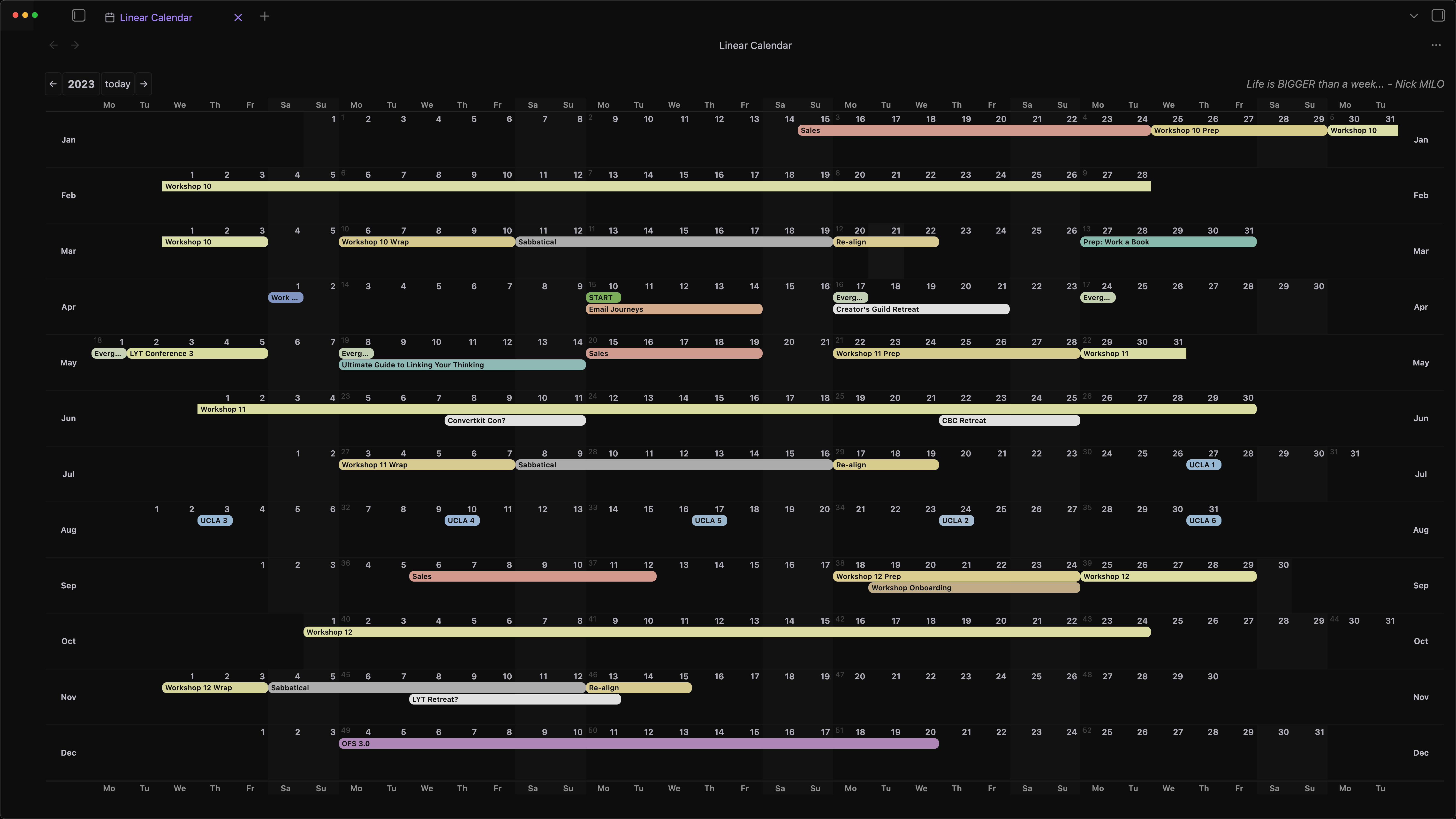
Lindar is a yearly horizontal linear calendar plugin for Obsidian.

The goal is simple: show the whole year at once, with one line per month, days flowing horizontally, and enough visual clarity to make longer time horizons feel natural again.

This project is inspired by Nick Milo's call for a more useful yearly calendar view, and by the broader idea that planning tools should support thinking beyond the current week or month.

Quick start

  1. Open the Linear Calendar view from the ribbon icon or command palette.
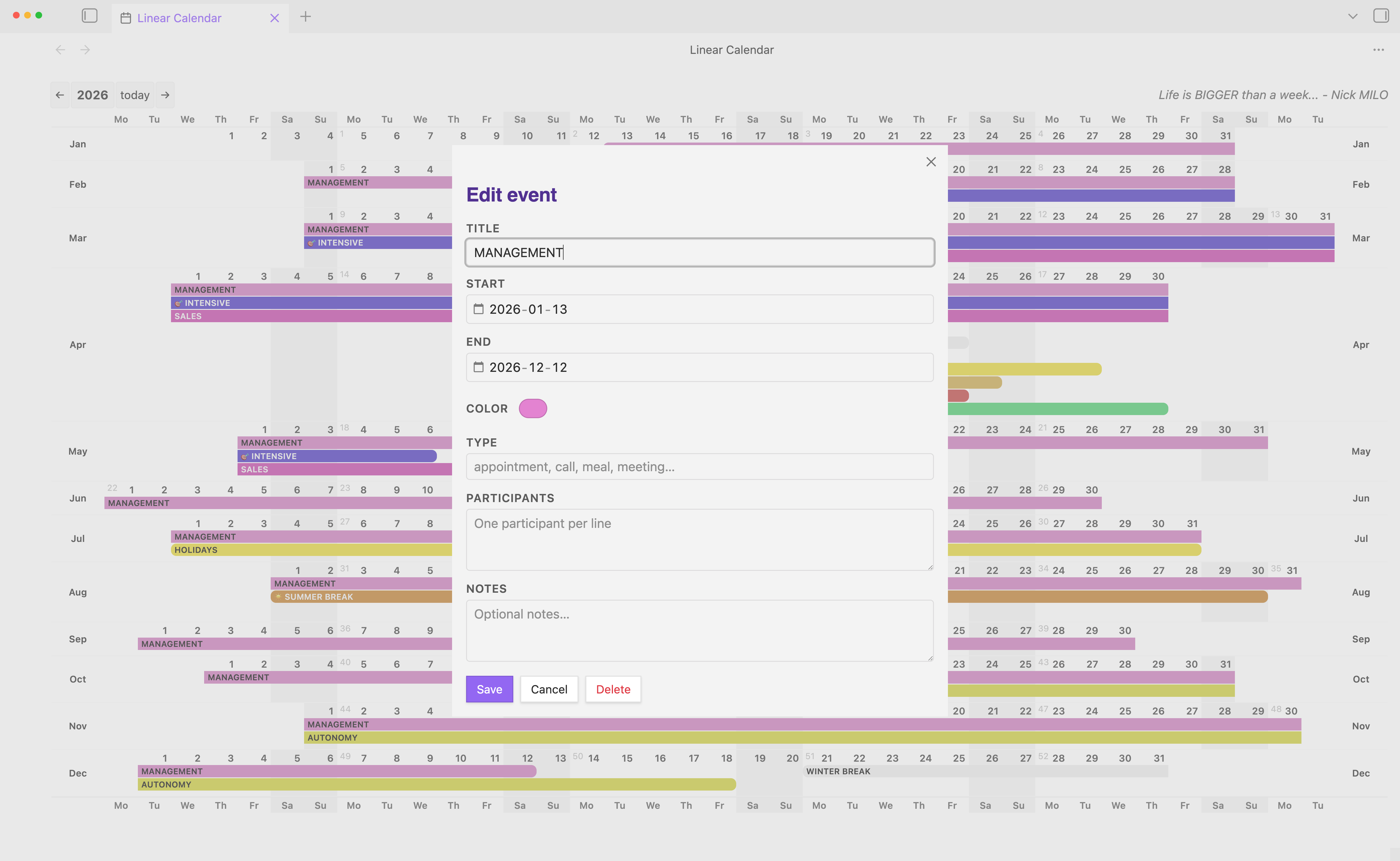
  2. Click a date (soon drag across dates) to create an event.
  3. Fill in title, date range, color, and optional metadata (type, participants).
  4. Save: the event is written as a Markdown note in your configured events folder.

Target experience

The plugin is being designed around these principles:

  • one row per month
  • horizontal scrolling across the full yearly grid
  • weekday headers aligned with each date column
  • sticky month labels on the left
  • a clean, elegant layout that feels at home in Obsidian
  • fast event creation directly from the calendar
  • beautiful, highly visible multi-day event bars

Planned feature set

Calendar layout

  • Yearly horizontal linear calendar with one row per month
  • Dates arranged horizontally across each month row
  • Weekday headers repeating across the top and aligned to date positions
  • Sticky year header and sticky month column
  • 96vh layout for an immersive full-page view
  • Horizontal scrolling for the grid
  • Today highlight so the current date stands out immediately
  • Light and dark theme support using Obsidian theme variables
  • Customizable motto shown in the view
  • Year navigation to move backward and forward across years

Event creation

  • Click a date cell to open a popup and create an event
  • Click-drag across cells to create a multi-day selection
  • Start and end dates editable in the popup
  • Free-text event type with lightweight suggestions like appointment, call, meal, or meeting
  • Participants list captured directly in the popup, one per line
  • Native OS color picker when available, with a curated palette fallback
  • Single-day and multi-day events rendered directly on the grid
  • Cross-week, cross-month, and cross-row continuity for longer events
  • Multiple events per day displayed cleanly without turning the grid into soup
  • Edit and delete existing events from the same popup

Storage model

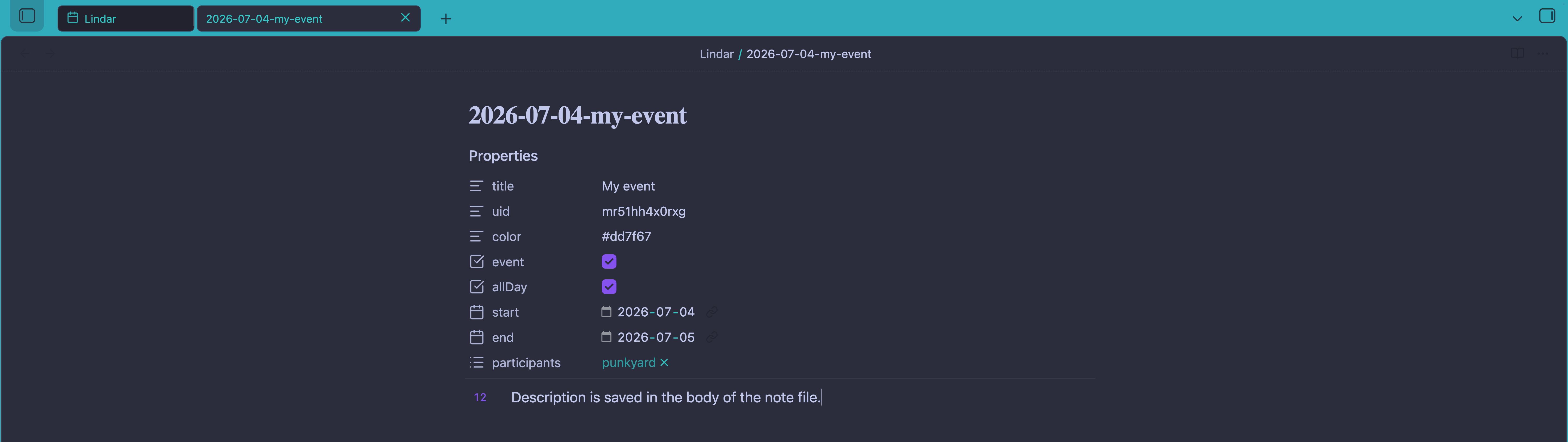
  • Events stored as Markdown notes inside the vault
  • one event note per event, using YAML frontmatter metadata
  • event notes remain searchable, linkable, and portable
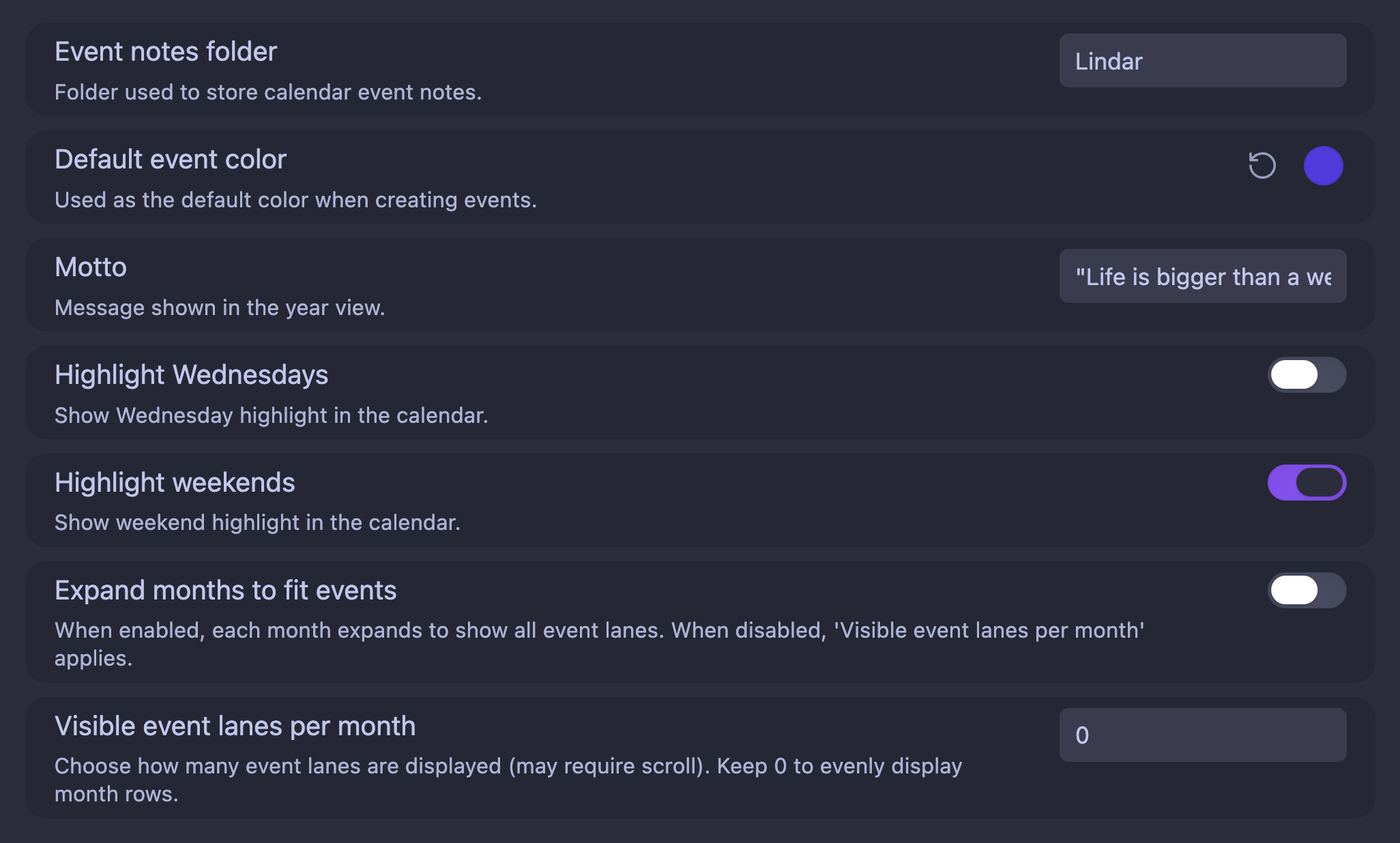
  • configurable events folder path in plugin settings

Example event note shape:

---
uid: abc123
event: true
allDay: true
title: Birthday party
date: 2026-04-20
endDate: 2026-04-22
color: "#e74c3c"
type: appointment
participants:
    - Alice
    - Bob
---
Optional notes about the event...

Event frontmatter

Linear Calendar stores each calendar item as a Markdown note with YAML frontmatter.

  • uid: stable internal event id
  • event: true: explicit marker for Linear Calendar event notes
  • allDay: true: current storage mode for yearly bar rendering
  • title: visible label in the calendar
  • date: start date in YYYY-MM-DD
  • endDate: inclusive end date in YYYY-MM-DD
  • color: event bar color
  • type: optional free-text classifier
  • participants: optional YAML list of people involved
  • note body: optional notes/details

type stays intentionally free-form.

That means you can use familiar values like:

  • appointment
  • call
  • meal
  • meeting
  • travel
  • deadline

...or any label matching your own workflow.

Existing older event notes without event, type, or participants remain compatible.

Compatibility notes

  • Older event notes continue loading even if they only have legacy fields.
  • event: false is treated as a deliberate opt-out and will not be loaded.
  • participants can be stored as a YAML list; empty values are ignored.

Technical direction

The plugin is planned as a standard Obsidian community plugin:

  • TypeScript
  • esbuild
  • npm
  • Obsidian Plugin API
  • modular source structure under src/
  • pure Obsidian/DOM UI approach rather than a heavy web framework

Development setup

The expected development flow follows the standard Obsidian community plugin workflow.

Prerequisites

  • git
  • Node.js (current LTS recommended)
  • npm
  • Obsidian
  • a separate Obsidian vault for plugin development

The safest starting point is the official Obsidian sample plugin structure, then adapt it for Linear Calendar:

  • clone or copy the sample plugin into .obsidian/plugins/obsidian-lindar
  • rename the plugin folder to match the final plugin id
  • update manifest.json with the correct plugin metadata
  • keep source files under src/
  • keep main.ts focused on plugin lifecycle and registration

Local development loop

From the plugin folder:

  • run npm install
  • run npm run dev
  • let the build watch process regenerate main.js on changes
  • reload Obsidian after manifest changes
  • enable the plugin in Settings → Community plugins

Expected project files

The roadmap assumes a typical Obsidian plugin layout like:

  • src/main.ts — plugin entry point
  • src/settings.ts — settings model and defaults
  • src/types.ts — shared calendar and event types
  • manifest.json — plugin metadata
  • package.json — scripts and dependencies
  • tsconfig.json — TypeScript configuration
  • esbuild.config.mjs — bundling configuration
  • versions.json — plugin version compatibility map
  • README.md — user-facing documentation
  • LICENSE — MIT license text

Development expectations

  • test inside a separate development vault, not a primary vault
  • prefer modular files over a large main.ts
  • use Obsidian APIs for settings, commands, views, and cleanup registration
  • keep startup work light and defer heavy rendering until needed
  • avoid network behavior in v1 unless clearly documented and user-controlled

Notes for contributors

  • Keep type free-form (do not enforce a strict enum).
  • Treat schema additions as backward-compatible unless explicitly marked breaking.
  • Prefer small frontmatter keys and stable semantics across releases.

Current development status

The plugin is actively moving from event rendering toward scroll and layout polish.

Note: feature branch feature/phase3-event-creation is ready locally. Further Linear Calendar work will continue in a separate conversation.

  • Yearly horizontal calendar grid with sticky month labels and headers
  • Event creation popup and markdown-backed event storage
  • Single-day and multi-day event rendering in month rows
  • Edit and delete events from the calendar
  • Render continuous multi-day event bars below date numbers
  • Improve month-list wheel capture, scroll behavior, and responsive lane layout
  • Finalize month event lane scrolling in empty tail areas
  • Polish event bars: spacing, contrast, and overflow
  • Add optional event type and participants metadata to stored event notes
  • Complete release readiness documentation and tests

Scaling and performance backlog (deferred)

The high-impact runtime optimizations are already in place (event cache, coalesced rendering, stale-render guards).

For larger vaults and heavier usage, these advanced optimizations are intentionally deferred:

  • Incremental rendering (update only changed month rows instead of rebuilding the full year view)
  • Background/preload event parsing strategy for very large event collections
  • Vault file-change listeners to keep in-memory event cache hot without explicit reloads

Roadmap

Phase 1 — scaffold

  • Start from the official Obsidian sample plugin structure
  • Create manifest.json
  • Create package.json
  • Create tsconfig.json
  • Create esbuild.config.mjs
  • Add versions.json
  • Add LICENSE
  • Create plugin entry point in src/main.ts
  • Create settings model in src/settings.ts
  • Create shared types in src/types.ts
  • Keep main.ts minimal and move feature logic into focused modules under src/
  • Add strict TypeScript settings and Obsidian typings
  • Implement settings persistence with loadData() and saveData()
  • Register a custom Obsidian view for the calendar
  • Add a ribbon icon and command to open Linear Calendar
  • Run npm install and confirm npm run dev rebuilds successfully
  • Test the plugin inside a separate development vault

Phase 2 — base calendar view

  • Render the yearly view with 12 month rows
  • Add correct day offsets for every month
  • Align weekday headers with the date grid
  • Make the month column sticky on the left
  • Make the header sticky on top
  • Apply the 96vh layout
  • Add horizontal scrolling
  • Highlight today
  • Add light/dark theme styling
  • Add year navigation controls
  • Display the customizable motto

Phase 3 — event creation and storage

  • Open a popup when the user clicks a date cell
  • Add title, start date, end date, color, and notes fields
  • Use the native color input when supported by the OS
  • Save events as Markdown notes with YAML frontmatter
  • Load saved events back into the calendar view
  • Render single-day and multi-day events as colored event bars
  • Edit and delete existing events from the calendar
  • Improve event bar spacing, contrast, and overflow behavior

Phase 4 — multi-day events and layout

  • Render multi-day events as continuous bars
  • Support events spanning weeks and months
  • Handle overlapping events with sensible lane stacking
  • Finalize month event lane scroll interaction
  • Add adaptive lane height / month-specific scrolling
  • Fix empty-event-list tail area wheel propagation

Phase 5 — polish

  • Add hover details / tooltip behavior
  • Improve spacing, typography, borders, and color balance
  • Auto-scroll the view so today is visible when useful
  • Handle leap years and edge cases gracefully
  • Finalize installation instructions and README usage guidance
  • Verify manual install works with main.js, manifest.json, and optional styles.css
  • Test reload/unload cleanup and command stability
  • Self-review against Obsidian developer policies and plugin guidelines
  • Test on macOS, Windows, and Linux where possible

Phase 6 — release and submission

  • Bump manifest.json version using SemVer
  • Update versions.json to map plugin version to minimum app version
  • Ensure manifest.json includes stable id, name, version, author, description, minAppVersion, and isDesktopOnly
  • Build release artifacts and verify main.js is bundled correctly
  • Create a GitHub release whose tag exactly matches manifest.json version, with no v prefix
  • Upload main.js, manifest.json, and optional styles.css as individual release assets
  • Confirm the repository includes README.md and LICENSE
  • Verify README clearly describes the plugin purpose and usage
  • Fork obsidianmd/obsidian-releases
  • Add the plugin entry to community-plugins.json
  • Ensure the submitted description matches manifest.json exactly
  • Open the community plugin PR using the plugin submission template
  • Complete the release checklist and respond to validation feedback

Release readiness checklist

When Linear Calendar is ready for release, this is the practical checklist to complete before submission:

Repository readiness

  • README.md clearly explains what the plugin does and how to use it
  • LICENSE is present and matches MIT
  • manifest.json contains the correct id, name, version, author, description, minAppVersion, and isDesktopOnly
  • versions.json exists and includes an entry for the current release version
  • main.js is built and committed for release artifacts
  • styles.css is included if custom styling is required
  • package.json scripts support npm run dev and npm run build
  • The plugin builds cleanly with npm run build
  • The plugin has been validated manually in a dev vault
  • Release tag matches manifest.json version exactly and uses no v prefix
  • GitHub release assets include main.js, manifest.json, and optional styles.css
  • Community submission PR is prepared with a matching description and metadata
  • community-plugins.json entry uses the exact same plugin id
  • Submitted description matches manifest.json description exactly
  • PR is opened against obsidianmd/obsidian-releases with the plugin template
  • Submission checklist is fully completed
  • Any validation failures are fixed by pushing another commit to the PR branch

Design notes

The visual target is:

  • precise grid
  • date numbers aligned at the top-right of cells
  • restrained borders for readability
  • strong event color contrast
  • enough density to see the year, without sacrificing legibility

In short: it has to look good.

Future features

  • when repo hits 100 GitHub ⭐

    • daily notes compatibility: insert and read events in daily notes within a designated block (default 'Agenda')
    • choose where to save: dedicated folder or daily notes or single log file or any file
    • choose event format: file or list block
  • when repo hits 500 GitHub ⭐

    • switch to vertical view
    • click on a month title to create an event all through that month
    • same for days: create a recurrent event on a day of the month throughout the year

License

This project is licensed under the MIT License.