
README file from
GithubKindle Local Sync
Local-only Kindle highlights and notes import for Obsidian.
Kindle Local Sync is a desktop-only Obsidian plugin that reads a USB-connected Kindle's local My Clippings.txt file and writes Kindle highlights and notes into Markdown files inside your Obsidian vault.
Demo
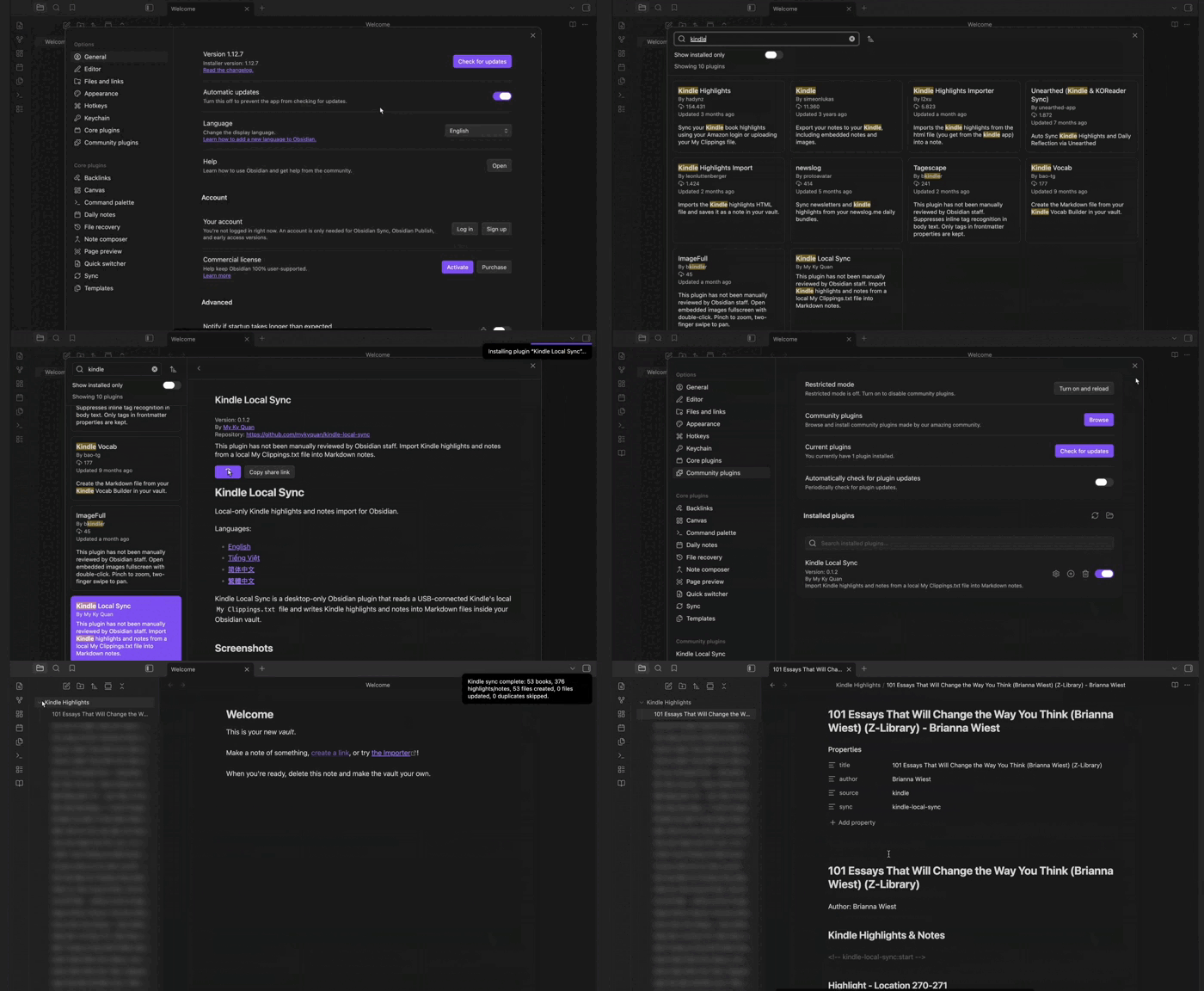
Demo: set the local My Clippings.txt path, sync Kindle highlights, and review the generated Markdown note output.
Features
- Desktop-only Obsidian plugin.
- USB-first Kindle clipping import.
- Manual
My Clippings.txtpath support. - macOS, Windows, and Linux path detection.
- Markdown output inside the Obsidian vault.
- One note per book.
- Generated sync region with stable clipping IDs.
- Safe filename and folder path sanitization.
- Parser and vault writer test coverage.
Languages
Installation from Obsidian Community Plugins
From the community directory (once approved):
Settings → Community plugins → Browse → search "Kindle Local Sync" → Install → Enable.
Quick Start
- Connect your Kindle by USB.
- Open Obsidian.
- Install and enable Kindle Local Sync.
- Set My clippings.txt path if the plugin does not detect your Kindle automatically.
- Select the book icon in the ribbon, or run Sync local kindle highlights from the command palette.
- Open the configured highlights folder to inspect generated notes.
How It Works
- The plugin detects
My Clippings.txtfrom a connected Kindle or a manually configured path. - It reads the local clipping file as UTF-8 text.
- It parses Kindle highlights and notes, skipping bookmark entries.
- It groups clippings by book.
- It creates the configured highlights folder if needed.
- It writes or updates one Markdown note per book.
The plugin only manages content between these markers:
<!-- kindle-local-sync:start -->
<!-- kindle-local-sync:end -->
Content outside those markers is preserved.
Privacy
Kindle Local Sync is local-only by design.
- No Amazon login.
- No Readwise integration.
- No cloud sync.
- No telemetry.
- No external APIs.
- No network requests.
- No vault content leaves your machine through this plugin.
The plugin reads My Clippings.txt from your local filesystem and writes Markdown files inside your Obsidian vault.
Troubleshooting
- Plugin is not listed yet: Install from Obsidian Community Plugins after approval. Until then, use BRAT or the GitHub Release ZIP if you are testing a beta release.
- My Clippings.txt is not found: Connect your Kindle by USB, then set the absolute My clippings.txt path manually in plugin settings.
- No highlights are imported: Confirm your Kindle has a local
My Clippings.txtfile and that it contains highlight or note entries, not only bookmarks. - Second sync looks unchanged: This is expected when the same clippings were already imported. The plugin avoids duplicate highlights and files.
- User notes were added to generated files: Keep personal content outside the
kindle-local-syncmarkers so it is preserved on future syncs.
Roadmap
- Broader parser fixtures from real Kindle clipping variants.
- More manual QA across macOS, Windows, and Linux.
- Release packaging checklist for community plugin submission.
- Optional note format refinements based on user feedback.