
README file from
GithubJSON Inspector
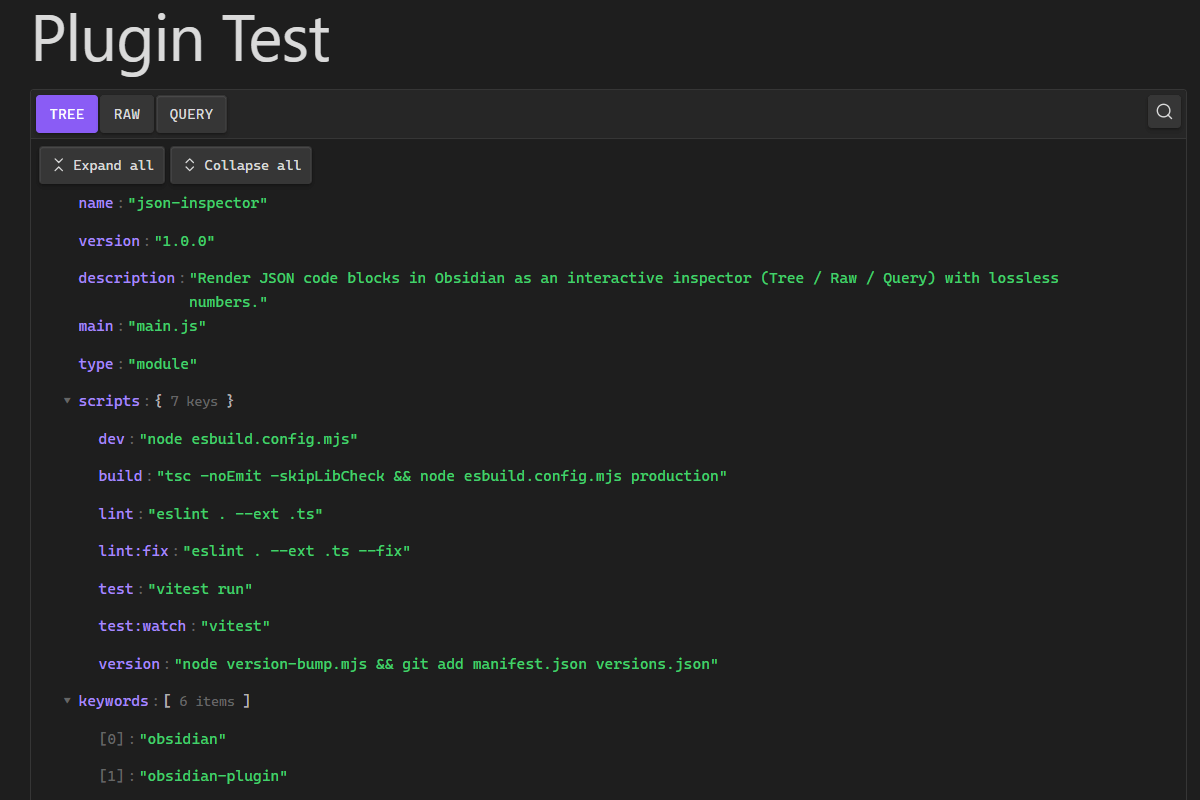
An Obsidian plugin that renders JSON code blocks as an interactive inspector — a Tree view, a Raw view, and a JSONPath Query view — directly inside your notes. Inspired by the JSTools JSON Inspector browser extension for Chrome.
Everything runs locally: no network requests, no telemetry, no accounts,
no eval. Numbers are parsed losslessly, so big integers and
high-precision decimals are never altered.
Created for JSON Formatter
Usage
Add a fenced code block with the language json-inspector:
```json-inspector
{
  "user": {
    "id": 42,
    "name": "Anton",
    "roles": ["admin", "developer"]
  }
}
```
When you leave edit mode (Reading view, or Live Preview with the cursor outside the block) the block becomes an interactive viewer.
Optionally, enable Render standard ```json blocks as JSON Inspector in
settings to also take over plain json blocks. This is off by default to
avoid conflicting with other plugins.
Features
Views
- TREE — collapsible objects/arrays, distinct colors for keys, strings, numbers, booleans and null, item counts, Expand all / Collapse all, keyboard navigation, and lazy rendering so large structures stay responsive. Long values wrap instead of breaking the note width.
- RAW — the exact original JSON, with Beautify, Minify, word-wrap toggle and Copy (the label flips to COPIED briefly). Beautify/Minify re-serialise losslessly.
- QUERY — run JSONPath expressions, execute with Enter, see a match count and result list, copy each result's value and path, and reuse the last 10 queries from local history.
Search
Press Ctrl/Cmd+F inside an inspector to search keys and values: match count, Next/Previous, automatic expansion of the matched node, highlighting, and Escape to close.
Node actions
Each node has an actions button (⋯) with: Copy value, Copy key, Copy object, Copy JSONPath, Copy JSON Pointer, Expand subtree, Collapse subtree.
JSONPath support
The bundled engine is dependency-free and safe (no eval/Function). It
supports $, member access (dot and bracket), array indices (including
negative), wildcards (* / [*]), recursive descent (..), unions ([0,2],
['a','b']), slices ([start:end:step]), and filters ([?(@.price < 10)])
with comparisons, &&/||, grouping and existence tests.
Settings
- Default view — Tree / Raw / Query
- Default expand depth
- Indent size — 2 or 4 (used by Beautify)
- Word wrap
- Show item counts
- Render standard ```json blocks as JSON Inspector (off by default)
- Maximum initial rendered nodes
- Remember query history
- Reset settings
Privacy & security
- No telemetry, no accounts, no network requests.
- No
evaland no unsafeinnerHTML; the DOM is built with safe APIs. - All JSON is processed locally. Note content is never logged to the console.
- Note JSON is never stored in settings or
localStorage. Only your preferences and (optionally) recent JSONPath query strings are persisted.
Accessibility
ARIA labels on all buttons, proper tab semantics for the view tabs, full keyboard navigation of the tree, visible focus states, and theme-driven contrast.
Manual installation
- Build the plugin (or download a release): you need
main.js,manifest.json, andstyles.css. - In your vault, create the folder
<vault>/.obsidian/plugins/json-inspector/. - Copy
main.js,manifest.json, andstyles.cssinto that folder. - In Obsidian: Settings → Community plugins, disable Restricted mode if needed, then enable JSON Inspector.
Building from source
npm install
npm run build      # type-checks, then produces main.js (production)
npm test           # run the unit tests
npm run lint       # lint the source
npm run dev        # watch build for development
The production build (npm run build) emits main.js. Together with
manifest.json and styles.css (already in the repo root), these are the three
files Obsidian needs.
Publishing to Obsidian Community Plugins
- Ensure
manifest.jsonhas a uniqueid, a clearname/description, and a correctminAppVersion, and thatversions.jsonmaps your plugin version to the minimum app version. - Push the code to a public GitHub repository.
- Create a GitHub release whose tag exactly equals the version in
manifest.json(e.g.1.0.0, novprefix), and attachmain.js,manifest.json, andstyles.cssas individual release assets. - Fork
obsidianmd/obsidian-releasesand add an entry for your plugin tocommunity-plugins.json. - Open a pull request and follow the review checklist. Once merged, the plugin appears in the in-app Community Plugins browser.
See the official guide: https://community.obsidian.md/plugins/json-inspector.
Development notes
- Parsing uses
lossless-json; the nativeJSON.parseis intentionally not used for note content. - Logic that needs testing (parser, path/format helpers, search, JSONPath) lives
in
src/servicesandsrc/utilsand is free of Obsidian/DOM imports. - UI components in
src/componentsuse Obsidian's safe DOM helpers and clean up their listeners through theMarkdownRenderChildlifecycle.