
README file from
GithubInline Tag — Obsidian Plugin
Write tag references with display labels. Click to search.


Support
If this plugin saves you time, a coffee is always appreciated ☕


What it does
Obsidian tags are powerful, but there's no built-in way to reference a tag inline with a human-readable label. This plugin introduces a simple syntax that bridges tags and wikilinks:
[[#tag-name|Display Label]]
In Reading view, this renders as a clickable label. Clicking it opens Obsidian Search pre-loaded with tag:#tag-name, showing every note associated with that tag — including notes that reference it via this syntax.
 Write
Write [[#tag|Label]] anywhere in your note — #tag is the searchable target, Label is what gets displayed.
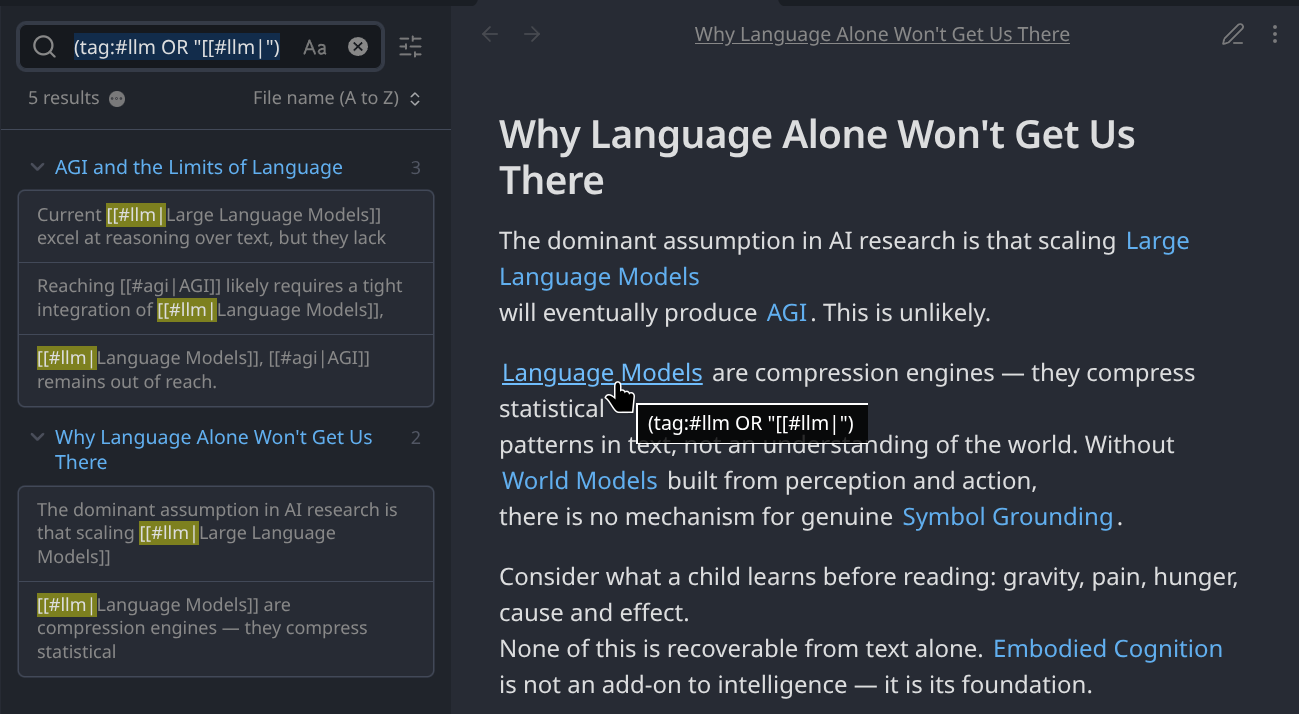 Tags render as clickable labels. Clicking one searches across all notes that share it — here returning 5 results across two notes.
Syntax
[[#TAG|LABEL]]
| Part | Rules |
|---|---|
TAG |
Required. No spaces. Letters, digits, -, _, /, Unicode. |
LABEL |
Required. Spaces and Unicode allowed. |
Valid
[[#backend|Backend]]
[[#work/dev|Web Development]]
[[#ui-ux|UI/UX]]
[[#project-alpha|Project Alpha]]
Invalid (left as raw text)
[[#tag with spaces|Label]]   ← space in tag
[[#tag]]                     ← missing label
[[tag|Label]]                ← missing leading #
[[#|Label]]                  ← empty tag
[[#tag|]]                    ← empty label
Installation
From Obsidian Community Plugins (recommended)
- Open Settings → Community plugins
- Disable Safe mode if prompted
- Click Browse and search for
Inline Tag - Install and enable
Manual
- Download the latest release from GitHub Releases
- Copy
main.js,manifest.json, andstyles.cssinto your vault's.obsidian/plugins/inline-tag/folder - Enable the plugin in Settings → Community plugins
Settings
| Setting | Default | Description |
|---|---|---|
| Live Preview decorations | On | Render tokens as styled labels in Live Preview; the cursor reveals raw syntax inside a token. Desktop only — not available on mobile. |
| Show canonical tag on hover | On | Tooltip shows tag:#name on hover |
| Style mode | Link | Link = styled like a wikilink · Tag pill = styled like a native tag |
| Debug logging | Off | Logs to DevTools console (Ctrl+Shift+I) |
How search works
Clicking a rendered label opens Obsidian Search with:
(tag:#tag-name OR "[[#tag-name|")
This finds:
- Notes with a native
#tag-nameObsidian tag - Notes that reference the tag using this plugin's syntax
Both usages are discoverable from a single click.
Inserting tags
Autocomplete while typing
Start a token with [[# and type a few characters — a suggestion list filtered from your vault's existing tags appears immediately. Select one to insert [[#tagname| with the cursor ready for the label.
Wrap selected text
Select any text, right-click, and choose Wrap as inline tag. A fuzzy-search modal lets you pick the tag; the selection becomes the label.
Known limitations
- Live Preview not available on mobile. Obsidian for Android and iOS does not use the CodeMirror 6 editor extension system, so the Live Preview decoration engine cannot run there. Tokens will render correctly in Reading view on all platforms.
- No hover preview of matching notes.
- No tag rename / refactor tooling.
Contributing
Issues and PRs are welcome on GitHub.
To build locally:
git clone https://github.com/MB-YUL/obsidian-inline-tag-plugin

cd obsidian-inline-tag-plugin
npm install
npm run dev      # watch mode
npm run build    # production build
Copy the output (main.js, manifest.json, styles.css) into your vault's plugin folder.
License
MIT © MB-YUL