
README file from
GithubImage Paste on GitHub
Upload pasted (or dropped) images straight to your own GitHub repository and insert
a raw.githubusercontent.com link instead of saving the file into your vault. Keep
your Obsidian vault small while your screenshots live on GitHub's CDN.
Why
Unlike Notion, Obsidian stores every pasted image as a local file, so your vault keeps growing. This plugin intercepts the paste, commits the image to a GitHub repo you control, and embeds the public raw URL — nothing is written to your vault.
⚠️ Before you start
- The target repository must be public. Raw GitHub links only render without a token for public repos, so every image you paste becomes publicly accessible. Do not paste sensitive screenshots.
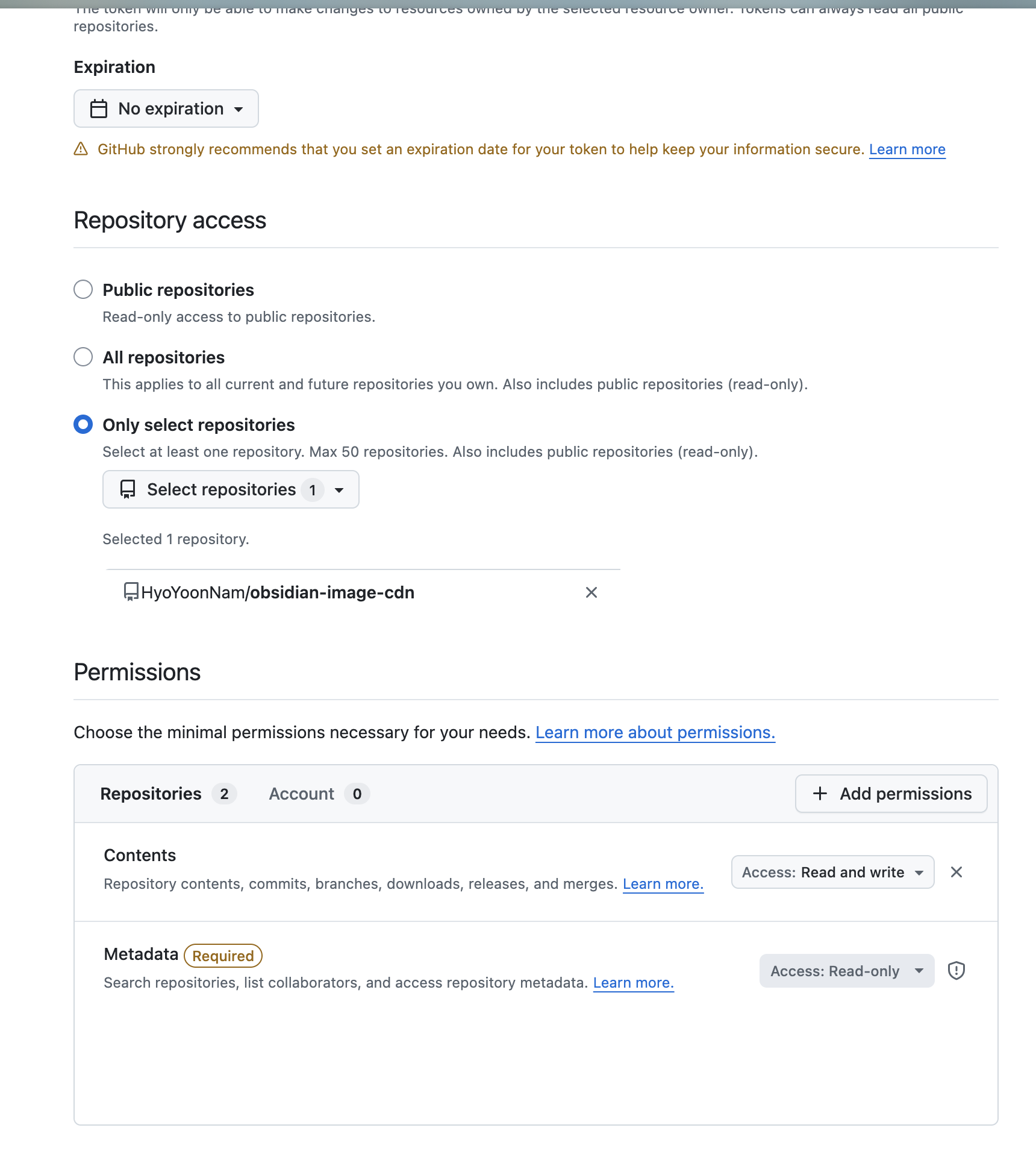
- Use a fine-grained personal access token scoped to a single repository with Contents: read and write, and give it an expiration date. Nothing else is needed, so a leaked token can only push to that one image repo.
- The token is stored unencrypted in this vault's plugin data (
data.json). Do not sync, commit, or sharedata.json.
Setup
Open Settings → Image Paste on GitHub. The settings are ordered so you choose the repository first, then create a token scoped to it:
- Fill in Owner (your username/org) and Repository.
- Create repository → Create: makes a new public repo (and fills in owner and repository for you). If your token is scoped too narrowly to create repos, it opens GitHub's new-repo page instead. Skip this if the repo already exists.
- Create a token → Open GitHub: generates a fine-grained PAT. Restrict it to that repository and grant Contents: read and write, then paste it into GitHub token.
- Optionally adjust Branch (default
main) and Upload path (defaultassets). - Click Test connection to confirm push access and public visibility.
When creating the token, restrict Repository access to your image repository and set Contents to Read and write (Metadata stays Read-only):
Usage
Paste or drag an image into any note. A ![uploading...]() placeholder appears,
and once the upload finishes it is replaced with .
If config is missing, Obsidian's default local-save behavior is left untouched.
Development
npm install
npm run dev    # watch build
npm run build  # type-check + production bundle
Copy main.js, manifest.json, and styles.css into
<vault>/.obsidian/plugins/image-paste-on-github/ to test.
Security
Obsidian has no secure credential storage, so the token is kept unencrypted in
data.json — the same as other token-based plugins. The plugin only sends the token
to GitHub in the Authorization header; it is never written to your notes, logged,
or placed in URLs. The practical risk is data.json leaking through sync, backups,
or sharing, so the main protection is keeping the token narrowly scoped:
- Scope it to a single public repository with Contents: read and write only.
- Set an expiration date and rotate it.
- Never sync, commit, or share
data.json.
With this setup, a leaked token can only push images to that one repo — it cannot touch the rest of your GitHub account.
License
MIT