
README file from
Github*️⃣ Any Task: Bring your checklists to life
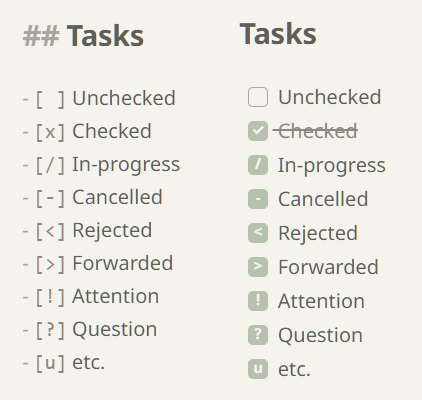
Unlock the full potential of your Obsidian tasks. Any Task renders every task marker as a beautiful, theme-aware checkbox, giving you the freedom to use any character to categorize your workflow.
Whether you're tracking progress with /, scheduling with >, or marking urgency with !, Any Task ensures these markers aren't just plain text—they are fully rendered, interactive checkboxes that look like a native part of your chosen theme.
Author: HMage ([email protected])
✨ Why you'll love Any Task
- ✅ Render any task marker — Transform any character inside your checkboxes (
[/],[>],[!],[-], etc.) into a fully rendered, visual icon. This extends Obsidian's default behavior to support any custom workflow you can imagine. - 🎨 Broad theme compatibility — Built-in support for the custom styles of popular community themes. It applies surgical CSS fixes to ensure every marker aligns perfectly with your chosen aesthetic, regardless of which theme you prefer.
- 🚀 Zero-config, instant setup — No complex menus or settings required. Just enable the plugin and it starts working immediately, adapting to your vault environment and theme changes.
- 💎 Lightweight and blazing fast — Optimized for performance to ensure your notes stay snappy and responsive, even with large task lists.
Installation
- Open Settings → Community plugins.
- Select Browse and search for "Any Task".
- Select Install, then Enable.
Development workspace
To contribute or customize the plugin:
# Install dependencies
npm install

# Start development (watch mode)
npm run dev

# Create a production-ready bundle
npm run build