
README file from
GithubObsidian - Frontmatter Date Manager
English | 简体中文 | Русский | Deutsch | 日本語





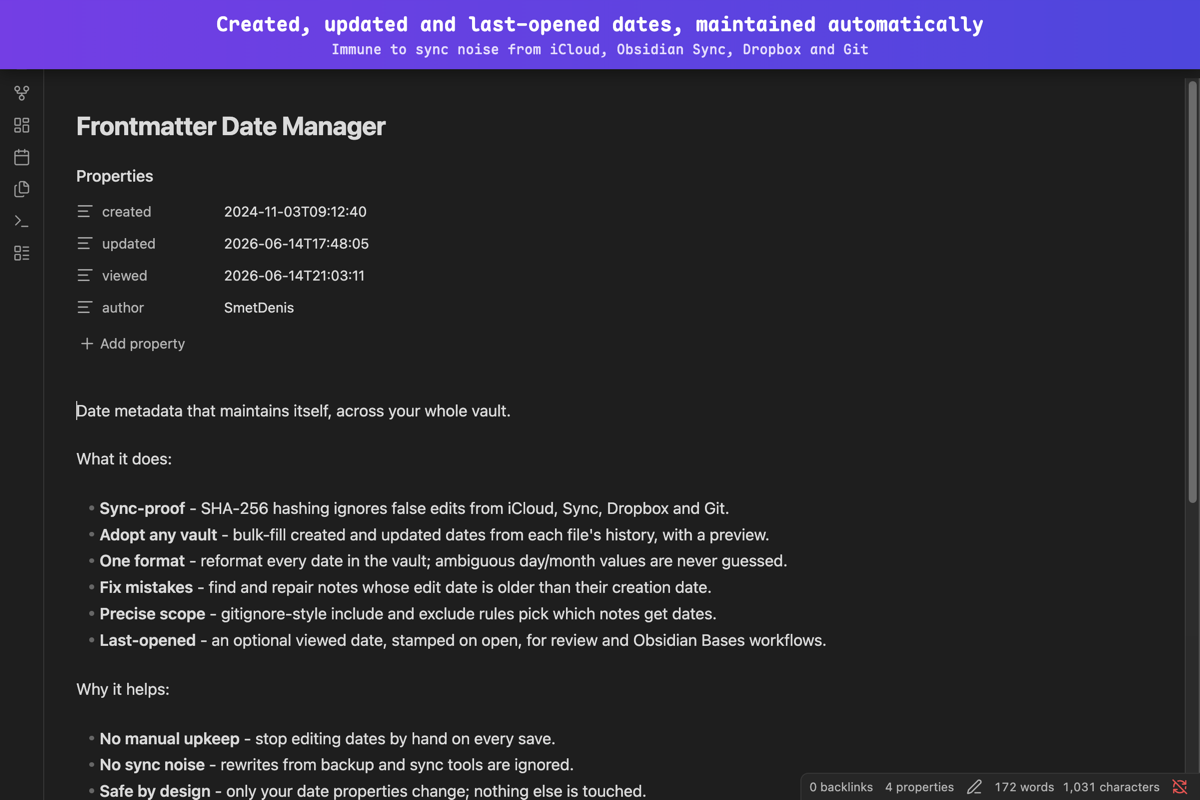
Automatically update created, updated, and viewed dates in YAML frontmatter when editing notes in Obsidian.
Why this plugin?
- Manual timestamp maintenance is tedious. Updating
createdandupdatedin frontmatter by hand every time you edit a note is error-prone and breaks your writing flow. - Obsidian has no built-in frontmatter date management. It tracks
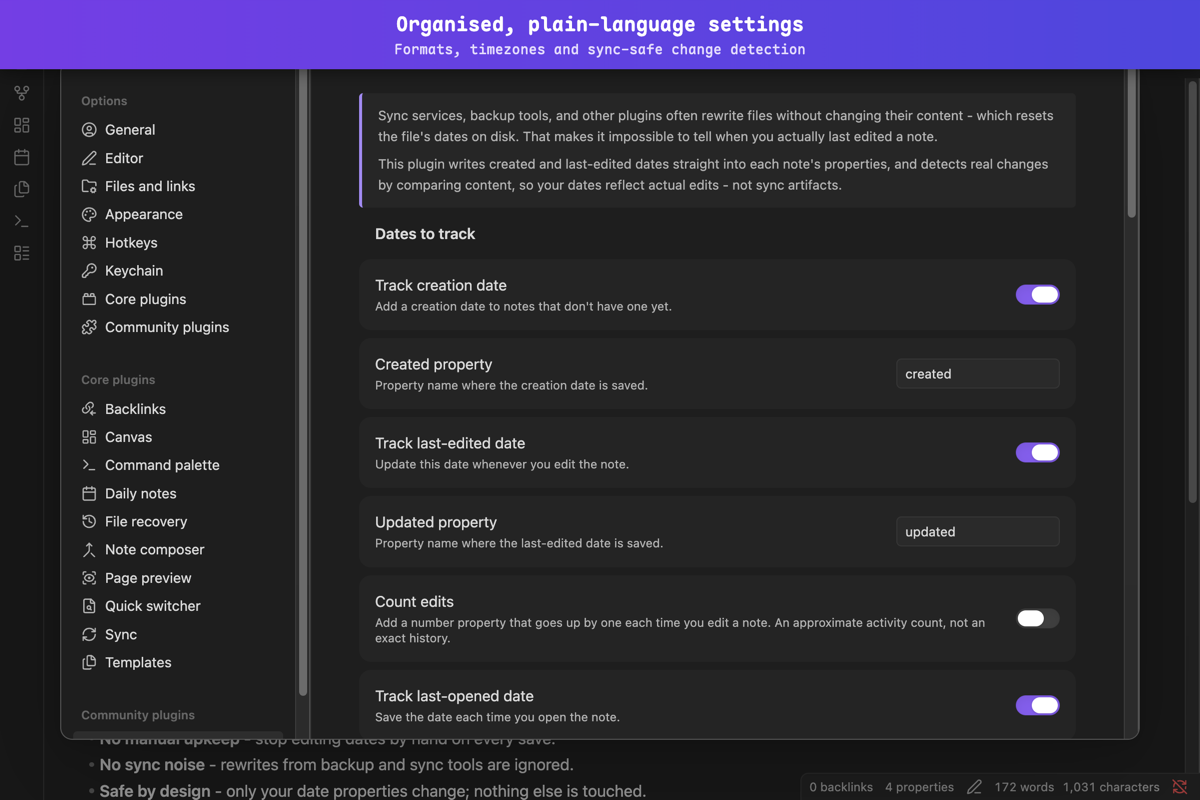
ctime/mtimeat the filesystem level but doesn't automatically write or maintain date properties inside your notes. - Sync tools cause false updates. Obsidian Sync, iCloud, Syncthing, Dropbox, and Git-based sync modify files without real content changes. Without content hashing, every sync would trigger a timestamp update - creating noise and potentially infinite sync loops.
- Templates and automation plugins conflict. Templater, Daily Notes, QuickAdd, and similar plugins create and immediately modify files. Without a configurable delay, timestamps get written before the template is fully applied, resulting in incorrect dates.
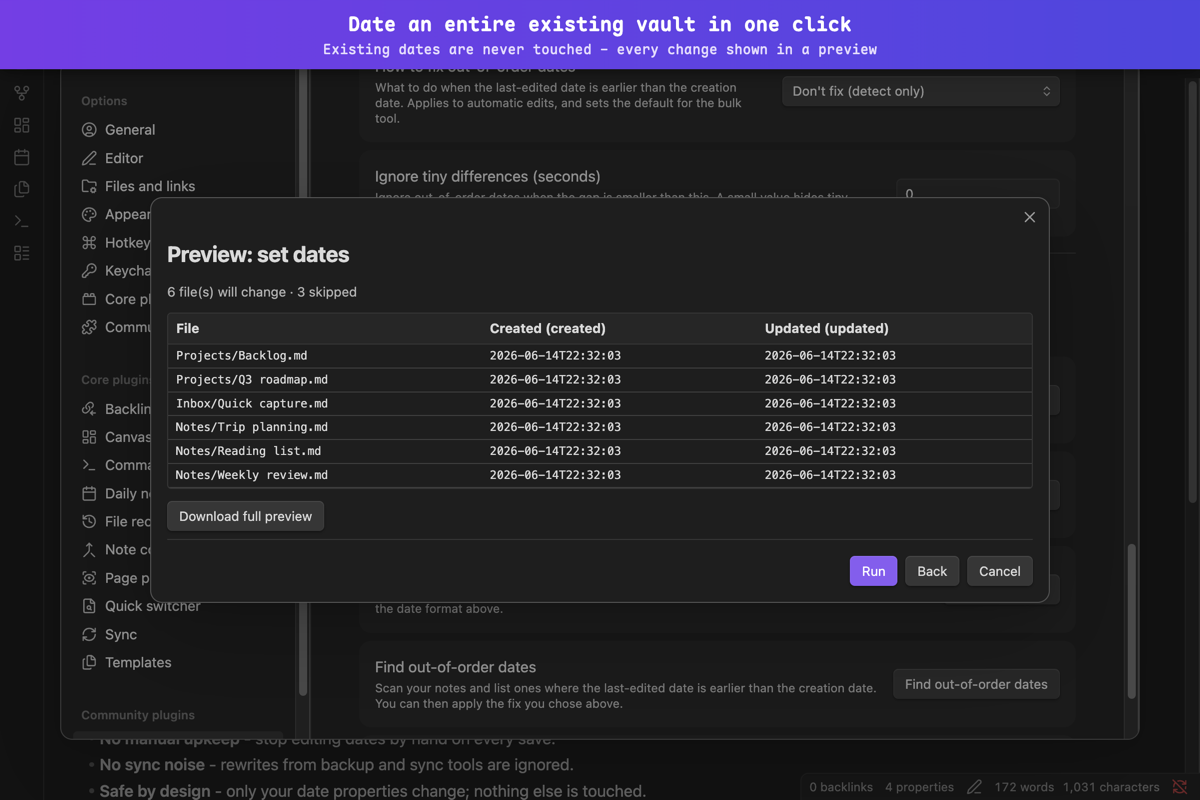
- Existing vaults lack timestamps. When you adopt the plugin on a vault with hundreds or thousands of notes, you need a way to bulk-populate timestamps from filesystem dates - not update each note one by one.
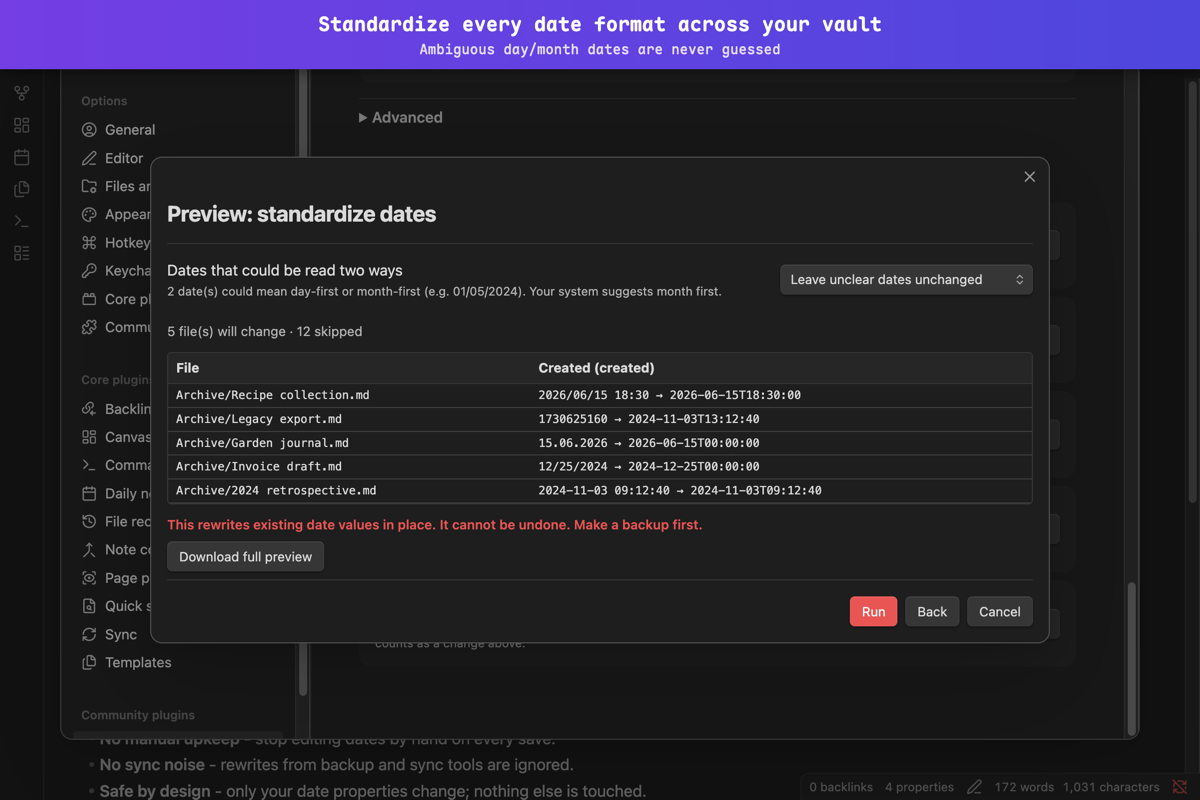
- Manual entry leads to inconsistent formats. Different notes end up with
2024-01-15,Jan 15, 2024,15.01.2024, and other variations. The plugin enforces a single configurable format across the entire vault. - No automatic "last opened" tracking. Obsidian tracks when a file was modified but has no concept of when you last read it - and no other plugin writes this into frontmatter. This plugin can optionally stamp a
vieweddate every time you open a note, making it queryable via Dataview for spaced repetition, review workflows, and "what haven't I looked at in months?" dashboards.
Features
- Auto-update
updatedfield on file modification (syncs withmtime) - Auto-set
createdfield on new files (syncs withctime) - Auto-set
viewedfield when a file is opened - unique feature not found in other plugins (disabled by default) - Count how often you edit each note (
updated_count, disabled by default) - an approximate activity signal you can sort or filter in Bases/Dataview to find your most-edited notes - Customizable date format (uses date-fns syntax)
- Timezone support with IANA timezone autocomplete
- String and number property types (number useful for Unix timestamps)
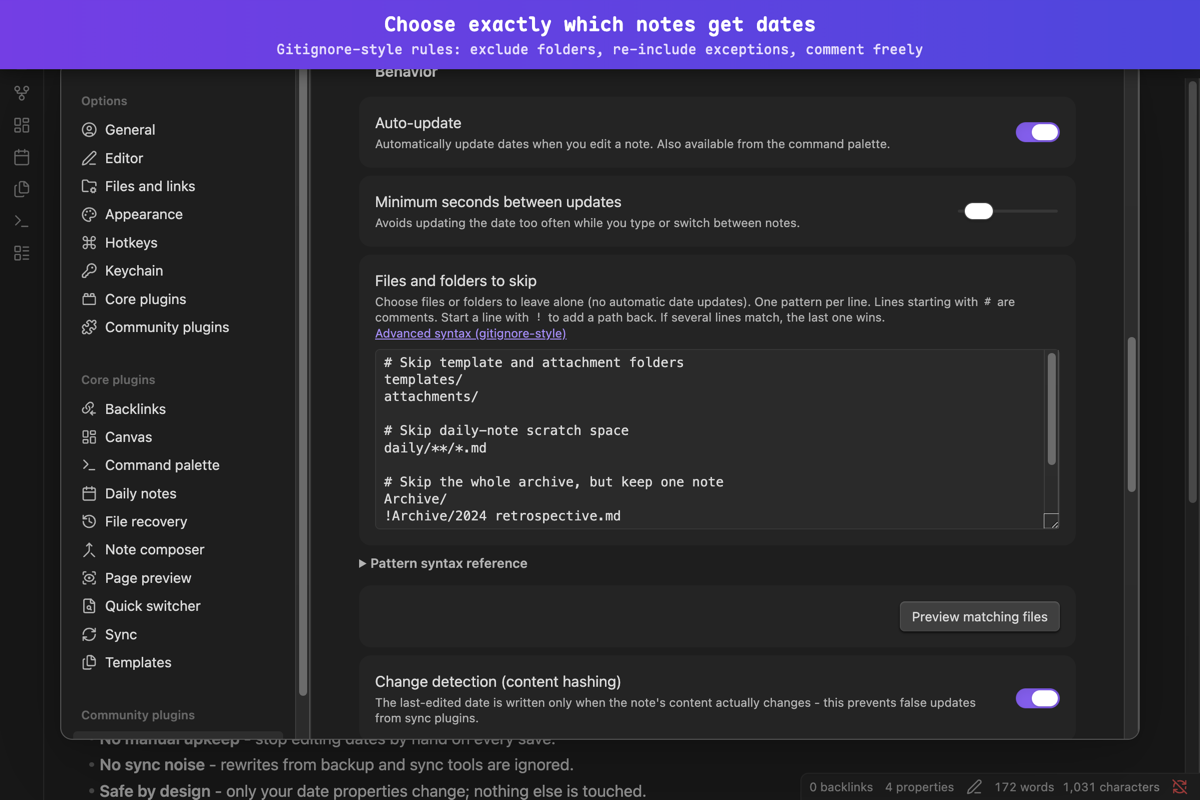
- Gitignore-style file filter rules with preview and validation
- Configurable minimum interval between updates
- Delay for newly created files (compatibility with Templater, Daily Notes, etc.)
- SHA-256 content hashing to detect real changes (prevents false updates from sync tools)
- Change detection mode: note body only, properties only, or both
- Property exclusion from change detection
- Run a command after dates are updated
- Bulk-fill dates from each file's own dates on disk, with dry-run preview
- Rename a property across all notes (migrate old names with preview)
- Reformat existing dates from one format to another (parse old, write new, with preview)
- Every bulk preview is paginated (Prev/Next), shows all affected files (no row cap), and can download the full diff as a TSV file on desktop (saved to your system downloads, never written into your vault)
- Toggle auto-update via command palette or status bar
- Pause auto-update for 5 minutes with automatic resume
- Multilingual UI following Obsidian's app language - English and Russian hand-checked, plus 19 baseline translations, all with per-key fallback to English
- Works on desktop and mobile
Screenshots
Installation
Requires Obsidian 1.13.0 or newer.
Community plugins
In Obsidian, open Settings > Community plugins > Browse, search for Frontmatter Date Manager, and click Install.
Manual installation
Download main.js, manifest.json, and styles.css from the
latest release
into <vault>/.obsidian/plugins/frontmatter-date-manager/.
Usage
The plugin runs automatically after installation. When you edit a markdown file, it updates the updated property with the current modification time. If the created property is missing, it sets it to the file's creation time. Optionally, enable the viewed date in settings to record when you last opened each note.
Configure behavior in Settings -> Frontmatter Date Manager.
Commands
| Command | Description |
|---|---|
| Update timestamps for current file | Manually trigger a timestamp update for the active note |
| Toggle auto-update on/off | Enable or disable automatic timestamp updates |
| Pause auto-update for 5 minutes | Temporarily pause updates with automatic resume |
Status bar indicator - shows current state (Paused or Paused (Xm)); click to toggle auto-update on/off.
Settings
Every option is findable through Obsidian's settings search. The gitignore-style skip rules and the advanced options (new file delay, cache, post-update command) live on their own sub-pages inside the plugin's settings tab.
| Setting | Default | Description |
|---|---|---|
| Track creation date | true |
Add a creation date to notes that don't have one yet |
| Created property | created |
Property name where the creation date is saved |
| Track last-edited date | true |
Update this date whenever you edit the note |
| Updated property | updated |
Property name where the last-edited date is saved |
| Count edits | false |
Add a number property that goes up by one on each edit (an approximate activity count, not an exact history) |
| Edit count property | updated_count |
Property name where the edit count is saved |
| Track last-opened date | false |
Save the date each time you open the note |
| Viewed property | viewed |
Property name where the last-opened date is saved |
| Date format | yyyy-MM-dd'T'HH:mm:ss |
Date & time format (date-fns syntax) |
| Timezone | "" (system) |
IANA timezone identifier; empty uses the system timezone |
| Save number-only dates without quotes | false |
Output numbers instead of quoted text for digit-only formats |
| Auto-update | true |
Automatically update dates when you edit a note |
| Minimum seconds between updates | 30 |
Minimum interval between date updates |
| Files and folders to skip | "" (all files) |
Gitignore-style rules: lines exclude, ! re-includes, # comments (own sub-page) |
| Change detection (content hashing) | true |
Write the date only when content actually changes (SHA-256 hashing) |
| What counts as a change | body |
What triggers updates: body, frontmatter, or both |
| Ignore these properties | [] |
Properties to ignore in change detection; add several at once, comma-separated |
| New file delay | 5000 ms |
Wait before processing newly created notes |
| Auto-populate cache on startup | true |
Build change-detection data for uncached notes when the plugin loads |
| Maximum cache entries | 10000 |
Oldest unused entries are removed when the cache exceeds this limit |
| Command after update | "" (none) |
Obsidian command to run after each date update |
Modified-before-created dates
| Setting | Default | Description |
|---|---|---|
How to fix out-of-order dates |
disabled |
What to do when the last-edited date is earlier than the creation date. Applies to automatic edits; disabled means detect-only. |
Ignore tiny differences (seconds) |
0 |
Ignore out-of-order dates when the gap is smaller than this. Useful to suppress sub-second clock skew. |
Find out-of-order dates |
(action) | Scans your notes (respects skip rules) and lists ones where the last-edited date is earlier than the creation date. Apply the fix in the modal. |
Available strategies: Set creation date to the last-edited date, Set last-edited date to the creation date, Set both to the most recent date.
Date format examples
| Format string | Example output |
|---|---|
yyyy-MM-dd'T'HH:mm:ss |
2026-04-12T14:30:00 |
yyyy-MM-dd HH:mm:ss |
2026-04-12 14:30:00 |
dd.MM.yyyy HH:mm |
12.04.2026 14:30 |
t |
1776268200 (Unix seconds) |
T |
1776268200000 (Unix ms) |
Note: This plugin uses date-fns, not Moment.js. Common migration:
YYYY->yyyy,DD->dd.
Finding your most-edited notes (optional)
Once Count edits is on, the updated_count property is a plain number you can sort and filter however you like. The plugin only writes the number - composing a view is up to you. For example, a Dataview query for the notes you edit most:
```dataview
TABLE updated_count, updated
WHERE updated_count
SORT updated_count DESC
LIMIT 20
```
Or in Obsidian Bases, sort by updated_count descending (optionally filter by a recent updated). The count is an approximate activity signal, not an exact history - it starts from the moment you enable the feature. It goes up once per edit session, not per keystroke: rapid edits within your Minimum seconds between updates window count as one. Running the Update timestamps for current file command also counts; bulk operations (populate/reformat/rename) rewrite dates without changing the count.
FAQ
First installation
Will the plugin modify all my existing notes when I first enable it?
No. The plugin only processes a file when you edit it. On first load it builds a background hash cache of your existing files to prepare for change detection, but it never writes timestamps during this process. Your vault stays untouched until you actually edit a note.
How do I add timestamps to notes I wrote before installing?
Use Settings → Bulk operations → Set dates from the file's own dates. It reads each file's own creation and modification dates on disk and writes them into your note's properties, with a dry-run preview so you can review before committing. Default mode is "Fill missing only" - existing dates are not overwritten. If your vault syncs via iCloud or Obsidian Sync, those on-disk dates may have been reset by the sync service - review the preview carefully.
I use Templater / Daily Notes / QuickAdd. Will the plugin conflict with them?
No. The plugin waits 5 seconds (configurable: Settings → Advanced → New file delay) before processing newly created files, giving template plugins time to finish.
Do I need to add properties to every note manually first?
No. If a note has no properties yet, the plugin creates the --- block and inserts the dates on the next edit. If properties already exist, it adds the date properties alongside your existing ones.
What date format works best with Dataview?
The default yyyy-MM-dd'T'HH:mm:ss (ISO 8601) works out of the box. Dataview can parse, sort, and compare it natively.
The plugin uses date-fns, not Moment.js. Does that affect me?
Only if you customize the date format. Key difference: use yyyy (not YYYY) for year, dd (not DD) for day. The plugin shows a hint in settings if it detects a Moment.js-style format.
Everyday usage
I enabled "viewed" timestamps but they don't appear in some notes.
The viewed timestamp is only written when you open a file. Notes you haven't opened since enabling the feature won't have the field yet. The same filter rules and minimum-interval setting apply to viewed writes, and the stamp is skipped for that opening if the note has unsaved changes in another open editor. Note that writing this date does change the file, so with the feature enabled, opening a note updates its modification time on disk.
While I type,
updateddoesn't change right away. Why?
The plugin never writes into a note that has unsaved changes in an open editor - Obsidian would merge that write into your live text and show a "modified externally" popup. The date update waits until the note is saved (Obsidian saves on its own a couple of seconds after you stop typing) and then lands by itself. For the same reason, a bulk operation skips notes with unsaved changes and lists them at the end: save or close those notes and run the preview again.
I edited tags or aliases, but
updateddidn't change. Is that a bug?
No. By default, change detection only looks at the note body - only changes below the properties block trigger a date update. To include property changes, switch Settings → Change detection → What counts as a change to "Both".
Will syncing (iCloud / Obsidian Sync / Dropbox) cause false timestamps?
No. The plugin compares file content via SHA-256 hashing. If a sync service rewrites a file without changing its content, the hash matches and no timestamp is updated. Enabled by default.
I renamed or moved a note. Does the plugin lose track of it?
No. The hash cache entry is automatically migrated to the new path. Existing timestamps are preserved.
I changed the date format. Will old timestamps be converted?
Not automatically. Use Settings → Bulk operations → Reformat dates to standardize all values. The plugin auto-detects existing formats (ISO 8601, European, US, numeric timestamps) and rewrites them using your current format. Preview all changes before applying.
A date like
01/05/2024could mean January 5 or May 1. What happens?
Such ambiguous day/month dates are left unchanged by default - the plugin never guesses. The preview shows how many were found and offers a one-click choice (day first or month first), pre-suggested from your system region, so you decide before anything is rewritten. Dates with only one valid reading (e.g. 25/12/2024) are always converted.
I renamed the property (e.g.
created→date_created). What about existing files?
Use Settings → Bulk operations → Rename property. Enter the old and new property names, preview affected notes, then apply. You can choose whether to delete the old property or keep both.
I changed the timezone. Will old timestamps be recalculated?
No. Same principle - old values are left untouched. New writes use the new timezone.
What happens if a note has broken YAML frontmatter?
The plugin skips that file and shows a notice with the file path and error details. It never writes to a file with malformed YAML. Fix the syntax and the plugin will pick it up on the next edit.
I'm saving rapidly. Will the timestamp update on every save?
No. There is a minimum 30-second interval between updates (configurable: 5-300 seconds) plus a 2-second debounce, so rapid edits are consolidated into a single timestamp write.
Sync and version control
The plugin stores a local cache file hash-cache.json inside its data directory (.obsidian/plugins/frontmatter-date-manager/). This file contains SHA-256 hashes used for content change detection. It rebuilds automatically on startup, so excluding it is safe and recommended.
Why exclude: the cache updates on every file edit, so multiple devices modify it independently - causing frequent sync conflicts and unnecessary traffic. Since it rebuilds automatically, syncing provides no benefit.
Add to your .gitignore:
.obsidian/plugins/frontmatter-date-manager/hash-cache.json
For Obsidian Sync: the file is already excluded automatically (Sync does not sync plugin data files beyond data.json).
For iCloud, Syncthing, Dropbox, or other file-based sync: add hash-cache.json to your sync tool's ignore/exclusion list for the plugin directory.
Privacy & capabilities
This plugin is fully local. It has no backend, makes no network requests, and collects no telemetry or analytics of any kind. The community plugin scorecard lists the capabilities a plugin's code can use; here is exactly what this plugin uses each one for:
- Reads markdown files in your vault. The bulk tools (fill dates, rename a property, reformat dates, find out-of-order dates, rebuild the change-detection cache) operate across the whole vault, so they list your markdown notes via Obsidian's
getMarkdownFiles(). The plugin never enumerates non-markdown files (getFiles()is not used), so attachments, images, and other binaries are never touched. - Writes only the configured date properties. All changes go through Obsidian's
processFrontMatter(), which touches only thecreated/updated/viewedproperties you configure and leaves the note body, key order, comments, and unrelated properties untouched. - Never writes into a note you are editing. If a note has unsaved changes in an open editor, the plugin waits (or, for bulk operations, skips it and tells you) instead of writing - so a date update can never be merged into the text you are typing.
- Writes one sidecar file in its own plugin folder. The SHA-256 change-detection cache (
hash-cache.json) is written inside.obsidian/plugins/frontmatter-date-manager/, never into your notes. - Local export only. The "Download full preview" button saves the diff as a local
.tsvfile via the browser and writes no file into your vault. File download is desktop only - on mobile the full diff stays readable in the on-screen table.
Languages
The plugin's interface follows Obsidian's own language setting automatically - there is no separate language option to set. It ships translations for 21 languages (Arabic, German, English, Spanish, Persian, French, Indonesian, Italian, Japanese, Korean, Dutch, Polish, Portuguese, Brazilian Portuguese, Russian, Thai, Turkish, Ukrainian, Vietnamese, and Simplified/Traditional Chinese), and any text a translation has not covered falls back to English, so the UI is never left blank. English and Russian are hand-checked; the rest are baseline translations and improvements are very welcome - see "Translations" in CONTRIBUTING.md.
Development
make              # Show all available commands
make install      # Install dependencies
make pre-commit   # Run all checks (format, lint, test, build)
make local-test   # Build and copy plugin to local vault
To use make local-test, set OBSIDIAN_VAULT_TEST in your shell environment, or pass it directly: make local-test OBSIDIAN_VAULT_TEST=/path/to/vault.