
README file from
GithubFolder Bases
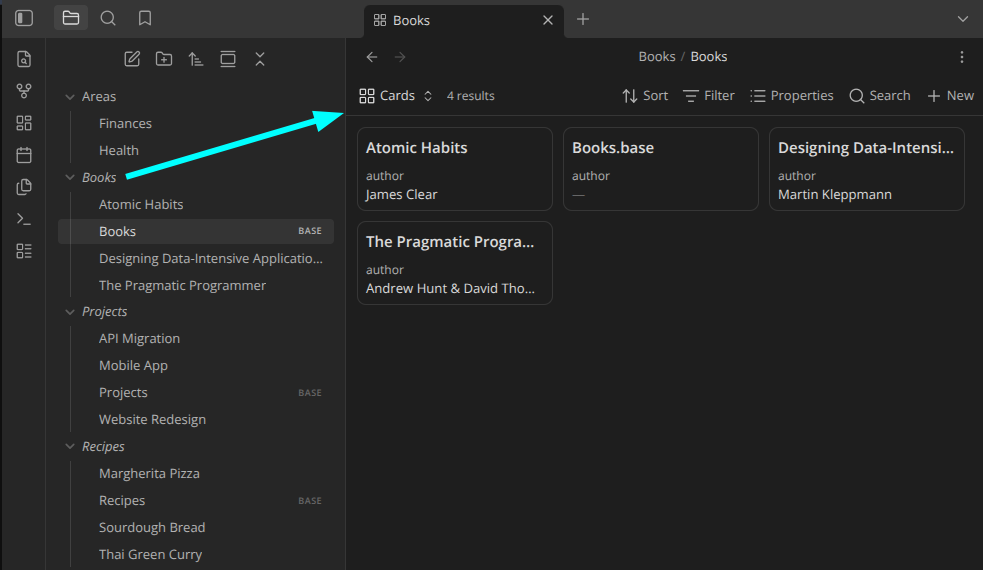
Open a folder's associated Base by clicking it
in the file explorer — like the Folder Notes community plugin, but for .base
files instead of notes.
Features
- Click a folder to open its base (plain click or modifier + click — configurable).
- Configurable base filename, with
{{folder_name}}/{{folder_path}}tokens (default: a same-named.baseinside the folder). - Optionally create a base from a template on modifier + click when none exists.
- Scope which folders respond with an exclude/include filter (glob patterns, optional subfolder matching).
- The collapse chevron always expands/collapses, so normal folder navigation is never lost.
- Right-click a folder for Open folder base / Create folder base.
Install (from source)
devbox run build      # type-check + bundle to main.js
# or: devbox run dev  # watch mode
devbox run test       # run the unit tests
Then enable Folder Bases in Settings → Community plugins. To use in another
vault, copy manifest.json, main.js, and styles.css into
<vault>/.obsidian/plugins/folder-bases/.
Releasing
devbox run release <version> bumps the version in manifest.json,
package.json, and versions.json, builds, commits, pushes, and creates a
GitHub release with main.js, manifest.json, and styles.css attached:
devbox run release 1.0.1 # or: just release 1.0.1
Requires a clean working tree and gh authenticated to the repo. Use a plain
semver version with no leading v (Obsidian tags omit it).
Documentation
Known limitations
- The click listener is attached to the main window's document. If you move the file explorer into a popout window, clicks there are not yet intercepted.