
README file from
GithubFeynman Learning — Obsidian Plugin
Learn anything deeply using the Feynman Technique: explain it simply, find the gaps, and fill them. This plugin guides you through the full four-step cycle inside Obsidian, with AI assistance powered by any OpenAI-compatible API (DeepSeek, GPT-4o, Claude, local models via Ollama, etc.).
Screenshots
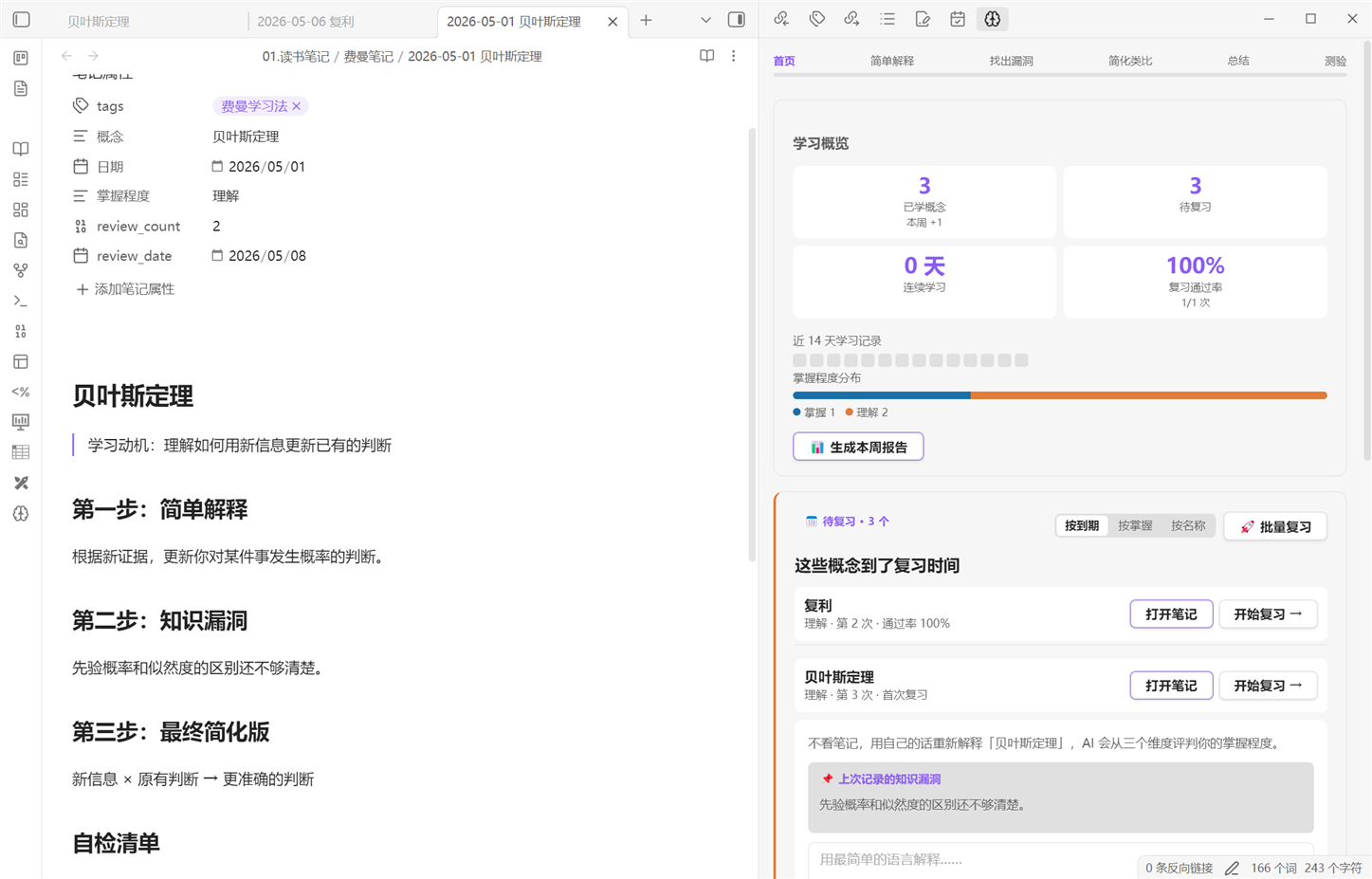
Dashboard — stats, activity heatmap, mastery distribution, and due review queue with sort & batch controls:
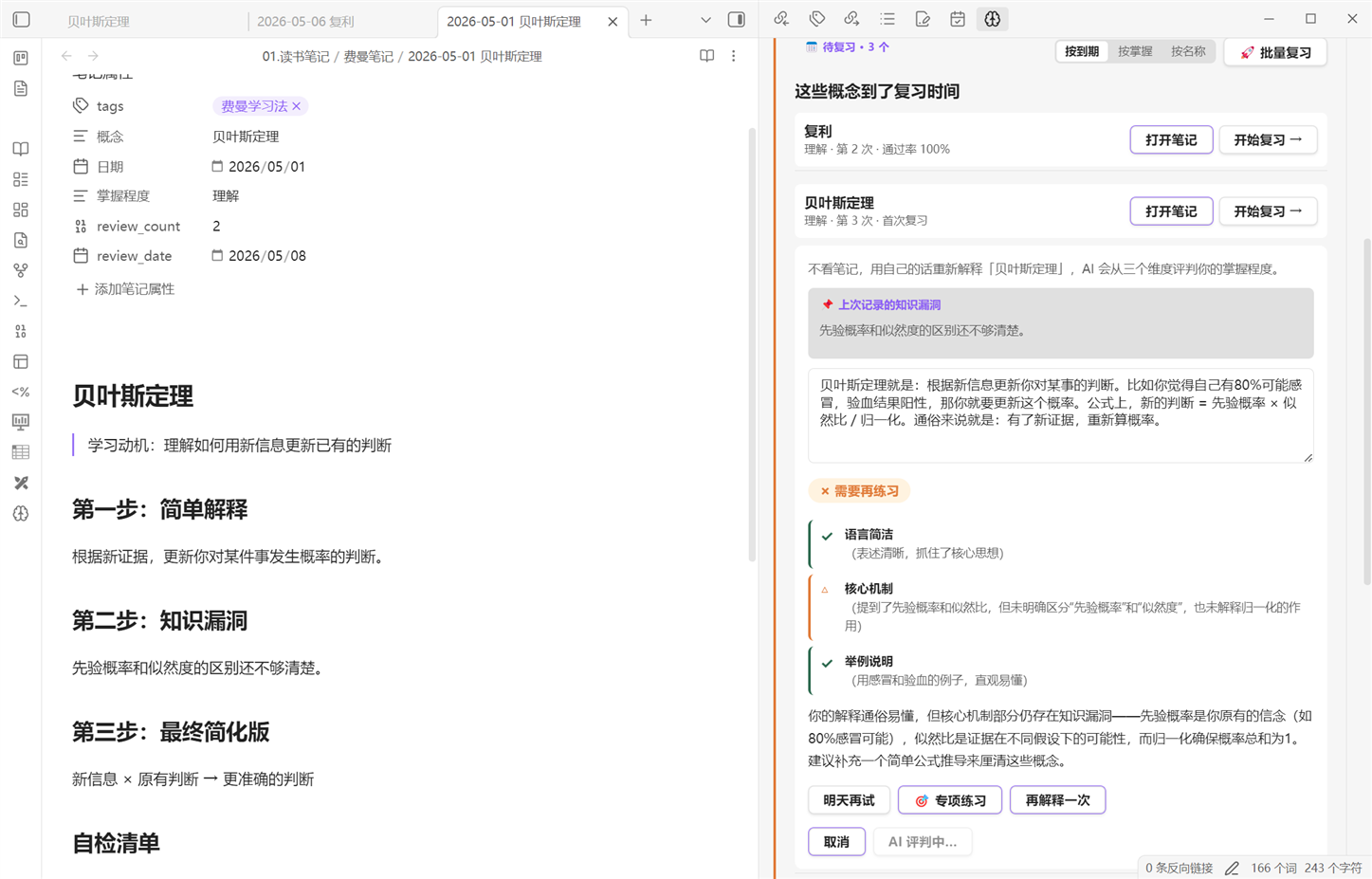
AI evaluation — 3-dimension scoring (语言简洁 / 核心机制 / 举例说明) with pass/fail, explanatory feedback, and one-click weak-point drill:
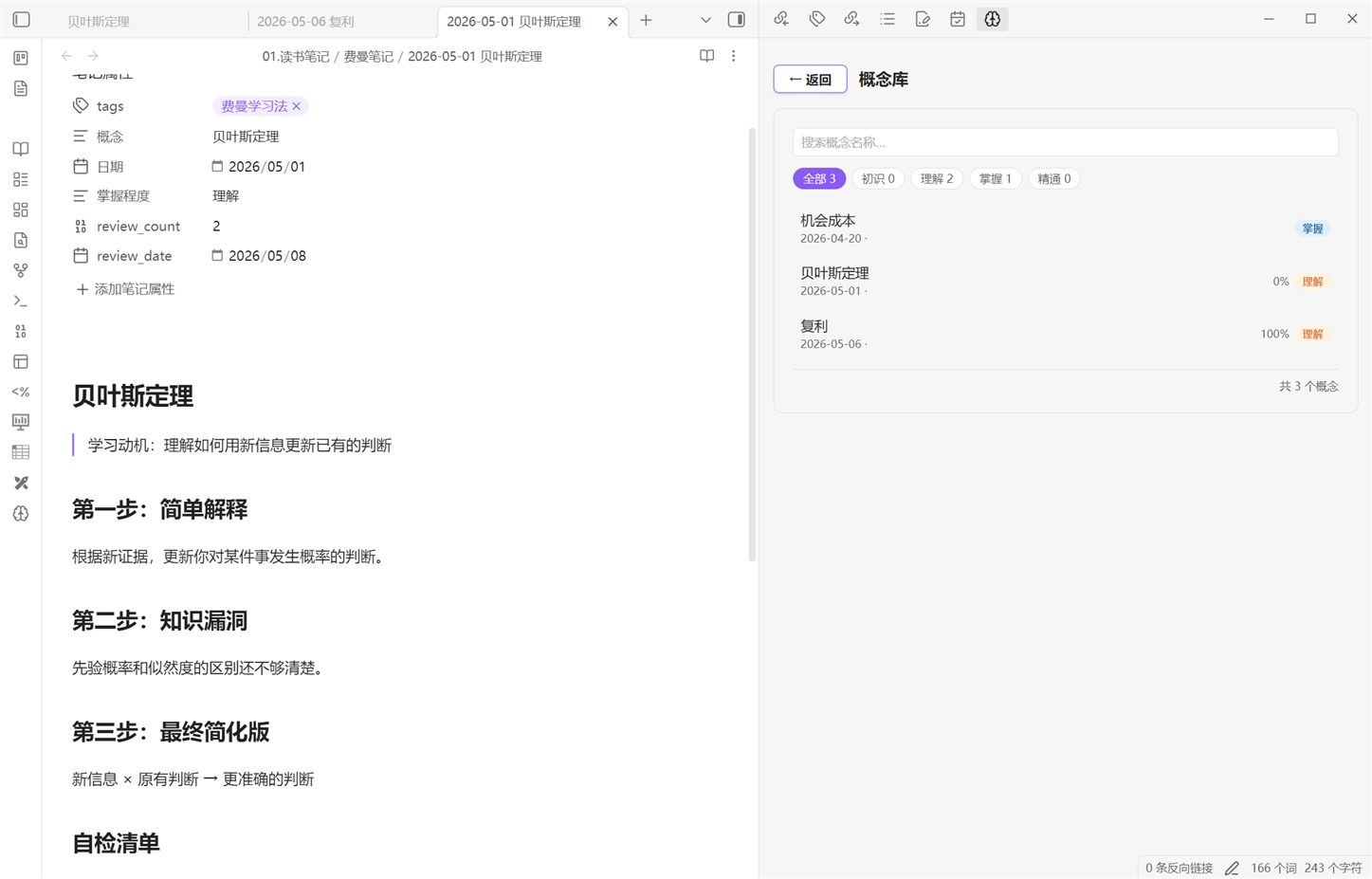
Concept browser — search and filter all your Feynman notes by mastery level:
Features
Learning workflow
- 4-step guided workflow — Select concept → Explain simply → Identify gaps → Simplify & analogize
- AI tutor — Follow-up questioning, gap analysis, and gap-coverage verification before you advance
- Text extraction + learning queue — Paste an article; AI extracts 3–8 concepts. Add any or all to a queue and work through them in order from the dashboard
- Filename preview — Edit the save filename before writing to vault (Step 4)
- AI quiz — Generate and answer questions on your explanation; receive per-question feedback
- Concept connections — AI finds related concepts from your library and optionally adds wiki-links to notes
- Learning recommendations — After saving, AI suggests 3 concepts worth learning next
Spaced repetition review
- Configurable intervals — Customize the three review intervals (default: 1 / 7 / 30 days) in Settings
- Three quality tiers — Each review is scored by AI on three dimensions:
- All ✓ ("很熟练") → interval × 1.3 (longer)
- Any △ (partial) → interval × 0.6 (shorter)
- Fail → retry the next day
- 3-dimension AI judgment — Scored on 语言简洁 / 核心机制 / 举例说明 (✓ △ ✗)
- Weak-point drill — After a failed or partial review, click 🎯 to get AI-generated targeted questions for the exact weak dimensions, with per-question feedback
- Weak-point tracking — Failed review dimensions are saved to the note and shown on the next review session
- Review sorting — Sort due concepts by due date (most overdue first), mastery level, or name
- Batch review — Review all due concepts in sequence with a progress bar; supports skip and exit
- "Review current note" command — Trigger a review session directly from a due feynman note via the command palette
Mastery & analytics
- Four mastery levels — 初识 → 理解 → 掌握 → 精通, advanced only on AI-evaluated pass
- Review pass rate — Per-concept and overall historical pass rate in the dashboard and concept browser
- Dashboard — Streak, total concepts, due count, mastery distribution bar, activity heatmap, weekly report
- Concept browser — Search and filter by mastery level with pass rates at a glance
- Weekly report — AI-written summary of the week: new concepts, reviews, pass rate, streak
Integrations
- Notion sync — Push each completed learning session to a Notion database
- Auto-save notes — Every session is saved as a Markdown note with YAML frontmatter
Installation
Option A — BRAT (beta, recommended for now)
- Install the BRAT plugin from Obsidian's Community Plugins
- Open Settings → BRAT → Add Beta Plugin
- Enter the repository:
jialingxiao/obsidian-feynman-learning - Enable Feynman Learning in Settings → Community Plugins
Option B — Manual
- Download
main.js,manifest.json, andstyles.cssfrom the latest release - Create the folder
.obsidian/plugins/feynman-learning/inside your vault - Copy the three files into that folder
- Enable Feynman Learning in Settings → Community Plugins
Option C — Community Plugin browser
Search for Feynman Learning in Settings → Community Plugins → Browse.
Setup
-
Open Settings → Feynman Learning and configure:
Setting Description Default API Key Your API key (required) API Base URL Endpoint URL https://api.deepseek.com/v1Model name Model to use deepseek-chatTemperature Response creativity, 0–1 0.8Review intervals Days for each review stage 1 / 7 / 30Notes folder Where learning notes are saved 费曼笔记Index file Path to your concept index note (optional) Notion Token Notion integration secret (optional) Notion Database ID Target Notion database (optional) -
Click Test Connection to verify your API key works.
Supported APIs
The plugin works with any service that implements the OpenAI Chat Completions API (/v1/chat/completions):
| Service | API Base URL | Model example |
|---|---|---|
| DeepSeek (default) | https://api.deepseek.com/v1 |
deepseek-chat |
| OpenAI | https://api.openai.com/v1 |
gpt-4o |
| Anthropic (via proxy) | your proxy URL | claude-opus-4-5 |
| Ollama (local) | http://localhost:11434/v1 |
llama3 |
| Any compatible service | your endpoint | your model name |
Usage
Click the brain icon (🧠) in the left ribbon to open the Feynman Learning panel.
Learning a new concept
- Step 1 — Select: Enter the concept name and why you want to learn it. Or click 📄 从原文提取概念 to paste an article and let AI suggest concepts.
- Step 2 — Explain: Write your explanation as if teaching a 12-year-old. The AI will ask follow-up questions to probe your understanding.
- Step 3 — Gaps: The AI identifies weak spots; you fill them in. AI verifies your final explanation covers each gap before you advance.
- Step 4 — Simplify: Refine your explanation and create an analogy. Optionally take an AI quiz or discover concept connections.
- Done — Edit the filename if needed, then save. The note is opened automatically.
Reviewing concepts
Due concepts appear in the Review section of the dashboard. Sort them by due date, mastery level, or name using the tabs at the top of the section.
- Click 开始复习 → on any item to write your re-explanation and get AI scoring.
- Click 🚀 批量复习 to cycle through all due concepts in sequence.
- Use the command palette and search "复习当前费曼笔记" when a due note is open.
Review intervals adjust dynamically based on AI scoring:
| Result | Next interval |
|---|---|
| All ✓ (很熟练) | base × 1.3 (longer) |
| Any △ (partial pass) | base × 0.6 (shorter) |
| Fail | 1 day (retry) |
Clicking 🎯 专项练习 / 🎯 强化弱点 opens an inline drill: the AI generates 2–3 targeted questions for the specific weak or partial dimensions. Submit answers for per-question feedback, or retry as many times as needed.
Weekly report
Click 📊 生成本周报告 in the dashboard to generate a Markdown summary of the week: concepts learned, reviews completed, pass rate, streak, and an AI-written reflection.
Note format
Each session creates a Markdown file with YAML frontmatter:
---
tags: [费曼学习法]
概念: "Newton's Laws"
日期: "2025-01-01"
掌握程度: "理解"
review_date: "2025-01-08"
review_count: 1
---
Failed reviews append a ## 复习记录 section with dimension scores and evaluation so subsequent sessions have a clear target.
Development
# Install dependencies
npm install

# Build (watch mode)
npm run dev

# Production build
npm run build

# Run tests
npm test

# Bump version (updates package.json, manifest.json, versions.json)
npm run bump 1.2.0
Tests live in src/__tests__/ and cover all pure utility functions (no Obsidian dependency).
Privacy
- Your API key is stored locally in Obsidian's plugin data file
- No telemetry or analytics of any kind
- The only external requests are to your configured API endpoint (and optionally Notion)
License
MIT © Xiaoxiaoqi