
README file from
Github🗺️ EngramQuest
English
The spaced-repetition system built for Obsidian notes. Write cards yourself, or let AI help — your notes stay clean, your memory stays yours.
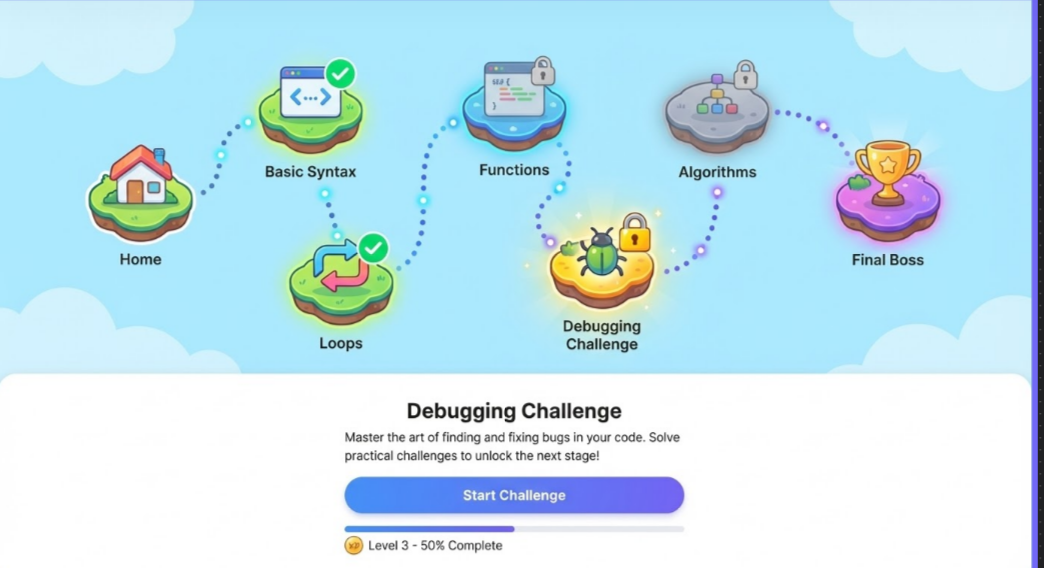
EngramQuest turns your Obsidian vault into a long-term memory system. Write flashcards directly in your notes, or use AI tools (Claude Code, Gemini CLI, Cursor) to generate cards, quest challenges, and visual memory maps — all without touching your original markdown.
✍️ Write Cards Yourself (No AI Required)
Add a tag and pick a format. Three formats are supported and freely mixable in one note:
#flashcards/math

Q: What is a derivative?
A: The instantaneous rate of change of a function at a point.
   Formally: lim(h→0) [f(x+h) − f(x)] / h

Q: What does this diagram show?
![[architecture.png]]
A: The architecture of a microservice system.
   Key components:
   - API Gateway
   - Service mesh
   - Message queue

---
Q: What is Stripe's core model?
A: Stripe is essentially a Saga system.
   It handles:

   - payment_intent state machine
   - retry / failure handling
   - fund consistency
   - webhook events

   You only receive the result.
---

---
Q: What is a Saga pattern?
A: A sequence of local transactions.

   Each step publishes an event.
   On failure, compensating transactions roll back.

   Used in: Stripe, Uber, Airbnb.
---

%%card%%
Q: When should I use %%card%%?
A:
Use it only when you want to paste a long AI answer that may contain its own Markdown separators.

---

This separator stays inside the answer.
%%card%%

{{c1::Calculus}} is built on limits, derivatives, and integrals
Capitals: France {{c1::Paris}}, Japan {{c2::Tokyo}}

Pythagorean theorem :: a² + b² = c²
[!TIP] Format roles at a glance: 🟢 Q:/A: is the everyday format. 🟡 %%card%% is the safe mode for long pasted AI answers. 🔵 --- fenced Q/A remains supported for existing notes and normal Markdown-friendly use.
| Format | Best for | Syntax |
|---|---|---|
| 🟢 Q:/A: Q&A ⭐ | Recommended daily format. Multi-line answers, images, tables, code blocks | Q: question → A: (answer can span multiple lines; single blank line within answer is ok; two blank lines end the card) |
| 🔵 --- fenced Q&A ⭐ | Existing long-answer notes and normal Markdown-friendly use | Wrap Q:/A: with --- lines — blank lines inside are never treated as card boundaries |
| 🟡 %%card%% long answer | Safe mode for pasted AI answers that may include --- separators |
Wrap one card between two %%card%% lines; everything after A: stays in the answer until the closing marker |
| 🧩 {{c1::}} Cloze | Fill-in-the-blank, Anki-compatible | {{c1::answer}} or {{c1::answer::hint}} |
| ⚪ :: Q&A | Quick one-liners only — answer must fit on a single line | question :: answer |
Tag format: #flashcards/topic — the name after the slash is the Deck name. Change the prefix (flashcards) in Settings.
How do I turn a long AI answer into a Review Deck card?
Use the normal 🟢 Q:/A: format for everyday cards. Use 🟡 %%card%% when you paste a long AI answer that may contain its own --- separators, headings, tables, code blocks, or many blank lines.
#flashcards/ai

%%card%%
Q: How should I explain agentic testing?
A:
Agentic testing checks whether an AI system can complete a task reliably, not just whether one function returns the right value.

---

Example:
- Give the agent a realistic task
- Verify the final artifact
- Check logs, tool calls, and failure recovery

```js
expect(result.completed).toBe(true)
```
%%card%%
Why this is safe: everything after A: stays in the answer until the closing %%card%%. The --- line above is preserved as part of the answer, so the card will not be cut early. Existing 🔵 --- fenced cards still work; %%card%% is only the safer option for long pasted AI output.
Quickest way to type the fence: press Ctrl+/ (or Cmd+/) on an empty line — Obsidian inserts %% %% and places the cursor in the middle. Just type card and you have %% card %%. Spacing and case are tolerated, so %%card%%, %% card %%, and %%CARD%% all work the same.
Embedding images in cards: Use Obsidian's wiki-link image syntax inside any card format:
Q: What does this diagram show?
![[diagram.png]]
A: The architecture of a microservice system.

Cell structure :: ![[cell-diagram.png]]
Both ![[image.png]] (wiki-link) and  (standard markdown) are supported. Images display directly in the review card during study sessions.
Open Hub → Review Deck to see all your cards automatically.
⚡ Quick Start (AI Path)
- Install Plugin: Install EngramQuest via Obsidian Community Plugins or GitHub Releases.
- Install Skills: Go to
Settings → EngramQuest → AI Skillsand click Install for your tool (Claude Code, Gemini CLI, Cursor, or Codex).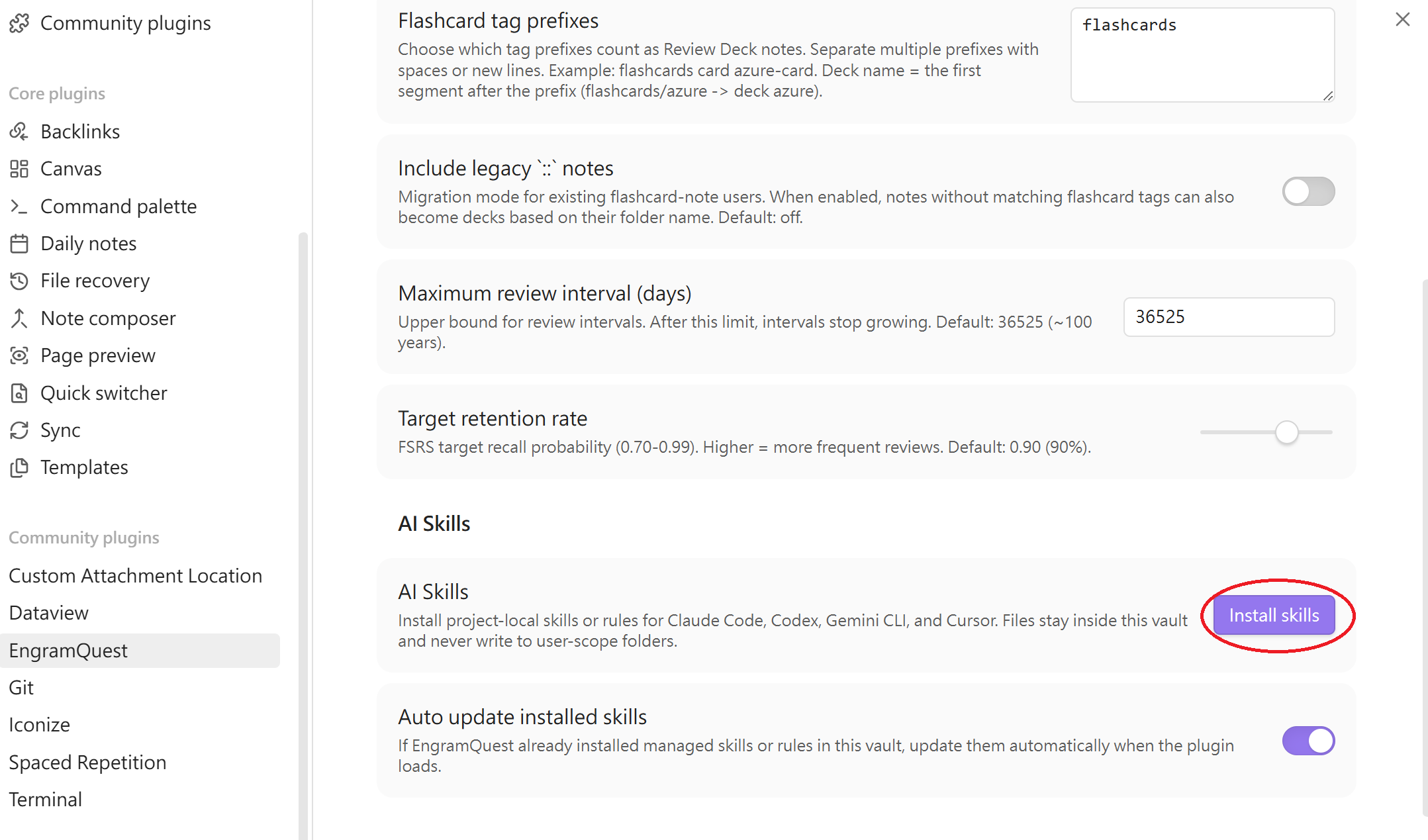
- Ask AI: "Turn
Note.mdinto a quest-map medium" or "Build a review deck from notes tagged with math." - Open Hub: Click the EngramQuest ribbon icon, switch to the relevant tab, and start learning.
✨ Key Features
🃏 Review Deck
Scientific long-term memory powered by the FSRS Algorithm.
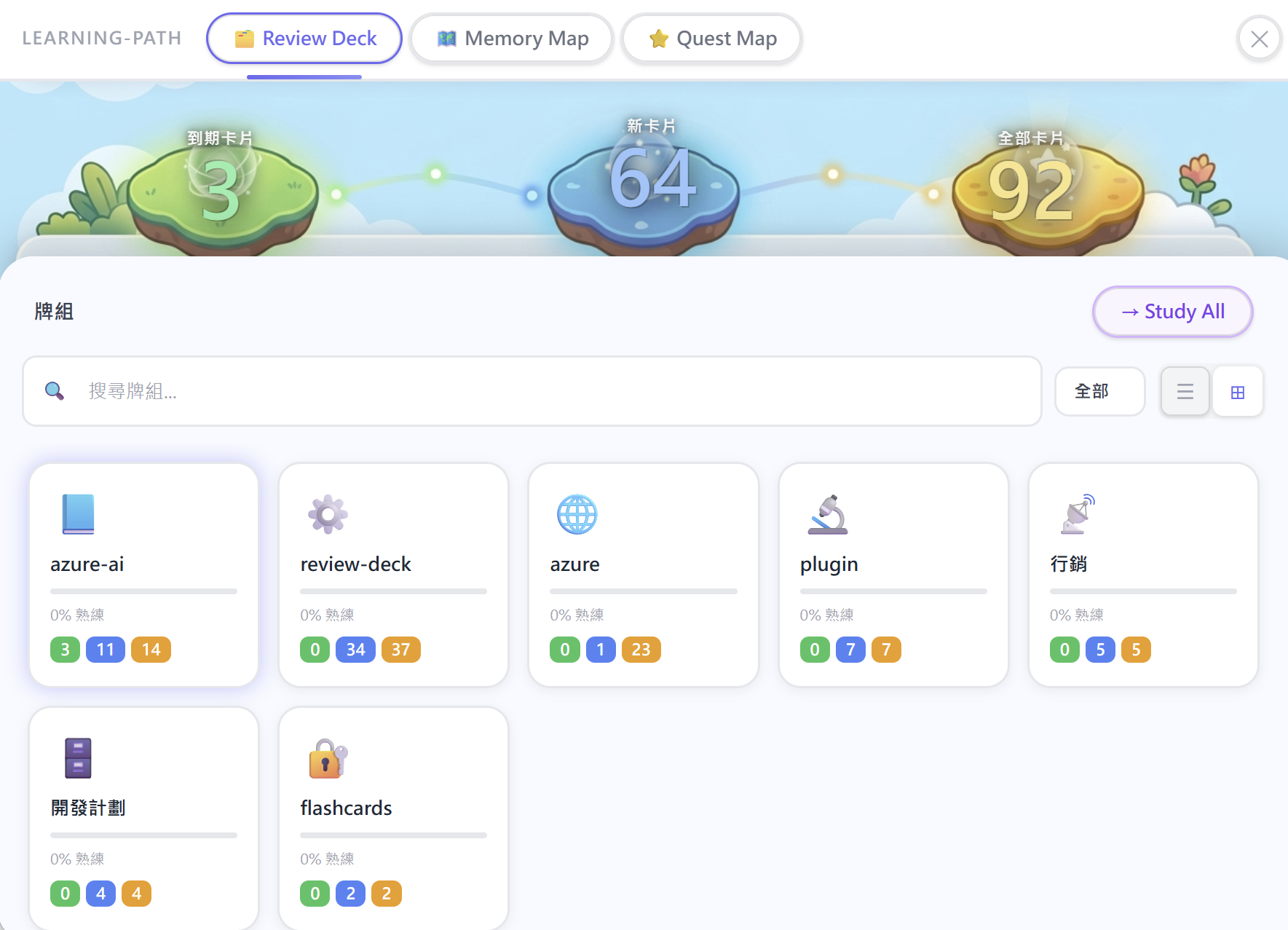
- Three card formats:
Q:/A:multi-line (recommended),{{c1::}}Cloze (Anki-compatible), and::one-liner — freely mixable in one note - Rich answers:
Q:/A:answers support multiple paragraphs, embedded images (![[img.png]]), tables, and code blocks — paste long AI output directly without reformatting - Multi-line Q&A (
Q:/A:): Both question and answer support multiple lines, embedded images, tables, and code blocks. A single blank line within a card is fine — two blank lines end the card. - Fenced Q&A (
Q:/A:wrapped in---): Wrap a card with---on its own line before and after. Blank lines inside are never treated as card boundaries. This remains supported for existing notes and normal daily use.--- Q: What is Stripe's core model? A: Stripe is essentially a Saga System. It handles: - payment_intent state machine - retry / failure handling You only receive the result. --- - Long AI answers (
%%card%%): Use this only when the answer may contain its own---separators. It is an extra safe mode, not a replacement for normalQ:/A:.%%card%% Q: What is Apple's business model? A: Apple sells integrated hardware, software, and services. --- This separator stays in the answer. %%card%% - Image support: Embed
![[image.png]]ordirectly inQ:/A:or::cards — images render in the review session - Auto-detection: Scans any note tagged with
#flashcards/topic— write cards wherever it fits your workflow - AI cards stay separate: AI-generated cards and scheduling data live in
engram-review/— AI never touches your source notes - Your own cards stay editable: Edit, Highlight (
==), and Quote (>) tools in the review session write changes directly back to your source note, keeping it as the single source of truth - Source note link: Every card connects back to its origin note — tap to read context, then resume right where you left off
- Triple-level Hints: Stuck? AI provides L1 (active recall prompt), L2 (context anchored to your own vault notes), or L3 (narrowing hint). L2 is what makes AI useful here — it links new knowledge to things you already know in your vault.
- FSRS scheduling: The latest spaced-repetition algorithm — intervals adapt to your actual recall performance, not fixed multipliers
🗺️ Quest Map
Turn long notes into structured, game-like learning stages — embedded directly in your vault as a .md file.
- AI-generated challenges: Multiple-choice, cloze fill-in, ordering, matching, and image occlusion (mask regions of your vault images as questions)
- Difficulty Scaling: Request Easy, Medium, or Hard modes from your AI
- Visual Progress: Track mastery per chapter and unlock the final Boss challenge
🧠 Memory Map
Visualize abstract concepts using Obsidian Canvas.
- Three ways to create: Ask AI to generate one, manually create a Canvas named
{note-name}-memory.canvas, or set a dedicated folder in Settings - Auto-detection: Any file ending with
-memory.canvasis automatically listed in Hub → Memory Map - Association Building: AI maps note relationships into visual knowledge chunks
- Deep Intuition: Contrast, analogy, and contextual anchoring for difficult topics
- Review Deck link: During review, the Memory Map button finds the matching canvas — first by name, then by scanning canvas content for a file node pointing to the source note. Include a file node in your canvas for reliable linking even after moves or renames
🌙 Dark Mode
EngramQuest adapts seamlessly to your Obsidian theme.
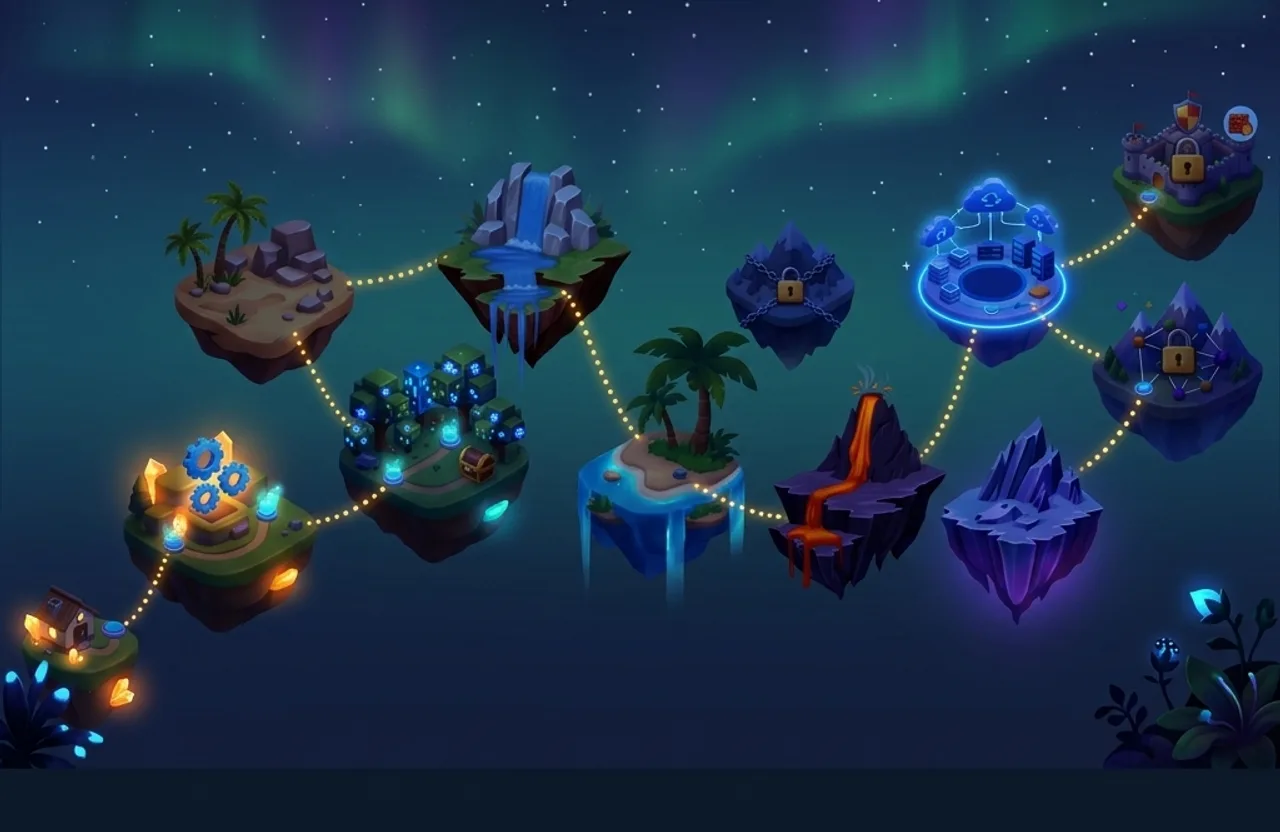
- Automatic theme detection: Hub background, review session, and achievement area all switch between light and dark assets automatically — no manual toggle needed
- Aurora-inspired dark theme: A custom deep-space floating island scene replaces the light background in dark mode, keeping the visual story consistent
- Cohesive dark palette: Difficulty badges (Easy / Medium / Hard), READY counts, and achievement badges all shift from their light-mode colors to an indigo-purple palette that reads cleanly against dark backgrounds
🏆 Achievements
Track your learning milestones and celebrate progress.
- 10 milestone achievements: From your very first card to 2,000 total reviews, 30-day streaks, 50 mastered cards, and more — each with a unique 3D-rendered icon
- Rarity tiers: Uncommon (UC) → Rare (R) → Legendary (LEG) — rarer achievements get glowing borders and special visual treatment
- Click any achievement card to open a detail panel showing your progress data — reviewed decks, mastered cards, activity calendar, and daily records linked directly to your learning history
- Aurora background: The achievement gallery uses the same dark-mode scene as a subtle translucent backdrop, giving it a premium cosmic feel
☕ Support My Work
If you find EngramQuest helpful, consider supporting its development!

🔬 Why It Works
EngramQuest is built on three pillars of cognitive science:
- Spaced Repetition: Review at the moment of near-forgetting. FSRS calculates intervals automatically.
- Retrieval Practice: Active recall before seeing the answer is far more effective than re-reading.
- Elaborative Encoding: Visual structures and concept maps build deeper cognitive links than text alone.
❓ FAQ
Q: Do I have to use AI?
A: No — and many users don't. Write cards yourself with ::, Q:/A:, or {{c1::}} syntax, add a #flashcards/topic tag, and the plugin picks them up automatically.
AI adds value in two specific ways: generating cards and quest challenges from notes you haven't formatted yet, and building L2 contextual hints that anchor each card to your personal vault knowledge — making recall stronger than isolated memorization.
Q: Where is my progress stored?
A: Review scheduling data is stored in engram-review/sr/ inside your vault as JSON files. AI-generated cards live in engram-review/ai-cards/. Neither touches your source notes. Cards you write yourself: the Edit, Highlight, and Quote tools in the review session write changes directly back to your note — intentionally, so your note stays the source of truth.
Q: Does EngramQuest support Anki?
A: Partially. The :: and {{c1::}} formats are Anki-compatible. Pair them with the Obsidian_to_Anki community plugin — install Obsidian_to_Anki + AnkiConnect, enable RemNote-style (::) syntax in its settings, and sync. Your cards will appear in Anki automatically.
The Q:/A: format is EngramQuest-native and does not sync to Anki — it's designed for rich multi-line answers, images, and tables that don't map cleanly to Anki's card model. Use :: or {{c1::}} for cards you want in both places.
Q: How can I make AI always follow a specific pattern when building a Review Deck?
A: Mark key answers in your notes using any syntax — Obsidian highlight ==text==, bold **text**, or any custom marker. Then add a rule to your AI config file (CLAUDE.md, GEMINI.md, or AGENTS.md):
IMPORTANT: When building a Review Deck, every highlighted ==text== must be turned into a review card.
繁體中文
Obsidian AI 原生學習系統 — 手動寫卡與 AI 生成,兩種用法都是一等公民。
EngramQuest 將你的筆記變成互動學習路徑。你可以自己在任何筆記裡寫卡片,也可以讓 AI 工具(Claude Code、Gemini CLI、Cursor)幫你生成。兩條路用的是同一個間隔重複引擎、同一套 Quest Map 和 Memory Map。
✍️ 自己手動寫卡(不需要 AI)
加一個 tag,選一種格式,三種格式可以在同一篇筆記裡自由混用:
#flashcards/學習科學

Q: 間隔重複的原理是什麼?
A: 在快忘記時複習,可以用最少時間達到最高記憶保留率。
   每次成功回想後,下次複習的間隔會自動拉長。

---
Q: Stripe 的核心模型是什麼?
A: Stripe 本質是一個 Saga System。

   它處理:
   - payment_intent 狀態機
   - retry / failure handling

   你只要「接結果」。
---

---
Q: 什麼是 Saga 模式?
A: 一連串的本地交易。

   每個步驟發布一個事件。
   失敗時,補償交易負責回滾。

   應用於:Stripe、Uber、Airbnb。
---

{{c1::間隔重複}} 是最有效的長期記憶方法之一
法國首都 {{c1::巴黎}},日本首都 {{c2::東京}}

畢氏定理 :: a² + b² = c²
[!TIP] 格式角色快速看: 🟢 Q:/A: 是日常主力格式。🟡 %%card%% 是貼上 AI 長答案時的安全模式。🔵 --- fenced 問答 仍然支援既有筆記和一般 Markdown 友善用法。
| 格式 | 適合 | 寫法 |
|---|---|---|
| 🟢 Q:/A: 問答 ⭐ | 日常推薦格式。 多行答案、圖片、表格、程式碼區塊 | Q: 問題 → A: 後可空(答案從下行開始);答案裡一個空行沒問題;兩個連續空行代表卡片結束 |
| 🔵 --- fenced 問答 ⭐ | 既有長答案筆記、一般 Markdown 友善用法 | 前後各加一行 --- 包住 Q:/A: — 裡面的空行永遠不會被當成卡片邊界 |
| 🟡 %%card%% 長答案 | 貼上 AI 長答案的安全模式,適合內容可能包含 --- 分隔線 |
前後各一行 %%card%% 包住一張卡;A: 後面直到結束標記前都會保留為答案 |
| 🧩 {{c1::}} 填空 | 填空記憶,Anki 相容語法 | {{c1::答案}} 或 {{c1::答案::提示}} |
| ⚪ :: 問答 | 簡短答案,僅限一行 | 問題 :: 答案 |
Tag 格式: #flashcards/主題 — 斜線後的名稱就是 Deck 的名字。前綴(flashcards)可在設定中修改。
如何把 AI 長回答做成 Review Deck 卡片?
平常寫卡片仍然建議用 🟢 Q:/A:。只有當你要貼上很長的 AI 回答,而且內容裡可能有 --- 分隔線、標題、表格、程式碼區塊或很多空行時,才使用 🟡 %%card%%。
#flashcards/ai

%%card%%
Q: 如何解釋 agentic testing?
A:
Agentic testing 檢查的是 AI 系統能不能可靠完成任務,而不只是某個函式有沒有回傳正確值。

---

範例:
- 給 agent 一個真實任務
- 驗證最後產物
- 檢查 logs、tool calls、失敗復原

```js
expect(result.completed).toBe(true)
```
%%card%%
為什麼安全: A: 後面的所有內容都會保留為答案,直到結尾的 %%card%%。上面的 --- 會被當成答案內容,不會提早截斷卡片。既有的 🔵 --- fenced 卡片仍然可以用;%%card%% 只是針對貼上 AI 長回答時的安全選項。
最快的輸入方式: 在空行按 Ctrl+/(Mac 是 Cmd+/),Obsidian 會直接插入 %% %% 並把游標放在中間。輸入 card 就成了 %% card %%。空格和大小寫都認,所以 %%card%%、%% card %%、%%CARD%% 三種寫法效果一樣。
在卡片中嵌入圖片: 在任何卡片格式中使用 Obsidian 的 wiki-link 圖片語法:
Q: 這張圖表示什麼?
![[diagram.png]]
A: 微服務系統的架構圖。

細胞結構 :: ![[cell-diagram.png]]
支援 ![[image.png]](wiki-link)和 (標準 markdown)兩種語法。圖片會直接顯示在複習卡片中。
開 Hub → Review Deck,你寫的卡片會自動出現。
⚡ 快速上手(AI 路徑)
- 安裝外掛: 在 Obsidian 安裝 EngramQuest(社群外掛商店或 GitHub Releases)。
- 安裝 Skills: 前往
設定 → EngramQuest → AI Skills,選你用的工具(Claude Code、Gemini CLI、Cursor 或 Codex)點 Install。 - 告訴 AI: 「把
筆記名稱.md做成 quest-map medium」 或 「把 tag:math 的筆記做成 review deck」。 - 開 Hub: 點側邊欄的 EngramQuest 圖示,切到對應分頁,開始學習。
✨ 核心特色
🃏 Review Deck(長期記憶)
基於 FSRS 演算法 的科學間隔重複。
- 三種卡片格式:
Q:/A:多行問答(推薦)、{{c1::}}Cloze 填空(Anki 相容)、::一行問答 — 可在同一篇筆記自由混用 - 多行問答(
Q:/A:): 問題和答案都支援多行、嵌入圖片、表格和程式碼區塊。答案裡一個空行沒問題;兩個連續空行代表卡片結束 - Fenced 問答(
Q:/A:用---包住): 前後各加一行---包住卡片。裡面的空行永遠不會被當成卡片邊界。這仍然支援既有筆記和日常使用--- Q: Stripe 的核心模型是什麼? A: Stripe 本質是一個 Saga System。 它處理: - payment_intent 狀態機 - retry / failure handling 你只要「接結果」。 --- - 圖片支援: 在
Q:/A:或::卡片中嵌入![[image.png]]或— 圖片直接顯示在複習卡片中 - 自動偵測: 任何帶有
#flashcards/主題tag 的筆記都會被掃描,卡片寫在哪裡都能偵測到 - AI 卡片獨立存放: AI 生成的卡片與排程資料存在
engram-review/,AI 不會修改你的原始筆記 - 手寫卡片可直接編輯: 複習時使用「編輯」、「高亮」或「粗體」功能,變更會直接寫回你的原始筆記,讓筆記始終是最新版
- 來源筆記連結: 每張卡片上方有 📄 按鈕 — 複習途中可即時跳轉到原始筆記查看脈絡,看完直接回到剛才的卡片
- 三段式提示: 想不起來時,AI 提供 L1(主動回想提示)、L2(錨定你自己 vault 筆記的情境)或 L3(縮小範圍提示)。L2 是 AI 真正有價值的地方 — 把新知識連結到你已經知道的東西
- FSRS 排程: 間隔根據你的實際回想表現自動調整,不會堆積複習壓力
🗺️ Quest Map(學習地圖)
將枯燥的長篇筆記變成結構化的遊戲關卡,直接嵌入 vault 成為一個 .md 檔案。
- AI 生成挑戰: 選擇題、Cloze 填空、排序題、連連看,以及圖片遮蔽題(把你 vault 裡的圖片局部遮住當題目)
- 難度分級: 可要求 AI 生成 Easy(初探)、Medium(鞏固)或 Hard(精通)模式
- 視覺進度: 直觀看到每個章節的掌握程度,解鎖最終 Boss 挑戰
🧠 Memory Map(視覺記憶)
利用 Obsidian Canvas 將抽象概念具象化。
- 三種建立方式: 請 AI 生成、手動建立命名為
{筆記名}-memory.canvas的 Canvas 檔案、或在設定中指定專用資料夾 - 自動偵測: 任何檔名以
-memory.canvas結尾的檔案都會自動出現在 Hub → Memory Map - 關聯建構: AI 自動分析筆記間的關聯,建立視覺化知識區塊
- 深度理解: 透過對比、類比與情境錨定攻克最難記的知識點
- Review Deck 連動: 複習時,Memory Map 按鈕會自動尋找對應的 canvas — 先比對同名檔案,找不到再掃描 canvas 內容中指向來源筆記的 file node。建議讓 canvas 包含指向來源筆記的 file node,即使檔案移動或改名也不會斷掉關聯
🌙 Dark Mode(深色模式)
EngramQuest 完整支援 Obsidian 深色主題,自動偵測、無需手動切換。
- 自動主題偵測: Hub 頭部背景、複習卡片介面、成就頁面,全部根據
theme-dark自動切換對應圖片,不需任何設定 - 極光深色背景: 深色模式下換成自製的深太空浮島場景,視覺風格與淺色版本完全對稱,不是單純調暗色調
- 深色配色系統: 難度 badge(Easy / Medium / Hard)、READY 數字、成就卡邊框,全部從淺色系轉換為靛紫色系(
#a5b4fc/#c4b5fd),在深色背景下清晰易讀
🏆 成就系統(Achievements)
記錄學習里程碑,讓持之以恆的努力被看見。
- 10 個里程碑成就: 從第一張卡片到累計 2,000 次複習、連續 30 天學習、精通 50 張卡片,每個成就都有專屬 3D 渲染圖示
- 稀有度分級: Uncommon(UC)→ Rare(R)→ Legendary(LEG)— 越稀有的成就有發光邊框與特殊視覺效果
- 點擊成就卡片 開啟詳細面板,顯示你的進度資料 — 已複習的牌組、精通卡片、活動日曆、每日紀錄,直接連結到你的學習歷程
- 極光背景: 成就展示區使用與深色模式相同的場景圖作為半透明裝飾背景,呈現質感宇宙感
☕ 支持我的工作
如果你覺得 EngramQuest 對你有幫助,歡迎贊助支持開發!
🔬 為什麼有效?
EngramQuest 結合了三大學習科學原理:
- 間隔重複 (Spaced Repetition): FSRS 演算法在快忘記時安排複習,最大化記憶效率。
- 提取練習 (Retrieval Practice): 先回想再看答案,效果遠勝重複閱讀。
- 精細編碼 (Elaborative Encoding): 將文字轉化為視覺結構,建立更深層的認知連結。
❓ 常見問題
Q: 我一定要用 AI 嗎?
A: 不需要 — 很多使用者根本不用 AI。用 :: 問答、Q:/A: 多行問答或 {{c1::}} Cloze 填空在任何筆記裡寫卡片,加上 #flashcards/主題 tag,插件就會自動偵測。
AI 在兩個地方真正有價值:從你還沒整理的筆記快速生成卡片和 Quest 關卡,以及建立 L2 情境提示 — 把每張卡片錨定到你個人 vault 裡已有的知識,讓回想比孤立記憶更有效。
Q: 我的學習進度存哪裡?
A: 複習排程資料存放在 vault 內的 engram-review/sr/ 資料夾,以 JSON 格式儲存。AI 生成的卡片存在 engram-review/ai-cards/,兩者都不會修改你的原始筆記。你自己手寫的卡片,在複習時使用「編輯」、「高亮」或「粗體」功能,變更會直接寫回原始筆記。
Q: EngramQuest 支援 Anki 嗎?
A: 部分支援。:: 和 {{c1::}} 格式與 Anki 相容,可搭配 Obsidian_to_Anki 社群插件使用。只需安裝 Obsidian_to_Anki + AnkiConnect,在設定中開啟 RemNote style(:: 語法),同步後卡片就會自動出現在 Anki 中。
Q:/A: 格式是 EngramQuest 專屬,不會同步到 Anki — 它是為多行答案、圖片、表格設計的,這些內容無法直接對應到 Anki 的卡片模型。如果你需要同時在兩邊使用,請改用 :: 或 {{c1::}}。
Q: 如何讓 AI 每次建立 Review Deck 時都依照我想要的固定模式?
A: 用你習慣的語法在筆記中標記重要答案,例如高亮 ==文字==、粗體 **文字** 或自訂記號,再到 AI 設定檔(CLAUDE.md、GEMINI.md 或 AGENTS.md)加入規則:
IMPORTANT: When building a Review Deck, every highlighted ==text== must be turned into a review card.
為終身學習者打造。Made with ❤️.