
README file from
GithubEnglish Write Checker
An Obsidian plugin that analyzes your English writing in real time using a local LLM via Ollama. It highlights grammar errors and style suggestions directly in the editor, with inline replacements you can accept with a single click.
Features
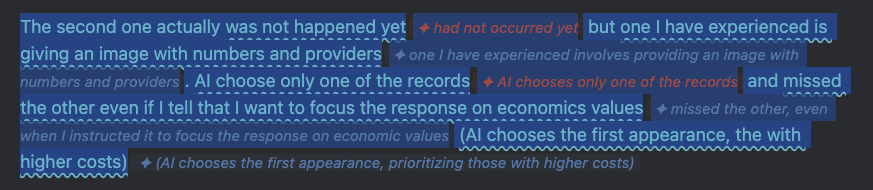
- Red underline — grammar mistakes (wrong tense, missing article, subject-verb disagreement, etc.)
- Blue underline — style improvements to reach C1-C2 level vocabulary and register
- Inline suggestion chips shown next to each flagged phrase
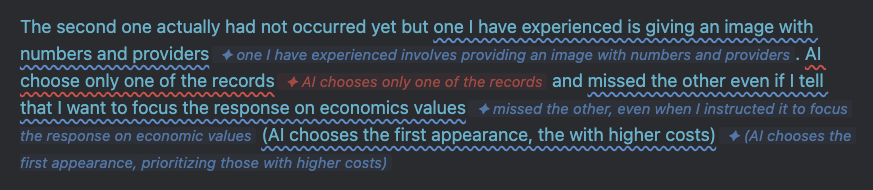
- Click any suggestion to instantly accept it
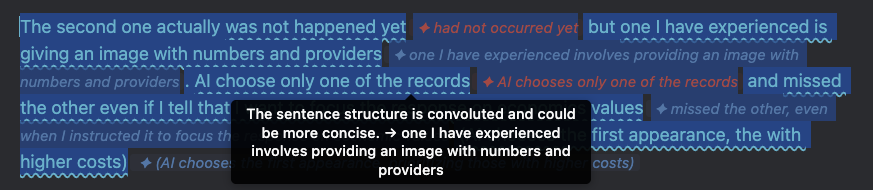
- Tooltip with explanation on hover
- Fully local — no data leaves your machine
Screenshots
Suggestions displayed inline
Hover to see the explanation
Click to accept a suggestion
Requirements
- Obsidian 0.15.0 or higher
- Ollama running locally
- Model pulled:
gemma3:4b(orgemma3:12bfor better quality)
Installation
- Clone or download this repository
- Copy the folder into your vault's plugin directory:
The folder must contain only:<your-vault>/.obsidian/plugins/english-write-checker/main.js,manifest.json,styles.css - Open Obsidian → Settings → Community plugins → enable English Write Checker
- Make sure Ollama is running:
ollama serve
ollama pull gemma3:4b
Usage
- Open a note and write or paste English text
- Select the paragraph you want to analyze
- Open the Command Palette (
Cmd+P) → English Write Checker: Analyze selected text - Click any suggestion chip to accept it, or hover to read the explanation
- To clear all suggestions: English Write Checker: Clear all suggestions
Tip: assign a hotkey to "Analyze selected text" in Settings → Hotkeys for faster access.
Settings
| Setting | Default | Description |
|---|---|---|
| Ollama endpoint | http://localhost:11434 |
URL where Ollama is running |
| Model | gemma3:4b |
Change to gemma3:12b for higher quality |
| Target level | C1 |
B2, C1, or C2 proficiency target |
License
MIT © Julio Gonzales
Based on write-good-obsidian by Mark Hesketh (MIT).