
README file from
GithubDynamic Font Size Plugin for Obsidian
A custom Obsidian plugin that allows you to dynamically adjust the font size of note content through frontmatter properties with an intuitive slider interface.
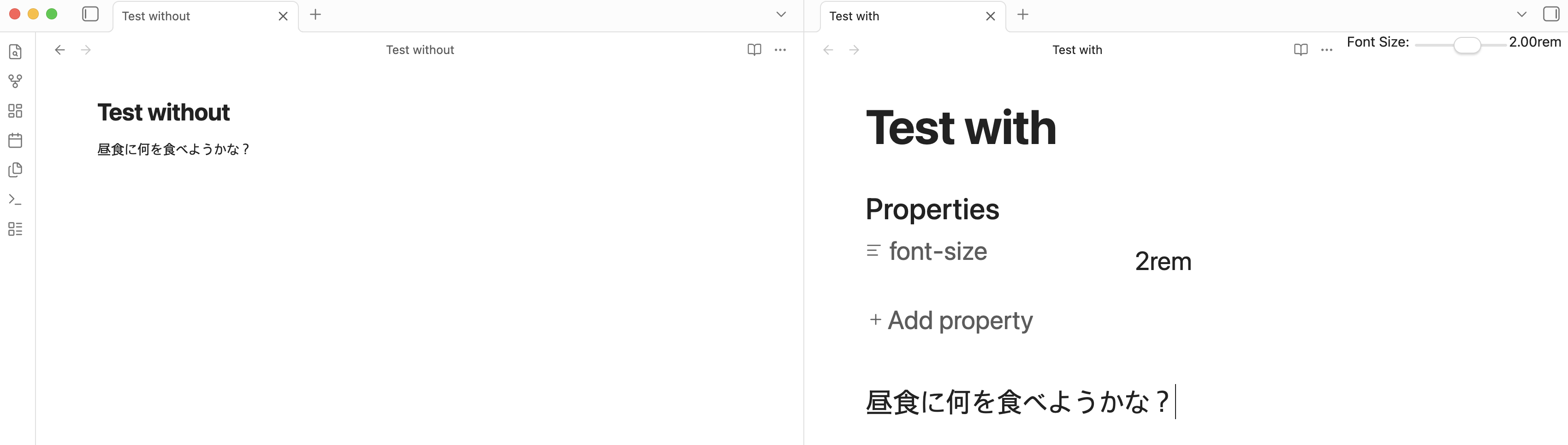
Features
- Property-based font sizing: Set font size using the
font-sizeproperty in note frontmatter - Real-time updates: Font size changes are applied immediately when you modify the property
- Interactive slider: Toggle a slider UI for easy font size adjustment
- Status bar indicator: Shows current font size in the status bar
- Configurable ranges: Customize minimum, maximum, and default font size values
- Smooth transitions: Font size changes animate smoothly for better UX
Usage
Method 1: Manual Property Setting
Add a font-size property to your note's frontmatter:
---
font-size: 1.5rem
---
Your note content will render at 1.5rem font size.
You can use either:
- String format with unit:
"1.5rem" - Numeric format:
1.5
Method 2: Slider Interface
- Open a note
- Run the command "Toggle font size slider" (Ctrl/Cmd + P, then search for it)
- A slider will appear in the view header
- Adjust the slider to change the font size
- The frontmatter will be updated automatically
Installation
Development Setup
-
Navigate to the plugin directory:
cd .obsidian/plugins/dynamic-font-size -
Install dependencies:
npm install -
Build the plugin:
npm run build -
For development with auto-rebuild:
npm run dev -
Enable the plugin in Obsidian:
- Go to Settings → Community plugins
- Reload plugins
- Enable "Dynamic Font Size"
Configuration
The plugin provides several configurable settings:
- Minimum font size: The smallest allowed font size (default: 0.5rem)
- Maximum font size: The largest allowed font size (default: 3.0rem)
- Default font size: The default value when using the slider (default: 1.0rem)
Access these settings in Settings → Dynamic Font Size.
Commands
- Toggle font size slider: Show or hide the font size adjustment slider in the current note
How It Works
The plugin:
- Monitors the active note for changes
- Reads the
font-sizeproperty from the note's frontmatter - Applies the font size to the note's content area using CSS
- Updates the display when you switch between notes or modify the property
- Cleans up styles when you close notes or disable the plugin
Technical Details
- Font sizes are specified in
remunits (relative to root font size) - Values are clamped between the configured minimum and maximum
- The plugin uses Obsidian's MetadataCache API for efficient frontmatter reading
- CSS transitions provide smooth font size changes
Support
For issues or feature requests, please open an issue in the repository.
License
MIT