
README file from
GithubDocument Comments
Notion / Linear-style margin comments for Obsidian — except the comments live inside the markdown file, stored as HTML comments. They render as floating cards in the right margin, but any other tool or AI agent that reads the raw .md sees them in context (a comment-free editor, a git diff, or an LLM all read the same thing).
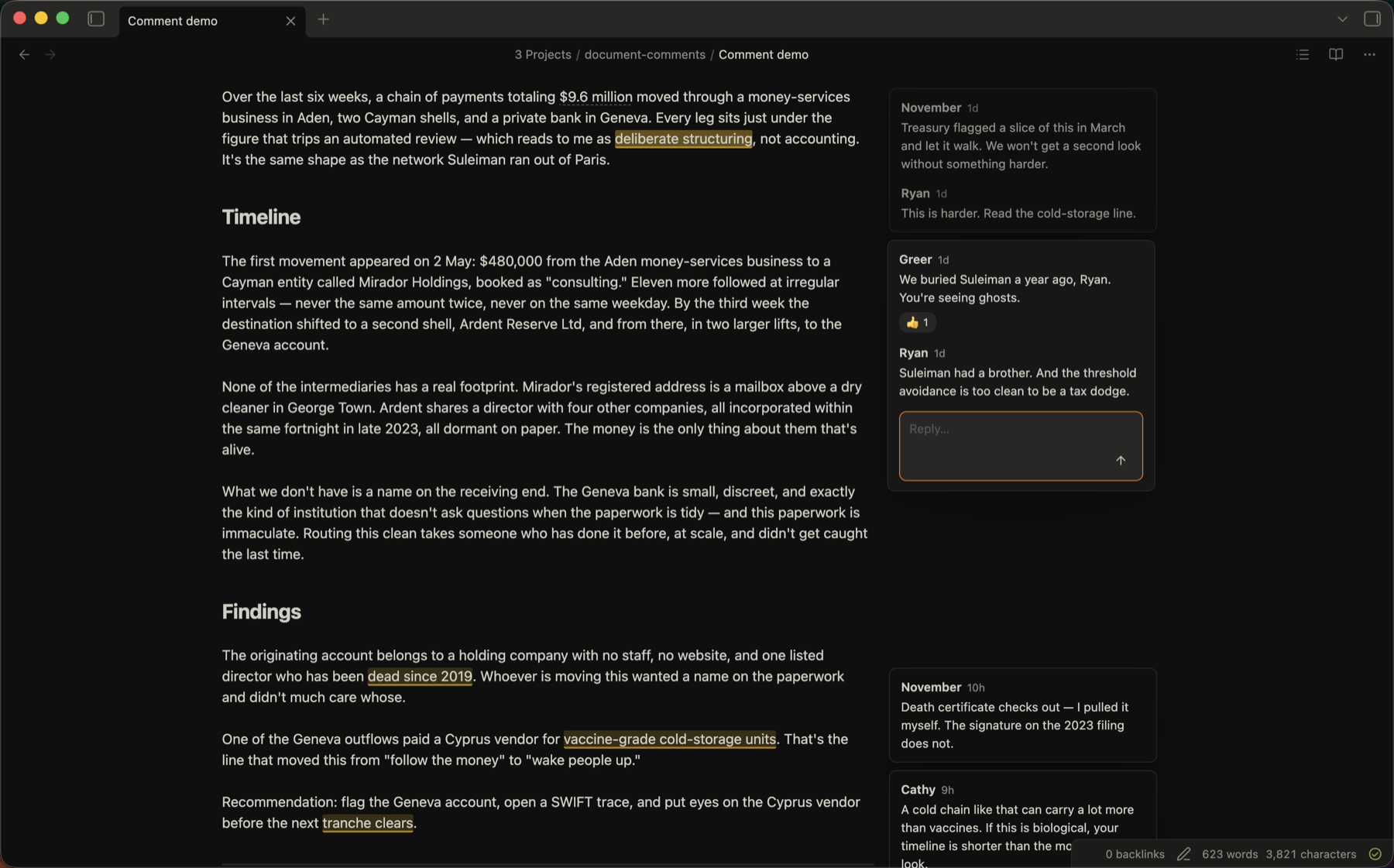
Desktop-only. Available in Obsidian's Community plugins store — see Install.
Features
- Inline storage. Comments are plain HTML comments in the file — invisible in Reading view and in other markdown renderers, and legible to agents/tools that read the raw text.
- Margin cards in Live Preview, Source, and Reading view, aligned to the highlighted text. Click a card to jump to its anchor; hover to light it up.
- Threads, resolve / reopen, emoji reactions, edit & delete — every action is a plain edit to the markdown, so it round-trips cleanly.
- Markdown in comment text — code spans, bold, links, lists, etc. render in the cards (margin and sidebar).
- Long comments collapse to a Show more preview; a thread taller than the screen opens in the sidebar instead.
- Inline composer. Select text → command or right-click → a draft card opens in the margin (no modal).
- "All discussions" sidebar — a panel listing the active note's comments with Open / Resolved / All filter tabs; while it's open the inline cards step aside (the in-text highlights stay).
- Toggle comments on/off (also hides the text highlights), and hide resolved comments by default.
How comments are stored
We should <!--c:k3f9-->ship on Friday<!--/c:k3f9--> regardless of the QA timeline.
<!--co:k3f9 by:kyle at:2026-06-17T10:00:00.000Z status:open quote:"ship on Friday"
kyle (2026-06-17T10:00:00.000Z): I thought we agreed Thursday?
sam (2026-06-17T10:05:00.000Z): Thursday is better for QA.
-->
<!--c:ID-->…<!--/c:ID--> delimits the highlighted span; <!--co:ID …--> holds the thread. An agent can list comments by scanning for <!--co:, and find the referenced text via the matching <!--c:ID--> span or the redundant quote: value. The markers are HTML comments, so they don't render anywhere except this plugin.
Install
Requires Obsidian 1.7.2 or newer, desktop.
Community plugins (recommended)
- Open Settings → Community plugins → Browse.
- Search for Document Comments, click Install, then Enable.
BRAT — for pre-release builds
- Install BRAT (Settings → Community plugins → Browse → search "BRAT") and enable it.
- Run the command BRAT: Add a beta plugin for testing and enter:
kylemcd/obsidian-document-comments - Enable Document Comments in Settings → Community plugins.
BRAT installs from the latest GitHub release and updates it automatically when new ones ship.
Manual
- Download
main.js,manifest.json, andstyles.cssfrom the latest release. - Drop them in
<your-vault>/.obsidian/plugins/document-comments/(create the folder). - In Obsidian, reload (or restart), then enable Document Comments under Settings → Community plugins.
Build from source
git clone https://github.com/kylemcd/obsidian-document-comments
cd obsidian-document-comments
npm install
npm run build
Then copy (or symlink) main.js, manifest.json, and styles.css into
<your-vault>/.obsidian/plugins/document-comments/ and enable the plugin.
Usage
- Add a comment: select text, then run Add comment on selection (command palette) or right-click → Add comment. Type in the margin card and press Enter (Shift+Enter for a newline).
- Reply / resolve / react / edit / delete: hover a card to reveal its action bar, or use the ⋯ menu.
- Open the sidebar: the Open comments sidebar ribbon icon or command.
- Show/hide comments and resolved: the ribbon, or the Toggle comments / Toggle resolved comments commands.
Set the name attached to your comments under Settings → Document Comments → Author.
Privacy
No network use, no telemetry, no accounts. Everything stays in your vault.
Known limitations
- Desktop-only for now — the margin column needs the horizontal space. A mobile / narrow-screen layout is planned.
- Comments whose highlighted text overlaps another comment's are stored fine but are a rough edge; avoid stacking comments on the same words for now.
- In Live Preview, the highlight doesn't show on text inside a table (Obsidian renders tables as a self-contained widget the highlight can't reach). The comment and its card still work, and the highlight shows in Reading view and Source mode.
Development
npm install
npm run dev      # esbuild watch → main.js
npm run build    # typecheck + production bundle
npm run check    # oxfmt + oxlint + eslint + tsc + vitest
npm test         # vitest
Releasing. Pushing a version tag (e.g. git tag 0.1.1 && git push origin 0.1.1) runs .github/workflows/release.yml: it builds the plugin, generates GitHub artifact attestations for the release assets, and publishes the release (and fails fast if the tag doesn't match manifest.json's version). Verify a downloaded asset with gh attestation verify main.js --repo kylemcd/obsidian-document-comments.
License
MIT — see LICENSE.