
README file from
GithubDaily TODO
A standalone Obsidian community plugin for a dedicated daily TODO workflow. Create dated TODO files in their own folder — separate from journal or daily notes — and roll incomplete tasks forward with one click. No Daily Notes or Periodic Notes plugin required.
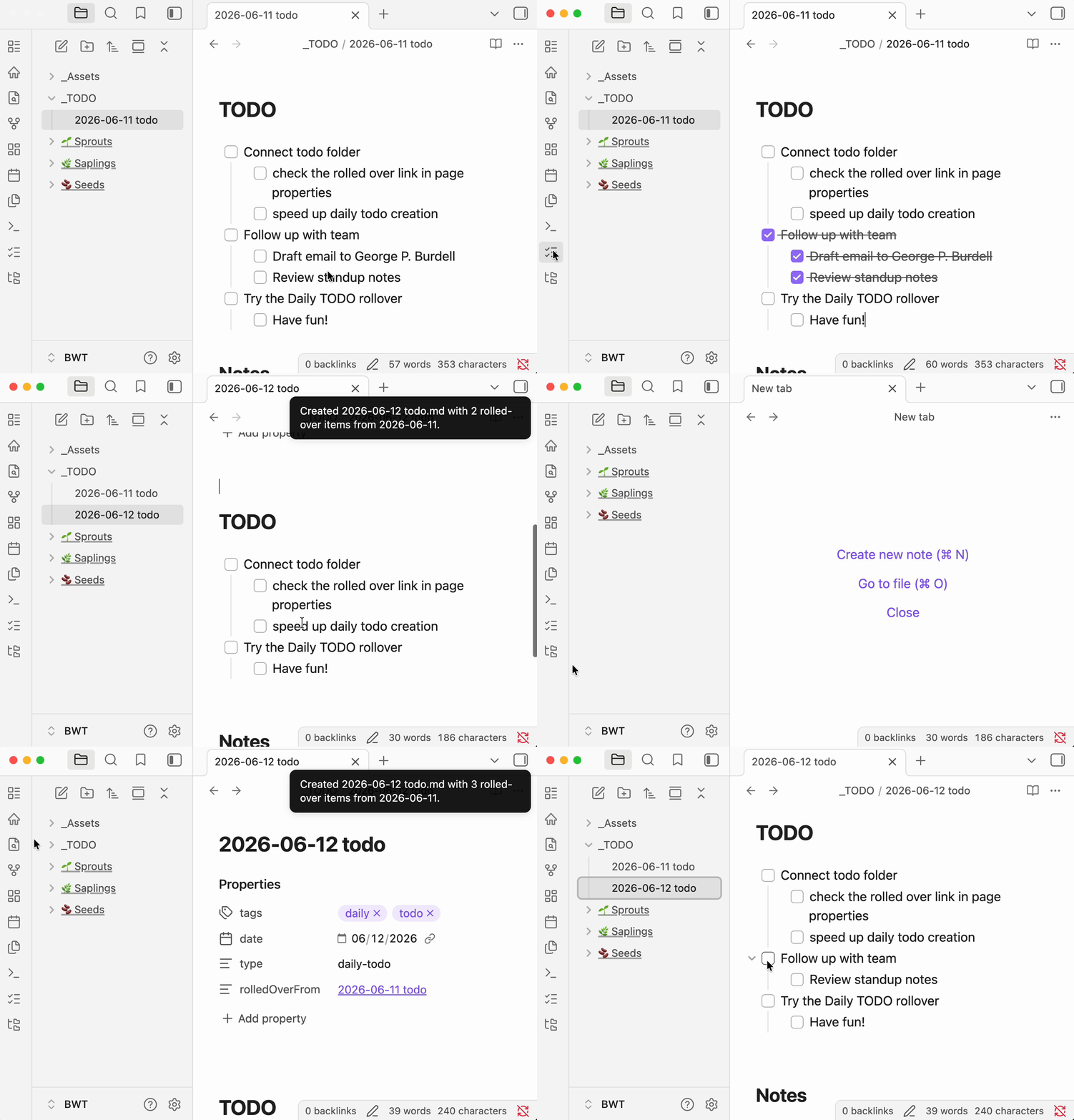
Features
- Standalone workflow — Does not require the Daily Notes or Periodic Notes plugins.
- One-click creation — Ribbon icon or command palette creates today's TODO file; not a hook on daily note creation.
- Dedicated TODO folder — Dated files like
2025-06-09 TODO.md, stored separately from journal or daily notes. - TODO-section scoped — Only rolls incomplete items from the
# TODOsection; stops at## Notesor other headings. - Smart nested rollover — Preserves nested content under incomplete tasks; skips completed checkbox subtrees.
- First-run setup — Modal to browse an existing folder or create
_TODOwith a sample yesterday file for immediate testing. - Frontmatter metadata —
tags,date,type: daily-todo, androlledOverFromwikilink to the source note. - Folder recovery — Re-prompts setup if the configured folder is deleted or moved.
- Automatic source detection — Finds the most recent dated TODO file before today in your configured folder (including subfolders).
- Configurable naming — Set the vault folder, file name suffix, frontmatter tag, and whether to include a
# TODOheading. - Legacy file support — Automatically renames older files that used
YYYY-MM-DDtodo.mdnaming to the currentYYYY-MM-DD TODO.mdformat.
Installation
From Obsidian Community Plugins
- Open Settings → Community plugins.
- Turn off Restricted mode if needed.
- Click Browse, search for Daily TODO, and install.
- Enable the plugin.
Manual installation
- Download
main.jsandmanifest.jsonfrom the latest GitHub release. - Create a folder
{vault}/.obsidian/plugins/dailytodo/. - Copy
main.jsandmanifest.jsoninto that folder. - Reload Obsidian and enable Daily TODO under Settings → Community plugins.
Usage
First run
The first time you use the plugin (or if your configured folder no longer exists), a setup modal appears when you run Create today's TODO:
- Browse folders — Pick an existing vault folder for daily TODO notes.
- Create
_TODO— Creates a_TODOfolder with a sample yesterday note so you can test rollover immediately.
After setup, today's TODO file is created automatically.
Daily workflow
- Configure the plugin under Settings → Daily TODO settings (optional — first-run setup handles the basics):
- TODO folder — Where daily TODO files are stored (default after setup:
_TODO). - File name suffix — Appended after the date (default:
TODO, producing2025-06-09 TODO.md). - TODO tag — Frontmatter tag added to new notes (default:
todo). - Include heading — Whether to add a
# TODOheading below the frontmatter.
- TODO folder — Where daily TODO files are stored (default after setup:
- Create today's note using either:
- The list-checks ribbon icon (Create today's TODO), or
- Command palette → Create today's TODO from previous day.
- If today's file already exists, the plugin opens it instead of creating a duplicate.
Example output
Given incomplete tasks in TODO/2025-06-08 TODO.md, running the command on June 9 creates TODO/2025-06-09 TODO.md:
---
tags: [daily, todo]
date: 2025-06-09
type: daily-todo
rolledOverFrom: "[[2025-06-08 TODO]]"
---

# TODO

- [ ] Finish report
  - [ ] Gather sources
- [ ] Email team

## Notes
The sample yesterday file created during first-run setup demonstrates nested rollover: completed sub-tasks (e.g. - [x] Draft email…) are left behind; incomplete siblings roll forward.
File naming
Daily TODO files must start with a date in YYYY-MM-DD format:
| Suffix setting | Example file name |
|---|---|
TODO |
2025-06-09 TODO.md |
| (empty) | 2025-06-09.md |
todo |
2025-06-09 todo.md |
Note structure
For best results, structure each daily TODO file like this:
# TODO

- [ ] Your tasks here

## Notes

Free-form notes that are never rolled over.
Only content between # TODO and ## Notes (or the next top-level heading) is considered for rollover.
Development
git clone https://github.com/aaronarcade/Obsidian-Daily-Todo.git
cd Obsidian-Daily-Todo
npm install
npm run dev
Symlink or copy the plugin folder into your vault's .obsidian/plugins/ directory. Use npm run dev for watch mode during development.
Build for production:
npm run build
License
MIT — see LICENSE.