
README file from
GithubDagens Ord — Obsidian Daily Danish Plugin
An Obsidian plugin built on the Anki Danish frequency deck (DDO Danish Frequency Deck). The UI follows a "word of the day" card layout, with English and Chinese glosses, example sentences, and pronunciation audio.
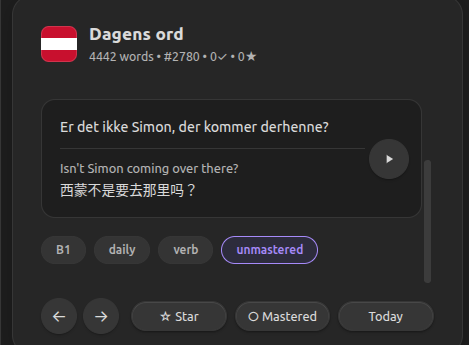
Translations: all 4442 words include English and Chinese word glosses, and each word's example sentence comes with an English and a Chinese translation.
Features
- Daily word rotation (deterministic selection by date)
- Deck navigation (← →), starred and mastered markers
- Today button jumps back to the current day's word
- Word audio: Danish MP3 from the Anki deck
- Example audio: generated locally via
edge-tts - On-demand audio download: audio is no longer bundled in the release. On first use the plugin checks your local audio and offers to download the files from GitHub
- CEFR filter: toggle A1–C2 levels individually in settings
- Flexible card location: show the daily word card in the right sidebar or as a draggable floating card over the editor
- Dark theme aligned with Obsidian's default dark UI
- Progress saved locally
Installation
- Download
main.js,manifest.json, andstyles.cssfrom the latest release into.obsidian/plugins/dagens-ord/ - Enable Dagens Ord under Settings → Community plugins
- The first time you open the view, the plugin checks for audio and prompts you to download it (see below)
Pronunciation audio
To keep the release small, audio files are not bundled. They are hosted in the audio/ folder of this repository and downloaded on demand.
- Self-check on open: every time you click the ribbon icon (or run Open daily Danish), the plugin compares your local audio against the remote file list. If anything is missing, it shows an English download prompt; if everything is present, it opens silently.
- Download with progress: if you accept, a progress bar shows the download status, and only the missing files are fetched (already-downloaded files are skipped, so it is resume-friendly).
- Manual download: you can also start it from Settings → Pronunciation audio → Download / Re-download, or via the command Download pronunciation audio.
- Downloading requires an internet connection. If GitHub is unreachable, the plugin falls back to a local-presence check and will not nag you while offline.
Usage
- Click the
 icon in the ribbon, or run Open daily Danish from the command palette
 - In Settings → Card display location, choose Right sidebar or Editor floating card
- In floating-card mode, drag the card to your preferred position. Use Hide to collapse it into a small Open button, then click Open to restore it
- Word play button: plays the Danish pronunciation
- Example play button: plays the locally generated example audio (downloaded via the step above)
Developer notes
Batch-generate example audio (local edge-tts)
Verify that edge-tts is installed and works on your machine:
edge-tts --voice da-DK-ChristelNeural --text "Godmorgen, hvordan har du det?" --write-media "audio/test_da.mp3"
Then from the plugin directory:
python3 scripts/edge-tts-examples.py --jobs 4 --retries 3
By default the script reads the full data/deck.json and generates audio/generated/ex-<word-id>.mp3 for every entry with an example sentence. Existing files are skipped (resume-friendly); use --overwrite to regenerate. Default concurrency is --jobs 4; on a stable network you can raise it to --jobs 8 or higher. If you hit NoAudioReceived, lower --jobs or increase --retries.
Import Chinese word meanings
Backfill word-level Chinese glosses from a Chinese Anki .apkg into data/deck.json:
npm run extract:zh
npm run build
The script writes translationZh and translationsZh. The plugin shows English and Chinese glosses under each word, and the example area shows the Danish sentence together with its English and Chinese translations.
Development
npm install
npm run extract   # Re-export deck from .apkg
npm run build     # Build main.js (bundles data/deck.json)
Note:
data/deck.jsonis bundled intomain.jsat build time. After editing the deck, you must rebuild (or push a tag so CI rebuilds) for changes to take effect in the plugin.
Deck source
DDO_Danish_Frequency_Deck_English.apkg — data/deck.json currently holds 4442 high-frequency Danish words, all with example sentences (13,097 unique Danish example sentences in total). The default daily pool uses all 4442 words; you can lower the count or filter by CEFR level in settings.
Acknowledgements
This plugin was inspired by ankidkdeck v2.0 (iskoldt-X/ankidkdeck).
Thanks to Yifan Huang for her help.